How to Use Facebook for Nonprofits and Raise Funds Online
Facebook and Instagram Fundraising
Eligible nonprofits in supported countries can receive donations through Facebook and Instagram fundraising experiences. Donations are routed through PayPal Giving Fund and later granted to the selected nonprofit.
For more campaign flexibility, RallyUp’s end-to-end fundraising platform helps teams run raffles, auctions, ticketing, crowdfunding, and peer-to-peer fundraising from one place.
Consider this: a hypothetical regional food bank that posts a fundraiser to its Facebook Page on a Friday afternoon. By Sunday night, 60 supporters have donated, volunteers have shared the post, and past donors have started giving again.
That is what Facebook’s nonprofit fundraising tools can do when set up correctly.
That is what Facebook’s nonprofit fundraising tools can do when set up correctly. Organizations can offer on-platform giving through their Facebook Page.
Supporters can also launch peer-to-peer and birthday fundraisers benefiting the organization, reaching donors who are already active on the platform.
Fundraising on Facebook for nonprofits works best as one channel inside a broader fundraising strategy that includes a donation form and CRM. Meta’s fundraising features can expand how many donors a campaign reaches and how easily they can give.
| Geographic note: This guide primarily covers U.S. nonprofits. Meta fundraising availability varies by country. Native Facebook and Instagram fundraising tools have not been available to charities in the European Economic Area since July 1, 2024. |
In this article
- How Facebook fundraising works for nonprofits
- 5 reasons why nonprofits use Facebook for fundraising
- How to create a Facebook page for a nonprofit organization in 5 steps
- What Facebook offers nonprofits, by category
- How to build a Facebook fundraising strategy in 9 steps
- Facebook best practices checklist for nonprofits
- Limitations of relying only on Facebook for fundraising
- How Facebook's fundraising fees compare to RallyUp
- Building a Facebook presence that keeps giving
How Facebook fundraising works for nonprofits
Nonprofits raise money on Facebook in two ways. They can launch a fundraiser from their official Page, or supporters can start one on the organization’s behalf.

Supporter-led fundraisers include birthday fundraisers, tribute campaigns, and community donation drives. Because these get shared inside personal networks, they often reach people the nonprofit’s own Page never would.
Donations made through Facebook and Instagram fundraising are received by PayPal Giving Fund. It provides the donor’s receipt and later grants the funds to the selected nonprofit.
Learn how to host a birthday fundraiser on FacebookWho can access Facebook fundraising tools?
Access to Facebook fundraising tools depends on nonprofit eligibility and regional availability.
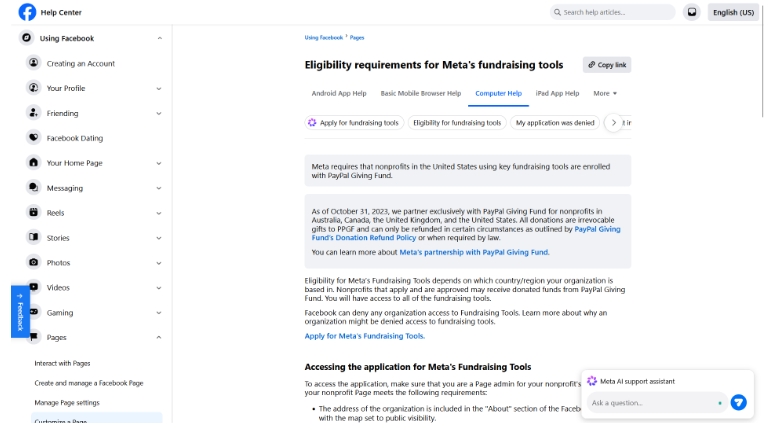
In the United States, nonprofits generally need active 501(c)(3) status with the IRS, a valid EIN, and a bank account at a recognized financial institution. The Facebook Page also needs its category set to Nonprofit Organization or Charity Organization, with a complete address listed in the About section.
Meta may also review the page category, address, activity, and organization details before approval. Since availability can vary by country and region, nonprofits should check Meta’s current requirements before planning donation campaigns on Facebook.
The PayPal Giving Fund side of the process
Meta eligibility is only half of it. Because donations route through PayPal Giving Fund, organizations also need to be set up on the PPGF side.
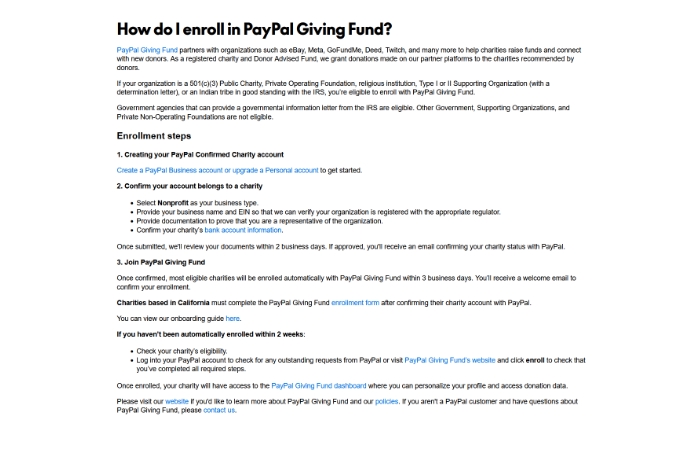
Per PayPal’s guidance, that generally means:
- Create a PayPal Business account, or upgrade an existing Personal account.
- Confirm that the account belongs to a charity, selecting Nonprofit as the business type.
- Provide the organization name, EIN, documentation proving you represent the organization, and the charity’s bank account details.
- Enrollment in PayPal Giving Fund then usually follows automatically once PayPal confirms the charity, typically within a few business days. California-based charities must complete an additional PPGF enrollment form.
PPGF eligibility is also broader than “501(c)(3) public charity.” It extends to private operating foundations, religious institutions, Type I and II supporting organizations with a determination letter, Indian tribes in good standing with the IRS, and government agencies that can provide a governmental information letter.
Private non-operating foundations are not eligible. Meta may apply its own, narrower requirements on top of this, so check both sets of terms before planning a campaign.
5 reasons why nonprofits use Facebook for fundraising
Facebook remains a strong channel for engaging supporters and supporting social media fundraising. The platform gives nonprofits direct access to communities, local audiences, volunteers, and donors who already spend time online every day.
Here’s why nonprofits continue to rely on Facebook:
1. A large, active audience
Facebook remains one of the largest social platforms in the world by user count, which means most nonprofits’ existing supporters are already there.
Supporters can share fundraising campaigns, event pages, and donation appeals with their own networks. This organic sharing can extend a campaign’s reach without paid promotion, though how far depends on the platform’s algorithm and your supporters’ networks.
2. Strong local and community engagement opportunities
Facebook Groups, local event pages, and community discussions help nonprofits stay connected with supporters beyond fundraising campaigns.

Organizations often use Facebook to recruit volunteers, promote local events, coordinate activities, and maintain ongoing communication with their communities.
3. Lower-friction fundraising experience
Supporters can make an on-platform donation benefiting the nonprofit without leaving Facebook, which keeps the donation path short and familiar. Built-in fundraising features, donation buttons, and on-platform engagement reduce the number of steps supporters take before contributing to a campaign.
4. Rich storytelling formats
Nonprofits can use photos, videos, Stories, Reels, and live streams to show impact in real time.
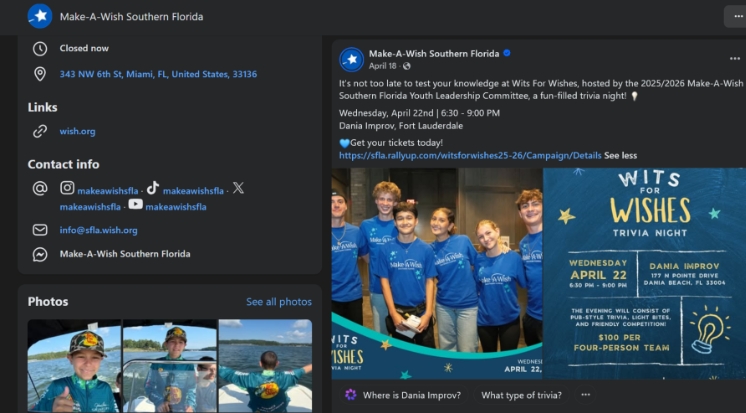
These formats help organizations share volunteer experiences, campaign progress, beneficiary stories, and event updates while building interest in upcoming fundraising event ideas.
5. Affordable audience targeting
Facebook ads for nonprofits help organizations promote fundraisers to specific audiences. Targeting can be based on interests, behavior, and location.
Nonprofits can use targeted campaigns to increase event attendance, improve local awareness, promote donation drives, and reach supporters more efficiently.
Learn how to promote your fundraiser effectivelyHow to create a Facebook page for a nonprofit organization in 5 steps
A strong Facebook Page helps nonprofits stay visible, communicate with supporters, and promote fundraising campaigns more effectively. It also gives organizations a central place to share updates, events, volunteer opportunities, and donation appeals.
Here’s how to create a Facebook page for a nonprofit that looks professional and supports long-term engagement:
Step 1: Create your nonprofit page
If you are learning how to start a Facebook page for a nonprofit, use your organization’s official name so supporters can easily find and recognize your page.
Choose the most relevant nonprofit or charity category during setup. Then, configure the core page details, including contact information, website links, and page username.
Step 2: Add nonprofit branding
Upload your nonprofit logo as the profile image and choose a cover photo that reflects your mission or community impact.
Consistent branding matters for nonprofits. Supporters often move between your website, donation pages, email campaigns, and social channels before taking action.
Step 3: Complete the About section
The About section should clearly explain your mission, programs, and impact. Include your website, contact details, donation links, and any important supporter resources.
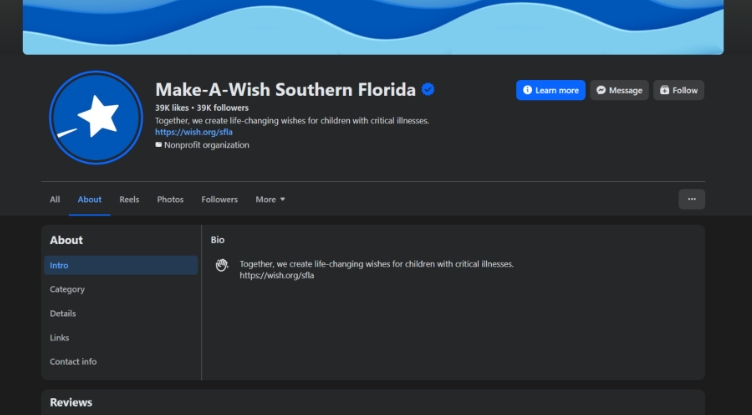
Use the About section as a quick introduction for first-time visitors to your nonprofit’s Facebook Page.
Step 4: Configure page settings and actions
Add a Donate or Learn More button to guide supporters toward the next step. Enable messaging and review page visibility settings.

Then, confirm that the right team members have secure access.
Step 5: Publish foundational content
Before promoting your page, publish a few posts that show supporters what your organization does.

Your nonprofit’s Facebook Page should start with welcome posts, volunteer stories, program updates, impact highlights, and event announcements.
What Facebook offers nonprofits, by category
Meta’s nonprofit features fall into several categories, and they are not interchangeable. Some facilitate giving, while others support promotion, communication, or reporting.
Availability also varies by account and country, so not every feature below will be accessible to every nonprofit.
Native giving experiences
These tools allow eligible nonprofits and their supporters to collect donations through Facebook fundraising experiences.
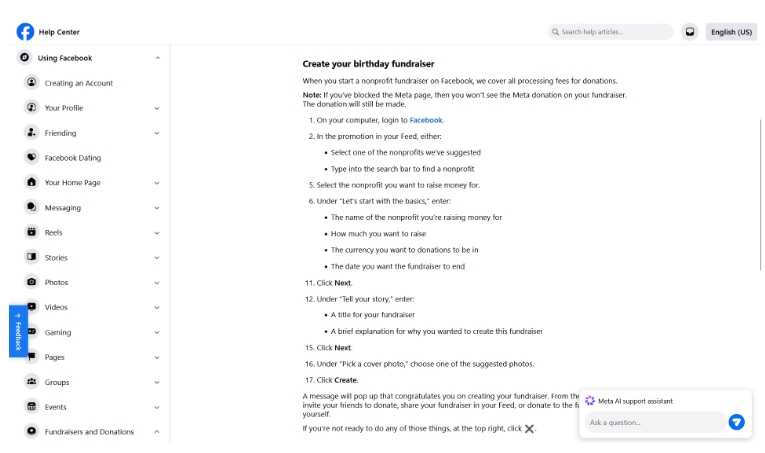
Each option supports a different campaign need, from organization-led appeals to supporter-driven giving:
- Page fundraisers: Nonprofits can create campaign-specific fundraisers through their Page, complete with donation goals, cover images, and campaign descriptions. These work well for emergency appeals, seasonal campaigns, and awareness initiatives.
- Supporter-created fundraisers: Supporters can raise money through birthday fundraisers and other personal campaigns. Because these fundraisers are shared within personal networks, they may reach people the nonprofit’s own Page would not.
- Donate buttons: Eligible Pages and posts can include an on-platform donation option benefiting the nonprofit.
- Live fundraising: Supporters can make donations while watching an eligible Facebook Live stream.
Donations made through these experiences are routed through PayPal Giving Fund and later granted to the selected nonprofit.
Promotion and storytelling
These tools help nonprofits promote campaigns, share impact, and reach wider audiences:
- Donation ads: Paid campaigns can target audiences by factors such as location, interests, demographics, and behaviour. They also support conversion tracking and campaign measurement.
- Reels and Stories: Short-form formats work well for donation reminders, event highlights, campaign updates, and behind-the-scenes content.
- Live video: Beyond its fundraising function, Facebook Live can support campaign updates, interviews, volunteer spotlights, and real-time storytelling.
Communication
Facebook also gives nonprofits ways to interact with supporters before, during, and after a campaign:
- Messenger: Teams can respond to donor questions and supporter inquiries. However, Messenger is designed for conversations, not unrestricted broadcasting. Outbound messages are subject to Meta’s messaging policies, supporter consent, and account permissions. It should not be treated as a bulk solicitation channel.
- Comment engagement: Responding to comments on posts and fundraisers is a simple way to acknowledge supporters and maintain relationships.
- Automated thank-you tools: Certain fundraising activities may support automated donor acknowledgments.
Management and reporting
Fundraising activity may need to be reviewed across two separate systems:
- Meta campaign insights: Nonprofit Manager may provide donation insights, supporter activity, campaign data, and payout information.
- PayPal Giving Fund reporting: Enrolled charities access donation information and grant details through PayPal Giving Fund’s dashboard. This is separate from Meta’s reporting system.
Campaign formats
The following are not standalone Meta products. They are campaign formats built using the tools above:
- Birthday, tribute, and memorial campaigns: These are supporter-created fundraisers organized around a personal occasion or cause.
- Challenges: Walking, fitness, reading, and community challenges often combine a Facebook Group, supporter-created fundraisers, and external challenge software.
Facebook does not provide a complete packaged challenge product. Nonprofits usually assemble the format using several tools.
How to build a Facebook fundraising strategy in 9 steps
A Facebook fundraising strategy works best when campaigns follow a clear content and outreach plan. It helps nonprofits stay consistent, improve engagement, and connect fundraising activity with larger outreach goals.
Here are the key steps nonprofits should follow when building a Facebook fundraising strategy.
Step 1: Set clear campaign goals
Start by defining what the campaign needs to achieve. Do this before creating content or launching fundraising appeals.
The channel can support donation targets, volunteer recruitment, event attendance, awareness campaigns, and community engagement.
Establishing campaign timelines and measurable objectives early makes it easier to track results later.
Step 2: Define your audience segments
Different supporters interact with different types of content and fundraising messages. Separate audiences into groups such as current donors, volunteers, local supporters, event attendees, and lapsed donors.
This helps nonprofits create more relevant campaigns and improve engagement across different audience segments.
Step 3: Set measurable KPIs
Common fundraising KPIs include:
- Donations raised
- Event conversion rate
- Engagement rates
- Follower growth
- Event registrations
- Reach and impressions
These metrics help organizations improve campaign performance, content strategy, and donor conversion over time.
Step 4: Plan your nonprofit content mix
Content variety keeps supporters engaged over longer campaigns. Your content strategy will work best with a balanced mix of posts.
Use donation appeals, impact stories, educational content, volunteer highlights, event reminders, and program updates.
Consistent storytelling helps supporters stay connected to the organization’s mission between fundraising campaigns. Many nonprofits also repurpose strong campaign content across social channels to reach supporters in different formats.
Take your nonprofit storytelling to InstagramStep 5: Share link posts strategically
A post with a single, clear link is easier for supporters to act on than one with several competing calls to action. Use link posts to direct supporters toward blog articles, campaign pages, volunteer sign-ups, event registrations, and donation forms.
Step 6: Try a content ratio if it helps
Some teams find a rough posting ratio useful for avoiding constant fundraising asks. One commonly cited starting point:
- 70% engagement and educational content
- 20% community or partner-focused content
- 10% direct fundraising appeals
This is a planning prompt, not a rule. Treat it as a starting point and adjust based on what your own audience responds to.
Step 7: Build a manageable posting workflow
A schedule your team can actually sustain matters more than a demanding one it abandons. Reduce workload by batching content creation, scheduling posts in advance, and planning campaigns monthly instead of day-to-day.
Step 8: Optimize for mobile engagement
Most Facebook users interact with campaigns on mobile devices, so content should be easy to view quickly. Short captions, clear visuals, and accessible donation links improve campaign performance.
Mobile optimization also matters when running Facebook ads for nonprofits. Many supporters will click donation campaigns directly from their phones.
Step 9: Engage consistently after posting
Publishing content is only part of the process. Nonprofits should respond to comments, answer messages, and thank donors publicly. These actions help maintain stronger supporter relationships throughout the campaign.
Want to skip the setup work? Our experts can create your campaign on RallyUp for free, then you can customize, launch, and fundraise your way.
Create my campaignFacebook best practices checklist for nonprofits
Your nonprofit’s Facebook page performs best when it stays active, visually consistent, and tied to campaign goals. Small operational improvements like the ones below often lead to stronger engagement and more consistent fundraising performance:
- Keep your page updated: Review contact details, campaign links, events, and program updates.
- Maintain recognizable branding: Use consistent logos, visuals, messaging, and organization details across your Page and campaign assets.
- Optimize videos for Facebook: Upload natively, keep videos short, add captions, and use searchable titles.
- Encourage supporter participation: Share user-generated content, fundraiser posts, hashtags, and volunteer highlights.
- Collaborate with nonprofit communities: Use cross-promotions, shared events, joint campaigns, and relevant Facebook Groups.
Limitations of relying only on Facebook for fundraising
Facebook can support nonprofit visibility and engagement. Still, relying on one platform can limit campaign flexibility, donor ownership, and long-term audience reach.
- Limited donor ownership: A page hosted on Facebook gives your organization limited control over supporter data and communication.
- Platform dependency risks: Algorithm changes can affect reach and engagement.
- Reporting and customization limits: Native tools may limit branding, reporting, and campaign workflows.
- Limited campaign flexibility: Auctions, raffles, ticketed events, sweepstakes, and peer-to-peer fundraising campaigns often need stronger infrastructure.
- Delayed payouts: PayPal Giving Fund receives donations made through Meta and later grants the funds to the selected nonprofit. Enrolled organizations generally receive monthly payments 15 to 45 days after a donation. Unenrolled organizations typically receive grants by check within 45 days, subject to PayPal Giving Fund’s verification and delivery requirements.
- Fees may apply at checkout: PayPal Giving Fund does not charge donors or charities for its own services. Meta or another payment partner may disclose separate fees, so nonprofits should verify the current terms shown in their account before launching a fundraiser.
- No native recurring-giving option: Meta currently does not support recurring donations through its fundraising tools. Facebook fundraising may help generate one-time gifts, but nonprofits need their own donation page or fundraising platform to build a reliable monthly-giving program.
On-platform giving works better when it is supported by tools for events, auctions, ticketing, peer-to-peer campaigns, and donor management. These may include tools for events, auctions, ticketing, peer-to-peer campaigns, and donor management.
RallyUp helps nonprofits manage those campaigns in one place. Its end-to-end fundraising platform supports campaigns promoted across Facebook, email, websites, and other outreach channels.
How Facebook’s fundraising fees compare to RallyUp
Donations made through Meta’s fundraising experiences are routed through PayPal Giving Fund rather than processed through the nonprofit’s own merchant account. PayPal Giving Fund does not charge donors or charities for its own services. Meta or another payment partner may disclose separate fees, so nonprofits should verify the current terms shown in their account before launching a fundraiser.
RallyUp offers Free and Flex pricing. Free includes the platform’s core fundraising components without a platform fee and presents donors with an optional RallyUp contribution.
Flex includes the core components plus advanced in-person event tools and charges an activity-based platform fee of 2.9%-6.9%. Standard payment-processing fees are separate and depend on the organization’s Stripe or PayPal agreement.
Fees and payout
| Facebook (via PayPal Giving Fund) | RallyUp Free Plan | RallyUp Flex Plan | |
|---|---|---|---|
| Platform fee | Verify current terms in your account | $0 | Varies by activity, 2.9% to 6.9% |
| Processing fee | Verify current terms in your account | 1.9% to 2.9% + $0.30 to $0.49 | 1.9% to 2.9% + $0.30 to $0.49 |
| Who covers the fee | Verify current terms in your account | Optional donor tip goes to RallyUp | Donor or nonprofit chooses |
| Payout timing | 15 to 45 days, up to 90 days if unenrolled | Based on the organization’s connected Stripe or PayPal payout schedule; alternative donor-advised-fund arrangements have separate timelines | Same as Free Plan |
Beyond fees, the two platforms differ in which campaign formats they support and how much donor information the nonprofit keeps.
| Facebook (via PayPal Giving Fund) | RallyUp Free Plan | RallyUp Flex Plan | |
|---|---|---|---|
| Formats covered | Donations, peer-to-peer, birthday fundraisers | All core fundraising components; no platform fee; optional RallyUp contribution presented to donors | All core components plus advanced in-person event components; activity-based platform fee; no RallyUp contribution requested by default |
| Donor receipt issued by | PayPal Giving Fund | The nonprofit | The nonprofit |
| Donor data | Limited — contact details shared only with donor permission | Nonprofit receives donor data | Nonprofit receives donor data |
| Branding and customization | Limited by native tools | Campaign pages customizable | Campaign pages customizable |
Building a Facebook presence that keeps giving
Facebook for nonprofits can support fundraising, volunteer outreach, donor engagement, and long-term community-building. From there, the work is simple. Keep your page current, plan content ahead, and make every campaign easy for supporters to join.
Facebook campaigns work better when the rest of your fundraising setup can carry that momentum. RallyUp, an end-to-end fundraising platform, helps teams run raffles, auctions, sweepstakes, ticketing, crowdfunding, peer-to-peer fundraising, and donation campaigns.
Book a free demo to see how RallyUp supports your next campaign.FAQs on Facebook for nonprofits
Yes. A nonprofit should use a Facebook Page instead of a personal profile because Pages support fundraising tools, analytics, advertising, and team access.
Create an official Facebook Page, complete Meta’s nonprofit verification using valid tax and banking details, and get set up with PayPal Giving Fund a PayPal Business account with confirmed charity status, which usually triggers PPGF enrollment automatically. Meta does not grant nonprofit status; it verifies status your organization already holds.
Yes. Meta offers fundraising tools, donation features, and some monetization options for eligible organizations that may vary by region and eligibility.
Facebook ads for nonprofits are generally paid, although some organizations may qualify for separate nonprofit advertising grants or external funding programs.
No. Meta Verified is usually a paid subscription service, even for a Facebook nonprofit page.
Now that you’ve seen it in action, are you ready to start fundraising?
Get Started