What is Event Conversion Rate? How to Calculate and Use ECR
Event Conversion Rate Explained
Event Conversion Rate shows how many attendees take action.
Key takeaways:
Calculate it as (Conversions ÷ Attendees) × 100, or use an Event Conversion Rate calculator.
Benchmarks typically range from 10%-30% by Event type and audience.
Improve ECR by sharpening CTAs, targeting the right guests, and following up fast.
You hosted the Event. People showed up. Funds came in.
So… did it actually work?
That’s what Event Conversion Rate (ECR) tells you. Not how crowded the room was. Not how impressive the total looked on a slide. But how many people felt compelled enough to take action – donate, pledge, sign up, or commit.
An Event that fills seats but moves no one is not a successful event.
In this guide, we’ll break down what Event Conversion Rate really means, how to calculate it, what a “good” ECR looks like, and, most importantly, how to use it to design high-performing events.
In this article
- What is Event Conversion Rate (ECR) in fundraising?
- Calculating Event Conversion Rate (ECR)
- Tracking Event Conversion Rate
- Tips for the accurate calculation of Event Conversion Rate
- Best practices: tracking
- What is a good Event Conversion Rate in fundraising?
- Tips for Achieving a Good ECR and Growth
- Smart moves to increase performance
- Start tracking Event Conversion Rate (ECR) with RallyUp
- Watch out! Don’t let these pitfalls tank your ECR
- Final thoughts: Measure what actually moves people
- Other metrics you might want to track
What is Event Conversion Rate (ECR) in fundraising?
And why is it a big deal?
Event Conversion Rate tells you how many people at your fundraising Event actually took action, like making a donation or pledge. It’s about showing up and giving back.
This number helps you see how well your Event turned guests into supporters. And it gives you clues on how to do even better next time.
Calculating Event Conversion Rate (ECR)
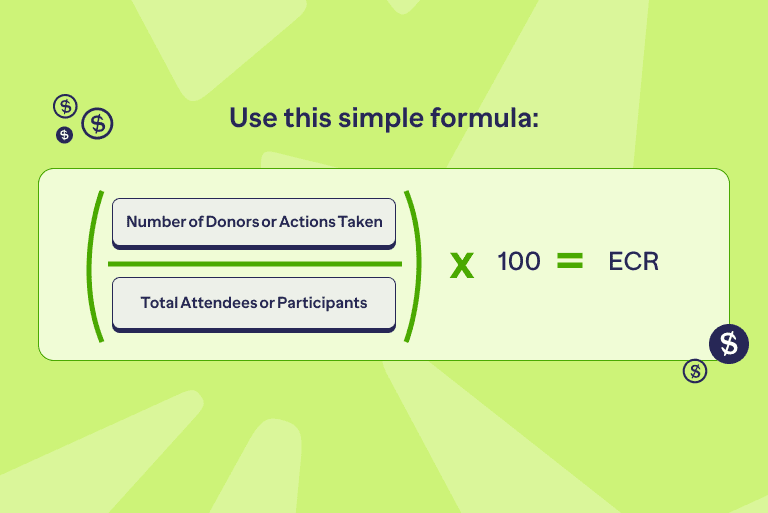
Want to know your ECR? Just divide the number of donors by everyone who showed up, then multiply by 100. And there’s your percentage!
Formula:
Event Conversion Rate = (Number of Donors or Actions Taken ÷
Total Attendees or Participants) ×100
Event Conversion Rate Example Using The Calculation
Example: Picture this: Your gala’s in full swing, 200 guests sipping sparkling drinks. By the end, 50 whip out their wallets to donate.
That’s (50÷200) ×100=25% ECR. Nice work!
But what if you could get 10 more to give? Let’s find out how.
Importance of Measuring Event Conversion Rate in Fundraising
A few things can boost (or tank) your rate:
- Was the Event exciting and engaging?
- Were your calls to action super clear?
- Did you invite the right crowd?
Think of it this way:
Attendance tells you who came.
Dollars raised tell you what came in.
But conversion rate? That tells you who really connected with your cause.
High rate = people were moved to act.
Low rate = something didn’t click.
Why this matters:
It helps you figure out the stuff that’s hard to see on the surface.
- Did your message land?
- Was your ask clear and easy to say yes to?
- Did the Event style (like a gala, Auction, or virtual hangout) fit the vibe of your guests?
Quick example:
Let’s say you are hosting a charity Event.
- 500 people showed up.
- 10 participants donated.
- You raised $10,000.
Sounds great, right?
But hold up!
If only 10 people actually donated, that’s a 2% conversion rate.
That tells a different story.
So, what now? Time to look closer. Maybe the donation link wasn’t easy to find. Maybe your message didn’t hit home.
Tracking conversion rate gives you the power to fix what’s not working—and double down on what is.
Myth vs. Truth
Myth: Big Events always have better ECRs.
Truth: Small, targeted Events often convert at 30%+ because of stronger connections.
Make smarter bets: Optimize your resources
Fundraising Events take up a lot. Time. Staff. Volunteers. Marketing. Money. So, how do you know which ones are worth it?
Track your conversion rate.
It tells you what’s working, what’s not, and where to double down.
Here’s what that looks like:
High conversion?
That Event’s pulling weight. Maybe even time to give it a boost.
Example: A gala converting 40% of guests? That’s gold. Consider upping the budget to reach more people or level up the experience.
Low conversion rate?
That’s a red flag. Maybe it’s time to pivot.
Quick win
A concert that only turns 5% of attendees into donors might not be your best play…especially if a Peer-to-Peer campaign brings in more committed givers.
Think cost per donor.
Let’s compare:
- Event A costs $10,000, gets 50 donors. That’s $200 per donor.
- Event B costs $5,000, gets 10 donors. That’s $500 per donor.
Which one’s giving you more bang for your buck?
(Hint: It’s not the cheaper one.)
When you know your numbers, you can invest smarter and get more out of every dollar, every hour, every effort.
If you want your event to do more than just fill up seats, start measuring what moves people.
Know your people: Sharpen audience targeting

Conversion data shows what worked and who it worked for.
Now you’re not just throwing invites into the void. You’re building Events around the people most likely to give.
Here’s how you do it:
Spot the trends.
Example: At a trivia night, younger attendees convert at 30%. Older guests? Only 15%. That tells you who to market to next time.
Track behaviors.
Do repeat donors give more than first-timers?
Do volunteers convert better than the general public?
That kind of insight helps you build smarter guest lists.
Get personal.
Say 50% of the corporate sponsors at your golf tournament made donations. That’s not just luck, it’s lead. Now you know who to follow up with and how to tailor the pitch.
Takeaway
Conversion rates = audience insights in disguise. Use them to fine-tune who you invite, how you engage them, and what you offer next.
Want stronger supporters? Start with the “why”
When you understand who is converting—and why—you stop guessing and start connecting.
No more chasing low-interest crowds. No more wasted effort.
Instead, you build real relationships with the people who care most.
Sharpen your game: Refine event strategy
If your conversion rate is dragging, it’s not random. It’s a clue.
Something in the planning, the experience, or the follow-up isn’t clicking…and now you’ve got a chance to fix it.
So, where should you look?
What really drives event conversion?
1. The message
Did your story hit home or fall flat?
Example: A dry mission statement won’t stir hearts. But a real story about someone your cause helped? That moves people.
2. The ask
Was your call-to-action clear? Timed right?
Example: A silent Auction with no instructions ® lost donors. People need to know exactly what to do and when to do it.
3. The format
Did the Event fit the audience?
Example: A formal dinner might feel out of place for a grassroots crowd. Maybe they’d show up (and give more) at a block party or local fest.
4. The energy
Was the Event engaging?
Example: Real-time donation thermometers. Live testimonials. Giving games. These can drive up energy and conversion.
5. The follow-up
Not everyone gives on the spot.
But a smart, timely thank-you email with a donate button? That can seal the deal. If conversions spike after the Event, your follow-up is what gets things rolling.
The takeaway:
Low conversion isn’t a failure. It’s feedback.
Use it to tweak the plan, test new tactics, and come back stronger.
Every insight is a step closer to an Event that not only runs smoothly but delivers real results.
Measure the heartbeat: track donor engagement & mission fit
When people give, it means they feel something. They saw where they fit in.
Here’s what to watch:
Emotional connection = action.
When Events make people feel, they’re more likely to give.
For example, a shelter’s “Meet the Animals” day, where people connect face-to-face? That’s a 50% conversion rate waiting to happen. Personal moments create powerful results.
Clarity matters.
If your attendees don’t understand how their donation helps, they won’t act.
Low conversion rate? It might mean your mission wasn’t clear or didn’t land. That’s fixable.
Conversion today, commitment tomorrow.
When someone gives, they’re more likely to stick around. High-converting Events often lead to stronger donor loyalty, more volunteers, and long-term advocates.
So, remember: A high conversion rate isn’t just a win for today. It builds momentum that lasts.
Get the full picture: use conversion to power ROI
Every fundraising Event is an investment. Time, money, people—all in.
The Event Conversion Rate shows you if the return was worth it.
Let’s sort it out a bit:
The total raised isn’t the whole story.
A $50K gala that brings in $60K sounds great. But if only 10% of people donated? That’s a lot of missed potential…and maybe a bloated budget.
Cost per donor counts.
If your conversion rate is low, your donor acquisition cost goes waaaaay up. And that cuts into your future fundraising power.
Sustainable beats splashy.
Big doesn’t always mean better.
Smaller Events with high conversion rates often give you more long-term. Because engaged donors stick around.
📍 Did you know?
Conversion rate brings context. It shows if your Event was just expensive noise or a real moment that inspired people to act.
Set the bar: benchmark & build better goals
Tracking your Event Conversion Rate is about planning forward.
Here’s how it helps:
Spot trends over time.
Compare this year’s numbers to last year’s. See what’s rising, what’s slipping, and where to focus.
Example: If your annual walkathon dropped from 25% to 15% conversion, that’s a red flag. Time to check for engagement issues—or maybe outside factors, like the economy.
Compare with others.
Use industry benchmarks to see where you stand.
Gala Events? Usually 20–30%.
Peer-to-Peer campaigns? Often 10–15%.
If you’re falling behind, it’s time to recalibrate.
Set SMART goals.
Not vague hopes. Real targets.
Quick win
Last year’s Auction had a 20% conversion rate. This year, you aim for 25% by adding a matching gift challenge and tightening up your CTAs. Now you’ve got a clear, focused goal and a plan to hit it.
Conversion data keeps your team sharp.
Stay flexible: match metrics to your mission
Donations are great, but they’re not the only way people show up for your cause.
The beauty of the Event Conversion Rate? You define what “conversion” means, based on YOUR goal.
What that might look like:
- Recurring donors: Who signs up for monthly giving?
- Volunteers: Who steps up to help after the Event?
- Advocates: Who shares your campaign or brings in new supporters?
- Pledges: Who commits to give later, even if they didn’t give now?
📍 Did you know?
Whatever your mission calls for, you can track it. Just set the big win you’re chasing and measure who took it. That’s your conversion.
Let’s bring it to life with a brief example.
You host a virtual fundraising webinar:
- 300 people show up
- 60 donate
- That’s a 20% conversion rate
The Event cost $5,000 and raised $15,000. Great, right? Let’s see if it really is:
Effectiveness:
20% is decent, but 50% of attendees dropped before the final CTA.
Maybe the content was too long? Time to tighten the format.
Efficiency:
You netted $10,000, but your cost per donor is $83.33. Could a simpler, cheaper Event hit similar results for less?
Audience insights:
Corporate guests converted at 40%, general attendees at 15%.
That tells you who to focus on next time (hello, corporate outreach!)
Refinement:
A single follow-up email added 5% more conversions.
Imagine what a full post-Event campaign could do.
Wrap-up:
Event Conversion Rate tells you where the biggest wins are hiding.
Track it. Learn from it. Use it to build better Events and even stronger supporter relationships. Every time.
Want to see RallyUp in action? Start your free campaign now!Tracking Event Conversion Rate
So, you want to know if your Event worked.
Let’s talk conversions. Not the vague kind. The kind that shows you the real results.
What counts as a conversion
Before you track anything, you’ve got to define the win.
What action exactly do you want attendees to take?
That’s your “conversion.” And it needs to be clear.
Some common conversion moves:
- Donate: One-time or monthly gifts—during or after the Event.
- Pledge: “I’ll give later” still counts if it’s a real commitment.
- Register: Sign-ups for memberships, volunteer roles, or recurring giving.
- Advocate: Sharing your campaign, inviting friends, signing petitions.
- Engage: Fill out a survey, attend a follow-up Event, click a post-Event email.
Make it Event-specific:
- Gala? Conversion = bidding or donating during the live Auction.
- Fundraising walk? Maybe it’s hitting a fundraising minimum.
- Webinar? Clicking a “donate” button in the thank-you email might be the moment.
📍 Did you know?
If you don’t define it, you can’t track it right.
And if you mash everything together (like donations and volunteer sign-ups), the data gets fuzzy. Keep your metrics clean.
Set up the right tracking framework
Now that you know what to track, here’s how to do it.
Three things you need:
- Total attendees: This is your starting number. Everyone who came—online or in-person.
- Number of conversions: The people who actually took the action you defined.
Tip
Define the window before the Event ends. That way, your follow-up plan is already in motion.
How to collect the right data
If you want to track conversions, you’ve got to track them right. That means collecting clean, reliable data—without making your team crazy.
Your method depends on your Event type. Now let’s see how.
For in-person Events
You’re face-to-face. Great. But don’t let data slip through the cracks.
- Check-in tools: Use platforms like Eventbrite or Cvent. QR code scanners work fast and keep it clean.
- Donation tracking:
- Mobile payments? Think Square or PayPal Zettle.
- Auctions or pledges? Use bid sheets or digital forms.
- Cash/check? Have staff log it—on the spot.
- Going old school? Spreadsheets and sign-in sheets can work for small crowds—but beware of typos and missed entries.
For virtual Events
Digital means data—but only if you set it up smartly.
- Platform insights: Zoom, Hopin, or Vimeo can show you who joined, how long they stayed, and what they clicked on.
- Trackable links: Embed donation buttons with UTM codes or unique URLs. If someone clicks, you’ll know.
- Registration forms: Grab names and emails at sign-up. That’s your follow-up goldmine.
For Peer-to-Peer Campaigns
Your supporters are doing the fundraising. Nice. But keep your eyes on the numbers.
- Use the Right Platform: RallyUp tracks how much each person (or team) brings in.
- Monitor Teams: Who’s meeting goals? Who’s close? That’s your data talking.
After the Event
The Event’s over—but the conversions might not be.
- Email Campaigns: Use tools like Mailchimp or Constant Contact. Add links you can track.
- CRM Sync: Plug your Event data into Salesforce, Bloomerang, or NeonCRM. You’ll be able to see long-term impact, not just one-time donations.
The tech that makes it all work
Now for the tools that tie it all together: your data dream team.
Event management platforms
- RallyUp: Whether it’s a gala, golf tournament, or silent auction, RallyUp lets you focus more on the donors and less on logistics. Run paddle raises live, streamline check-in with QR codes, pre-register guests for faster access, offer hybrid experiences with built-in livestreaming and much more.
- Eventbrite: Tracks check-ins and Ticket sales. Syncs with donation platforms.
- Cvent: Great for big Events with lots of moving parts.
Donation + Payment Tools
- PayPal, Stripe, Square: Easy, fast, and track every transaction.
- RallyUp: Simple, flexible fundraising with “Donate” buttons on any Campaign.
CRMs (Your Data HQ)
- Salesforce Nonprofit Cloud: Super customizable. Tracks donors and Event activity over time.
- Bloomerang, NeonCRM: User-friendly with great dashboards and reporting.
Analytics Tools
- Google Analytics: Watch how people move through your donation funnel.
- UTM Codes: Add them to links and you’ll know exactly what drove the click.
- Tableau, Power BI: Turn numbers into visuals. Spot trends. Share insights with your team.
Marketing + Automation
- Mailchimp, HubSpot: Who opened your emails? Who clicked? Who gave?
- Bitly: Shorten your links. Track every click.
- Zapier: Connect your tools. Automate the boring stuff (like syncing sign-ups to your CRM).
How to read your conversion rate
You’ve got the data. Now it’s time to squeeze out the insights. This is where magic happens. You’re not just crunching numbers; you’re unlocking what really works.
Start with the basics
First, do the math:
Conversion Rate = (Number of Conversions ÷ Total Attendees) × 100
Simple, but powerful. From there, we dive deeper.
Segmentation: slice the data
Don’t treat every attendee the same way. Break it down to find out who’s converting—and why.
- Attendee type: Are first-timers more generous than returning guests? Do corporate sponsors convert better than volunteers?
- Donation size: Are your $25 givers more common—or are big gifts ($1,000+) driving your numbers?
- Channel tracking: Who gave during the Event vs. after? Maybe that follow-up email did more than you thought.
- Event element impact: What lit the spark? A powerful speech? The Auction? That moving beneficiary story? Use timestamps and feedback to pinpoint the moment.
Trend spotting: zoom out
Now look across time. What’s changing?
- Year-Over-Year: Are conversion rates going up? Down? Flatlining? For example, maybe your virtual Events improved after adding a live Q&A.
- Event to Event: Some formats just work better. Maybe galas crush it, but trivia nights fizzle.
- Industry benchmarks: Compare your numbers to the norm: think 20–30% for galas, 10–15% for Peer-to-Peer. Are you ahead of the curve or playing catch-up?
Look for patterns: correlation time
Want to get next-level smart? Look at what’s driving those conversions.
- Event Duration: Did longer Events lead to fewer donations or more?
- Ticket Price: Are low-cost Events pulling in more attendees but fewer conversions?
- Audience Demographics: Younger crowd vs. older crowd: who’s more likely to give?
- Satisfaction Surveys: Ask how people felt. Happier guests often turn into donors. Match feedback with behavior.
Tips for the accurate calculation of Event Conversion Rate
Ready to tackle the digits, right? Cool. Let’s make sure your Event Conversion Rate reflects reality, not rough estimates.
Step 1: Get a real headcount
Don’t guess how many people showed up. Know it.
- For in-person Events: Use check-in tools like Eventbrite or Cvent. QR code scanners work too. This avoids counting ghosts—like no-shows or people who just wandered in.
- For virtual Events: Don’t trust raw registration numbers. Track who actually logged in—and stayed. Zoom or Hopin analytics can help you weed out quick drop-ins.
- Running multiple sessions? Decide this up front: Are you counting each session’s attendance or just unique people overall? Tip: Use unique attendees for the cleanest data.
Quick example
If 500 people bought Tickets but only 400 showed up? Your conversion math starts with 400. Not 500. Keep it real.
Step 2: Level up with smart tracking
Feeling ready to go deeper? These tricks will amp up your tracking game.
- Try A/B testing: Put your CTAs to the test. Does “Donate Now” work better than “Make a Difference”? Try both. See what sticks.
- Use predictive analytics: If you’ve got the data and the tools, start predicting who’s likely to give—based on past behavior or demographics. Think of it as donor forecasting.
- Track the whole journey: People don’t always donate at the Event. They might see the invite, attend, get a follow-up email, and then give. Use multi-touch tracking to follow the full trail.
Step 3: Watch out: common tracking traps
Even great tracking can hit some bumps. Here’s what to look out for and how to fix it fast.
1. Data gaps happen
- The Problem: Walk-ins not recorded. Cash donations missed. Incomplete lists mess up your math.
- The Fix: Use digital check-ins and centralized donation tools (like RallyUp). Keep everything in one system.
2. Confusing attribution
- The Problem: Someone donates—but was it because of your Event, or an email they saw last week?
- The Fix: Add UTM codes to links. Or just ask: “What inspired your gift today?” Data + context = clarity.
3. You’re short on staff or tools
- The Problem: You’re doing big things with a tiny team. Fancy tracking sounds great, but feels out of reach.
- The Fix: Start scrappy. Use what you’ve got—Google Forms, PayPal reports, even Excel. Build as you grow.
4. Apples vs. Oranges Events
- The Problem: Comparing your gala’s conversion rate to a fun run? Not helpful. They play by different rules.
- The Fix: Set benchmarks by Event type. Look at trends within each category instead of across the board.
5. Outside forces mess with your numbers
- The Problem: Maybe donations dipped because the economy tanked. Or your Event overlapped with three others. Not everything is in your control.
- The Fix: Add context. Pair your numbers with stories, surveys, or community feedback. Data alone isn’t the whole picture.
Case in point: Hybrid gala in action
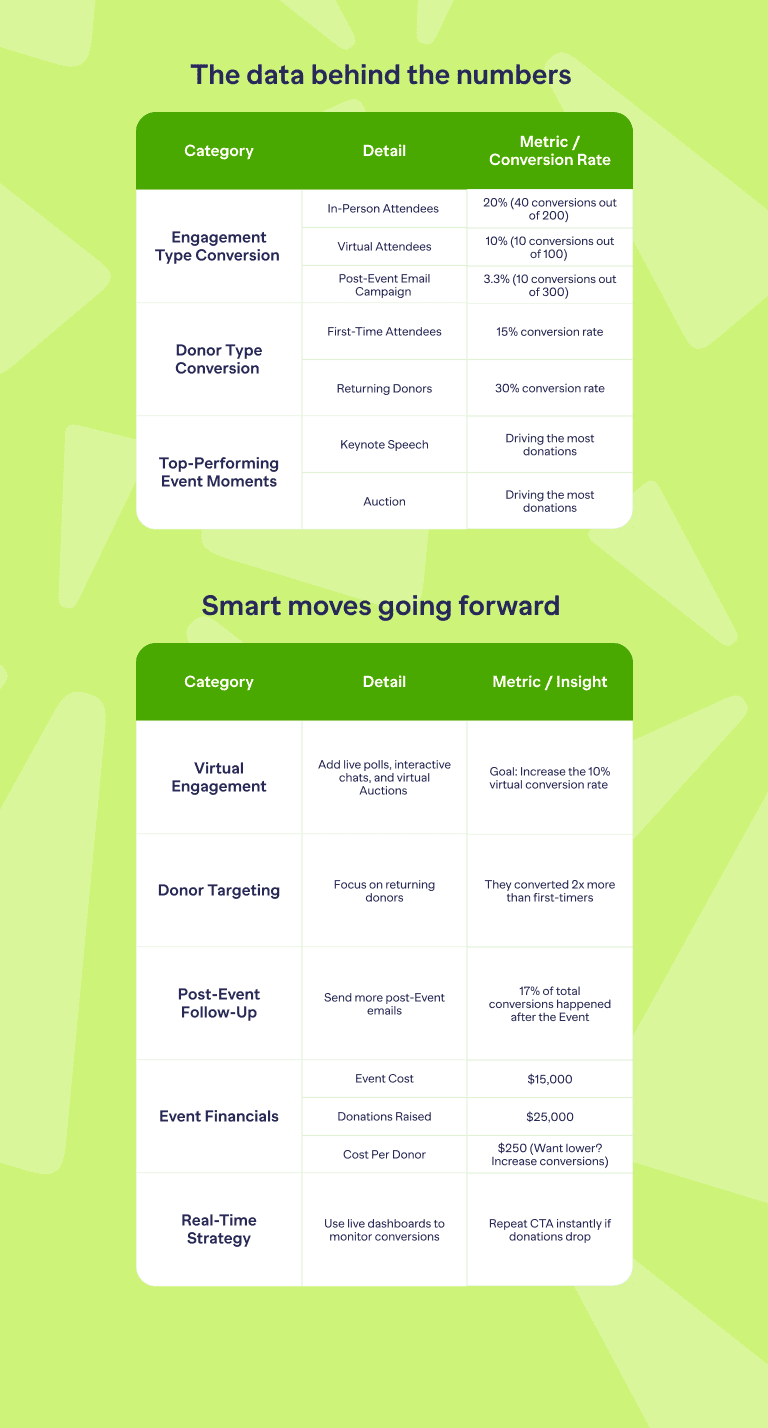
A nonprofit hosts a hybrid fundraising gala with 200 in-person and 100 virtual attendees—that’s 300 total. The goal? Drive donations during the Event and in the 7 days after.
How they tracked it:
- In-Person: Check-in via ticketing apps. Online fundraising + old-school Auction bid sheets = donations.
- Virtual: Attendance tracked on Zoom. Donation links had UTM codes for precise tracking.
- Post-Event: Mailchimp fired off follow-up emails with trackable donation links.
What happened?
- 60 total donors:
- 40 in-person
- 10 virtual during the Event
- 10 from follow-up emails
Event Conversion Rate= (60 ÷ 300) × 100 = 20% overall
Best practices: tracking
- Keep it consistent: Always use the same tracking windows (like 7 days post-Event) so your data stays apples-to-apples.
- Connect your tools: Sync your Ticketing, donation, and CRM platforms to avoid messy manual work and missing data.
- Train your team: Make sure staff and volunteers know exactly how to log attendee check-ins and donations.
- Test before you scale: Run tracking systems at a smaller Event first. Fix the kinks before the big night.
- Watch the dashboards: Monitor conversions while the Event is happening. If something’s lagging, tweak your message live.
- Track after the applause: Many donors give after the Event. Follow up, track it, and count it. Don’t leave those gifts on the table.
What is a good Event Conversion Rate in fundraising?
Event Conversion Rate growth benchmark
There’s no one-size-fits-all number, but here’s where most Events land.
- Fundraising Events (galas, dinners, etc.):
A solid ECR (Event Conversion Rate) is 15% to 25%.
Top-tier Events? They can push past 30%.
Example: 200 guests, 50 donors = 25% ECR.
- Peer-to-Peer Events (walks, runs):
Usually lower, around 10% to 20%.
Why? Participants often raise money from others, not giving themselves.
- Ticketed or registration-based Events:
Think 5% to 15% conversion for purchases—not donations.
Depends heavily on audience interest and the Event’s pull.
- Online donation pages (tied to Events):
Expect 12% to 19%, especially for virtual or hybrid Events.
High-stakes causes like hunger relief can spike to 47%.
It varies by sector.
- Hunger & Poverty Orgs:
Strong mission = high urgency = ECRs as high as 47%.
- Health Nonprofits:
Often in the 15% to 25% range, especially with emotional storytelling or big-name Events.
- Cultural or Education Orgs:
More about engagement, less about donations—so 10% to 15% is typical.
What else impacts ECR?
- Who’s in the room:
Events packed with loyal donors or major gift prospects?
You’ll likely hit 20%–30%.
Public Events full of first-timers? Expect 5%–15%.
- Event size:
Small + exclusive = higher ECR.
Big + open = more reach, but usually lower conversion.
- Call-to-Action strength:
A great CTA (like a live Auction or matching gift) can bump your ECR by 5%–10%.
- The Economy:
It matters. In 2025, donor counts are down 4.5% from last year.
That means overall ECRs might trend a bit lower—especially for smaller donors.
Quick benchmark highlights.
- M+R’s 2023 Report:
Average main donation page = 12%.
Event-specific pages? Often better—15% to 25% thanks to in-person energy.
- 2025 Report:
Campaigns hitting 10% to 30% are in the success zone.
Top performers get there through strategy, design, and donor love.
Bottom line: What’s “Good”?
- Most fundraising Events: Aim for 15% to 25%.
- Peer-to-Peer efforts: 10% to 20% is the sweet spot.
- Exceptional campaigns: 30 %+ is possible with the right story, audience, and urgency.
If your ECR is under 10%, don’t panic but do dig in. It might mean your CTA isn’t clear enough, your follow-up is too light, or you’re targeting the wrong crowd.
Tips for Achieving a Good ECR and Growth
How to hit a strong ECR (and keep growing it year after year)?
Want your Event Conversion Rate (ECR) sitting in that 15%–25 % sweet spot?
Want to see it climb 10%–20% year-over-year?
Here’s your playbook.
Make your CTAs pop
Say it loud, say it clearly. “Donate Now.” “Support Our Mission Today.”
Test versions: “Help Now” can lift conversions by 5%–10%.
Tell stories that stick
Real people. Real impact.
Share beneficiary videos or powerful stats during your Event. It’s an emotional fuel that can raise your ECR by 5%–10%.
Smooth out the donation process
Less friction, more giving.
Cut down form fields. Make it mobile friendly. Offer options like credit cards, PayPal, and Apple Pay. Fewer dropouts = more donations.
Bring in the right people
Don’t leave your high-potential guests off the invite list.
Returning donors and corporate sponsors convert at 20%–40%. First-timers? More like 10%–15%. Stack the room smartly.
Track in real time
Keep your finger on the pulse during the Event.
Use live dashboards to spot lulls in giving. If conversions dip, switch up your CTA or re-engage the crowd—on the spot.
Follow up, fast
The Event’s over, but you’re not done.
Within 48 hours, send personalized emails with donation links you can track. Expect a 3%–5% bump in your ECR from this one move.
Test everything
A/B test your CTAs. Swap out elements (Auction vs. Raffle?).
Each test teaches you what clicks—and what converts. That’s how you build consistent growth.
Turn up the heat with urgency
Try matching gifts or countdown challenges like “Double Your Impact—Ends Tonight!”
A simple urgency hook can boost ECR by 10%–15%.
Use case: Charity Run 2025
- The Setup:
Your nonprofit is running a 2025 charity race with 500 participants.
Last year, you saw an ECR of 12% (60 donors).
You’re aiming higher this time.
- The Target:
For Peer-to-Peer Events, a strong ECR is 15% to 20% = 75 to 100 donors.
Want year-over-year growth? Start with 10% to 20% more—66 to 72 donors is a realistic first step.
Smart moves to increase performance
Fix the mobile gap
Mobile brings in 57% of your traffic, but those users aren’t converting as well.
Make your forms fast, simple, and thumb-friendly.
Add a matching gift window
Just the idea of doubling donations creates urgency.
That alone could lift your ECR by 5%.
Hit non-donors with post-Event emails
Reconnect with those who didn’t give on race day.
A strong follow-up could land you another 5–10 conversions.
Measure what matters
Use tools like RallyUp to track registrations and donations in one place.
Then compare your ECR post-Event to your 12% baseline. That’s how you learn, adjust, and grow.
Start tracking Event Conversion Rate (ECR) with RallyUp
Just follow these steps and watch your conversions roll in.
Step 1: Define what counts as a “conversion”
Start here—what’s your goal?
- Pick your action:
RallyUp gives you options. Decide what you’re tracking:
- One-time or recurring donations
- Ticket sales for your Event
- Raffle or Sweepstakes entries
- Peer-to-Peer fundraising sign-ups
Example: Let’s say a conversion = any donation made during or within 7 days after your Event. Great! Lock that in.
- Choose your time frame:
Will you count donations made: - Only during the Event?
- Only post-Event (like from follow-up emails)?
- Or both? (Smart move: most orgs use a 7-day post-Event window.)
- Write it down:
Keep your team on the same page. Add your ECR definition to your RallyUp campaign notes—it lives right in the dashboard.
Step 2: Set up your Event in RallyUp
Now, let’s get your campaign live.
Create the Event:
- Log in (or create your free account at rallyup.com).
- Head to “Campaigns.”
- Hit “New Campaign.”
- Select “Event.” To go virtual or hybrid, select “Livestream” too.
Brand it like you mean it:
- Upload your logo.
- Pick your colors.
- Drop in a strong call to action like “Donate Now” or “Grab Your Spot!”
Your Event page = your conversion engine. Make it shine.
Set up Ticketing:
- RallyUp lets you sell individual or group Tickets.
- Use pre-registration to grab attendee names, emails—even save payment info.
- Why it matters: Clean data = accurate conversion tracking.
Stack on fundraising activities:
Want more conversions? Layer in extras like:
- A Raffle
- A silent Auction
- A Peer-to-Peer challenge
The best part? RallyUp keeps it all under one link. One URL. Everything tracked. No confusion.
Quick win
Add a donation button right next to Ticket sales. Capture multiple conversions in one shot.
Step 3: Track who showed up
Only attendees who actually attend should count toward your ECR.
Watch the numbers live:
Head to your RallyUp dashboard to track real-time registrations and Ticket sales. This gives you your total potential attendees—your ECR denominator.
- Check people in (the smart way):
- In-Person? Use RallyUp’s QR code scanner to check people in. No Ticket, no count. No-shows? They’re out of the equation.
- Virtual? Use livestream analytics or RallyUp’s Zoom integration to track unique logins. It’s not about RSVPs—it’s about who actually clicks in.
- Double-check your list:
- Go to “Experiences” → your Event → “Check-in Attendees.”
- Export the confirmed attendee list.
- Compare it to your registration list to scrub out no-shows. This keeps your ECR sharp and honest.
Step 4: Track those conversions
This is where it gets good. Time to measure the magic—who took action?
Monitor donations in real time:
- Head to “Campaigns,” select your Event, and tap “View Donations.”
- You’ll see who gave, how much, and when. Clean, timestamped, and all in one place.
- Use filters (date, campaign type) to laser in on what’s Event-related. Ignore unrelated gifts.
Track non-donation actions too:
- Raffles? Auctions? Peer-to-Peer signups? RallyUp tracks those on autopilot.
- Peer-to-Peer Participants can even have their own dashboards. Their results feed right into your main campaign report.
Need specific reports?
- Grab detailed stats from “View Donations” or “Event Reports.”
- Want Raffle data? Pull just that. Want an Auction performance? Easy. Pick what you need.
Capture post-Event donations:
- Send follow-ups using RallyUp or link to Mailchimp or Constant Contact.
- Use trackable URLs or UTM codes, so every donation is traced back to your Event.
- Yes, post-Event giving still counts, as long as it’s in your defined window (usually 7 days).
Step 5: Boost your tracking power with analytics
Want next-level insight? Time to bring in the big tools.
Google Analytics + Zapier:
- Connect RallyUp to GA via Zapier.
- Every time someone donates, it triggers an “Event” in GA.
- Set up Goals in GA to track actions like donation completions—then compare them to your attendee data for an enhanced ECR view.
Meta Pixel (for Meta Masters):
- Drop the Pixel on your campaign page to track donor behavior.
- Learn which ads or posts actually led to clicks and conversions.
CRM Sync (This One’s Gold):
- Integrate RallyUp with CRMs like Salesforce, HubSpot, or Microsoft Dynamics.
- You’ll get one clean, centralized view of every attendee and every gift.
- Want to see how first-timers performed vs. returning donors? Use your CRM filters. Data goldmine.
Step 6: What the numbers say: calculating ECR
Now for the moment of truth—how did your Event perform?
1: Grab your data
- Go to “Check-in Attendees” and export the list. This gives you the total number of people who showed up.
- Then head to “View Donations” or “Event Reports” and pull your total number of conversions—donations, Ticket sales, Raffle entries, etc.
2: Do the math
- Use the formula:
ECR = (Total Conversions ÷ Total Attendees) × 100 - That’s your Event Conversion Rate—straight up, no fluff.
Step 7: Keep your data clean (and smart)
Use RallyUp’s Built-in IDs:
Every attendee and every transaction gets a unique ID. No duplicates. No mix-ups.
Want to double-check conversions? Match donor emails to attendee emails. Done.
Step 8: Jump into RallyUp’s reports to get even better
Good numbers? Great. Now let’s make them better.
Get the full picture:
- Go to “Campaigns” → your Event to see donation totals, Ticket sales, check-ins, and more.
- Export to Excel or Google Sheets if you want to slice and dice the data yourself—like comparing ECR by donor type or activity.
Track year-over-year growth:
- RallyUp saves all your campaign history. Use it to compare this year’s ECR with last year’s and track your momentum.
- Goal? Shoot for a 10%–20% lift year-over-year. If you’re at 15%, aim for 16.5–18% next time.
Spot what’s working:
- See which tactics made the biggest splash. Was it the live Auction? Text-to-Give? Email follow-ups?
- For example: Text-to-Give lets donors text a keyword to 33100 and instantly get your campaign link. It’s a mobile game changer.
Use your analytics stack:
Pair with Google Analytics or Meta Pixel to see how people behave on your page. Use what you learn to fine-tune your next campaign.
💗 Need a backup? RallyUp’s got you.
Don’t go through it alone.
Book a fundraising specialist (it’s free!):
RallyUp has real humans – experts – ready to help you set up tracking, boost your ECR, and nail your goals!
Practical example: let’s run the numbers
You’re hosting a hybrid gala. Here’s how it breaks down:
Attendees:
- 150 people RSVP’d in person, but only 140 showed up.
- 50 RSVPs virtually, but only 45 logged in.
- Total attendees = 185 (after no-shows).
Conversions:
- 30 in-person donors
- 10 virtual donors
- 5 post-Event donations via follow-up
- Total conversions = 45
- ECR = (45 ÷ 185) × 100 = 24.32%
That’s solid. But now, let’s squeeze out more.
Insight:
- Virtual folks converted at 22.22%. In-person was 21.43%. Close call, but virtual wins.
- Try adding a virtual Auction next time to lift that number even more.
Next Move:
- Hook up Google Analytics via Zapier.
- Track visits to your page.
- Tweak your CTAs based on what you see and aim for a 10% boost.
Watch out! Don’t let these pitfalls tank your ECR
Even the best plans can backfire if you miss these common tripwires:
Counting ghosts (a.k.a. No-Shows):
Just because someone registered doesn’t mean they showed up.
If you skip check-in data, your attendee count gets inflated, and your ECR takes a hit.
Solution: Always use RallyUp’s check-in tools (QR codes, logins, etc.) to track who came.
Forgetting to log offline donations:
Cash, checks, or side-door donations that never make it into RallyUp? Yeah, those mess with your conversion numbers.
Solution: Route all donations—every single one—through RallyUp’s system so nothing gets lost in the shuffle.
Losing the trail on post-Event gifts:
A donor gives a few days later—great! But if you don’t link it back to the Event, it won’t count toward your ECR.
Solution: Use RallyUp’s campaign filters or trackable links (hello, UTM codes) to make sure every follow-up donation gets credited to the right Event.
Double dipping on donors:
One donor gives, then enters a Raffle. If you count them twice, your data’s off.
Solution: RallyUp’s unique IDs. Stick to them so you’re only counting one conversion per person per action.
Ready to crush 25% ECR at your next Event?
Fire up your donors with RallyUp!
Get started!Final thoughts: Measure what actually moves people
A full room doesn’t mean a successful Event. Action does.
Event Conversion Rate shows you where attention turned into commitment—and where it didn’t. Track it, learn from it, and use it to design smarter Events that convert more than just interest.
If you want to track ECR without spreadsheets, guesswork, or missed data, RallyUp, our end-to-end fundraising platform makes it easy. From check-ins to donations to post-Event follow-ups, everything stays connected—so your numbers actually mean something.
FAQs on Event Conversion Rate
- Galas & Dinners: Shooting for 15%–25% is solid. Knock it out of the park with 30 %+.
- Peer-to-Peer Events (like charity runs): 10%–20% is the sweet spot.
- Virtual or hybrid Events: Aim for 12%–19%. Hunger-focused orgs? They’ve hit up to 47%.
- Ticketed Events (like paid registrations): Expect 5%–15%, depending on how hot your offer is.
Context check:
The tighter your audience (think: loyal donors), or the stronger your CTA (“Double Your Gift Now!”), the higher your ECR. But with a tougher economy, average Events may land closer to the 10%–15% range.
Simple math, smart tracking:
- Define “Conversion”:
What counts? A donation? A Raffle entry? Spell it out—and pick a time window (like “during the Event plus 7 days after”). - Count real attendees:
Use check-ins (QR codes, Zoom logins, etc.). No-shows don’t count. - Track conversions:
Centralize donations through fundraising platforms. Include post-Event gifts using trackable links. - Clean your data:
Match donors to attendees. Check for duplicates. Don’t double-count someone who donates and buys a Ticket.
Formula Time:
→ ECR = (Total Conversions ÷ Total Attendees) × 100
Boom. That’s your ECR.
Here’s your ECR dream team:
- Event Platforms: Eventbrite, Cvent – for tracking attendees and conversions.
- Donation Systems: RallyUp, PayPal – for logging every dollar.
- CRMs: Salesforce, Bloomerang, NeonCRM.
- Analytics: Google Analytics, Tableau.
- Email Tools: Mailchimp, Constant Contact – perfect for follow-ups that drive post-Event donations.
Heads up, these slip-ups can wreck your ECR. Let’s not do that.
- Missing real attendance: Counting no-shows or forgetting walk-ins? That bloats your attendee count.
- Unlogged donations: Got cash donations or offline gifts floating around unrecorded? They won’t count unless you log them. Use RallyUp or another platform to keep it all in one place.
- Wrong attribution: Don’t let a random donation sneak into your Event count. Use Event-specific links or UTM codes to keep things clean.
- Moving targets: Changing what “conversion” means halfway through? Bad idea. Stick to one definition so your data tells a clear story.
- Double dips: Accidentally counting the same donor twice? That spikes your ECR falsely. RallyUp uses unique IDs to keep it tight. Use those.
Time to level up.
- Make your CTA pop: “Donate Now.” “Give Today.” Urgent CTAs like these can lift conversions by 5%–10%.
- Tell better stories: Real stories = real emotion = real results. Expect another 5%–10% bump when people connect with your cause.
- Easy donations win: Mobile-friendly forms. Apple Pay. Google Pay. Make it easy, and watch those completions climb. Most abandonment rates drop 50 %+.
- Invite the right crowd: Bring in past donors and sponsors. They convert at 20%–40%, while newbies hit 10%–15%.
- Create a countdown: Matching gifts or 24-hour challenges add urgency—and can boost your ECR by 10%–15%.
- Follow up fast: Send a personal email within 48 hours. Just doing this can raise your ECR 3%–5%.
Look inward:
Pull past Event data from your RallyUp dashboard. Compare this year’s gala to last year’s. Even a 1% lift matters.
Check the standards:
- Galas: 15%–25%
- Peer-to-Peer: 10%–20%
- Virtual/Hybrid: 12%–19%
Know your sector:
Hunger or poverty orgs? You might hit 47%. Arts and culture? Expect 10%–15%.
Chase the leaders:
High-growth nonprofits are landing 25%–30%. That’s the gold standard.
Absolutely. ECR works for any action you care about.
For example:
- Volunteer sign-ups
- Monthly giving commitments
- Social shares
- Auction or Raffle entries
Other metrics you might want to track
Now that you’ve seen it in action, are you ready to start fundraising?
Get Started