How Can Nonprofits Grow & Engage Supporters on Instagram in 2026
Using Instagram for Nonprofits
Use Instagram for nonprofits with clear goals, consistent storytelling, and intentional formats. Reels expand reach, carousels educate, stories maintain engagement, and Meta tools enable fundraising. Pair Instagram momentum with structured campaign tools to convert visibility into donations and community growth.
Instagram plays a central role in how nonprofit organizations communicate today. It is where causes are discovered, stories are shared, and communities form around shared values.
For nonprofits, the platform offers a direct way to show work in progress, highlight real impact, and stay visible to supporters daily. At the same time, Instagram requires intention. Posting without structure or goals rarely leads to meaningful engagement.
This guide explains how nonprofits use Instagram effectively as part of their broader social media strategy. It covers setup, content planning, growth, and measurement, with practical guidance that teams can apply immediately.
In this article
- Why Instagram for nonprofits?
- Getting started with Instagram for nonprofits
- Define goals and audience
- Content strategy for Instagram nonprofits
- Using Instagram formats to increase engagement
- Instagram best practices for nonprofits
- Growing your nonprofit on Instagram
- Fundraising on Instagram for nonprofits
- Using Meta Ads for nonprofit campaigns
- Analytics and performance tracking on Instagram for nonprofits
- Keeping Instagram sustainable for your nonprofit
- Final thoughts: Turning Instagram engagement into real impact
- FAQs about Instagram for nonprofits
Why Instagram for nonprofits?
When we think “Instagram,” we think memes, reels, and creator content. But it is also a place where people discover news, social issues, and causes. Many users first encounter nonprofit work while scrolling through their daily content.
Visual formats make this possible. Photos, short videos, and carousels allow nonprofits to communicate quickly and clearly. Reels, stories, and feed posts create multiple entry points for attention and engagement without requiring long explanations.
Instagram’s role in nonprofit social media strategy
That initial moment of attention matters. A clear Instagram post pauses scrolling, surfaces a problem, and shows a simple way to respond.
This makes Instagram a strong awareness and engagement channel within a broader social media strategy for nonprofit organizations.
The relationship between Instagram and nonprofits has evolved in recent years. In 2025, Instagram reached 3 billion users worldwide, many of them young and socially aware. Instagram complements Facebook, TikTok, LinkedIn, and X by focusing on discovery and connection.
Tip: Use Instagram to share impact stories and real moments. Use Facebook and other platforms to support structured campaigns and fundraising flows.
Getting started with Instagram for nonprofits
A defined social media strategy for nonprofits ensures that Instagram supports long-term goals rather than operating in isolation.
Every nonprofit should use a professional Instagram account. This unlocks analytics, contact options, and platform tools built for organizations.
Step 1: Set up a professional nonprofit account
- Create an Instagram account or convert an existing one
- Switch to a Business or Creator profile
- Connect the account to your nonprofit’s Facebook Page
- Enable contact buttons for email and phone
A professional account gives visibility into reach, engagement, and audience behavior. These insights matter later when refining your nonprofit social media strategy.
Step 2: Optimize your nonprofit profile
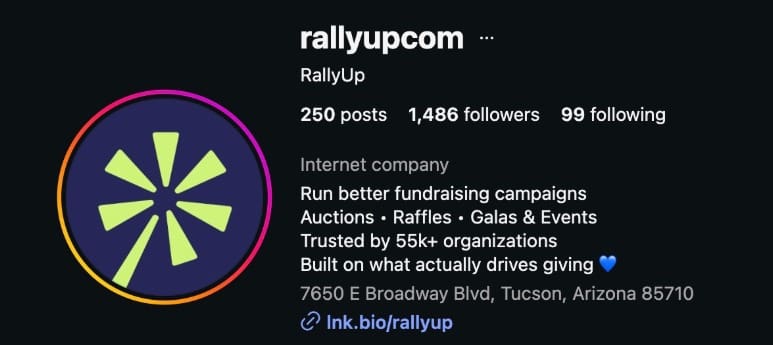
Your profile is often the first impression. It should explain who you are and why your work matters in seconds.
Profile essentials
- Profile photo: logo or recognizable brand mark
- Name field: nonprofit name with a clear identifier
- Bio: short mission statement or cause focus
- Link: website, donation page, or link-in-bio tool
Bio writing tips: Use plain language, focus on impact and purpose, include one clear action
Step 3: Set expectations from day one
Before posting, align internally on how Instagram will be used.
Questions to answer
- Who manages the account?
- How often will you post?
- What goals does Instagram support?
- How does it fit into your broader social media marketing for nonprofits?
Clear expectations reduce inconsistency and prevent burnout.
Meta requirements for nonprofits on Instagram
To access Instagram’s nonprofit and fundraising features, Meta requires the following:
- A professional Instagram account (Business or Creator)
- A connected Facebook Page for your nonprofit
- A verified nonprofit status with Meta (for fundraising tools)
- Compliance with Meta’s community and fundraising policies
These requirements apply across Instagram and Facebook. Setting them up early avoids limitations later when running campaigns or donation features.
Define goals and audience
Before posting anything, it helps to be clear about what Instagram is supposed to do for your nonprofit. Without that clarity, content becomes random.
Nonprofits use Instagram to:
- Build awareness
- Keep supporters engaged
- Support fundraising or volunteer efforts
Write these goals down and decide which ones matter most right now. Each post will have its own purpose, so don’t stuff everything into one post or reel.
Keep the audience’s attention in mind
Instagram is a short-attention-span platform. People scroll quickly and decide within seconds whether a post is worth their time. That makes audience understanding important.
Your nonprofit is likely speaking to more than one group at the same time. Some people are discovering your cause for the first time. Others already follow your work and want updates.
A smaller group may be ready to donate, volunteer, or share your message. Instagram works best when you acknowledge these differences and plan content accordingly.
Post with audience intent in mind
Different people stop scrolling for different reasons. When posts are created with a specific audience in mind, Instagram feels less like broadcasting and more like a conversation.
- For someone new to your nonprofit, they’ll need context. Simple explainers, short reels, and clear visuals help them understand what the issue is and why it matters.
- Existing supporters respond well to updates. Field photos, progress posts, and behind-the-scenes moments help them feel connected to the work.
- Donors and committed supporters look for impact. Posts that show results, milestones, and real outcomes give them confidence in supporting your organization.
Content strategy for Instagram nonprofits
When someone visits your profile, they should quickly understand what your nonprofit does and why it matters. This is how you decide what to post while keeping planning realistic for small teams:
Decide what your account will focus on
Every strong nonprofit account has a clear center.
This might be the people you serve, the problem you work on, or the work happening on the ground. That focus acts as a filter for content decisions.
You might see better results when you return to a few core themes consistently. Over time, this repetition builds recognition and trust.
Common focus areas
- The issue or cause you work on
- The people or communities you support
- The work your organization does day to day
- The people who make that work possible
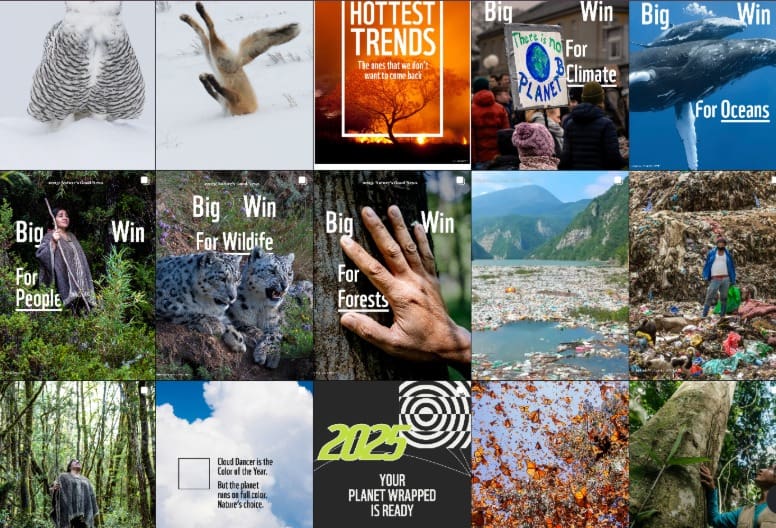
Example:
WWF’s Instagram is about updates on Earth and nature
The types of content that work best for nonprofits
Instagram favors content that’s real and current. For nonprofits, this usually means showing everyday moments rather than highly produced campaigns.
Content types that perform consistently
- Impact stories from the field
- Volunteer and staff spotlights
- Simple explainers about the cause
- Progress updates and milestones
- Events and community moments
Individually, these posts may feel small. Together, they help followers understand your work and stay connected to it.
Grow your fundraising friend circle with social mediaUse Instagram formats with intent
Each Instagram format serves a different purpose. Choosing formats intentionally keeps content clear and manageable.
- Feed posts work well for key updates and evergreen content
- Carousels are useful for explainers and step-by-step stories
- Reels help reach new audiences
- Stories support frequent, informal updates
You don’t need to use every format at once. Starting with one or two formats leads to better consistency.
Balance storytelling and action
This rhythm helps people stay engaged without feeling pressured:
Posts should focus on storytelling and context for a sustainable Instagram presence. Some should encourage replies and conversations. A smaller number should invite people to take action.
For example:
Mutual Aid Disaster Relief spent 3 weeks sharing awareness posts about working in winter.
These posts show the situation on the ground and help followers understand the scale of the problem. During this period, captions focus on awareness and updates, not donations.
When the nonprofit later shares a fundraising post, the ask feels natural. Followers already know what is happening and why support matters.
Plan content in a sustainable way
Practical planning habits that become a part of your workflow and can be used on social media for nonprofit organizations:
- Collect photos and notes as work happens
- Keep a shared list of post ideas
- Create content in batches
- Leave room for timely updates
Safeguarding and privacy considerations
Protect the dignity and privacy of people featured in your content. Obtain clear consent before sharing photos or videos, especially when children or vulnerable individuals are involved.
Avoid exploitative imagery. When collecting supporter data through forms, messages, or ads, follow privacy regulations such as GDPR and local data protection laws.
Using Instagram formats to increase engagement
Instagram is built around formats, and each format is designed to capture attention in a specific way and encourage a specific type of interaction. For nonprofits, this means choosing the right format for the right message.
According to Meta’s guidance for nonprofits and public interest organizations, using these formats as intended leads to stronger reach, engagement, and visibility over time.
1. Carousels
Carousels are one of the most effective Instagram formats for nonprofits. They encourage people to slow down, swipe, and spend more time on a post. This makes them ideal for explaining ideas or showing progress.
Nonprofits use carousels to break down complex issues into simple steps. One slide introduces the topic. The next few slides add context, visuals, or data. The final slide often points to the next step.
What works well with carousels:
- Explaining a cause in simple terms
- Showing before-and-after impact
- Sharing a short story across multiple frames
- Breaking down how donations or programs work
Engagement tips:
- Keep one clear idea per slide
- Use short text that is easy to read on mobile
- End with a prompt that invites saving or sharing
2. Stories
Stories are designed for frequent, informal updates. For nonprofits, stories are a strong way to stay present without overproducing content. Since stories disappear after 24 hours, they create a sense of timeliness.
Good uses for stories:
- Field updates and day-to-day work
- Volunteer shout-outs
- Polls and question stickers
- Event reminders and countdowns
Stories also support interaction. Polls, questions, and sliders make it easy for followers to respond with minimal effort.
3. Reels
Reels are currently one of the strongest discovery tools on Instagram for nonprofits. They are shown to people who do not follow your account, which makes them valuable for reaching new audiences. The focus should be on clarity and relevance.
Reel ideas for nonprofits:
- A quick explanation of a problem or issue
- A short “day in the field” clip
- A volunteer or staff member speaking directly to the camera
- Before-and-after moments from your work
Reel tips:
- Get to the point in the first few seconds
- Use captions for accessibility
- Keep videos short and focused
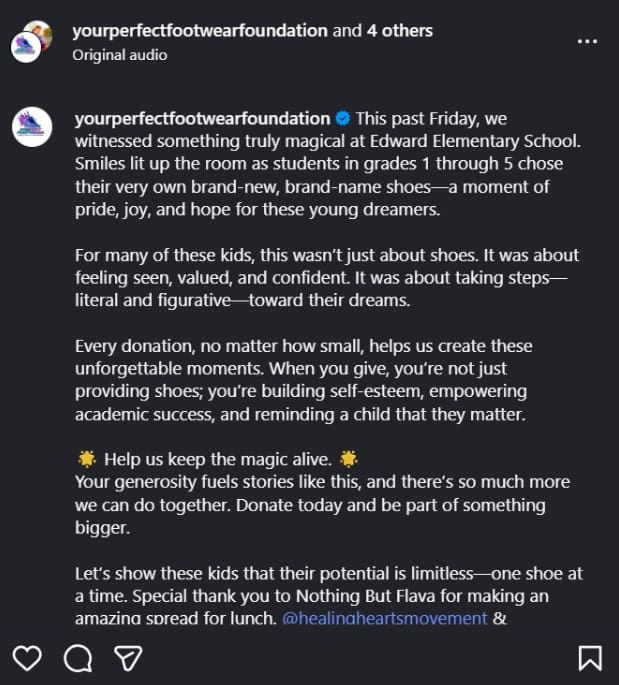
Example:
Your Perfect Footwear Foundation posted an update reel for their donors, which included the behind-the-scenes of how their fundraiser affected their cause. They also added an explanation and a call-to-action in their caption.
See how you can effectively use social media to promote school fundraising campaigns
4. Lives and broadcasts
Live sessions work best when there is a clear purpose, such as an update, conversation, or event.
Lives are useful for Q&A sessions, campaign launches, or conversations with staff and partners. They are less about reach and more about depth.
When to use Lives:
- Major updates or announcements
- Campaign kick-offs
- Conversations with experts or team members
Even occasional live sessions humanize your organization and build trust.
Use RallyUp to live stream your fundraiser directlyInstagram best practices for nonprofits
Instagram’s largest user base sits in the 25-34 age group, followed closely by users aged 18-24. This audience engages heavily with short-form video, interactive content, and clear storytelling.
The best practices below focus on how nonprofits structure posts, formats, and timing to match how this audience actually uses Instagram.
Treat the first three seconds as the gate
Viewers scroll past quickly. Your opening frames carry the entire post; they cannot start without context.
What to do:
- Put the main image in the first frame, and as the thumbnail
- Add the subject in the first frame
- Add on-screen text for clarity
- Design for sound-off viewing
Meta’s own video guidance emphasizes showing brand and message early, including within the first three seconds. Instagram has also added Reels retention and “skip rate” style signals that emphasize early drop-off.
Example:
RallyUp’s reel uses the speakers in the thumbnail and adds relevant and large captions for accessibility.
Use carousels to increase time spent on posts
Carousels perform well because they hold attention and encourage swiping. A Hootsuite experiment reports higher engagement rates for carousels than reels and single-image posts. Moreover, they had the highest number of saves in 2025.
For nonprofits, this makes carousels useful for explaining ideas, showing progress, and walking supporters through a story in steps.
Carousel ideas for nonprofits:
- “What happened + what we did + what changed”
- “3 things people misunderstand about this issue”
- “Where your donation goes” in 5-7 slides
- “Before/during/after” project timeline
Carousel execution tips:
- Slide 1: clear hook in 8 words or fewer
- Slides 2-6: one idea per slide
- Final slide: one action prompt, one link path
Use reels for reach
Reels remain a strong discovery lever because they show up as ads and promotions if you boost them, plus they are shareable and don’t disappear as stories do.
Reel practices that improve performance:
- Start with motion or a human face in frame
- Use captions on every reel
- Keep the message single-topic
- Use native editing and simple cuts
Quick tip: Reels also support a wider range of aspect ratios, with 9:16 common for full-screen viewing.
Use stories to get replies and taps
Stories reward frequency and interaction. Stickers reduce friction because they let people respond with one tap.
Story prompts nonprofits can use weekly:
- Poll: “Which update do you want today?”
- Questions: “Ask us anything about our work”
- Quiz: “Myth or fact” about the issue
- Countdown: event start, campaign close, matching window
Post with a weekly, expected rhythm
Consistency improves learning. Your team learns what to make. Your audience learns what to expect. Benchmark datasets show posting frequency and engagement patterns that help with planning.
Simple weekly rhythm
- 2 feed posts
- 1 carousel
- 2-3 story sets
- 1 reel
This rhythm fits most small nonprofit teams. It stays sustainable.
Make every post and design accessible
Accessibility improves comprehension and watch time. It also makes content easier to reach and resonate with the audience most active on Instagram today.
Clear captions, readable text, and simple visuals reduce friction. When posts are easier to understand, people are more likely to stay, engage, and share.
Accessibility is practical targeting. When content works well across devices, sound settings, and attention spans, it reaches the right people without additional effort.
Accessibility checklist:
- Add captions to every video
- Use a readable text size in stories
- Avoid dense paragraphs on graphics
- Add alt text when relevant
Growing your nonprofit on Instagram
Growth on any social media channel, especially one as populated as Instagram, does not happen overnight – or even within a month. Focus on relationships and reach at the same time to grow steadily. Of course, it’s not that easy, and there are more things to it.
Collaborate with aligned creators and organizations
Partnerships combine and expand viewership. When another account collaborates with yours or is tagged in your reel, your nonprofit is introduced to a new audience with built-in trust.
Example: Drugs for Neglected Diseases initiative collaborated with WHO to further their reach and spread awareness. They also used the hashtags #WorldNTDDay #UniteActEliminate #EndTheNeglect.
You do not need celebrities. Micro-influencers and community leaders often bring more relevant engagement then celebrities.
Collaboration ideas:
- Joint Instagram Live with a partner organization to tap into both audiences at once
- Co-created reels designed for the Reels feed and Explore page
- Volunteer or donor takeover days through Stories
- Cross-tagging in feed posts during campaign launches
- Using Instagram’s Collab post feature, so one post appears on both profiles
- Shared carousel posts breaking down a common issue from two perspectives
- Story shoutouts that encourage followers to visit the partner profile
- Joint hashtag campaigns to increase search visibility
- Event countdown collaborations using Stories stickers
Quick tip on pitching collaborations
Mention the shared issue, suggest one clear format such as a joint reel or Collab feed post, and explain how it benefits both audiences. Creators and partner organizations respond better to focused ideas than open-ended requests.
Encourage supporter participation
Instagram is meant for the audience, and it grows better when the audience participates. Your followers or bystanders are not going to do so if they aren’t given a chance.
Whether they’re regular donors or volunteers, invite the community to share why they support your cause, post photos from events, and tag your account while using a campaign hashtag.
Get them to participate by hosting an Ask Me Anything (AMA) so they can submit questions or stories. User-generated content builds credibility and expands reach beyond your own feed.
Optimize for discovery
Growth depends on being found by people who do not follow you yet.
Simple practices like using relevant keywords in your bio, writing clear captions that include cause-related terms, adding geo-tags when relevant, and using focused hashtags tied to your issue.
Quick tip: Adding hashtags and keywords to your caption does not mean spamming it completely. Instead, keep your captions relevant to the post, like quick explainers, since Instagram’s search function now indexes keywords in captions.
Build a consistent posting rhythm
We’ve heard the phrase “consistency is key” our entire lives. It is most relevant today for social media growth. Accounts that post regularly stay visible. Long gaps can reduce momentum and lead to disappearance from the Explore page.
A sustainable rhythm works better than bursts of activity. Two to three strong posts per week, supported by stories, produce steady growth for nonprofit accounts. It also helps repeat appearances on people’s feeds if they interacted with you once.
Engage with the community
While growth is about your community engaging with you, it is just as important to engage back.
Reply to comments. Respond to direct messages. Acknowledge shares and tags. When people feel seen, they stay. Think of it like sending personalized thank-you letters, but the social media version.
Over time, this creates a core community that supports campaigns and amplifies impact.
Fundraising on Instagram for nonprofits
Instagram allows nonprofits to collect donations directly inside the platform through Meta’s charitable giving tools. When enabled properly, supporters can donate from your profile, posts, stories, reels, or Live sessions
Some nonprofits prefer directing Instagram traffic to a campaign page using a link-in-bio or fundraising platform such as RallyUp, especially when running larger campaigns.
Step 1: Make sure fundraising tools are enabled
Before planning a campaign, ensure your nonprofit is enrolled in Meta’s fundraising tools. This requires a professional account, a connected Facebook Page, and approved nonprofit status within Meta’s system.
Step 2: Pick where fundraising appears on Instagram
Each placement serves a different behavior. Some are better for discovery. Others are better for urgency.
| Placement | Best Used For | Why It Works |
|---|---|---|
| Profile donate button | Ongoing support | Always visible to visitors |
| Feed fundraiser post | Campaign milestones | Shareable and stays on profile |
| Stories donation sticker | Urgency and reminders | Quick taps and repeat exposure |
| Reels fundraiser | Reaching new audiences | Discovery through Reels feed |
| Instagram Live | Deeper engagement | Real-time interaction and trust |
Essentially, it is advised you use every type of format to increase reach and engage audiences, but you don’t have to use them all in the same week. Reuse content and space it out over the month.
Step 3: Build a simple campaign structure
Fundraising performs better when it follows a clear sequence.
Start by showing the situation on the ground. Share context and real updates. Once followers understand what is happening, introduce a defined goal.
Keep the message focused on one outcome and one number. After the ask, continue posting updates so supporters see momentum.
Fundraising should feel like a continuation of your storytelling, so engagement stays steady.
Step 4: Use story and reels campaigns strategically
Stories are effective for reinforcement. Because they appear at the top of the app and disappear quickly, they work well for reminders, countdowns, and daily updates during a campaign.
Reels are effective for reach. A short reel that clearly explains the campaign goal can introduce your campaign to people who do not follow you yet. Keep reels direct. State the problem early. Mention the goal clearly. Most importantly, guide viewers to your profile’s donate button.
Example:
NoThanks App started a Yes Please! Aid for Gaza fundraising campaign and shared multiple on-field and donation goal posts.
They announced multiple donation methods, like crypto:
Posted updates when they neared their goal but needed more:
And an announcement for crossing their goal:
Step 5: Turn engagement into action
Instagram builds momentum, and RallyUp – an end-to-end fundraising platform helps nonprofits convert that momentum into structured fundraising campaigns, ticketed events, sweepstakes, or peer-to-peer drives.
Complete with full-fledged campaign pages, you can use Instagram to redirect your audience to your main fundraiser.
Using Meta Ads for nonprofit campaigns
Meta structures nonprofit campaigns around three core goals: increasing awareness, driving action, and growing your community.
Paid ads help nonprofits reach people beyond their followers. They also help you reach specific age groups and interests, which matters when you want to get in front of the 18-34 audience that dominates Instagram usage. Organic content builds trust. Paid content scales reach.
When paid ads make sense
1. Increase awareness
- Share urgent updates
- Distribute critical information during a crisis
- Communicate around a legislative or public policy issue
Inside Ads Manager, this means selecting the Awareness objective. The system will optimize delivery toward people most likely to remember your ad.
2. Take action
- Fundraise
- Encourage recurring donations
- Drive traffic to a donation page
- Re-engage previous donors
- Lead supporters to take a specific action
Inside Ads Manager, select the Sales objective and set the conversion location to your website. Optimize for conversions.
3. Grow your community
- Collect emails
- Recruit volunteers
- Build a mailing list
- Register supporters for programs
- Acquire new potential donors
Select the Leads objective in Ads Manager. Use Instant Forms to reduce friction. Set your performance goal to maximize leads.
The core campaign types to run
| Goal | Best Campaign Direction | What to Send People To |
|---|---|---|
| Awareness | Video views / reach style campaigns | A reel or short video story |
| Consideration | Traffic or engagement | A landing page or campaign page |
| Leads | Lead form | Volunteer interest form |
| Donations | Conversions or on-platform donation tools, wherever available | Donation page or fundraiser |
Targeting that fits nonprofits
Targeting makes it easier to reach the right audience quickly.
Good starting audiences:
- Retarget people who watched your reels
- Retarget profile visitors and engagers
- Lookalike-style audiences from donor or email lists (where available)
- Local radius targeting for events
Broad targeting works when the creative is strong and the ask is simple.
Ad authorization for social-issue content
If your ads relate to social issues, public policy, elections, or political topics, Meta may require additional ad authorization. This process can include identity verification and a “Paid for by” disclaimer that appears on the ad.
Start this process early if your nonprofit plans to run advocacy or policy-related campaigns. Completing authorization in advance prevents delays when launching time-sensitive campaigns.
Analytics and performance tracking on Instagram for nonprofits
Instagram provides a large number of metrics. Most of them are not equally important. For nonprofits, measurement should connect back to mission outcomes, not vanity signals.
Track trends over time and document insights to guide future campaigns and improve overall social media performance.
Start with three questions:
- Are more people discovering your organization?
- Are supporters engaging with your content?
- Are people taking action?
Instead of checking performance daily, review trends monthly or quarterly. Look for patterns rather than single-post spikes.
Core metrics to monitor
- Reach and profile visits
- Saves and shares
- Reel retention
- Link clicks or donation page visits
- Leads or donations connected to campaigns
Quick tip: Follower count matters less than engagement quality. A smaller, active audience brings in more impact than a larger passive one.
If reels consistently reach new audiences, produce more of them. If carousels generate saves, use them for educational content. If a campaign drives profile visits but no donations, review the donation experience.
Keeping Instagram sustainable for your nonprofit
Many nonprofits struggle with consistency. The issue is rarely creativity; it is structure.
Start by assigning clear ownership. One person should oversee the Instagram strategy, even if content creation is shared. Define who captures photos, who writes captions, and who responds to comments and direct messages.
Download our long-term Instagram strategy checklist to begin your planning!
Instagram for Nonprofits: Long-Term Strategy Checklist
This checklist supports long-term growth, structured planning, and sustainable execution. When Instagram is treated as an ongoing system rather than a series of posts, performance becomes more predictable and manageable.
1. Clarify Instagram’s role in your organization
Instagram should support real outcomes, not just activity.
2. Establish content pillars
Example pillars:
- Impact and field work
- Education and awareness
- Community and volunteers
- Campaigns and fundraising
- Behind-the-scenes operations
Content pillars prevent random posting and improve consistency.
3. Build a campaign calendar
A calendar reduces last-minute stress and improves quality.
4. Create clear internal workflows
Clarity prevents burnout and missed opportunities.
5. Maintain a sustainable posting rhythm
Consistency over months matters more than short bursts.
6. Measure performance quarterly
Look for patterns across three months, not single posts.
7. Review and refine
Improvement comes from small adjustments over time.
Final thoughts: Turning Instagram engagement into real impact
Instagram gives nonprofit organizations a direct line to awareness, engagement, and action.
When goals are clear, formats are used intentionally, and campaigns follow structure, the platform becomes a reliable growth channel:
- Reels expand reach
- Stories maintain a connection
- Carousels educate
- Fundraising tools reduce friction
- Consistency builds trust over time
Success does not require constant posting. It requires focus and rhythm. When engagement builds, the next step must be simple.
RallyUp, an end-to-end fundraising platform, helps nonprofits convert Instagram momentum into structured fundraising campaigns, peer-to-peer drives, and event-based giving that turn visibility into measurable impact.
Create a campaign today and start your Instagram strategy!FAQs about Instagram for nonprofits
Post consistently using reels and carousels that clearly explain your cause and show real impact. Collaborate with aligned partners, encourage shares, and optimize your bio and captions for search.
Most nonprofits see steady results with 2-3 quality posts per week supported by regular stories. Consistency matters more than volume.
Meta Verified for businesses is a paid subscription available to eligible Business accounts in supported countries. Eligibility depends on profile completeness, security measures like two-factor authentication, account age and activity, and compliance with Meta policies.
Instagram works well for awareness and engagement, while Facebook often supports fundraising and community building.
Now that you’ve seen it in action, are you ready to start fundraising?
Get Started