Learn about RallyUp’s Raffle options and how to customize them.
This information is provided for general informational purposes only and does not constitute legal advice. Laws change frequently. Last reviewed: September 4, 2026.
Raffles are a fundraising method where donors purchase entries for the chance to win a prize. RallyUp provides many tools and customization options to help you run a smooth and successful Raffle. The links below will take you to other Knowledge Base articles with further information.
What are the legal requirements for running a Raffle?
Raffle regulations vary widely depending on location. Before you start planning your Raffle, confirm whether your organization is eligible to run one based on your state and local regulations:
Understand: Legal Regulations Concerning Raffles
Individuals and for-profit businesses can also run Raffles on behalf of a charity organization. The process depends on the customer type:
For-profit businesses (CSRs): CSRs can run offline Raffles on their own. For online Raffles, the benefiting organization must invite you to fundraise on their behalf through RallyUp. See: Understand: CSR Fundraising for US 501(c) Organizations
Individuals (Advocates): Advocates cannot run Raffles on their own. The benefiting organization must invite you to fundraise on their behalf through RallyUp. See: How-to: Run a Charity Raffle or Sweepstakes If You Are an Individual
What’s the difference between Raffles and Sweepstakes?
Sweepstakes are a good alternative to Raffles since they function similarly. The key difference is that Sweepstakes must offer a free method of entry:
Understand: Raffles vs. Sweepstakes
What pricing options are available for Raffles?
Pricing options can be found in the following article:
What Are RallyUp’s Pricing Options? Free vs Flex
What types of Raffles can I run on RallyUp?
There are several types of Raffles you can run on RallyUp:
- 50/50 Raffle (also known as a split-the-pot or jackpot Raffle): Donors can enter for a chance to win part of the funds raised
- Prize Raffle: Donors can enter for a chance to win traditional prizes like vacation packages, goodie baskets, etc.
How-to: Allow Donors to Purchase Raffle Entries for Any Prize Available
How-to: Allow Donors to Purchase Raffle Entries for Specific Prizes
Can I preview a sample Raffle before creating my own?
Take a glimpse at a sample Raffle to see if this Component is right for you.
How do I add offline Raffle entries to my Campaign?
You can also sell Raffle entries offline. RallyUp makes it easy to add those offline purchases to your online records:
How-to: Add Raffle or Sweepstakes Entries You’ve Sold Offline
How should I set up entry levels to maximize donations?
The way you set up your entry levels can encourage more people to participate and donate at higher levels so you raise the most money possible:
Insights: Use Entry Levels to Increase Donations
How-to: Create Raffle and Sweepstakes Entry Levels
What items can I raffle on RallyUp?
RallyUp does not maintain a fixed list of restricted prize items, but two layers of policy apply to every Campaign.
Your payment processor — Stripe or PayPal — has its own prohibited items policy. Prizes involving firearms, tobacco, alcohol, or other regulated goods may be blocked at the payment processing level regardless of your local laws. Review your processor’s prohibited items policy before finalizing your prize lineup.
RallyUp also reserves the right to pause or shut down any Campaign that violates its terms of service. Campaigns that violate payment processor or platform policies may be paused without advance notice, so review both sets of policies before listing any prize.
What is Campaign pre-registration and how does it work?
Pre-registration allows donors to create a RallyUp account and save a payment method before your Raffle begins. When your Raffle starts, they can check out quickly and easily:
Understand: Campaign Pre-Registration
How can I promote my Raffle to reach more donors?
Spreading the word about your Raffle to as many people as possible is the best way to ensure its success. You can share the link or QR code to your fundraiser on social media or send an email to your donors, family, and friends to get the word out:
How-to: Find and Share Your Campaign Link
How-to: Use QR Codes to Promote Your Fundraisers
Our free Text-to-Give tool allows donors to text a keyword to 33100 and immediately receive a Campaign link so they can participate and donate from their mobile device:
How-to: Promote Your Campaign with Text-to-Give
RallyUp’s Sharing Rewards program gives donors bonus entries for promoting your Campaign on social media. This helps your Raffle reach a much wider audience:
How-to: Promote Your Raffle or Sweepstakes with Sharing Rewards
If you’re planning to host a live event and draw winners in person, consider turning it into a hybrid event by livestreaming the drawing. You can even enable Gated Livestreaming and require donors to purchase tickets to view the Livestream:
Insights: Turn Your Fundraiser into a Live Virtual Event
How do I handle state and geographic restrictions for my Raffle?
Raffle laws vary widely by state and country, and you are responsible for confirming that your organization is legally permitted to run a Raffle in your area before you launch. Two tools can help you manage eligibility on RallyUp.
First, you can add an eligibility acknowledgment to your Campaign Page. This prompts participants to confirm they meet any residency or age requirements you specify before they purchase entries.
Second, your payment processor — Stripe or PayPal — provides tools to block transactions from specific states or countries. Configure those geographic restrictions directly in your Stripe or PayPal account settings before you open entry sales. RallyUp does not automatically apply state-specific Raffle rules on your behalf.
See How-to: Limit Eligible Donors to Certain Geographic Areas for further information and instructions.
Can my supporters purchase Raffle entries on a mobile device?
Yes. RallyUp is fully mobile-optimized for both organizers and supporters — there is no dedicated mobile app to download. Everything works through a standard web browser on any smartphone or tablet.
Share your Raffle Campaign using a direct link or a QR code. When supporters open the link on their phone, the Campaign Page automatically adjusts to fit their screen, and they can browse prizes, choose entry levels, and complete their purchase entirely on mobile.
How do I set an entry cap or end date for my Raffle?
You can control when your Raffle closes in three ways. Each option is available in your Raffle’s Campaign Setup.
- End date. Set a date and time when entry sales automatically close. Use this for Raffles tied to a specific event. See How-to: Change Your Campaign End Date.
- Entry cap. Set a maximum number of entries. Once that number is sold, entry sales close automatically, which gives every participant a known range of odds. See How-to: Limit the Total Number of Raffle Entries Available.
- Both. Combine an end date and an entry cap. Entry sales will close as soon as either condition is met — whichever comes first.
How do I draw winners for my Raffle?
RallyUp offers multiple options for automatic or manual drawing, so you can select the option that works best for your situation:
Understand: Drawing Raffle and Sweepstakes Winners
How do I notify Raffle winners and non-winners?
Similarly to drawing winners, you can have RallyUp email the winners and non-winners automatically, or you can notify them manually:
How-to: Notify Raffle, Sweepstakes, and Auction Winners
How-to: Notify Raffle, Sweepstakes, and Auction Non-Winners
What reports are available for managing my Raffle?
RallyUp provides several reports you can use to manage Raffle details and analyze data:
Your campaign dashboard gives you real-time visibility as your Raffle runs, including total entries sold, funds raised, and individual transaction details.
When you need a full record, you can export your data as a CSV file. Available exports include:
- Entries report: All entry purchases with donor names and contact information.
- Winners report: The drawn winners for each prize.
- Donations report: A complete transaction history.
To access your reports:
- Go to Account Navigation in the left menu and select Campaigns.
- If you have chosen a list view, click on the Campaign title. If you have chosen a grid view, click on the Campaign image.
- Scroll down to RAFFLE MANAGEMENT and select the information you want to view:
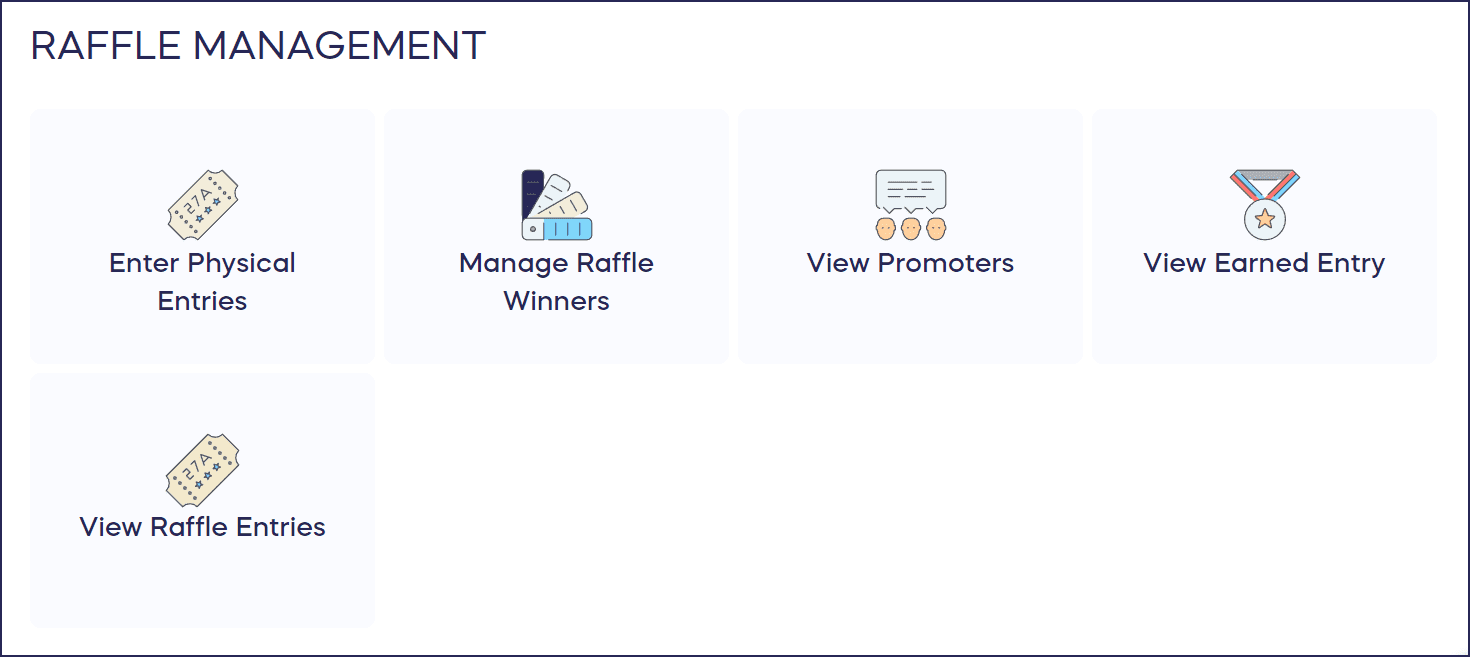
How can I track donor behavior and analyze Campaign performance?
Integrate your RallyUp account with Google Analytics or Meta Pixel to track donor behavior on your Campaign Pages. Use these insights to pinpoint successful fundraising methods, create targeted ads, and more:
How do I get started creating my Raffle Campaign?
Click here to create a free account and start building your fundraiser. Test out your Campaign before going live by selecting the ‘Preview’ button at the top of any page in Campaign Setup:
How-to: Preview Your Campaigns in Draft Mode
How can I get help with my Raffle Campaign?
Have questions? We’re here to help! Our team is available via chat on our website during normal business hours. Just hit the purple message button on the bottom right of your screen. You can also search our Knowledge Base for answers.
Frequently Asked Questions
What is a charity Raffle and how does it work?
A charity Raffle is a fundraising method where donors purchase entries for the chance to win prizes. RallyUp provides tools to run both traditional prize Raffles and 50/50 Raffles where winners receive a portion of the funds raised.
Are Raffles legal everywhere in the United States?
No, Raffle regulations vary by location across the US. Nine states currently do not permit the online sale of Raffle entries: Alabama, California, Hawaii, Indiana, Minnesota, New Jersey, New Mexico, Utah, and Washington. Selling Raffle entries online in these states is not permitted under state law, regardless of which fundraising platform you use. Always confirm your eligibility and review the applicable regulations before launching a Raffle.
Insights: See If You’re Eligible to Run a Raffle
Do I need to handle state Raffle restrictions myself, or does RallyUp take care of that?
You are responsible for verifying that your Raffle complies with local laws. RallyUp provides tools to support compliance — including eligibility acknowledgments and the ability to configure geographic restrictions through your payment processor — but does not automatically apply state-specific rules. If you’re unsure whether Raffles are permitted in your state, consult a legal advisor before launching.
Can I run both a 50/50 Raffle and Prize Raffle at the same time?
Yes, you can offer both cash prizes and traditional prizes in the same Campaign. This gives donors more prize options and can increase participation by appealing to different donor preferences.
How can I encourage more people to participate in my Raffle?
Try strategic entry level pricing with discounts for bulk purchases. You can also promote your Raffle with Text-to-Give, Sharing Rewards, and social media. Consider Livestreaming your winner drawing to create excitement and engagement.
Can individuals or for-profit businesses run charity Raffles on RallyUp?
Yes, both individuals and for-profit businesses can run Raffles on behalf of charity organizations through RallyUp. The process and capabilities differ depending on your customer type:
For-profit businesses (CSRs): CSRs can run offline Raffles on their own. For online Raffles, the benefiting organization must invite you to fundraise on their behalf through RallyUp. See: Understand: CSR Fundraising for US 501(c) Organizations
Individuals (Advocates): Advocates cannot run Raffles on their own. The benefiting organization must invite you to fundraise on their behalf through RallyUp, which gives you the ability to run Raffles and Sweepstakes. See: How-to: Run a Charity Raffle or Sweepstakes If You Are an Individual
Can I close my Raffle automatically when all entries are sold?
Yes. Set a maximum entry count in your Raffle’s Campaign Setup, and entry sales will close automatically once that number is reached. You can also combine an entry cap with an end date — the Raffle closes as soon as either condition is met.
Is there a mobile app for RallyUp?
No. RallyUp does not have a dedicated mobile app, but the full platform is optimized for mobile browsers. Share your Campaign link or a QR code, and supporters can purchase entries from any smartphone or tablet without downloading anything.
Can I export a list of Raffle entries and winners?
Yes. Download CSV reports from your Campaign Dashboard at any time, including entry details, donor contact information, transaction history, and drawn winners. These exports can also support post-Raffle compliance documentation and record-keeping.
Understand: Drawing Raffle and Sweepstakes Winners
What happens if a prize I want to raffle is restricted?
If a prize violates your payment processor’s prohibited items policy or RallyUp’s terms of service, the transaction may be blocked or the Campaign may be paused. Review both policies before listing any prize to avoid disruptions to your Raffle.
Keep Learning
Looking to go deeper? RallyUp’s Fundraising Education page is packed with videos, guides, and resources to help you run better Campaigns — whether you’re just getting started or looking to level up your next fundraiser.