What the Donor Feed is, how it works on your Campaign Page, and what organizers and donors can control.
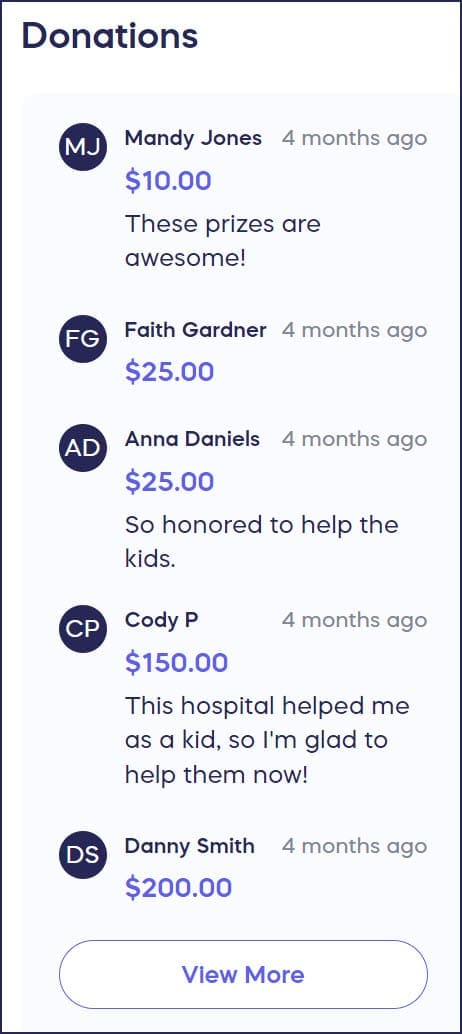
The Donor Feed is a live, scrolling stream of contributions that appears on your Campaign Page as donations, bids, pledges, and/or purchases come in:
It’s automatically enabled on every RallyUp Campaign and requires no setup — but understanding how it works helps you make the most of it and know when to adjust it.
What Is the Donor Feed?
The Donor Feed is a real-time display of contributions on your Campaign Page. It appears on the right side of the page and updates automatically as donations, bids, pledges, and/or purchases come in — no manual refreshing required for you or your donors.
Every new RallyUp Campaign has the Donor Feed enabled by default. You don’t need to turn it on or configure it to use it.
How the Donor Feed Benefits Your Campaign
The Donor Feed does quiet but meaningful work for your fundraiser while it’s live.
It gives your Campaign credibility. A Campaign Page with an active, scrolling feed of real contributions signals to new visitors that other people are participating and that the Campaign is legitimate. This is especially valuable early in a Campaign when you’re trying to build momentum.
It encourages potential donors to give. Seeing others contribute is one of the most effective motivators in fundraising. When a visitor lands on your page and sees activity in the feed, it creates a sense of community and social proof that a static page can’t replicate.
It recognizes donors publicly. Many donors appreciate seeing their name appear in the feed after they give. It’s a small but meaningful acknowledgment — a way of saying their contribution was seen and is part of something larger.
What Appears in the Donor Feed
Each entry in the Donor Feed shows the donor’s name, their contribution amount, and the time of the contribution. If a donor left a comment during checkout, their comment appears in the feed alongside their contribution.
A few nuances worth knowing:
Multiple contributions in one checkout session appear as a single entry. If a donor adds multiple items to their cart and checks out once, their combined contribution appears as one entry in the feed. Their generosity is recognized — it simply isn’t listed item by item.
Multiple checkout sessions appear as separate entries. If the same donor returns and contributes again in a new checkout session, they’ll appear in the feed again. Each checkout is its own entry.
Auction bids work differently from other contribution types. When a donor places their first bid on an Auction item, that bid appears in the Donor Feed labeled as BID. Subsequent bids from the same donor on the same or different items do not appear in the feed. This keeps the feed readable during active Auctions rather than flooding it with every bid increment.
How Donor Privacy Works
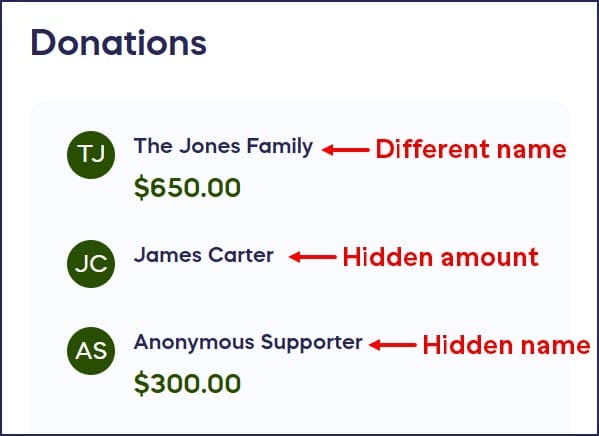
Donors have control over what appears in the feed next to their name. During checkout, donors can choose to hide their name, their contribution amount, or both.
- If a donor hides their name, they appear in the feed as “Anonymous.” They can also choose to display their donation under a different name.
- If a donor hides their amount, their name still appears but the contribution amount is not shown.
- If a donor hides both, the entry still appears in the feed as an anonymous contribution — confirming activity without identifying the donor.
As an organizer, you can always see the full details of every contribution — including the names and amounts of anonymous donors — in your Campaign Management Menu. Donor privacy settings only affect the public-facing Donor Feed.
Organizer Controls
You have three controls over the Donor Feed and its contents:
Hide the Donor Feed entirely. If you prefer not to display contributions publicly — for privacy reasons, audience preferences, or Campaign design — you can disable the Donor Feed at any time, including after your Campaign has gone live. When hidden, the feed is removed from your Campaign Page, but all contribution data remains accessible to you internally.
How-to: Hide the List of Donors and Donations from Your Campaign Page.
Edit or disable donor comments. You can edit the text of any donor comment that appears in the feed, or remove it entirely. You can also disable the comment feature across your entire Campaign so that donors are not prompted to leave comments during checkout.
What Are Donor Comments and How Do They Boost Engagement?
How-to: Disable Donor Comments
📝 Note: Beyond editing or removing comments, individual feed entries cannot be edited or removed.
Frequently Asked Questions
Can I hide the Donor Feed from my Campaign Page?
Yes. You can disable the Donor Feed at any time — before or after your Campaign goes live — from Campaign Setup > Options > Page Design Options. Hiding the feed removes it from public view but does not affect your internal contribution records. See How-to: Hide the List of Donors and Donations from Your Campaign Page.
Can donors leave comments in the Donor Feed?
Yes. Donors are prompted to leave an optional comment after completing checkout. If they do, the comment appears in the Donor Feed alongside their name and contribution amount. As an organizer, you can edit or remove individual comments, or disable the comment feature for your entire Campaign. See What Are Donor Comments and How Do They Boost Engagement?, How-to: Edit Donor Comments, and How-to: Disable Donor Comments.
Why does a donor appear in the feed more than once?
Each checkout session generates its own entry in the Donor Feed. If a donor contributes multiple times in separate sessions — for example, buying Raffle tickets on Monday and making a donation on Wednesday — they’ll appear in the feed twice. This is expected behavior and reflects their genuine level of support.
Why don’t Auction bids after the first one appear in the feed?
Only a donor’s first bid on an Auction item is shown in the Donor Feed, labeled as BID. Subsequent bids are not displayed. This prevents the feed from being overwhelmed by bidding activity on active Auction items, keeping it readable and useful for donors browsing the Campaign Page.
A bidder appears in my Auction bid list but not in the Donor Feed — is something wrong?
Nothing is wrong — this is expected behavior. Each bidder appears in the Donor Feed once, based on their first bid. If the same person bids multiple times, their ongoing bidding activity will not generate additional feed entries. For a full view of all bids placed by a specific person, check the Auction bid list in your Campaign Management Menu.
How-to: View Lists of Auction Bids and Bidders
Can a donor hide themselves from the Donor Feed completely?
Donors can hide their name and/or their contribution amount during checkout. If both are hidden, their entry still appears in the feed as an anonymous contribution — the feed shows activity without identifying the donor. They can also choose to display their donation under a different name. There is no option for a donor to prevent their contribution from appearing in the feed entirely. If complete removal is needed, contact RallyUp Support.
Can I remove a specific entry from the Donor Feed?
You cannot remove individual feed entries directly. You can edit or remove a donor’s comment from their entry, but the entry itself (name, amount, timestamp) remains in the feed.
If I hide the Donor Feed, can I still see donation information?
Yes. Hiding the Donor Feed only affects what’s visible to the public on your Campaign Page. You and other Campaign administrators can always access the full list of donors and contribution details in the Campaign Management Menu, regardless of whether the feed is visible publicly.