Remove the ability for donors to leave a comment on your Campaign Page.
By default, anyone that donates to your RallyUp fundraising Campaign can leave a comment during checkout. This comment displays in the Donor Feed along with their donation amount, creating a public stream of supporter messages on your Campaign Page:

While donor comments often provide valuable social proof and encourage additional giving, some organizations prefer to disable this feature for various reasons, including:
- Maintaining a cleaner page design
- Avoiding potential moderation issues
- Simply preferring a more streamlined donor experience
You can disable donor comments at any time, even if your Campaign Page is already live and accepting donations. Disabling comments removes the comment field from your checkout process and hides the comment section from your Campaign Page.
How do I disable donor comments on my Campaign Page?
- Go to Account Navigation in the left menu and select Campaigns.
- If you have chosen a list view, click on the Campaign title. If you have chosen a grid view, click on the Campaign image.
- Select Campaign Setup.
- Go to Options in the timeline at the top and select Page Design Options.
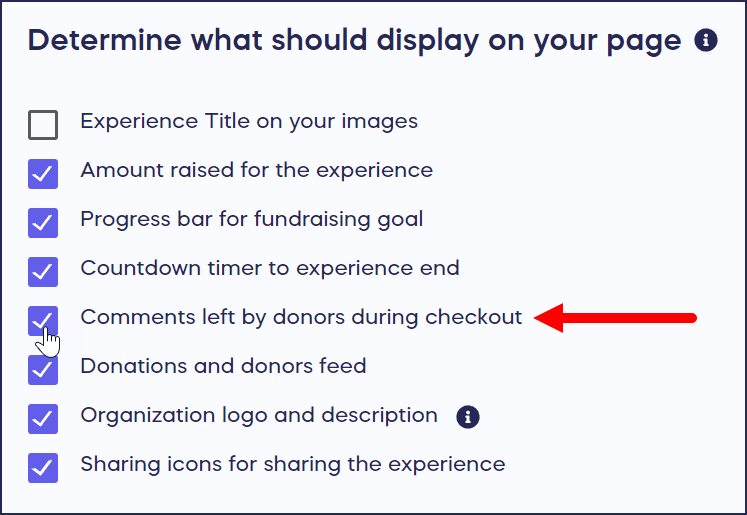
- Scroll down to Determine what should display on your page.
- Uncheck the box next to Comments left by donors during checkout:
- Select SAVE.
If you don’t want to completely disable donor comments but are concerned about potentially inappropriate comments, you can manually monitor and edit the donor comments while your Campaign is live. Learn more in How-to: Edit Donor Comments.
What happens to existing comments when I disable this feature?
When you disable donor comments, all existing comments are hidden from public view on your Campaign Page. The comments are not deleted—they remain in your Campaign’s database and you can still view them in your administrative dashboard.
If you re-enable comments later, the previously hidden comments will become visible again on your Campaign Page. This gives you flexibility to temporarily hide comments without losing the donor engagement data permanently.
Frequently Asked Questions
Will disabling comments affect donations?
Disabling comments typically has minimal impact on donation rates. While visible comments can provide social proof that encourages giving, many successful Campaigns operate without comments enabled. The primary factors affecting donations are your cause’s appeal, Campaign marketing, and how well you communicate impact—not whether donors can leave comments.
Can I hide comments temporarily and re-enable them later?
Yes, you can toggle the comment setting on and off at any time during your Campaign. This flexibility allows you to disable comments temporarily if you’re experiencing moderation issues, then re-enable them once resolved. All existing comments remain in your system when disabled and automatically reappear when you turn the feature back on. This makes it easy to manage comments strategically throughout your Campaign.
Do donors know when comments are disabled?
When comments are disabled, the comment field simply doesn’t appear during the checkout process. Donors won’t see a message saying “comments are disabled”—the option to leave a comment just isn’t presented. This creates a streamlined checkout experience without drawing attention to the absence of the feature. Most donors completing transactions won’t notice or question the lack of a comment field.
Can I disable comments on specific Components but not others?
No, the comment setting applies to your entire Campaign across all Components. You cannot selectively enable comments for donations while disabling them for Raffle entries, Auction bids, or other transactions. The setting is Campaign-wide. If you need different comment settings for different fundraising initiatives, consider running separate Campaigns with their individual comment configurations.
What are common reasons organizations disable comments?
Organizations commonly disable comments to reduce moderation workload, especially for large Campaigns with hundreds or thousands of donors. Some disable comments to maintain privacy when donors prefer not to be publicly associated with the cause. Others disable comments to create a cleaner, more professional page design focused on impact stories rather than donor messages. Educational institutions sometimes disable comments to protect student privacy in youth-focused fundraisers.
Can I moderate comments instead of disabling them entirely?
Yes, RallyUp allows you to manually edit or remove inappropriate donor comments while keeping the feature enabled for other donors. This moderation approach lets you maintain the social proof benefits of donor comments while filtering out any problematic content. The manual moderation option provides more control than simply disabling all comments. Learn the complete moderation process in the article about editing donor comments.
Will disabling comments remove them from email receipts?
Comments appear in donor receipts regardless of whether they’re displayed on your Campaign Page. When a donor leaves a comment during checkout, it’s included in their email receipt for their personal records. Disabling comments on your public Campaign Page only affects the public display—it doesn’t retroactively remove comments from receipts that have already been sent, and it doesn’t prevent comments from appearing in administrative reports.