Remove your organization’s logo and information from your fundraiser.
If you have registered your organization in our system, you have the option to display a logo and description for your organization on your fundraising pages. However, there may be specific circumstances in which you’d like to hide this information. You can do so anytime on any Campaign Page, even if your Campaign is already live.
Why would I want to hide my organization description?
Several scenarios make hiding your organization description beneficial for specific Campaigns:
- When running Campaigns for specific programs or initiatives rather than your overall organization, removing the general organization description keeps the focus on that particular cause.
- Some organizations prefer streamlined Campaign Pages with minimal information to avoid overwhelming supporters.
- If your Campaign description already includes all relevant organization details, displaying a separate organization section becomes redundant.
- Peer-to-Peer Campaigns where Participants create Personal Fundraising Pages often work better without organization descriptions since Participants tell their own stories.
- Some Campaigns benefit from a cleaner, more focused appearance that highlights the specific fundraising goal rather than general organizational information.
How do I hide my organization description from my Campaign Page?
- Go to Account Navigation in the left menu and select Campaigns.
- If you have chosen a list view, click on the Campaign title. If you have chosen a grid view, click on the Campaign image.
- Select Campaign Setup.
- Go to Options in the timeline at the top and select Page Design Options.
- Scroll down to Determine what should display on your page and uncheck the box next to Organization logo and description:
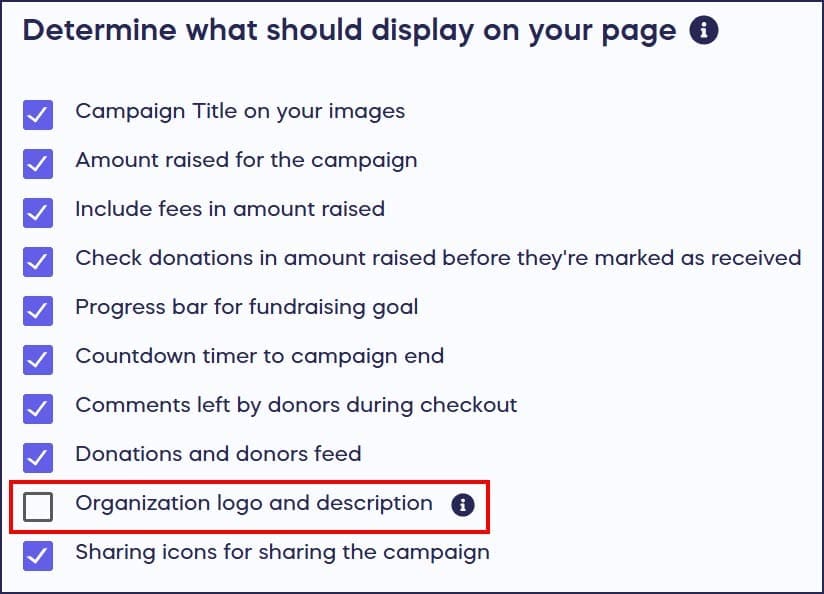
- Select SAVE.
Your organization description and logo will be immediately removed from your Campaign Page. This change only affects the specific Campaign you’re editing, so your organization description will still appear on other campaigns unless you hide it there as well.
Can I hide my organization description on some campaigns but not others?
Yes, the organization description display setting is configured individually for each Campaign. You have complete control over which Campaigns show your organization information and which don’t. This flexibility allows you to tailor each Campaign Page to its specific purpose and audience. For example, you might display your organization description on your main fundraising Campaigns to build trust and credibility, while hiding it on focused program Campaigns or Peer-to-Peer fundraisers where the Campaign description tells the complete story. Each Campaign Page operates independently, so changes to one Campaign don’t affect your other Campaigns.
What happens to my organization description if I hide it?
When you hide your organization description from a Campaign Page, both your organization logo and description text are removed from that specific Campaign. The information isn’t deleted from your RallyUp account, it simply doesn’t display on that particular Campaign Page. You can restore the organization description anytime by returning to Page Design Options and rechecking the box next to Organization logo and description. Your organization information remains saved in your account settings, so you don’t need to re-enter anything when you choose to display it again. This makes it easy to test different page layouts and decide what works best for each Campaign.
Does hiding my organization description affect donor trust?
Hiding your organization description doesn’t necessarily harm donor trust if your Campaign description provides sufficient context about your cause and mission. Many successful Campaigns focus entirely on the specific fundraising goal without including general organizational information. The key is ensuring your Campaign description clearly explains who you are, what you’re raising money for, and why supporters should trust you with their donations. If your Campaign description effectively establishes credibility and communicates your mission, a separate organization section may be unnecessary. Consider your audience and whether they’re already familiar with your organization when deciding whether to display or hide this information.
Frequently Asked Questions
Will hiding my organization description affect my Campaign’s tax-deductible status?
No, hiding the organization description from your Campaign Page does not affect the tax-deductible status of donations. Tax-deductibility is determined by your organization’s registered nonprofit status with RallyUp, not by what information displays on your Campaign Page. Donors still receive proper receipts for tax-deductible donations regardless of whether your organization description appears on the Campaign. However, displaying your organization information can help donors verify your legitimacy and nonprofit status before contributing.
Can I hide just the logo or just the description separately?
No, the Organization logo and description setting controls both elements together. When you uncheck this option, both your organization logo and description text are hidden from the Campaign Page. You cannot selectively hide one while showing the other through this setting. If you want to display organizational information but with different content or formatting, consider using a custom section instead, which gives you more control over exactly what appears and how it’s formatted.
Does hiding the organization description affect how my Campaign appears in search results?
Hiding your organization description removes that content from your Campaign Page, which means search engines won’t index that specific text for your Campaign. However, your Campaign description and other visible page content still get indexed. If your organization name and mission details are important for search visibility, make sure to include relevant keywords in your Campaign description. You can also add custom sections with organization information formatted specifically for your Campaign’s needs.
Can I add different organization information for different Campaigns?
Your organization description is set at the account level and applies to all Campaigns by default. You cannot create different organization descriptions for different Campaigns. However, you can hide the standard organization description on specific Campaigns and use custom sections to add Campaign-specific organizational information. This approach gives you flexibility to tailor organizational context to each Campaign’s unique audience and purpose while maintaining your official organization profile in your account settings.
Will my organization description still appear on Donation Pages if I hide it from Campaigns?
Campaign settings and Donation Page settings are managed separately. Hiding your organization description on a Campaign Page does not automatically hide it from your Donation Pages. If you want to hide your organization description from Donation Pages as well, you’ll need to adjust the settings for each Donation Page individually through their respective Page Design Options. This separation allows you to maintain different information displays across your various fundraising pages based on their specific purposes.