
How to Run a Successful Silent Auction: Step-by-Step Guide with Checklist & Calculator
How to Run a Silent Auction
- A silent auction lets supporters bid on items without an auctioneer, and the highest bid at the closing time wins. Most people now run one online.
- Online: on RallyUp this is an Online Auction. It runs for 5–10 days, bidders get outbid alerts, winners are charged automatically, and it’s eligible for the Free plan.
- At your event: on RallyUp this is a Silent Auction. Guests scan a QR code on each item and bid from their phones, with no app to download. It’s on the Flex plan.
- Price starting bids off fair market value, set sensible increments, and turn on proxy bidding so bidders stay in the running while they’re busy.
- Turn on Auction Gifts so the 70–90% of bidders who don’t win can still give. RallyUp publishes a 20–35% lift in donations.
A silent auction is a fundraiser where supporters bid on donated items without an auctioneer. Bids go in quietly against a displayed current price, many items are open at once, and whoever holds the highest bid when the clock runs out wins.
Most people searching for a silent auction today mean one that runs online, so this guide starts there. On RallyUp, that online version is called an Online Auction, and it’s eligible for the Free plan. The in-person version, where guests bid from their phones at your event, is called a Silent Auction, and it’s on the Flex plan. Both are covered below, followed by an 11-step plan, a budget calculator, and a free checklist.
In this article
- How to run a silent auction online
- How to run a silent auction at your event
- Online, at your event, or both?
- 11 steps to plan a successful silent auction
- Phase 1: Planning
- Phase 2: Preparing
- Phase 3: Running
- Silent auction budget calculator and checklist
- After the auction: charge winners, deliver items, and thank bidders
- Final words: decide where your silent auction runs, then run it
- FAQs on silent auctions
How to run a silent auction online
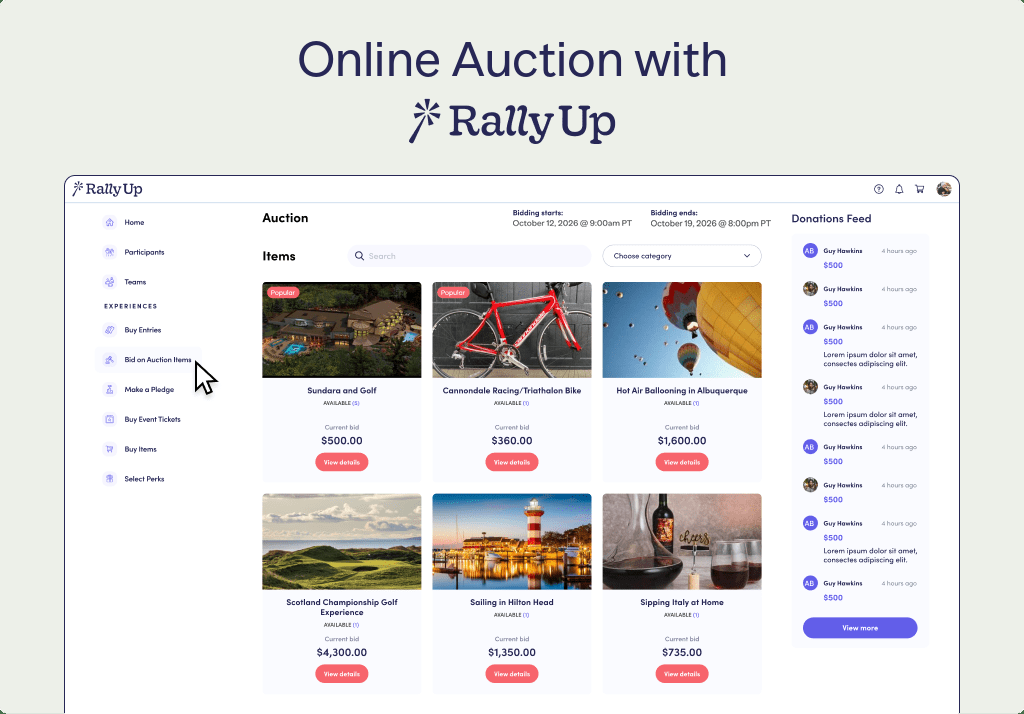
This is the most common case and the easiest place to start: no venue, no floor plan, and anyone you can send a link to can bid. On RallyUp it runs as an Online Auction through the Online Auctions Component, a Core Component that’s eligible for the Free plan. RallyUp has hosted more than 16,000 auctions, and organizations have raised over $13 million through them.
How long to run it
Five to ten days is typical. That’s long enough for supporters to see your emails, browse, and come back after they’ve been outbid, and short enough to keep urgency. Promote the auction for a week or two before bidding opens, then set a specific closing date and time you can count down to. The last day routinely brings in a disproportionate share of bids, so close in the evening, when people are off work and on their phones.
Photos and descriptions
Online, how you present an item is most of the job. A donated weekend cabin photographed badly on a phone raises a fraction of what the same cabin raises photographed well. For every item:
- Use bright, uncluttered photos, and more than one for your anchor items.
- Write a description that makes people want the thing: what it is, what’s included, any dates or restrictions, and its fair market value.
- Add one specific line about impact, like “This bid funds a month of after-school mentoring.”
- Put your highest-value item at the top of the page or first in the featured category. It resets what bidders think is normal for everything below it.
You don’t have to write all of it from scratch. RallyUp’s AI Fundraising Content Generator drafts item descriptions in one click from the auction title, the item title, and your organization description. You stay the editor, which turns a weekend of writing into an afternoon of editing.
Starting bids and bid increments
Start low enough to draw early bids and high enough to protect the item’s perceived value. A good rule of thumb is 30–50% of fair market value, with the exact ranges in Step 8 below. Set increments per item, so a $2,000 vacation package doesn’t climb in $5 steps. On an Online Auction you can also:
- Turn on proxy bidding. Proxy bidding is a standard option in a silent auction: a bidder sets a maximum once, and the system raises their bid in increments up to it.
- Add Buy It Now to high-demand items, so someone who must have it can buy instantly at a set price.
- Track fair market value per item, so tax receipts are accurate without a spreadsheet.
Outbid alerts
Outbid alerts are what make the final hours competitive. On RallyUp, bidders always get an email when they’re outbid or when the auction ends, and they can opt in to text alerts too. That gives them a reason to come back and raise their bid before time runs out.
Closing and charging winners automatically
When the clock runs out, the highest bid wins, and RallyUp charges winning bidders automatically. Nobody has to chase payments or send invoices. Before you publish, run Power Preview, RallyUp’s fully interactive test mode. Place test bids and push test transactions through checkout exactly as a bidder would, so you find any problem before your supporters do.
What it costs
An online silent auction has close to no fixed costs: no venue, no catering, no A/V. On the Free plan there’s no platform fee. Donors are given the option to add a tip at checkout, and you keep what you raise whether or not they do. Standard payment processing fees apply on every plan and go to Stripe or PayPal, not RallyUp. If you’d rather turn tipping off, the Flex plan charges per Component instead, with auction platform fees capped at $100 per item, whatever the winning bid.
How to run a silent auction at your event
If you’re hosting a gala, a dinner, or a tournament, run the silent auction in the room. On RallyUp this is a Silent Auction, an Advanced Galas & Events Component that runs on the Flex plan. Everything in the online section still applies, since items, photos, pricing, and outbid alerts work the same way. This section covers what changes when guests are in the room with you.
Guests scan a QR code and bid from their phones
- Every item gets its own QR code and item link. A guest scans the code next to the item, and its bidding page opens on their phone.
- There’s no app to download. Bidding runs in the phone’s browser, which matters in a room full of guests who won’t install anything.
- Outbid alerts reach guests by email, with optional texts, so someone at the bar knows they’ve been outbid at the dessert table.
- Proxy bidding lets a guest set a maximum and enjoy the evening instead of hovering over one table.
RallyUp reports that QR code scanning increases participation by up to 40% and that the app-free approach increases participation by 60%. Both come from the same place: one less step between wanting to bid and bidding.
One tab all night, one charge
The last ten minutes decide how guests remember your night. With Event Balances and Automated Checkout, every charge a guest makes accumulates on one running tab: silent auction wins, Live Auction bids, Fund-a-Need gifts, raffle entries, and purchases. That tab settles in a single charge. Checkout is line-free: automatic at a time you choose, from a link on the guest’s phone, or with a volunteer. RallyUp reports that 90% of payments complete in under a minute and 75% of guests check out on their phones.
Set up the room
Set up the day before, if you can.
- Put high-value items where guests linger: near the bar, the food, or the main mingling area.
- Group similar items together, like restaurant gift cards in one place and experiences in another.
- Give each item a table tent with a short description, the starting bid, the increment, and its QR code.
- Keep paths wide enough for wheelchairs and for a crowd around your anchor items.
- Test the venue Wi-Fi and cell signal in the actual room, at the time of day your event runs.
- Set out a pickup table for physical items. For services and experiences, email the details instead of handing over paper.
A two-person team can run the room: one person at check-in and pickup, one walking the floor to help guests bid. For a bigger event, you can add volunteers at item displays.
What it needs from your plan
The in-person Galas & Events Components, including Silent Auctions, Live Auctions, Fund-a-Need, Paddle Raise+, Event Balances, Automated Checkout, and Live Display, are on the Flex plan. Flex charges per Component, from 2.9% to 6.9% with several Components at 0%, and has no contract, subscription, or setup fee. Auction platform fees stay capped at $100 per item. If you’d rather not build it yourself, RallyUp’s experts can set up your Campaign through Create My Campaign while you review and launch.
If your event has a stage, the same plan covers the rest of the room: an auctioneer-led Live Auction for your top lots, Fund-a-Need for the in-room ask, and Paddle Raise+.
Start fundraising!Online, at your event, or both?
If you’re not sure which one you’re running, this table settles it. A silent auction can also run in both places at once: open online bidding a few days early, then keep it open in the room on the night.
| Online | At your event | Both (hybrid) | |
|---|---|---|---|
| Where people bid | On your auction page, from anywhere | In the room, by scanning a QR code on each item | Online before the event, then online and in the room on the night |
| How long it runs | Usually 5–10 days | A few hours | A few days, closing at the event |
| Who can bid | Anyone you send the link to | Guests in the room | Guests and remote supporters, on the same items |
| What you plan | Items, photos, pricing, promotion | All of that, plus venue, room setup, and checkout | All of the above |
| RallyUp product | Online Auction | Silent Auction | Silent Auction |
| Plan | Free plan eligible | Flex plan | Flex plan |
A live auction, where an auctioneer calls bids out loud one item at a time, is a different format. If that’s what you’re planning, start with RallyUp’s Live Auctions. Plenty of organizations run one alongside a silent auction at the same event.
11 steps to plan a successful silent auction
These steps apply whether you run it online or at an event. Step 5 is for events only, so if you’re online, skip it and give the time to procurement and promotion. Start about four months ahead for an event, or six to eight weeks ahead for an online auction.
Phase 1: Planning
Step 1: Define your charity auction goals
Decide exactly how much you want to raise, because that number shapes every decision about items, pricing, and promotion. If you’re also selling tickets or taking donations, split the goal across those sources so the auction isn’t carrying the whole target. Then answer a few questions:
- Which program or project is this funding?
- How many bidders can you realistically reach, and at what giving levels?
- What else counts as success, like new donors or reactivated lapsed ones?
Step 2: Decide on your budget
Work backward from your goal. Fees and promotion make up most of an online auction’s budget, while venue and catering dominate an in-person one, which is the biggest financial argument for starting online. Set aside 10% as a buffer for surprise costs. To model it, use the budget calculator below.
Step 3: Decide who does what
You don’t need a committee. Plenty of successful auctions are run by one or two people. What matters is that each job has an owner, even if that owner is you for several:
- Running it: keeps the timeline and makes the final calls.
- Asking for items: the job most worth handing to a second person, because procurement grows with the number of people asking.
- Promoting it: email, social posts, and reminders while bidding is open.
- Handling the money: expenses, receipts, and the final numbers.
An event adds room setup and someone on hand during the night. That’s where volunteers help most, and it’s the part an online auction skips. When you ask for help, name the task and the time it takes.
Step 4: Understand your legal and compliance requirements
Before you collect a single item, confirm the requirements where you operate: tax receipts and reporting, any fundraising registration your state requires, state rules on charitable auctions, and donor data protection for online bidders. OBBBA, signed into U.S. law on July 4, 2025, added tax reporting and transparency obligations for 501(c)(3) organizations. Check your obligations with your own counsel or state authority. Nothing here is legal advice.
Step 5: Choose your venue (events only)
- Space: plan for at least 10 square feet per guest so displays don’t create bottlenecks.
- Accessibility: ADA-compliant and wheelchair accessible.
- Connectivity: phone bidding depends on Wi-Fi and cell signal, so test both in the room itself.
- Cost: ask about nonprofit rates, and look for venues that include catering, furniture, and A/V.
Step 6: Design an auction catalog
Curate your catalog instead of accepting whatever arrives. A mix that works:
- Experiences (55–65%): vacation packages, behind-the-scenes tours, chef’s table dinners, private lessons. These consistently outperform goods.
- Premium goods (25–35%): gift baskets, local artwork, sports memorabilia, wine.
- Novelty and impulse items (5–10%): fun add-ons that keep smaller bidders engaged.
Aim for one item for every three to five bidders, plus two to five anchor items to build early interest. Bundle small or mismatched donations into themed packages. A $50 restaurant gift card, a bottle of wine, and a set of glasses become a “Date Night Package” that feels like a $150 experience. For more inspiration, see these silent auction ideas.
Phase 2: Preparing
Step 7: Start the procurement process
Start with the network you already have. Ask board members which businesses they use and whether they’ll make an introduction, then move to vendors who already work with you, then local businesses. When you ask:
- Visit during slow hours, never at peak times.
- Bring a one-page flyer about your organization and a specific request.
- Offer options: “Would you prefer to donate a $75 or a $50 gift card?”
- Follow up with a short, personal thank-you letter.
Step 8: Price your items right
Starting bids that are too high scare people off, and bids that are too low cap your revenue. Show both the fair market value and the starting bid on every listing. That transparency raises bids rather than lowering them.
- Items worth $100 or less: start at $25–40, with $5–10 increments.
- Items worth $100–300: start at about 38% of value, with $10–25 increments.
- Items worth $300 or more: start at 50% of value, with $25–50 increments.
- Buy It Now: 100–120% of fair market value, for high-demand items only.
Step 9: Choose the right tech stack
Most bidders now expect to bid and pay on their phones, so silent auction software isn’t really optional anymore. RallyUp is genuinely easy to use for a single auction, and it covers the bigger event when you get there:
- Easy to build and launch: an Instant Fundraiser Template gets an auction live in 15–20 minutes, and 40% of RallyUp campaigns use one. Or RallyUp’s experts can build it for you through Create My Campaign.
- Phone bidding with no app download, outbid alerts, proxy bidding, and automatic charging of winners.
- Auction Gifts, so bidders who don’t win can still give.
- Free human support on every plan. Ask for a human, get a human.
- Room-ready tools on Flex when you need them: Event Balances, Automated Checkout, Live Auctions, Fund-a-Need, and Paddle Raise+.
When you’re ready to grow, pair your auction with a Raffle, Peer-to-Peer, or Crowdfunding in the same Campaign, with one URL and one checkout. Organizations raise 38% more by combining campaign types, and you can add a Component to a Campaign that’s already live. If you’re choosing between an auction and a raffle, here’s the quick answer on silent auctions vs. raffles.
Step 10: Kick off registration and promotion
For an event, start promoting about six weeks out. For an online auction, start a week or two before bidding opens.
- First: email your donor list, ask board members to personally invite their networks, and post photos of your anchor items.
- Next: post in local community calendars and neighborhood groups, and ask item donors to share the auction with their own customers.
- Final week: send “last chance” emails with item previews and bidding instructions, and post a daily countdown.
Phase 3: Running
Step 11: Run the final hours and close the auction
Deadlines drive bidding, so give people a reason to act now. Online, send a “closes tonight” email on the final morning and a same-day social post. It’s often the cheapest revenue of the whole auction. In the room, announce the close clearly 30 minutes ahead, and again at 10 minutes. Then close at the time you promised. A clear, unmoved closing time keeps bidders trusting the next auction you run.
Silent auction budget calculator and checklist
Set your goal, pick a cost cap, and estimate your main expenses to see what you’ll net.
Silent Auction Budget Calculator
Set your fundraising goal, pick a cost cap, and estimate your main expenses. See how much you can spend—and how much you’ll net.
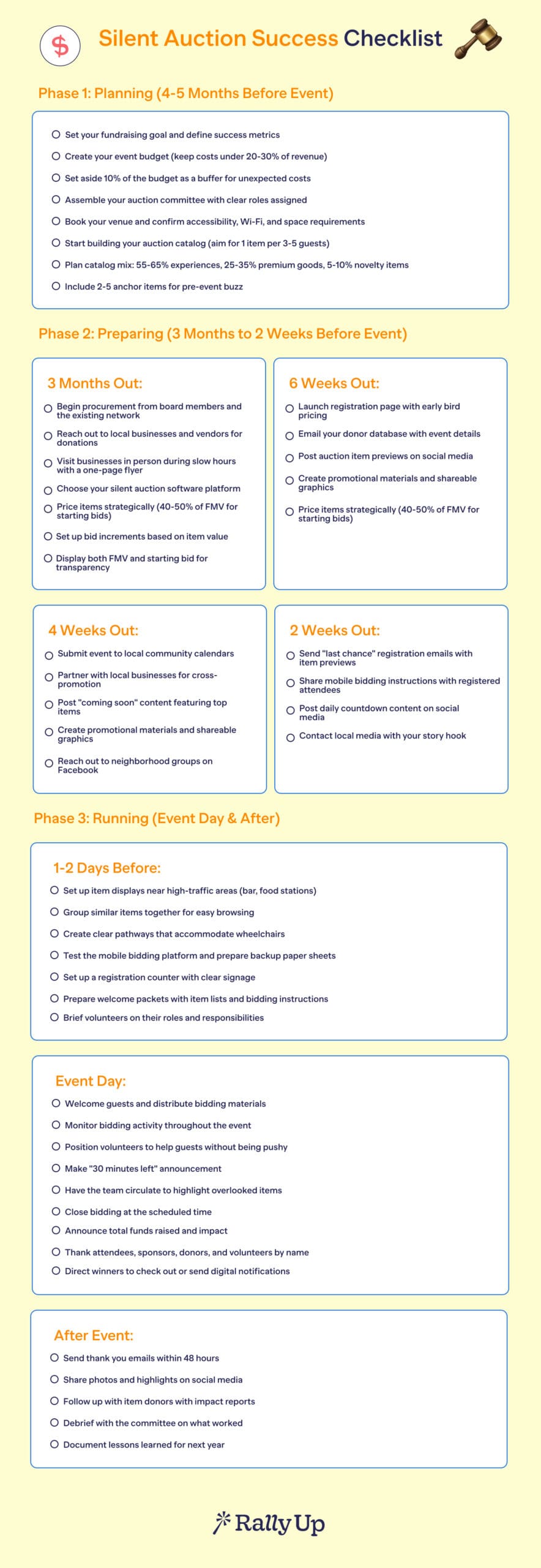
Download the free silent auction planning checklist
After the auction: charge winners, deliver items, and thank bidders
Charge winners
Online, RallyUp charges winning bidders automatically when the auction closes. At an event, Event Balances and Automated Checkout settle each guest’s whole night in one charge. Either way, every winner gets a receipt with the item’s fair market value for their tax records.
This is also where Auction Gifts pays off. Between 70% and 90% of bidders won’t win anything. With Auction Gifts turned on, bidders can choose a gift amount at checkout, and it’s charged only if they don’t win any of the items they bid on. Losing bidders become donors, automatically. RallyUp publishes a 20–35% increase in donations for auctions that use it, and no other platform we’ve researched offers it.
Pickup and shipping
Decide how each item reaches its winner before the auction closes, and say so in the item description:
- Pickup: name a place and a window, such as your office during the following week, or the pickup table at your event.
- Shipping: for small items going to remote winners, decide up front whether you’ll cover postage or build it into the starting bid.
- Services and experiences: email the voucher or booking details, and introduce the winner to the donor business.
Thank your bidders
Within 48 hours, share the total raised and what it funds, and thank item donors, sponsors, and volunteers by name. Then:
- Thank every bidder, not just the winners. They all showed up for your cause.
- Send item donors a short impact note. It’s the easiest way to get them back next year.
- Invite bidders to your newsletter or your next campaign.
Your bid history and item performance reports are worth an hour here. They show which items drew bids, which sat untouched, and who bid but never won, which is exactly the list to invite next time.
Final words: decide where your silent auction runs, then run it
Three things determine how a silent auction does: items your supporters actually want, starting bids priced properly, and bidding and paying that take no effort. One decision comes before all three:
- Running it online? That’s an Online Auction, eligible for the Free plan, with outbid alerts, proxy bidding, automatic charging, and Auction Gifts. You can launch this week.
- Running it at your event? That’s a Silent Auction on the Flex plan, with a QR code on every item, no app downloads, and one charge per guest at the end of the night.
More than 55,000 organizations use RallyUp, with a 97% event satisfaction rating.
Watch a demoFAQs on silent auctions
Experiences consistently outperform goods: vacation packages, chef’s table dinners, behind-the-scenes tours, and private lessons. Aim for roughly 55–65% experiences, 25–35% premium goods, and 5–10% novelty items, with two to five high-value anchor items to set perceived value for the rest of the catalog.
Five to ten days is typical. Promote it for a week or two before bidding opens, set a specific closing date and time, and send a “closes tonight” email on the final day, which usually brings in the most bids.
Each item has a starting bid and a bid increment, bids are placed privately, and whoever holds the highest bid at the announced closing time wins. Most silent auctions now take bids on phones, and many let bidders set a maximum with proxy bidding.
Online, unless you already have an event on the calendar. An online silent auction needs no venue or floor plan, runs for days instead of hours, and reaches supporters who could never attend. If you have a gala booked, run it in the room, or both: open online bidding a few days early and close it at the event.
An Online Auction runs on the web with no event attached and is eligible for the Free plan. A Silent Auction is the in-person version for your event, with a QR code on every item, phone bidding with no app, and Event Balances with Automated Checkout. It’s an Advanced Galas & Events Component on the Flex plan.
Not for an online silent auction. RallyUp’s Online Auctions Component is eligible for the Free plan, which has no platform fee. Donors are given the option to tip at checkout, and you keep what you raise whether or not they do. Payment processing fees apply on every plan. An in-person Silent Auction is on the Flex plan, which charges 2.9%–6.9% per Component, with several at 0%, and caps auction fees at $100 per item.
No. RallyUp is mobile bidding software: bidders use their phones, online or by scanning an item’s QR code at your event. It doesn’t provide paper bid sheets.
Between 70% and 90% of bidders don’t win anything. With Auction Gifts, bidders can choose a gift amount at checkout, and it’s charged only if they don’t win any of the items they bid on. RallyUp publishes a 20–35% increase in donations for auctions that use it.
Now that you’ve seen it in action, are you ready to start fundraising?
Get Started