Donor comments let supporters share messages with their contributions, creating social proof that encourages more giving. Learn how to enable, manage, edit, and disable donor comments on RallyUp.
Donor comments are optional messages that supporters can leave when making contributions to your RallyUp fundraising Campaign. These comments appear in a public Donor Feed on your Campaign Page alongside donation information, creating social proof and community engagement that encourages additional supporters to give. Comments are enabled by default and display in real-time as donations come in, amplifying donor enthusiasm and building momentum for your Campaign.
How Do Donor Comments Work?
When supporters complete a donation or purchase on your RallyUp Campaign, they’re automatically prompted to leave a comment after submitting payment. The comment prompt appears on the payment summary page, making it easy for donors to share why they’re supporting your cause.

The donor experience:
- Donor completes their contribution and submits payment
- Payment confirmation page displays with comment prompt
- Donor can type a message (optional—they can skip this step)
- Comment posts to the Campaign’s public Donor Feed in real-time
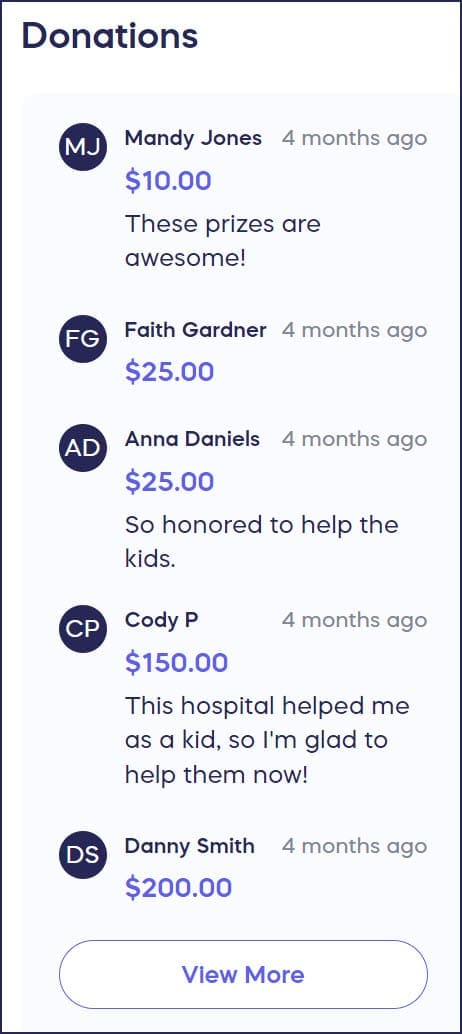
What appears in the Donor Feed:
Comments display on your Campaign Page alongside donor names and contribution information, creating a visible stream of support that visitors can see. This social proof demonstrates community engagement and validates your cause to potential new donors.
Why Donor Comments Boost Fundraising
Donor comments serve as powerful social proof that influences giving behavior. When potential supporters visit your Campaign Page and see enthusiastic comments from others, they’re more likely to contribute themselves.
Psychological impact:
Research in charitable giving shows that social validation significantly increases donation rates. When people see others supporting a cause and expressing enthusiasm, it:
- Validates the decision to give: Comments show that real people are contributing
- Creates community: Supporters feel connected to others who share their values
- Builds momentum: Visible engagement encourages additional participation
- Demonstrates impact: Donors often mention why they’re giving, reinforcing your mission
Engagement amplification:
Comments allow donors to become advocates for your cause. Their public messages:
- Share personal connections to your mission
- Express excitement and enthusiasm
- Encourage friends and family to give
- Create emotional connections with new visitors
Managing Donor Comments
Who Can Leave Comments?
Only donors who make actual payments can leave comments. Simply visiting your Campaign Page does not enable commenting—supporters must complete a transaction first.
This requirement ensures that comments come from genuine contributors who have a stake in your Campaign’s success, maintaining authenticity and credibility.
Viewing the Donor Feed
The Donor Feed displays publicly on your Campaign Page, showing donations and comments as they arrive in real-time. Anyone who visits your Campaign can see these comments, creating transparency and social proof for your fundraising efforts.
The feed typically shows:
- Donor name (or “Anonymous” if they chose to hide their name)
- Contribution amount (or hidden if anonymous donation)
- Comment text
- Timestamp
Editing or Removing Comments
Campaign administrators have full control over donor comments. If a comment contains inappropriate content, errors, or needs modification, you can edit or remove it.
Common reasons to edit comments:
- Typos or formatting errors the donor wants corrected
- Sensitive information accidentally included
- Inappropriate language or content
- Duplicate comments
When to remove comments:
- Spam or promotional content
- Offensive or inappropriate messages
- Comments that violate your organization’s policies
- Requests from donors to remove their comments
Disabling Donor Comments
While donor comments provide valuable social proof, some organizations prefer not to display public comments on their Campaign Pages. Donor comments are enabled by default, but you can easily disable them if they don’t fit your fundraising strategy.
Reasons to disable comments:
- Privacy concerns for sensitive causes
- Preference for simpler Campaign Page design
- Worry about negative or off-topic comments
- Focus on other engagement methods
Important note: Disabling comments removes the comment prompt from the donation flow and hides any already existing comments from your Campaign Page. However, donation information (names and amounts, unless anonymous) will still display unless you choose to disable that as well.
How to Hide the List of Donors and Donations from Your Campaign Page
Best Practices for Donor Comments
Encourage Meaningful Comments
While comments are optional, you can encourage more donors to leave messages by:
Asking specific questions: On your Campaign Page, suggest what donors might share: “Tell us why you’re supporting this cause!” or “Share your connection to our mission.”
Highlighting great comments: When promoting your Campaign on social media, share inspiring donor comments to show the community you’re building.
Thanking commenters: Personally thank donors who leave thoughtful comments to encourage others to do the same.
Moderate Proactively
Check your Donor Feed regularly to ensure comments remain positive and on-topic. Quick moderation prevents inappropriate content from impacting your Campaign’s credibility.
Moderation checklist:
- Review new comments daily during active Aampaigns
- Edit typos or errors promptly when donors request
- Remove spam or inappropriate content immediately
- Respond to questions or concerns raised in comments
Leverage Comments for Storytelling
Donor comments provide authentic testimonials about your organization’s impact. Use these comments in:
Future marketing materials: Quote inspiring donor messages in emails and social media posts
Thank-you communications: Reference comments that resonated with your team
Board presentations: Share donor enthusiasm through their own words
Grant applications: Include comments as evidence of community support
Donor Comments and Privacy
Anonymous Donations
Donors can choose to make anonymous donations, hiding their names and contribution amounts from public view. When donors select the anonymous option, their comments (if they leave one) will display as coming from “Anonymous” rather than showing their name.
This allows supporters to share messages about your cause while maintaining financial privacy.
Data Privacy
All donor information, including comments, is stored securely and handled according to RallyUp’s privacy policies. Comments are visible to anyone visiting your Campaign Page, but other donor details (email addresses, payment information) remain private.
Frequently Asked Questions
Can I require donors to leave comments?
No, donor comments are always optional. Donors can choose to skip the comment prompt and complete their contribution without leaving a message. Making comments mandatory would create friction in the donation process and could reduce conversion rates.
What happens to comments if I disable the feature?
When you disable donor comments, the comment prompt is removed from the donation flow. Previously submitted comments are not deleted—they’re simply hidden from public view. If you re-enable comments later, previous comments will reappear.
Can donors see each other’s comments in real-time?
Yes, donor comments display in real-time on your Campaign Page’s Donor Feed. When a donor submits a comment, it appears immediately for anyone viewing your Campaign, creating dynamic social proof that builds momentum.
Can donors edit their own comments after submitting?
Donors cannot edit their own comments directly. If a donor wants to modify or remove their comment, they need to contact you (the Campaign administrator). You can then edit or remove the comment on their behalf using the administrative tools.
Do comments appear in donation reports?
Yes, donor comments are included in your donation reports. When you export donation data, the Comments column shows any messages donors left with their contributions, allowing you to review sentiment and identify engaged supporters.
Will negative comments hurt my Campaign?
In practice, negative comments on fundraising Campaigns are extremely rare. Most donors leave positive, supportive messages because they’ve chosen to contribute to your cause. However, if inappropriate comments appear, you can quickly edit or remove them to maintain your Campaign’s positive atmosphere.
Can I disable comments for specific fundraising Components?
The donor comment setting applies Campaign-wide. You cannot enable comments for some Components (like Auction bids) while disabling them for others (like Raffle entry purchases) within the same Campaign. The setting is all-on or all-off for the entire Campaign.
Getting Started with Donor Comments
Donor comments are automatically enabled for all new RallyUp Campaigns, so you don’t need to take any action to activate this feature. Simply launch your Campaign and watch as donors share their enthusiasm and support.
If you later decide to disable comments or need to edit specific messages, the administrative tools are readily available in your Campaign Management Dashboard.
Need Help?
Our support team is available via chat on our website during business hours. Click the purple message button at the bottom right of your screen. You can also search our Knowledge Base for detailed how-to articles and answers to common questions.