Troubleshoot your payment processing account so you can start accepting donations.
After creating or linking a Stripe or PayPal account, you may see that your account status is listed as Pending. Unfortunately, you won’t be able to start fundraising until your Stripe or PayPal account is listed as Connected.
When your account status is Pending, your account is still being reviewed or verified. This can occur when:
- Your Stripe/PayPal account is not fully set up
- Your Stripe/PayPal account requires activation
- Your information, such as ID documentation, nonprofit discount, payment schedule, etc., is being confirmed
How do I find my Stripe or PayPal account status?
- Select Organization Settings from the left menu, then go to Payment Processing.
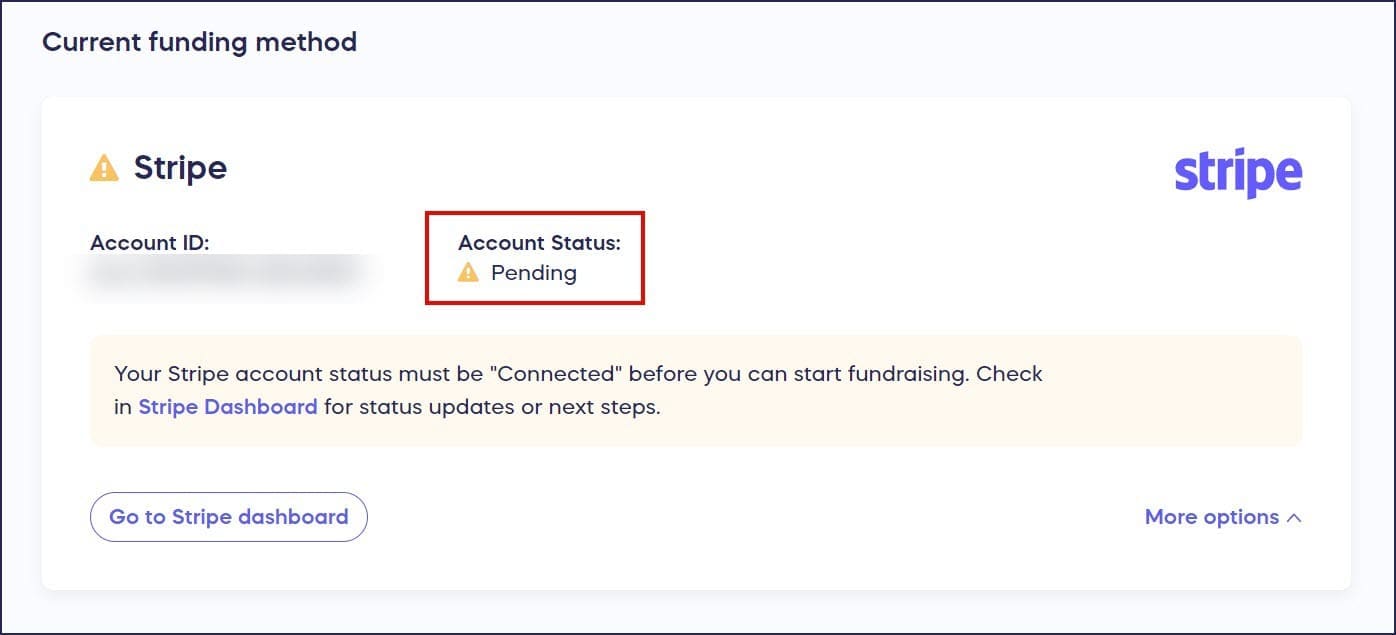
- Look for Account Status:
How do I troubleshoot a pending account status?
- Reconnect your account. Select Link a different account under More options and complete the setup process again with the same account information:
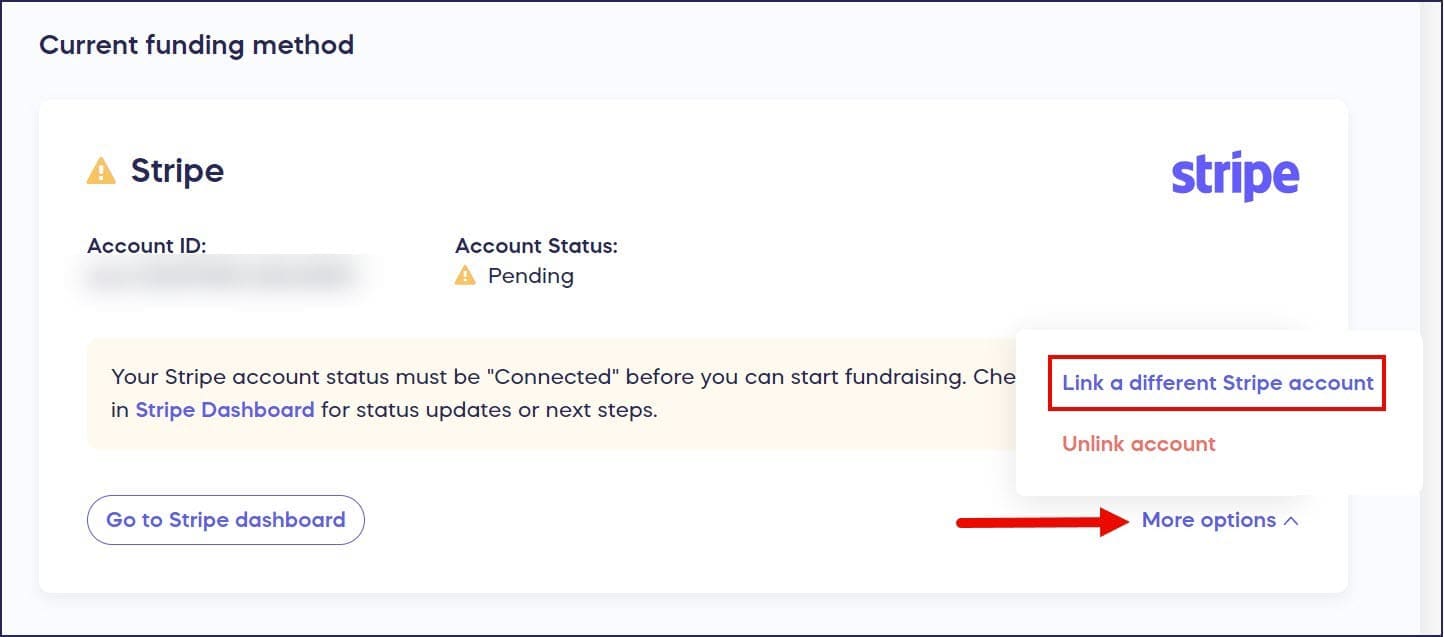
This will resolve the issue for most users.
- Confirm that you are using the correct email address. If you’re setting up a preexisting Stripe/PayPal account, make sure you’ve input the email address associated with that account.
- Confirm that you are linking the correct Stripe/PayPal account. If you have more than one account under the same email address, you might have linked the wrong one.
- Confirm that your Stripe/PayPal account is activated. You won’t be able to accept payments until your account is fully activated. See the articles below for further instructions.
- Confirm your account is a Business account. PayPal and Stripe Personal accounts cannot be used to accept payments on RallyUp. If you signed up with a Personal account, log in to your PayPal or Stripe dashboard and upgrade it to a Business account. Then select Link a different account under More options in Payment Processing to reconnect.
- If you’re using PayPal, confirm that Vaulting and Custom Card Processing are enabled on your account. These two features are required for the RallyUp and PayPal integration to work correctly, and PayPal does not enable them by default. If your status remains Pending after the steps above, contact PayPal Support and ask them to enable both Vaulting and Custom Card Processing on your account before reconnecting.
- If reconnecting alone doesn’t resolve the Pending status, reset your connection by clearing your browser session. Follow these steps:
- Make sure only one browser tab with RallyUp is open and close any extras.
- Log out of RallyUp.
- Log out of PayPal or Stripe.
- Clear your browser cache and cookies.
- Log back in to RallyUp, go to Organization Settings, then Payment Processing.
- Select Link a different account under More options and complete the setup process again.
When should I contact Stripe or PayPal for help?
If your Stripe/PayPal account is new, the verification process can take a few days. Check after that time to see if your account status has changed to Connected. If it’s still Pending and none of the troubleshooting tips work, contact Stripe or PayPal to see if there are any other steps you need to take. You can use the following template in your message:
Hello,
I have created and activated my account, but it is still unable to accept charges. Please let me know what else I need to do before I can start processing credit card payments.
Thank you,
{Your name}
What if my newly added bank account in Stripe or PayPal is not available for payouts?
If you’ve added a new bank account in Stripe or PayPal and it isn’t showing as available for payouts, this is a bank verification issue that your payment processor manages directly. RallyUp cannot view or change the status of bank accounts within your Stripe or PayPal account, so you’ll need to resolve this with their support team.
Stripe and PayPal typically require newly added bank accounts to go through a verification process before they become available for payouts. There may also be additional steps or documentation required on your end.
To get your bank account enabled for payouts, contact your payment processor directly:
- Visit the Stripe Support contact page or PayPal Support contact page.
- Let them know that you added a new bank account and it is not yet available for payouts.
- Ask them to review your account for any pending verification steps or required actions.
You can use the following message as a starting point:
Hello,
I recently added a new bank account to my Stripe/PayPal account, but it is not yet showing as available for payouts. Could you please review my account and let me know if there are any pending verification steps or actions I need to complete?
Thank you,
{Your name}
What if Stripe or PayPal ask me questions about what my organization “sells”?
Stripe and PayPal review every account independently, including nonprofit accounts. As part of this review, your payment processor may contact you to ask what your organization accepts payments for or what you are “selling.” This is a standard part of their compliance process and is not caused by anything in your RallyUp setup.
When this happens, respond to Stripe or PayPal directly and describe your organization’s fundraising activities — for example, that your organization collects charitable donations and processes event registrations. RallyUp cannot see your payment processor’s internal review status or the questions they have sent to you. All communication about Stripe or PayPal’s compliance review must happen directly between you and your payment processor.
What if Stripe or PayPal tell me the issue is “on RallyUp’s side”?
If your payment processor tells you the issue is on RallyUp’s side, first confirm your connection status in RallyUp:
- Select Organization Settings from the left menu, then go to Payment Processing.
- Check that your Account Status shows Connected.
If your Account Status shows Connected, your Stripe or PayPal account is successfully linked and RallyUp is ready to process payments. Any remaining holds, reviews, or information requests must be completed directly in Stripe or PayPal — RallyUp cannot see, override, or release a hold that your payment processor has placed on your account. Contact them directly and let them know your RallyUp connection is confirmed as Connected.
If your Account Status does not show Connected, follow the steps in the How do I troubleshoot a pending account status? section above.
What if I’ve already contacted Stripe or PayPal and my account is still showing Pending?
If you’ve already reached out to Stripe or PayPal and were told your account looks complete, but RallyUp still shows a Pending status, there may be an outstanding requirement that isn’t prominently displayed in your payment processor’s dashboard.
The Pending status RallyUp shows comes directly from Stripe or PayPal. RallyUp cannot override or change it on your behalf. If RallyUp is still receiving a Pending signal, your payment processor’s systems have not yet confirmed that your account is fully activated and ready to accept charges through a third-party platform like RallyUp. This can happen even when your Stripe or PayPal dashboard does not clearly indicate a required action.
In this situation, contact Stripe or PayPal a second time and ask specifically about requirements that may not be visible in your standard dashboard view. Use the following message as a starting point:
Hello,
I have already completed the setup steps visible in my account dashboard, but my account is still unable to accept payments through a third-party fundraising platform (RallyUp). The platform is showing my account status as Pending.
Could you please check my account for any of the following:
- Any outstanding identity or business verification requirements not clearly displayed in my dashboard
- Any incomplete onboarding steps preventing my account from becoming fully active
- Any account limitations, holds, or open compliance reviews currently in place
- Anything that would prevent my account from accepting charges through a connected third-party platform
Thank you,
{Your name}
Once Stripe or PayPal identify and resolve the outstanding requirement, reconnect your account in RallyUp:
- Select Organization Settings from the left menu, then go to Payment Processing.
- Under More options, select Link a different account and complete the setup process again with the same account information.
What if PayPal confirmed my restrictions are removed but my status is still Pending?
If PayPal has confirmed that all restrictions on your account have been removed but RallyUp is still showing your status as Pending, complete the browser reset steps in the troubleshooting section above (log out of RallyUp and PayPal, clear your browser cache and cookies, then reconnect). If your status does not change after reconnecting, contact RallyUp Support.
Do I need to configure branding settings in Stripe or PayPal separately from RallyUp?
Yes, if your payment processor asks you to. Stripe and PayPal have their own branding configuration that are separate from the branding you manage in RallyUp. Stripe and PayPal’s branding settings control how your organization appears on Stripe or PayPal-hosted pages and on payment confirmations that your payment processor sends directly to your donors.
Your RallyUp Campaign Pages use the branding you set up in RallyUp — changes made in Stripe or PayPal do not affect what donors see on your RallyUp pages. If your payment processor prompts you to complete branding configuration, complete it directly in your Stripe or PayPal dashboard. To learn how to manage your organization’s branding in RallyUp, see Understand: Branding Your Account.
Can I accept donations while I wait for my PayPal account to be approved?
If you have reconnected your account, confirmed your email address, and contacted PayPal, and your account is still showing as Pending, PayPal likely has outstanding verification requirements that have not yet been resolved. RallyUp receives your account status directly from PayPal in real time, so a persistent Pending status means PayPal still has actions or reviews on their end that must be completed before your account can be approved. RallyUp cannot see the specific requirements or override the status on your behalf.
If you need to start accepting donations while you wait, you have two options:
- Connect Stripe. Stripe is the payment processor we recommend for most organizations. Once you create and verify a Stripe account, funds are sent to your bank account as donations come in. Stripe also offers a nonprofit discount that can reduce your standard processing fees.
- Use Pledge. Pledge is a built-in option that does not require you to create or verify an external account. RallyUp handles receipts and disbursements on your behalf. Processing fees are higher than Stripe or PayPal, and funds are disbursed on a scheduled basis rather than as donations come in.
For a full side-by-side comparison of fees and features, see PayPal vs. Stripe: Which Payment Processor Is Best for Nonprofits?
Frequently Asked Questions
What does Pending account status mean, and why is it happening?
A Pending status means your Stripe or PayPal account is still being reviewed or verified. Common reasons include an incomplete account setup, an account requiring activation, or information being confirmed, such as ID documentation, nonprofit discount verification, or payment schedule details. You won’t be able to start fundraising until your account status changes to Connected.
What’s the first thing I should try to fix a Pending status?
Reconnect your account by selecting “Link a different account” under More options and completing the setup process again with the same account information. This resolves the issue for most users.
Does my PayPal or Stripe account need to be a Business account?
Yes. RallyUp requires a PayPal or Stripe Business account to accept payments. Personal accounts cannot be used for payment processing. If you have a Personal account, log in to your dashboard and upgrade it to a Business account, then reconnect it in RallyUp.
What are PayPal Vaulting and Custom Card Processing, and how do I get PayPal to enable them?
Vaulting and Custom Card Processing are two PayPal account features that must be enabled before the RallyUp and PayPal integration can work correctly. PayPal does not turn on either feature by default. If your PayPal account status remains Pending after completing the standard troubleshooting steps, contact PayPal Support, let them know you’re connecting your account to RallyUp, and ask them to enable both features. Once PayPal confirms they’re active, return to Organization Settings > Payment Processing in RallyUp and check whether your status has changed to Connected.
What if I have multiple Stripe or PayPal accounts?
Make sure you’re using the correct email address associated with the account you want to link. If you have multiple accounts under the same email, verify that you’ve linked the correct one.
How long does the verification process take?
If your Stripe or PayPal account is new, the verification process can take a few days. Check after that time to see if your account status has changed to Connected.
What should I do if troubleshooting doesn’t fix the Pending status?
If your account is still Pending after a few days and none of the troubleshooting tips work, contact Stripe or PayPal directly to see if there are additional steps you need to take before you can start processing payments.
I already contacted Stripe or PayPal and they said my account looks complete. Why does RallyUp still show Pending?
The Pending status in RallyUp is reported directly by Stripe or PayPal. RallyUp cannot change it independently. Contact Stripe or PayPal again and ask them to check specifically for outstanding identity or business verification requirements, incomplete onboarding steps, active account limitations or holds, and anything preventing your account from accepting charges through a connected third-party platform. This level of detail helps their support team look beyond the standard dashboard view.
What if PayPal told me restrictions are removed but my status is still Pending in RallyUp?
Start by logging out of both RallyUp and PayPal, clearing your browser cache, and reconnecting your account. If the Pending status does not update after those steps, contact RallyUp Support and include your Organization ID, found in your profile menu in the upper right corner of RallyUp, so our team can review your connection directly.
Can I accept donations while my account status is Pending?
Not with the processor account that shows as Pending. However, you can connect a different processor in Organization Settings > Payment Processing and start accepting donations right away while the Pending account is resolved. For example, if PayPal is Pending, you can connect Stripe or Pledge instead, and if Stripe is Pending, you can connect PayPal or Pledge instead. See PayPal vs. Stripe: Which Payment Processor Is Best for Nonprofits? for a full comparison.
Why isn’t my newly added Stripe or PayPal bank account available for payouts?
Newly added bank accounts in Stripe or PayPal typically go through a verification process before they become available for payouts, and there may be additional documentation required on your end. RallyUp cannot view or change the status of bank accounts connected to your Stripe or PayPal account, so contact your payment processor directly and ask them to review your account for any pending verification steps or required actions.
I recently updated my bank account in Stripe or PayPal. Will that change my Account Status in RallyUp?
No. Your Account Status in RallyUp (Pending or Connected) reflects whether your Stripe or PayPal account is linked and verified — it has nothing to do with your bank account details. RallyUp never stores your bank account number, so updating it in Stripe or PayPal won’t affect your RallyUp connection status. If the update triggers a new verification requirement on Stripe or PayPal’s end, they’ll notify you directly.
Stripe or PayPal is asking me what I “sell” or what I accept payments for. Is this normal for a nonprofit?
Yes, this is a standard part of your payment processor’s account review process. Stripe and PayPal independently review every account, including nonprofit accounts. When prompted, describe your organization’s fundraising activities directly to Stripe or PayPal. For example, that your organization collects charitable donations through RallyUp. RallyUp cannot see or respond to your payment processor’s compliance questions on your behalf.
Stripe or PayPal told me the issue is on RallyUp’s side. What should I do?
First, check your connection status in RallyUp by going to Organization Settings > Payment Processing and confirming that your Account Status shows Connected. If it does, your RallyUp setup is complete and any remaining hold or review is managed by Stripe or PayPal. Contact them directly and let them know your RallyUp connection is confirmed as Connected.
Do I need to set up branding in Stripe or PayPal as well as in RallyUp?
Yes, if they ask you to. Stripe and PayPal have their own branding settings that are separate from the branding you configure in RallyUp. Stripe and PayPal’s branding affect Stripe or PayPal-hosted pages and the emails that Stripe or PayPal send to your donors, it does not affect how your RallyUp Campaign Pages look. You can update your Stripe or PayPal branding settings directly in your Stripe or PayPal dashboard.