Get expert eyes on your Campaign before it goes live — and make sure it’s set up to perform.
Building a Campaign for the first time — or even the tenth — can leave you wondering: is this good enough? Is the page clear to donors? Is anything set up incorrectly? Optimize My Campaign gives you access to a real fundraising expert who reviews your Campaign and tells you exactly what to improve, before your first donor ever sees it.
What Is Optimize My Campaign?
Optimize My Campaign is a free Done-For-You Service built into RallyUp. When you submit a request, a fundraising expert looks over your Campaign and sends you a personalized list of suggestions — things to fix, improve, or reconsider before you go live.
The review covers three areas:
- Functionality — making sure your Campaign is configured correctly and will work the way you intend
- Presentation — helping your page look polished and professional to donors
- Donor experience — ensuring the path from landing on your page to completing a donation is clear and compelling
Think of it as a pre-flight check. You’ve done the work of building your Campaign — Optimize My Campaign makes sure it’s ready to fly.
Why Use Optimize My Campaign?
Most organizers are experts in their cause, not in online fundraising. That’s not a gap — it’s exactly what this service is designed to bridge.
When you submit your Campaign for review, you’re matched with people who have hands-on experience running fundraisers across a wide range of causes, budgets, and Campaign types. They know the patterns that lead to strong results and the small details — an unclear call to action, a missing image, a confusing entry level name — that quietly cost you donations.
A few specific reasons it’s worth using:
- First-timers: If this is your first Campaign on RallyUp, a review helps you avoid common setup mistakes before they affect real donors.
- High-stakes Campaigns: For your organization’s most important fundraiser of the year, an expert second opinion is worth more than you might expect.
- Complex Campaigns: The more Components, entry levels, or custom settings your Campaign has, the more there is to misconfigure. A review catches what’s easy to miss when you’re close to the work.
- It’s free and fast: There’s no cost, and you’ll typically hear back within one business day.
How to Submit a Request
You can submit an Optimize My Campaign request directly from Campaign Setup, Your Campaign doesn’t need to be live to request a review — just make sure it’s fully set up in Draft first.
To submit a request:
- Go to Account Navigation in the left menu and select Campaigns.
- Click on your Campaign (title in list view or image in grid view).
- Select Campaign Setup.
- Click on the Get Help tab on the far right of the screen.
- Select Optimize My Campaign.
- Fill out the request form. If you have any specific concerns, you can indicate them on the form:
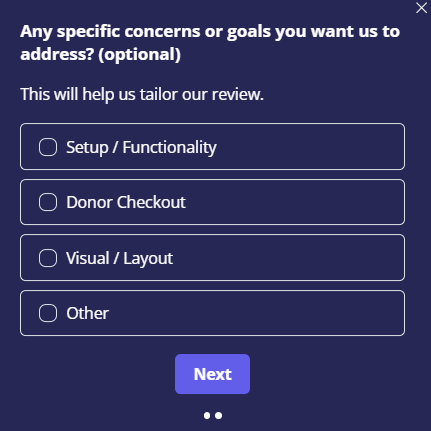
- Select Next to submit your request.
✓ Result: You’ll receive a confirmation pop up that your request has been submitted. A reviewer will follow up by email, typically within one business day.
What to Expect After You Submit
Within one business day, you’ll receive an email with your reviewer’s findings. The email will include:
- A list of specific suggestions for your Campaign
- Clear instructions for how to make each recommended change yourself
The feedback is practical and actionable — not generic advice, but specific observations about your Campaign and what would make it stronger. You’re in control of what you act on; the reviewer’s role is to surface the opportunities, not make changes on your behalf.
📝 Note: Optimize My Campaign is a review and recommendation service. Your reviewer will not make changes to your Campaign directly — all updates are made by you, based on the suggestions provided.
Frequently Asked Questions
Is Optimize My Campaign free?
Yes. Optimize My Campaign is included at no additional cost for all RallyUp customers.
Does my Campaign need to be finished or Live before I can request a review?
No — submitting your request while your Campaign is still in Draft is actually ideal. Just make sure your Campaign is fully set up first so your reviewer can give you the most thorough feedback possible.
How long does the review take?
The typical turnaround is one business day. During peak periods it may take slightly longer, but you’ll receive a confirmation as soon as your request is submitted so you know it’s in the queue.
Will the reviewer make changes to my Campaign for me?
No. Your reviewer will send you a list of specific suggestions and instructions for how to make each change yourself. This keeps you in full control of your Campaign while still giving you expert guidance.
What if I disagree with a suggestion?
The suggestions are recommendations, not requirements. You know your audience and your organization better than anyone — use your judgment. If something doesn’t feel right for your specific situation, you don’t have to act on it.
Related Articles
- Creating your Campaign: How-to: Create a Fundraising Campaign
- Previewing before you publish: How-to: Preview Your Campaigns in Draft Mode
- Customization options: Understand: Campaign Customization Options
- Adding images: How-to: Add Images to Your Fundraiser
- Banner image formatting: How-to: Format Campaign Banner Images
- Writing your Campaign description: Insights: Add Storytelling Elements to Your Campaign Description
- Account branding: Understand: Branding Your Account