Allow donors to contribute without sharing their names publicly.
There are many reasons why a donor may want to give their donation anonymously, such as religious reasons, shyness, or simply getting more pleasure from giving than from being thanked.
What privacy options does RallyUp offer for donors?
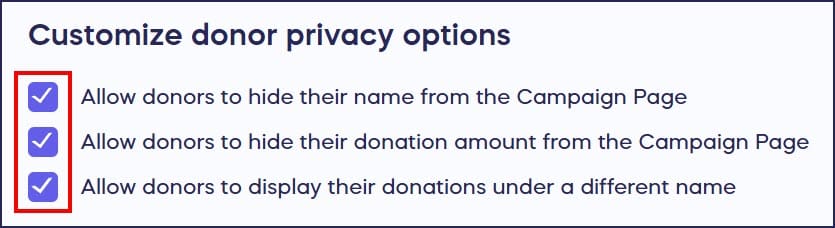
RallyUp offers several ways for donors to protect their privacy:
- Hide their name from the Campaign Page (name used for the account will still be included in reports)
- Hide their donation amount from the Campaign Page (donation amounts will still be included in reports)
- Display their donation under a different name (assumed name and account name will be included in reports)
You can enable any or all options on any Campaign.
Are anonymous donations completely private from the organization?
While donors can hide this information from the Campaign Page, their information cannot remain completely anonymous to the organization. Donor identity and contact information can be found in Campaign reports to facilitate the delivery of items, tickets, prizes, or other physical goods.
How do I allow donors to hide their names from the Campaign Page?
You can select the donor privacy options you want to allow during Campaign Setup. You can change them anytime, even if your Campaign is already live:
- Go to Account Navigation in the left menu and select Campaigns.
- If you have chosen a list view, click on the Campaign title. If you have chosen a grid view, click on the Campaign image.
- Select Campaign Setup.
- Go to Options in the timeline at the top and select Checkout Options.
- Scroll down to Customize donor privacy options and check the boxes next to the options you want to allow:
- Select Save.
How can donors anonymize their donations?
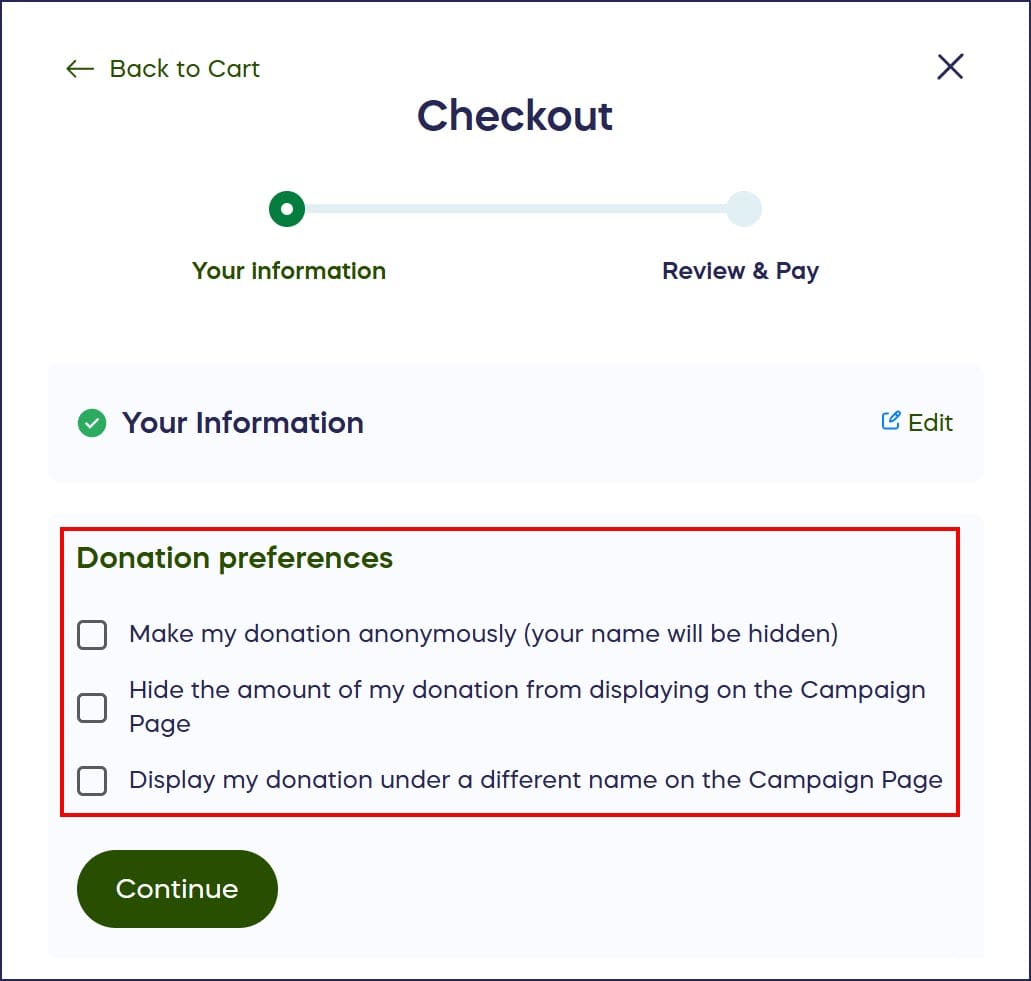
Donors can select their privacy preferences during checkout:
What do anonymous donations look like on the Campaign Page?
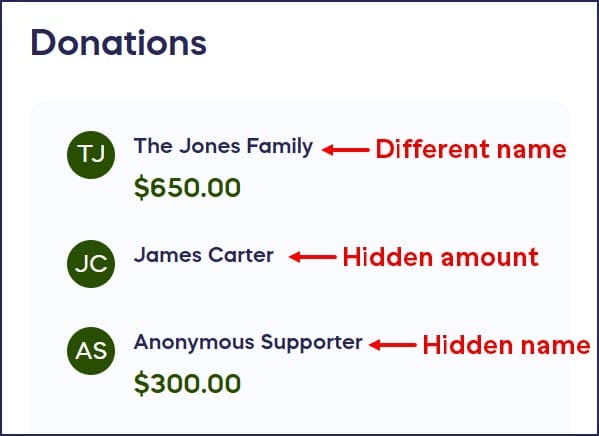
This is how anonymized donations will display in the Donation Feed on the Campaign Page:
Frequently Asked Questions
Can donors be completely anonymous to the organization?
No, while donors can hide their information from the public Campaign Page, their identity and contact information will always appear in Campaign reports. This is necessary for delivering items, tickets, prizes, or other physical goods, and for proper financial record-keeping. Learn how to access this information: How-to: Export Donation and Donor Reports.
Can I require all donations to be public on my Campaign?
Yes, you control which privacy options are available to donors. You can choose not to enable any anonymity options during Campaign Setup, requiring all donors to have their names and amounts displayed publicly on the Campaign Page.
What’s the difference between hiding a name and using an assumed name?
Hiding a name displays the donation as “Anonymous” on the Campaign Page. Using an assumed name allows donors to choose what name appears publicly (like “The Smith Family”), while their real name is still recorded in your reports.
Can donors change their privacy settings after making a donation?
Donors typically cannot change their privacy settings after completing their donation. If they want to modify their anonymity preferences, they would need to contact you to make changes on their behalf.
Will hiding donor names affect my fundraising results?
Some organizations find that displaying donor names encourages giving through social proof, while others find that offering privacy options increases donations from those who prefer anonymity. Consider your audience’s preferences when deciding which options to enable. You can also hide the entire Donor Feed if needed: How-to: Hide the List of Donors and Donations From Your Campaign Page.