Remove the progress bar from your Campaign Page so viewers won’t see how close you are to your fundraising goal.
If you’ve added a fundraising goal to your RallyUp Campaign, your Campaign Page will automatically display a progress bar showing how much you’ve raised toward that goal. You can hide this progress bar at any time.

How do I hide the progress bar on my Campaign Page?
- Go to Account Navigation in the left menu and select Campaigns.
- If you have chosen a list view, click on the Campaign title. If you have chosen a grid view, click on the Campaign image.
- Select Campaign Setup.
- Go to Options in the timeline at the top and select Page Design Options.
- Scroll down to Determine what should display on your page and uncheck the box next to Progress bar for fundraising goal:
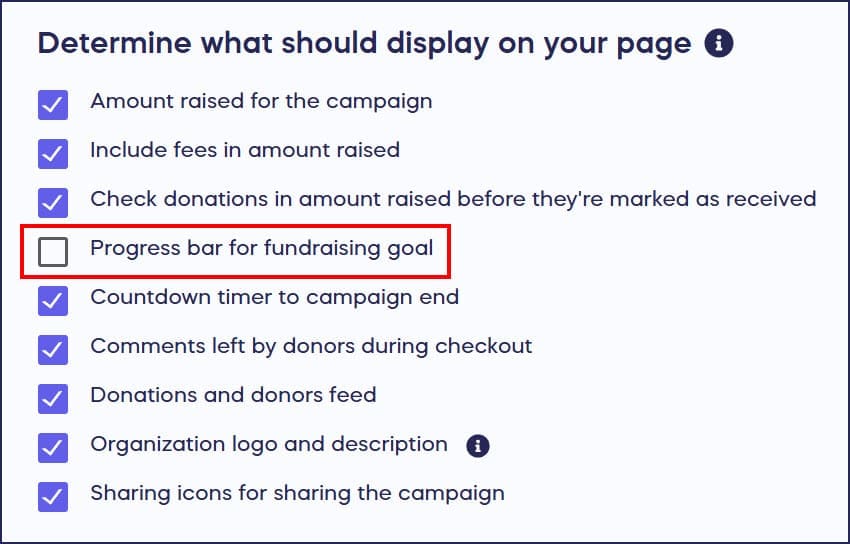
- Select Save.
Frequently Asked Questions
Why would I want to hide the progress bar from my Campaign?
You might want to hide the progress bar if you’re just starting your Campaign and haven’t raised much yet, or if you prefer not to publicly display how close you are to your fundraising goal. Some organizations find this creates less pressure on donors.
Does hiding the progress bar also hide my fundraising goal?
Yes, hiding the progress bar removes both the visual bar and the goal amount from public view on your Campaign Page. Donors won’t see how much you’re trying to raise or how much you’ve raised so far.
Can I still see the progress bar if I hide it from donors?
Yes, you can always view your fundraising progress and goal in your Campaign Management Menu, even when it’s hidden from public view on your Campaign Page.
Can I show the progress bar again after hiding it?
Yes, you can show the progress bar at any time while your Campaign is live. Go to Campaign Setup, then Options, select Page Design Options, and re-check the box next to “Progress bar for fundraising goal.”
Where do I find the setting to hide the progress bar?
Go to Campaigns in the left menu, select your Campaign, then Campaign Setup. Go to Options in the timeline at the top, select Page Design Options, and scroll to “Determine what should display on your page.” Uncheck the box next to “Progress bar for fundraising goal.”