Set or change the start dates for your Campaign and fundraising Components to suit your needs.
When you create a fundraising Campaign on RallyUp, you can launch your fundraiser immediately or set a future start date. You can also set different start dates for different fundraising Components, giving you maximum flexibility.
How do I set or change my Campaign start date?
- Go to Account Navigation in the left menu and select Campaigns.
- If you have chosen a list view, click on the Campaign title. If you have chosen a grid view, click on the Campaign image.
- Select Campaign Setup.
- Go to Dates & Times in the timeline at the top.
- If you’ve selected only one Component, scroll down to When do you want to start…?*.

If you have selected multiple fundraising Components, scroll down to Choose when fundraising activities start for your donors.
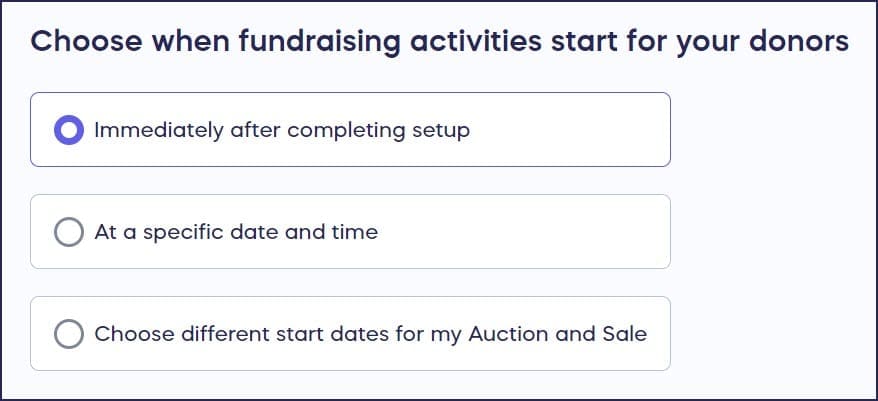
- Select the start date option that works best for you. If you want to set different start dates for each Component, select the Choose different start dates… option. If you choose to start different Components on different dates, you’ll then select the start date and time for each one individually.
*Terminology may differ according to Campaign settings.
When you finish setup and are ready to go live or schedule your Campaign, a pop-up with the start date information you selected will appear:

💡 Tip: If your Components start at different times or on different dates, add a brief note in your Campaign Page description explaining the difference. For example: “Our online auction opens on [date] — you can start browsing and bidding from home! Our in-person event takes place on [event date], and bidding will remain open throughout the evening.” A short, upfront explanation prevents confusion and helps donors participate with confidence.
Can I pause my Campaign after it has started?
If your Campaign is already live, but you want to pause and restart it at a later date, contact our customer success team so they can freeze your fundraiser. Freezing a Campaign ensures no further transactions will occur. Contact us again when you want to resume the fundraiser, and we can unfreeze it.
Frequently Asked Questions
How do I schedule my Campaign to start on a future date?
When creating your Campaign, go to Dates & Times in Campaign Setup and select your preferred start date instead of launching immediately. You can set a specific date and time for your fundraiser to go live.
Can I set different start dates for different fundraising Components?
Yes, if you’ve added multiple Components to your Campaign, you can choose different start dates for each one. Select “Choose different start dates” in the Dates & Times section to set individual start times for each Component.
How do I explain different Component start dates/times to donors?
Use your Campaign Page description to spell out all differences clearly. For example: “Our online auction opens on [date] — browse and bid from home! Our in-person event takes place on [event date].” Stating all differences up front helps donors plan ahead and participate confidently.
What happens if I need to pause my Campaign after it goes live?
Contact RallyUp’s customer success team to freeze your Campaign, which prevents any further transactions. When you’re ready to resume fundraising, contact the team again to unfreeze your Campaign.
Do I need to set a start date or can I launch immediately?
You can launch your Campaign immediately upon completing setup, or schedule it to start at any future date and time. The choice is completely flexible based on your fundraising timeline.
Where do I find the start date settings for my Campaign?
Navigate to Campaigns in the left menu, click on your Campaign, select Campaign Setup, then go to Dates & Times in the timeline at the top. The start date options will appear in this section.