Customize the description shown on your supporters’ bank statements.
Customizing the text associated with the charge that shows on your donor’s bank statement can prevent confusion and decrease credit card disputes arising from unfamiliar charges. You can set a default bank statement text in your organization settings or create a custom one for individual Campaigns. Credit card disputes can cost your organization money through lost donations and bank dispute fees, so adding recognizable bank statement text helps reduce potential chargebacks.
How do I set a default bank statement text for my organization?
- Go to Organization Settings in the left menu and select Payment Processing.
- Scroll down to Enter the text that will display on the donor’s credit card statements and enter the text you want to display:
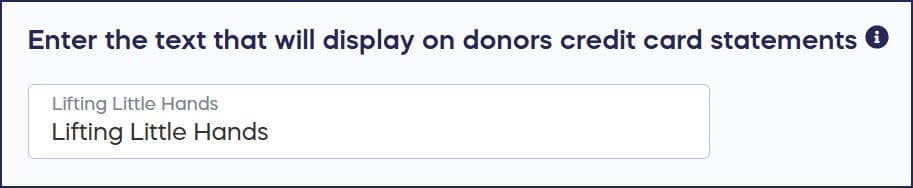
Characters (!,-,’) and numbers cannot be used.
- Select Save.
How do I customize bank statement text for a specific Campaign?
- Go to Account Navigation in the left menu and select Campaigns.
- If you have chosen a list view, click on the Campaign title. If you have chosen a grid view, click on the Campaign image.
- Select Campaign Setup.
- Go to Options in the timeline at the top and select Checkout Options.
- Scroll down to Enter the text that will show on supporters’ credit or debit card statements and enter the text you want to display:

- Select Save.
Frequently Asked Questions
What happens if I don’t customize my bank statement text?
If no custom text is entered in either your organization settings or Campaign Setup, the text will default to your Campaign title’s first 22 characters. This may not always be recognizable to donors.
Which bank statement text takes priority if I set both?
The bank statement text in your organization settings will override the one you enter in Campaign Setup. If you want individual Campaigns to show different text, leave the organization setting blank.
Why should I customize the bank statement text?
Credit card disputes from unfamiliar charges can cost your organization money through lost donations and bank dispute fees charged by the bank. Customizing the statement text helps donors recognize the charge and reduces chargebacks.
What characters can I use in bank statement text?
You cannot use special characters (!, -, ‘) or numbers in your bank statement text. Only letters and spaces are allowed to ensure the text displays correctly on all bank statements.
Can I set different bank statement text for different Campaigns?
Yes, you can customize the bank statement text for each individual Campaign in Campaign Setup. Just make sure you haven’t set an organization-wide default, as that will override individual Campaign settings.