
Manage your Donor Feed by editing or removing the comments left by donors.
Allowing donors to leave comments when they donate is an excellent way for donors to share their excitement and engage with your cause. That said, sometimes you may need to edit or remove some of the comments you receive.
Can I disable donor comments instead of editing them?
If you don’t want to monitor donor comments manually, you can disable them for any reason, even if your Campaign is already live: How-to: Disable Donor Comments.
How do I edit or remove a donor comment?
- Select Campaigns from the left menu.
- If you have chosen a list view, click on the Campaign title. If you have chosen a grid view, click on the Campaign image.
- Select View Donations*.
- Find the contribution associated with the comment you want to edit, then select the three-dot icon on the right:
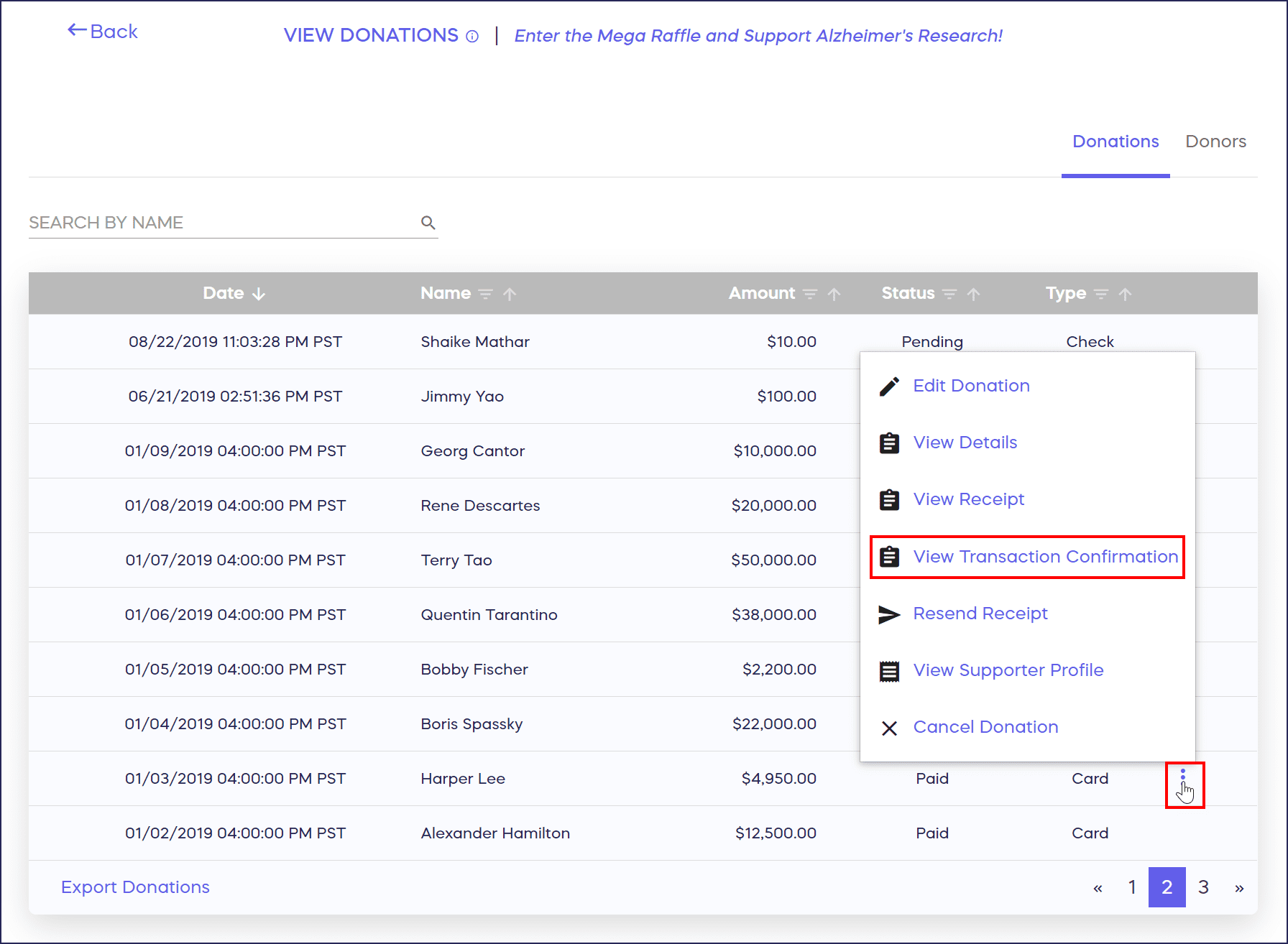
- Select View Transaction Confirmation*.
- Edit the comment at the top of the receipt. Or, to remove the comment entirely, delete the comment. Then, select Save.

*Terminology may differ according to Campaign settings.
Frequently Asked Questions
Why would I need to edit or remove donor comments?
You may need to edit comments that contain inappropriate language, personal information that should remain private, spam, or off-topic content. Editing helps maintain a positive, professional Campaign Page while respecting donor participation.
Will donors be notified if I edit their comments?
No, donors do not receive notifications when you edit or remove their comments. However, they may notice the change if they revisit your Campaign Page or review their donation receipt.
Can I edit comments after my Campaign has ended?
Yes, you can edit or remove donor comments at any time, even after your Campaign has ended. Access comments through the View Donations section and follow the same steps to make changes.
Does editing a comment affect the donation amount or receipt?
No, editing or removing a comment only changes what appears publicly on your Campaign Page. The donation amount, receipt, and all transaction details remain unchanged and intact.
What’s the difference between editing and disabling comments?
Editing allows you to manage individual comments one at a time, while disabling comments prevents all future donors from leaving comments on your Campaign. You can disable comments at any time, even mid-Campaign.