Save time when creating a new Campaign by copying a previous one.
If you’ve previously run a successful fundraising Campaign on RallyUp and want to run the same kind of Campaign again, you can copy any Campaign to save valuable time and energy. Copying an existing Campaign transfers over details such as:
- Chosen fundraising Components
- Custom text
- Images
- Items
- And more!
How do I copy a Campaign?
- Go to Account Navigation in the left menu and select Campaigns.
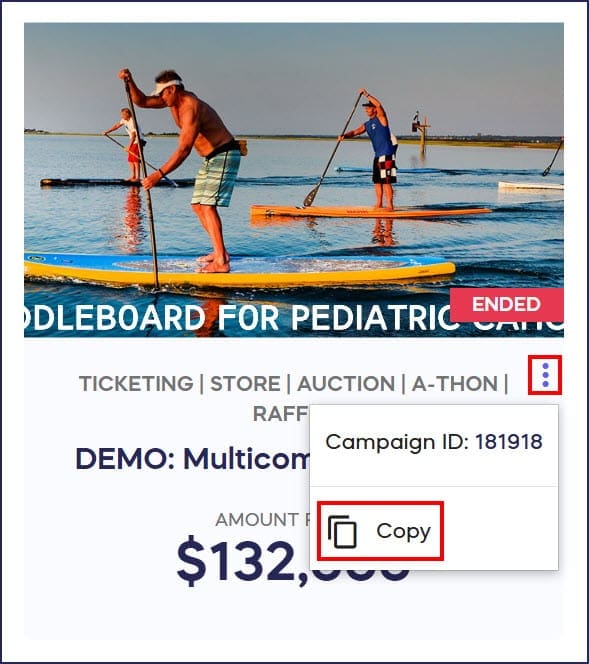
- If you have chosen a list view, hover your mouse over the Campaign title, click on the three-dot icon on the right, and select Copy:

If you have chosen a grid view, click on the three-dot icon under the Campaign image and select Copy:
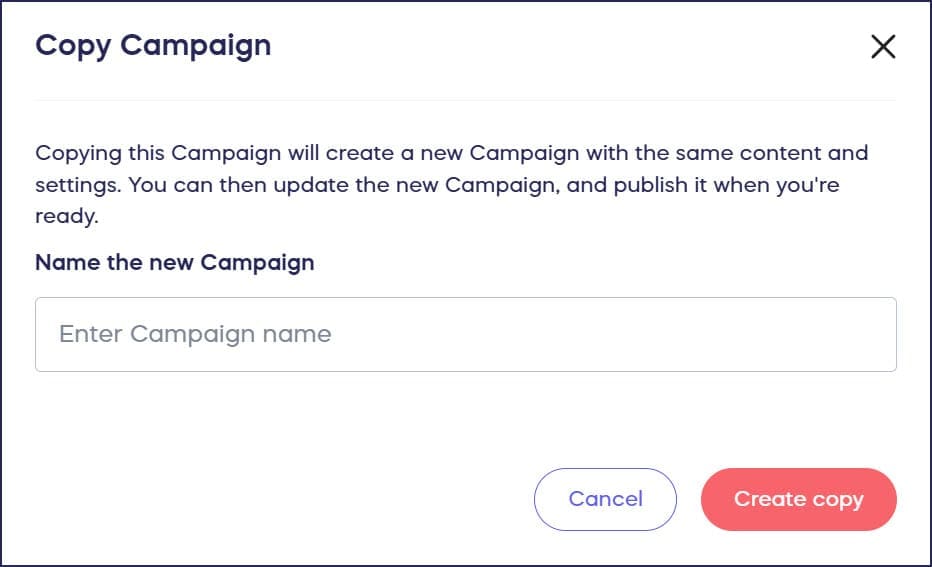
- Enter the title for your new Campaign, then select Create copy:
What information doesn’t get copied when duplicating a Campaign?
Although many Campaign features get copied, some don’t, such as:
- Donations
- Participants
- Teams
- Updates
Additionally, you’ll need to set new start and end dates for all Components and limited-time Campaign items.
Frequently Asked Questions
Can I copy a Campaign that’s already ended?
Yes, you can copy any Campaign from your account, whether it’s active, ended, or in draft mode. The copied Campaign will retain all customization and settings from the original.
What features don’t transfer when I copy a Campaign?
When copying a Campaign, donations, Participants, Teams, and Updates from the original won’t transfer to the new copy. You’ll also need to set new start and end dates for all fundraising Components and time-limited items.
How do I access my copied Campaign after creating it?
After you create a copy, the new Campaign will appear in your Campaigns list in Draft Mode. You can find it by going to the Campaigns section in the left menu and looking for the title you assigned during the copy process.
Can I edit the copied Campaign before launching it?
Yes, the copied Campaign opens in Draft Mode, allowing you to review and modify any settings, text, images, dates, or fundraising Components before making it live.
Does copying a Campaign duplicate my donor data?
No, donor information and transaction history from the original Campaign do not transfer to the copied version. Each Campaign maintains separate donor records and reporting.
Does copying a Campaign create a new Campaign ID?
Yes. Every copied Campaign receives its own unique Campaign ID. The new Campaign is completely independent from the original — changes you make to the copy do not affect the original, and no donor data or gift history is shared between them.
Does the copied Campaign include my images and page content?
Yes. Copying a Campaign transfers all settings and content from the original, including banner images, descriptions, components, and page layout. You can update any of these in Campaign Setup before you launch.
Why does my new Campaign still show images from a previous Campaign?
If you copied a Campaign from a previous year, the images carry over from the original. To update them, go to Campaign Setup and replace the images with new ones. Your changes take effect as soon as you save.
Will the copied Campaign show funds raised from my original Campaign?
No. The copied Campaign starts at $0 raised with no transaction history. Your original Campaign retains all of its donor records and fundraising totals.
Can individuals or companies fundraising for a nonprofit copy a Campaign?
Copying a Campaign is available to Organization accounts. Individuals and companies (CSR accounts) raising funds on behalf of a nonprofit do not have access to this feature and will need to set up each new Campaign individually.