Set up and disable email notifications for new payments made to your Campaign.
Automated transaction notification emails can help you monitor the progress of your fundraiser in real time. You can send these notifications to as many people as you like, including yourself.
How do I set up transaction notifications?
- Go to Account Navigation in the left menu and select Campaigns.
- If you have chosen a list view, click on the Campaign title. If you have chosen a grid view, click on the Campaign image.
- Select Campaign Setup.
- Go to Options in the timeline at the top and select Checkout Options.
- Scroll down to Add people you want notified each time a donation is made, add the email address you would like to receive notifications, and select SAVE:

Repeat for each email address.
- Select Save at the top of the page.
How do I disable transaction notifications?
- Go to Account Navigation in the left menu and select Campaigns.
- If you have chosen a list view, click on the Campaign title. If you have chosen a grid view, click on the Campaign image.
- Select Campaign Setup.
- Go to Options in the timeline at the top and select Checkout Options.
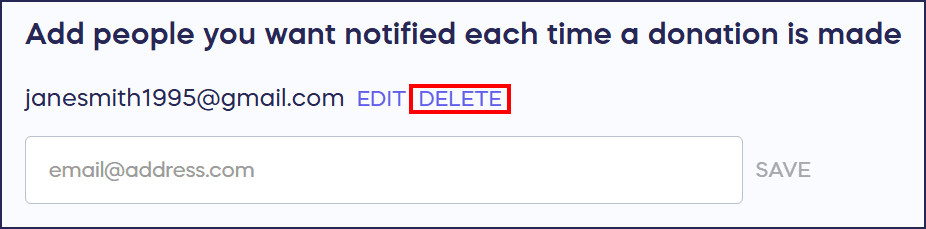
- Scroll down to Add people you want notified each time a donation is made and select DELETE next to the email address(es) you wish to remove:
- Select Save at the top of the page.
Do Campaign Organizers automatically receive transaction notifications?
No, Campaign Organizers and Administrators do not automatically receive these notifications. They’ll need to be added to the notification list to receive them.
Frequently Asked Questions
What are transaction notification emails?
Transaction notification emails are automated alerts sent each time a payment is made to your Campaign. These notifications help you monitor your fundraiser’s progress in real time and stay informed about new donations as they come in.
How many people can receive transaction notifications?
You can add as many email addresses as you’d like to receive transaction notifications. This allows you to keep multiple team members, board members, or stakeholders informed about your Campaign’s donation activity.
Do Campaign Organizers automatically get notified of new transactions?
No, Campaign Organizers and Administrators do not automatically receive transaction notifications. They must be manually added to the notification list if you want them to receive these alerts.
Can I turn off transaction notifications temporarily?
Yes, you can disable transaction notifications at any time by deleting email addresses from the notification list. You can always re-add them later if you want to resume receiving notifications.
When are transaction notification emails sent?
Transaction notification emails are sent immediately after each donation or payment is processed on your Campaign. This provides real-time updates so you can respond quickly to supporter contributions.