Connect RallyUp with Salesforce, HubSpot, Mailchimp, Google Analytics, and 5,000+ apps. Learn how integrations sync donor data, automate emails, and track Campaign performance.
RallyUp integrations sync donor data between your fundraising Campaigns and the tools you already use, including CRM systems, email marketing platforms, analytics tools, and thousands of other apps through Zapier. Integrations automatically update contact lists, enable targeted email automation, track donor behavior, and help manage relationships without manual data entry. This complete guide covers all available integrations and how to connect them to your RallyUp account.
What Are RallyUp Integrations?
Short answer: RallyUp integrations automatically sync donor information and transaction data between your fundraising campaigns and external apps like CRMs, email marketing platforms, and analytics tools.
Detailed explanation: When donors contribute to your RallyUp Campaigns, integrations automatically send their contact information, donation amounts, and activity data to connected apps. This eliminates manual data entry, ensures your donor database stays current, and enables sophisticated marketing automation based on supporter behavior. Integrations are especially valuable for organizations switching from other fundraising platforms, allowing you to maintain historical data while seamlessly adding new donor information.
Analytics Integrations
Google Analytics
Track visitor behavior on your Campaign pages to understand demographics, traffic sources, session duration, and conversion rates. Google Analytics helps identify which marketing channels drive the most donations.
Meta Pixel (Facebook Pixel)
Monitor donor behavior on your fundraising pages and create targeted advertising campaigns on Facebook and Instagram. Meta Pixel allows you to build custom audiences and retarget previous visitors.
CRM Integrations
CRM (Customer Relationship Management) integrations automatically add or update contacts in your database whenever you receive a new donor or donation. CRMs help analyze donor behavior, improve supporter engagement, assist with retention strategies, and grow your organization systematically.
Built-in CRM Integrations
RallyUp offers native integrations with the following CRM platforms:
- Salesforce – Industry-leading CRM for enterprise nonprofits
- HubSpot – All-in-one marketing, sales, and service platform
- ActiveCampaign – CRM with advanced automation capabilities
- Virtuous CRM – Purpose-built for nonprofit organizations
- Bloomerang – Donor management focused on retention
- Little Green Light – Affordable CRM for small nonprofits
CRM Integrations via Zapier
With a Zapier account, you can also connect:
- NeonCRM
- Monday.com
- Pipedrive
- Zoho CRM
- Act! CRM
- Dozens more options
Email Marketing Integrations
Email marketing integrations automatically add or update contacts in your email platform whenever you receive new donors or donations. These integrations enable automated email campaigns targeting specific supporter segments, such as donors who purchased certain items or contributed within specific timeframes.
Understand: Email Marketing Automation
Built-in Email Marketing Integrations
RallyUp offers native integrations with:
- Mailchimp – Popular email marketing platform with robust automation
- SendGrid Marketing Campaigns – Email delivery and marketing platform
- Constant Contact – Contact management with email marketing
Email Marketing Integrations via Zapier
With a Zapier account, you can also connect:
- Moosend
- Zoho Campaigns
- iContact
- Campaign Monitor
- AWeber
- Robly
- Dozens more options
Zapier Integrations
Zapier connects RallyUp to over 5,000+ apps and services, enabling endless automation possibilities. Use Zapier to:
- Post Raffle winners on Twitter or Facebook
- Send Campaign updates to Slack channels
- Add donors to Google Sheets automatically
- Create tasks in project management tools
- Sync data with accounting software
- Build custom workflows between any compatible apps
Zapier automation (“Zaps”) can connect your fundraisers with virtually any business or productivity application.
Before You Begin
Before connecting integrations, ensure you have:
- An active account with the service you want to integrate (Salesforce, Mailchimp, etc.)
- Administrator access to both your RallyUp and integration accounts
- Basic understanding of what donor data you want to sync
Time to complete: 5-15 minutes per integration, depending on complexity
How to Add Integrations to Your RallyUp Account
Follow these steps to connect any integration:
- Log into your RallyUp account.
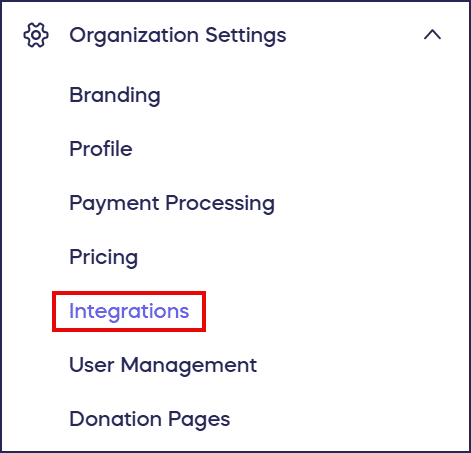
- Go to Organization Settings in the left menu and select Integrations:
- Find the app you want to integrate and select View Integration.
- Follow the provided steps to link your account and configure the integration settings.
What happens next: Once connected, the integration will automatically sync data according to your configured settings. New donors and donations will immediately appear in your connected apps.
Frequently Asked Questions
What types of data do integrations sync?
Integrations typically sync donor contact information (name, email, phone), donation amounts, transaction dates, Campaign names, purchased items, and custom field data you collect during checkout. Specific data fields vary by integration type.
Do I need a paid account with other services to use integrations?
Most CRM and email marketing platforms require paid accounts, though many offer free trials or nonprofit discounts. Google Analytics and Meta Pixel are free services. Zapier offers both free and paid plans depending on usage volume.
Can I use multiple integrations simultaneously?
Yes, you can connect multiple integrations at the same time. For example, you can simultaneously sync data to Salesforce (CRM), Mailchimp (email marketing), and Google Analytics (tracking). Each integration operates independently.
How do I know if my integration is working correctly?
After connecting an integration, make a test donation or transaction to verify data appears in your connected app. Most integrations sync data within minutes. Check your connected app’s contact list or reporting dashboard to confirm proper synchronization.
What happens to historical data when I add an integration?
Most integrations only sync new data created after connection. They don’t automatically import historical RallyUp data. However, you can export past donor information from RallyUp reports and manually import it into your integrated apps if needed.
Can I disconnect an integration if I no longer need it?
Yes, you can disconnect any integration at any time from the Integrations page in your RallyUp account settings. Disconnecting stops future data syncing but doesn’t delete data already sent to the connected app.
Why would I use integrations instead of manual data entry?
Integrations eliminate time-consuming manual data entry, reduce human error, ensure your donor database stays current in real-time, and enable sophisticated automation that’s impossible with manual processes. Organizations using integrations save dozens of hours monthly on administrative tasks.
What’s the difference between CRM and email marketing integrations?
CRM integrations focus on comprehensive donor relationship management, tracking all interactions and engagement history. Email marketing integrations specifically handle communication campaigns, list segmentation, and automated email workflows. Many organizations use both types together for maximum effectiveness.
Which integration should I set up first?
Start with your most-used tool where donor data is most critical. Most nonprofits prioritize CRM integrations (like Salesforce or HubSpot) to centralize donor management, followed by email marketing integrations for communication, then analytics tools for performance tracking.
Benefits of Using RallyUp Integrations
For Organizations Switching Platforms
If you’ve recently switched to RallyUp from another fundraising platform, integrations allow you to:
- Keep all data from previous fundraisers in your existing systems
- Seamlessly add new RallyUp donor information
- Continue using programs and workflows you already know
- Maintain consistent reporting across platforms
For Marketing Automation
Create sophisticated marketing campaigns by:
- Segmenting donors based on contribution levels or campaign types
- Sending automated thank-you emails immediately after donations
- Triggering targeted follow-up campaigns for specific donor behaviors
- Building custom audiences for social media advertising
For Donor Relationship Management
Improve supporter retention by:
- Maintaining complete donor interaction histories
- Identifying engagement patterns and giving trends
- Personalizing communication based on past behavior
- Tracking lifetime value and relationship strength
For Performance Analytics
Make data-driven decisions by:
- Understanding which marketing channels convert best
- Identifying Campaign elements that drive donations
- Calculating return on investment for different strategies
- Optimizing future Campaigns based on behavioral insights