Learn about RallyUp’s Peer-to-Peer options and how to customize them.
Peer-to-Peer fundraising, also known as team fundraising, is a way for your supporters to help raise funds on your behalf. It gives supporters the ability to share your fundraising Campaign with their family, friends, and social media network. This maximizes your Campaign’s outreach, which can boost the amount of funds you raise.
Peer-to-Peer can be enabled for any of the following fundraising Components:
- Raffles/Sweepstakes (supporters can get credit for entries sold)
- Ticketing & Registration (supporters can get credit for tickets sold)
- Crowdfunding (supporters can get credit for donations made)
- Storefront (supporters can get credit for items sold)
- Auctions (supporters can get credit for Buy It Now items; please note that Peer-to-Peer can only be enabled for Auctions if you’re also running another fundraising Activity)
Note that Peer-to-Peer cannot be run on its own. If you want to run a traditional Peer-to-Peer Campaign, select Crowdfunding and then enable Peer-to-Peer.
RallyUp provides many tools and customization options to help you run a smooth and successful Peer-to-Peer fundraiser. The links below will take you to other Knowledge Base articles with further information.
What are some examples of Peer-to-Peer Campaigns?
Crowdfunding with Peer-to-Peer
What’s the difference between Peer-to-Peer and A-Thon fundraising?
Peer-to-Peer fundraising is similar to but not quite the same as an A-Thon. Both allow supporters to help you fundraise, but in different ways:
- Peer-to-Peer: Supporters sign up as participants to help spread the word about your fundraiser. When someone makes a donation or purchase, they can credit the participant that sent them to your fundraiser
- A-Thons: Supporters sign up to complete units of a specific activity (e.g., walking laps) and earn donations for each unit completed (e.g., someone pledges one dollar for each lap their friend walks)
How do I enable Peer-to-Peer for my Campaign?
You can enable Peer-to-Peer in Campaign Setup:
- Go to Account Navigation in the left menu and select Campaigns.
- If you have chosen a list view, click on the Campaign title. If you have chosen a grid view, click on the Campaign image.
- Select Campaign Setup.
- Go to Getting Started in the timeline at the top.
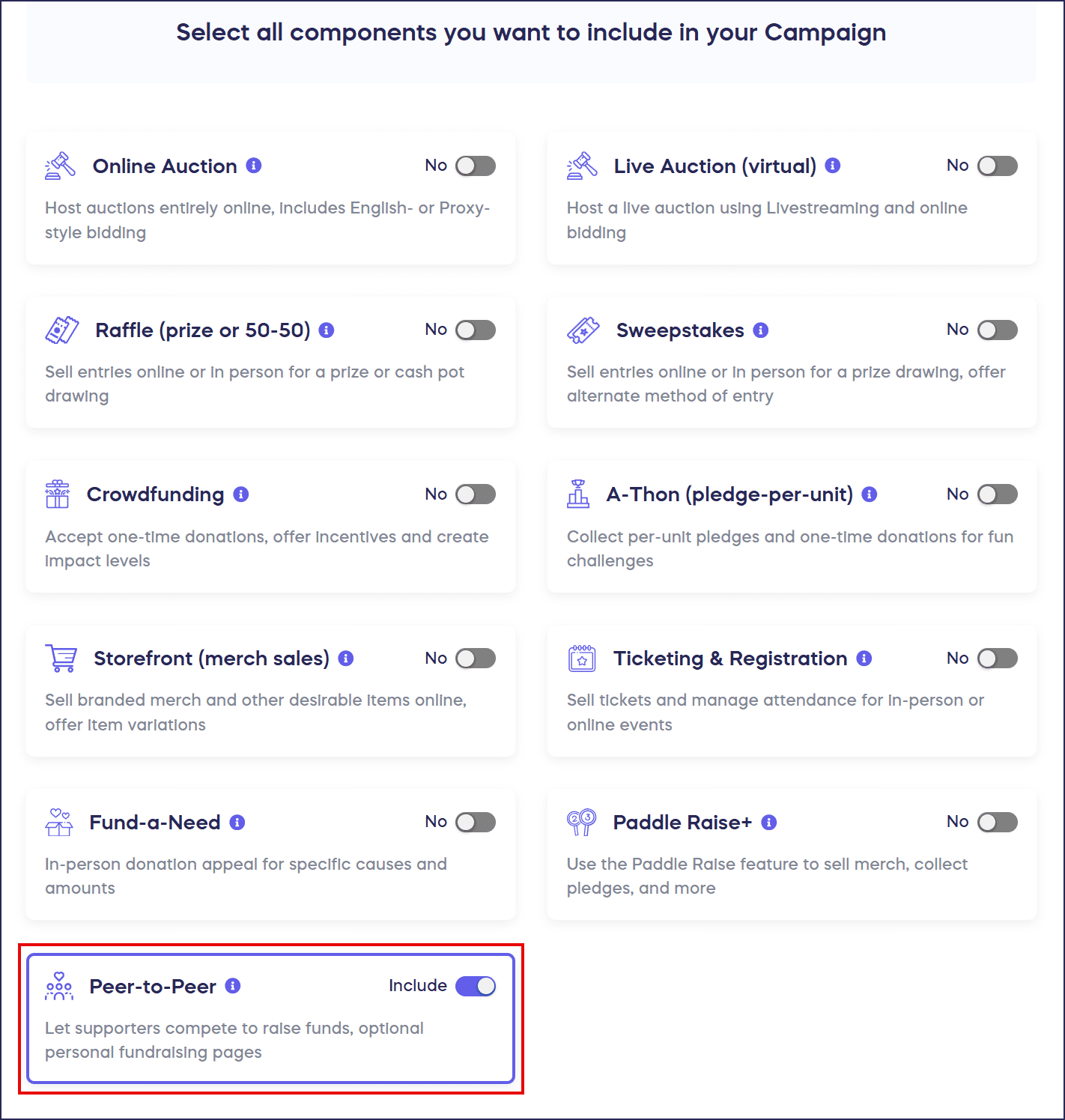
- Scroll down to Select all components you want to include in your Campaign and select Peer-to-Peer:
How do I select which Components will use Peer-to-Peer?
If you add more than one fundraising Component to your Campaign, you can apply Peer-to-Peer to one, several, or all Components. For example, if you enable Peer-to-Peer for your Raffle or Sweepstakes, donors can credit a Participant when they purchase entries; if you enable Peer-to-Peer for a Storefront, donors can credit a Participant when they purchase items; if you enable Peer-to-Peer for Crowdfunding, donors can credit a Participant when they make a donation, and so on.
- Go to Peer-to-Peer in the timeline at the top.
- Scroll down to Enable Peer-to-Peer for one or more Activities:
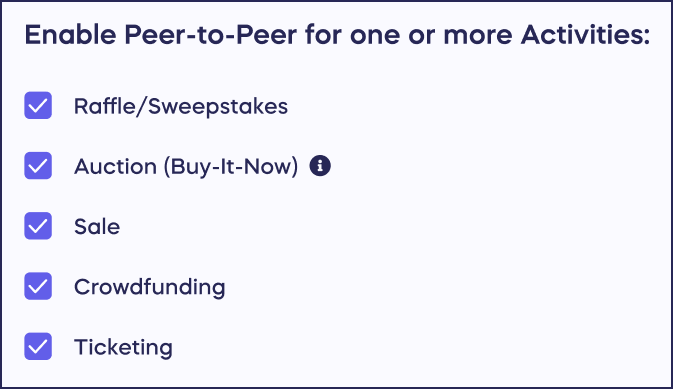
- Select the Component(s) you want by clicking on the checkboxes. You can select one, all, or some.
How do Participants and Teams work in Peer-to-Peer?
You can allow supporters to sign up as individual Participants, fundraise together in Teams, or both. If a supporter creates a Team, they can invite others to join their Team.
How to Add Peer-to-Peer or A-Thon Participants and Teams
How-to: Limit the Number of Participants That Can Join a Team
How-to: Invite People to Join Your Fundraising Team
Can I customize Peer-to-Peer terminology?
The following Peer-to-Peer terms are customizable:
- Participants
- Teams
- Participant Center
How-to: Customize Campaign and Activity Terminology
How-to: Rename Your Participant Center
What is pre-registration for Peer-to-Peer Campaigns?
Pre-registration allows donors to create a RallyUp account, save a payment method, and sign up as a Participant before your Peer-to-Peer fundraiser begins. When your Peer-to-Peer fundraiser starts, they can check out quickly and easily:
Understand: Campaign Pre-Registration
What’s the difference between public and private registration?
If you opt for public registration, anyone who visits your fundraiser can sign up as a Participant and/or Team. If you opt for private registration, you’ll need to manually add Participants and/or Teams instead of allowing them to sign up on their own.
Understand: Public vs. Private Registration
How do I add prizes and leaderboards to my Campaign?
One effective way to generate excitement and healthy competition among your participants is to display leaderboards and offer prizes to top supporters. You can also add different leaderboards or prizes for different criteria, such as highest amount raised vs. most unique donors.
How-to: Add Peer-to-Peer or A-Thon Leaderboards
How-to: Add Peer-to-Peer or A-Thon Prizes
What is the Participant Center and how does it work?
You can add a Participant Center to your Campaign where supporters can learn how to participate, register as a Participant and/or Team, and view leaderboards and/or prizes.
Understand: Peer-to-Peer Participant Center
How do Personal Fundraising Pages work for Participants and Teams?
You can also enable Personal Fundraising Pages for each Participant and/or Team that can be customized, shared on social media, and sent to family and friends. If a donation is made to a specific Participant of any Team, the Participant’s amount raised and the Team’s total amount raised will reflect the donation.
How-to: Edit Peer-to-Peer and A-Thon Fundraising Pages
Note that Personal Fundraising Pages cannot be used to fundraise for individual personal causes. RallyUp is a fundraising platform for nonprofits and other charities only.
How do donors credit a Participant or Team?
When someone donates or makes a purchase, they can choose which Participant and/or Team gets credit for the donation, or donate without crediting anyone:
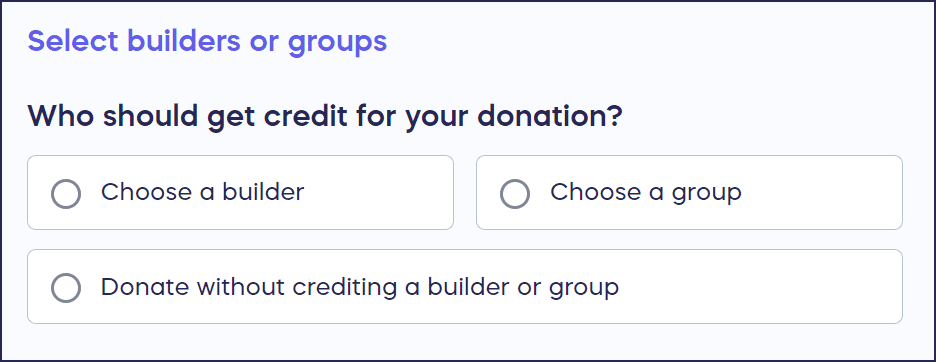
If the donor can’t find the Participant and/or Team they’re looking for, RallyUp allows write-in donations by default. However, if you allow write-in donations, you’ll need to credit the appropriate Participant or Team manually. You can disable write-in donations anytime.
How-to: Disable Write-In Donations for Peer-to-Peer Campaigns
How-to: Credit a Write-in Donation
Frequently Asked Questions
Can I run a Peer-to-Peer Campaign by itself?
No, Peer-to-Peer cannot be run on its own and must be paired with another fundraising Component. If you want to run a traditional Peer-to-Peer Campaign, select Crowdfunding as your Component and then enable Peer-to-Peer functionality.
What’s the difference between individual Participants and Teams?
Individual Participants fundraise on their own and receive credit for donations made through their Personal Fundraising Pages. Teams allow multiple Participants to fundraise together under a shared Team name, with both individual and collective fundraising totals displayed on leaderboards.
Can donors choose not to credit any Participant when they donate?
Yes, donors can choose to donate without crediting any specific Participant or Team. They can also use the write-in option to credit someone not listed, though this requires manual crediting by the Campaign organizer unless you disable write-in donations.
Which fundraising Components support Peer-to-Peer?
Peer-to-Peer can be enabled for Raffle, Sweepstakes, Ticketing & Registration, Crowdfunding, Storefront, and Auctions (only if paired with another Component). Participants can receive credit for entries, tickets, donations, items, or Buy It Now purchases depending on which Components you enable.
Do Participants need to create an account to fundraise?
Yes, supporters must create a RallyUp account to become Participants or join Teams. You can enable pre-registration to allow supporters to create accounts and save payment methods before your Campaign officially starts, making it easier for them to begin fundraising immediately.
Can I control who becomes a Participant in my Campaign?
Yes, you can choose between public or private registration. With public registration, anyone can sign up as a Participant or Team. With private registration, you manually add Participants and Teams, giving you complete control over who can fundraise on your behalf.