Modify or delete your recurring donation from your RallyUp account.
If you need to update or cancel a recurring donation for any reason, you can do so anytime by logging into your RallyUp account.
What can I change about my recurring donation?
You can change the amount you give per donation, how frequently you make the donation, and the payment method used.
How do I update my recurring donation?
- Go to rallyup.com and log in with the email address you used to make the donation.
- Click on the circle with your initials in the upper right corner of the screen and select My Account.
- Select the My Donations tab, then select Recurring:

- Hover your mouse over the donation you wish to edit and click on the three-dot menu on the right:
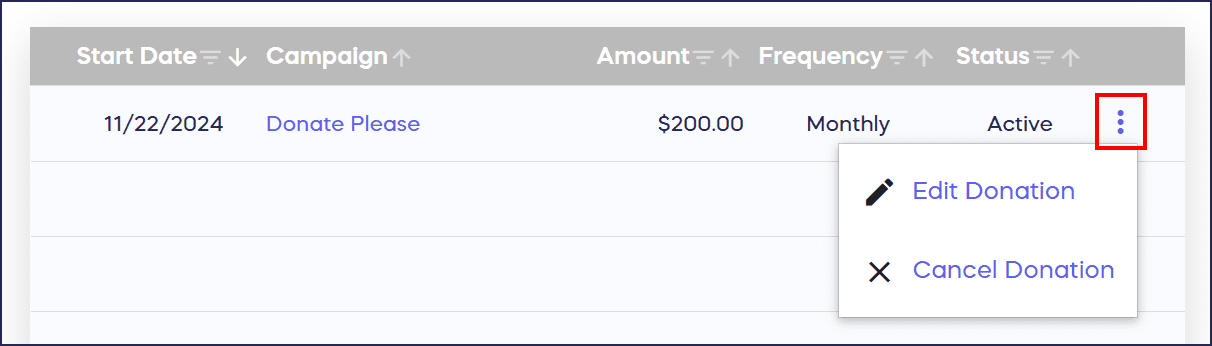
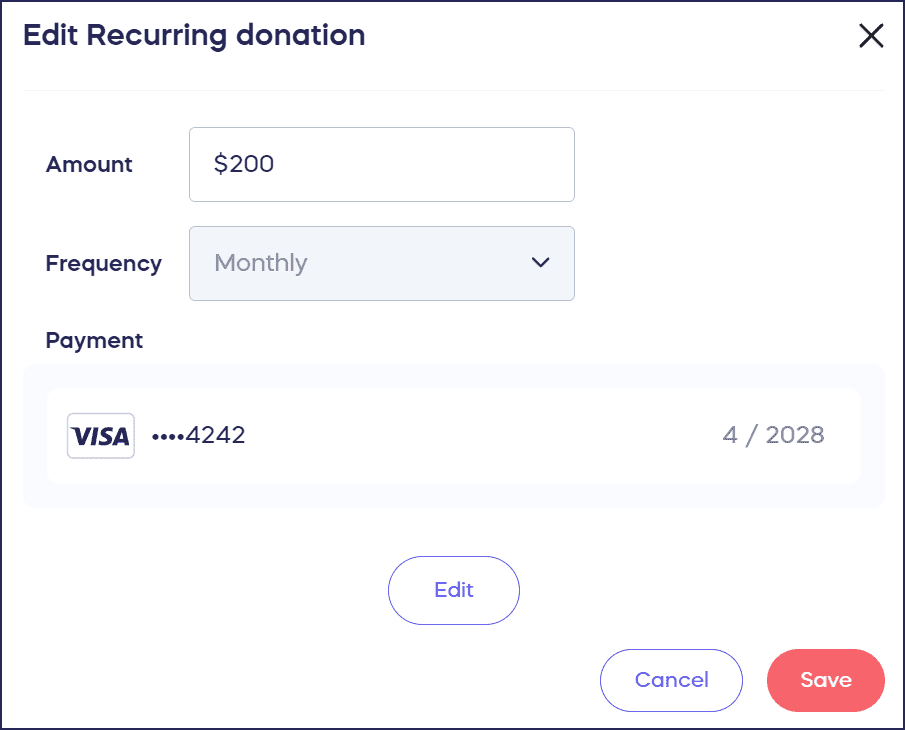
- Select Edit Donation to change the donation amount, frequency, or credit card.
- Select Save:
How do I cancel my recurring donation?
- Go to rallyup.com and log in with the email address you used to make the donation.
- Click on the circle with your initials in the upper right corner of the screen and select My Account.
- Select the My Donations tab, then select Recurring:

- Hover your mouse over the donation you wish to edit and click on the three-dot menu on the right:

- Select Cancel Donation.
- To confirm that you want to cancel all future payments for this recurring donation, select Cancel donation:

What happens when I cancel a recurring donation?
Canceling a recurring donation will only stop future recurring donations from being made. It will not cancel or refund any previous payments that have already been made.
Frequently Asked Questions
Can I change the amount of my recurring donation?
Yes, you can edit the donation amount by logging into your RallyUp account, going to My Donations, selecting Recurring, and choosing Edit Donation from the three-dot menu.
Will canceling my recurring donation refund previous payments?
No, canceling only stops future recurring donations. It will not cancel or refund any payments that have already been processed. All past donations remain with the organization.
Can I change the frequency of my recurring donation?
Yes, when you select Edit Donation, you can modify the frequency (weekly, monthly, quarterly, etc.) along with the amount and payment method.
Do I need a RallyUp account to manage my recurring donation?
Yes, you need to log into a RallyUp account using the email address you used when donating. If you don’t have an account yet, you can create one with that same email.
Can I update my credit card for recurring donations?
Yes, you can change your payment method by selecting Edit Donation. This allows you to update your credit card information for all future recurring payments.