Highlight any special rules or conditions so donors can easily review important information.
Checkout is an ideal place to capture donors’ attention, so RallyUp lets you add a step to the checkout process to highlight need-to-know details. You can also make donors agree to your terms before donating or making a purchase.
This article uses the terms “donor” and “donation,” but this terminology may differ depending on your Campaign settings.
Why would I add a notice during checkout?
Adding a notice during checkout allows you to capture donors’ attention at a critical moment when they’re actively engaged with your Campaign. The checkout process is an ideal place to highlight need-to-know details, special rules, or important conditions that donors should review before completing their transaction. You can use this feature to communicate important information and even require donors to acknowledge and agree to your terms before they can complete their donation or purchase.
How do I add a notice for donors during checkout?
- Go to Account Navigation in the left menu and select Campaigns.
- If you have chosen a list view, click on the Campaign title. If you have chosen a grid view, click on the Campaign image.
- Select Campaign Setup.
- Go to Options in the timeline at the top and select Checkout Options.
- Scroll down to Do you want to display a notice before donors submit their donation? and enter the information you want to show:
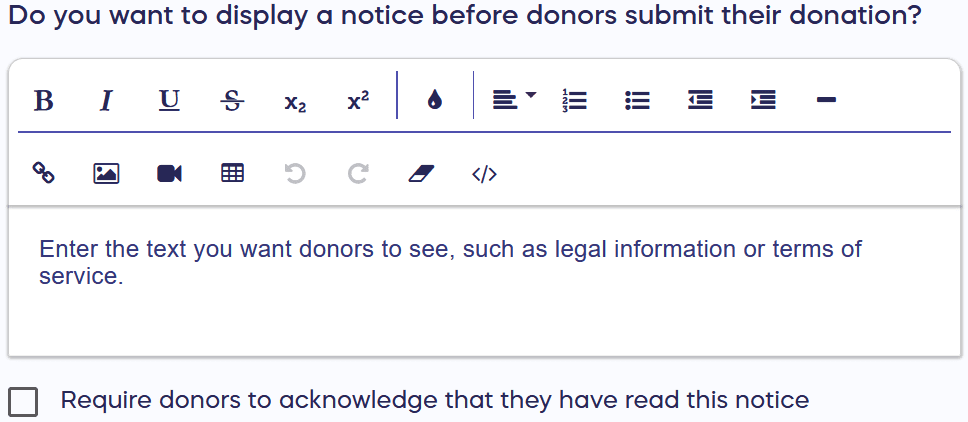
Optionally, check the box to Require donors to acknowledge that they have read this notice.
- Select Save.
What do donors see when I add a checkout notice?
Your notice will display during the “Review & Pay” step of the checkout process:
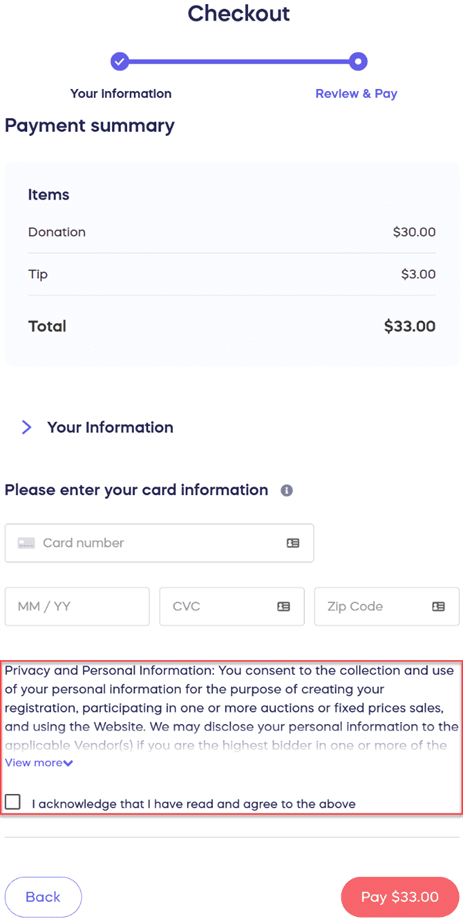
Donors will see your custom message prominently displayed before they submit their payment, ensuring they have the opportunity to review any important information you’ve included.
Frequently Asked Questions
What is a checkout notice?
A checkout notice is a custom message that appears during the checkout process to highlight special rules, conditions, or important information for donors. It adds an extra step to the checkout flow where you can capture donors’ attention and ensure they’re aware of need-to-know details before completing their donation or purchase. You have the option to simply display information or require donors to acknowledge and agree to your terms.
Can I require donors to acknowledge they’ve read the notice?
Yes, you can optionally require donors to acknowledge that they have read your notice. When setting up your checkout notice in the Checkout Options, simply check the box to “Require donors to acknowledge that they have read this notice.” This adds a checkbox that donors must select before they can complete their payment.
When does the notice appear during checkout?
The notice appears during the “Review & Pay” step of the checkout process. This is the final step before donors submit their payment, making it an ideal moment to capture their attention and ensure they review any important information, terms, or conditions related to their transaction.
What happens if donors don’t check the acknowledgment box?
If you have opted to require donors to acknowledge that they have read and agree to the notice, they won’t be able to pay until they check the acknowledgment box. This ensures that all donors have confirmed they’ve reviewed your important information before completing their transaction.
What type of information should I include in a checkout notice?
Use checkout notices to communicate special rules, terms and conditions, delivery information, pickup instructions, legal disclaimers, prize limitations, event details, refund policies, or any other important information donors need to know before completing their transaction. Keep your notice clear and concise to ensure donors read and understand the information before proceeding with their payment.