Learn how to integrate Meta Pixel with RallyUp to track donor behavior, create targeted Facebook and Instagram ads, and measure Campaign conversion rates. Step-by-step setup guide.
Meta Pixel (formerly Facebook Pixel) is an analytics tool that tracks visitor behavior on your RallyUp Campaign Pages, enabling you to measure conversion rates, create targeted Facebook and Instagram advertising, and retarget supporters who viewed but didn’t donate to your Campaigns. By integrating Meta Pixel with your RallyUp account, you can understand which ads drive donations, build custom audiences based on supporter behavior, and optimize your social media marketing strategy. This complete guide covers what Meta Pixel does, how to set it up, and which donor actions it automatically tracks.
What Is Meta Pixel?
Short answer: Meta Pixel is a tracking code that monitors visitor actions on your RallyUp Campaign Pages and sends this data to Facebook, allowing you to measure ad effectiveness, retarget website visitors, and create lookalike audiences.
Detailed explanation: When someone visits your Campaign Page after seeing your Facebook or Instagram ad, Meta Pixel records their behavior—whether they viewed content, added items to cart, initiated checkout, or completed a donation. This data helps Facebook’s advertising algorithm identify which ads generate donations, optimize future ad delivery to similar supporters, and enable retargeting campaigns to people who showed interest but didn’t contribute. Meta Pixel bridges the gap between your fundraising Campaigns and Facebook’s advertising platform.
Why Use Meta Pixel with RallyUp Campaigns?
Measure Advertising Effectiveness
Track which Facebook and Instagram ads actually generate donations rather than just clicks. Meta Pixel shows the complete conversion path from ad impression to completed transaction, revealing your true return on ad spend.
Create Custom Audiences
Build highly targeted audience segments based on supporter behavior. Create custom audiences of people who:
- Viewed your Campaign Page but didn’t donate
- Added items to cart but abandoned checkout
- Completed donations for specific Campaigns or Components
- Visited your Campaign Page multiple times
Retarget Interested Supporters
Show ads specifically to people who previously visited your Campaigns but didn’t contribute. Retargeting audiences convert at significantly higher rates than cold audiences because they’re already familiar with your organization.
Build Lookalike Audiences
Use your custom audiences as templates for Facebook to find new supporters with similar characteristics, interests, and behaviors. Lookalike audiences help you reach people most likely to care about your cause.
Optimize Ad Campaigns Automatically
Facebook’s algorithm uses Meta Pixel conversion data to automatically show your ads to people most likely to donate, improving Campaign performance without manual optimization.
What Meta Pixel Tracks on RallyUp Campaigns
Once connected, Meta Pixel automatically records these “standard events” when visitors take actions on your Campaign Pages:
View Content Event
Tracked when visitors view:
- Campaign Pages
- Donation Pages
- Participant Center
- Team or Participant fundraising pages
Add to Cart Event
Tracked when users add items to their cart, including:
- Ticketing & Registration ticket purchases
- Storefront items
- Raffle entries
- Sweepstakes entries
- Auction bids
- Any other campaign Components
Initiate Checkout Event
Tracked when users start the checkout process to make a purchase or donation from any Campaign Page.
Donate Event (Purchase)
Tracked when users complete a transaction on any of your Campaigns, including:
- One-time donations
- Recurring donations
- Campaign Component purchases
- Ticketing & Registration ticket sales
- Storefront item purchases
These standard events provide Facebook with detailed data about supporter behavior, enabling sophisticated audience targeting and conversion optimization.
Privacy and Compliance Considerations
Data Collection Transparency
Meta Pixel collects visitor data including:
- Page views and navigation patterns
- Items added to cart
- Checkout initiation
- Completed transactions
- Device and browser information
Ensure your privacy policy discloses this tracking to visitors.
Cookie Compliance
Meta Pixel uses cookies to track users. Depending on your location and audience:
- EU organizations must comply with GDPR
- California organizations must comply with CCPA
- Consider implementing cookie consent banners
iOS Tracking Limitations
Apple’s iOS privacy features limit tracking capabilities for users who opt out of tracking. Meta’s Conversions API provides alternative tracking methods, though this requires additional technical setup beyond basic Meta Pixel integration.
Before You Begin
Before integrating Meta Pixel with RallyUp, you’ll need:
- A Facebook Business Manager account for your organization
- A Facebook Ads Account (created through Business Manager)
- Your Meta Pixel ID (created in Facebook Events Manager)
- Administrator access to your RallyUp account settings
Time to complete: 10-15 minutes for initial setup
Creating a Facebook Business Manager Account
Meta Pixel requires a Facebook Business Manager account. If you don’t already have one, create it first:
- Visit business.facebook.com.
- Click Create Account.
- Enter your organization name and contact information.
- Complete the setup process.
Facebook Business Manager Setup Instructions
Creating a Facebook Ads Account
After setting up Business Manager, create an Ads Account:
- Go to your Facebook Business Settings and log in.
- Select Accounts, then select Ad Accounts.
- Select +Add.
- Select Create a new ad account.
- Complete the ads account setup.
Creating Your Meta Pixel
Once your Business Manager and Ads Account are ready:
- Go to Facebook Events Manager in Business Manager.
- Navigate to the Pixels tab.
- Select Create a pixel.
- When the pop-up appears, select Create.
- Copy your Pixel ID (you’ll need this for RallyUp integration).
Your Pixel ID is a unique number that identifies your tracking pixel. Keep this ID accessible for the next step.
Adding Meta Pixel to RallyUp
Once you have your Pixel ID, connect it to your RallyUp account:
- Log into your RallyUp account.
- Go to Organization Settings in the left menu.
- Select Integrations.
- Scroll down to find Meta Pixel.
- Select View Integration.
- Toggle the switch to enable Meta Pixel on your donor-facing pages.
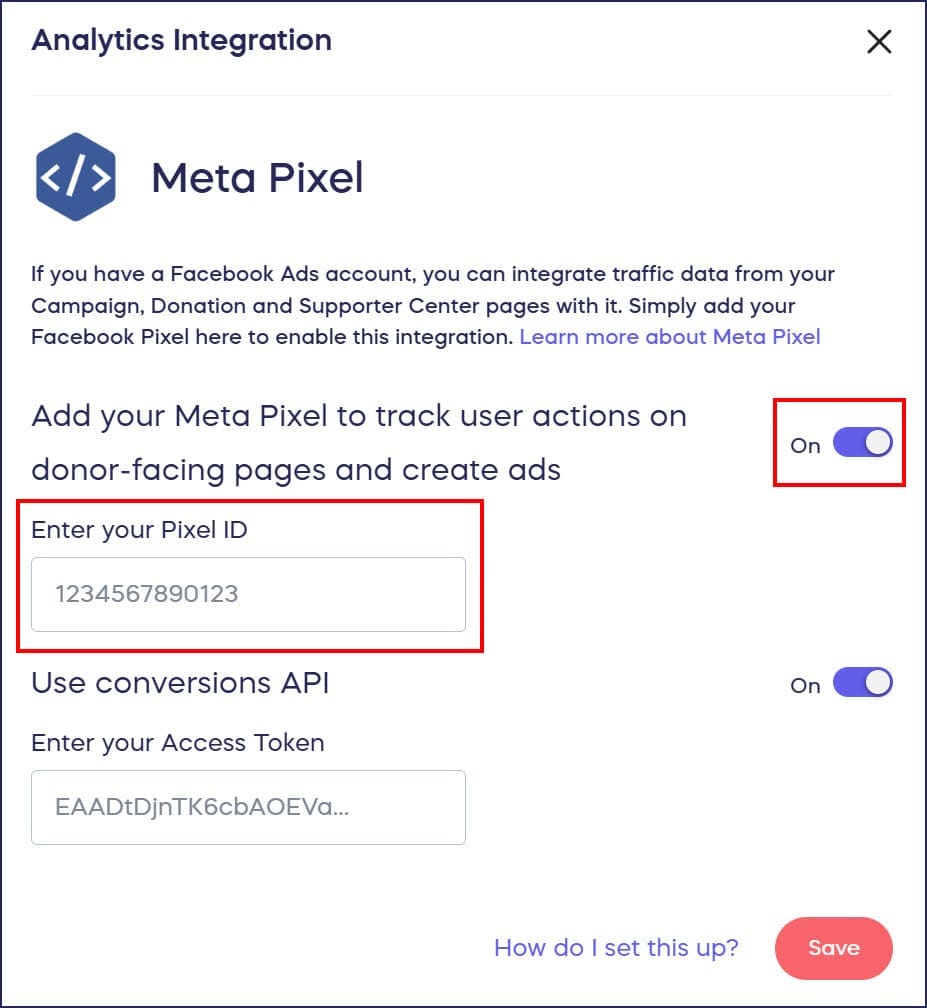
- Enter your Pixel ID in the provided field.
- Select SAVE at the bottom of the page.
What happens next: Meta Pixel immediately begins tracking visitor behavior on all your RallyUp Campaign Pages. Data typically appears in Facebook Events Manager within 20-30 minutes after someone takes a tracked action.
Verifying Meta Pixel Installation
Confirm your Meta Pixel is working correctly:
Using Facebook Events Manager
- Go to Facebook Events Manager.
- Select your pixel.
- View recent events to confirm data is flowing.
- Check that “View Content,” “Add to Cart,” “Initiate Checkout,” and “Donate” events appear.
Using Meta Pixel Helper (Chrome Extension)
- Install the Meta Pixel Helper browser extension.
- Visit your RallyUp Campaign Page.
- Click the extension icon in your browser.
- Verify your Pixel ID appears and is firing correctly.
- Check that appropriate events trigger as you navigate your Campaign.
Troubleshooting Meta Pixel Integration
Pixel Not Firing
If Meta Pixel Helper shows your pixel isn’t firing:
- Verify you entered the correct Pixel ID in RallyUp settings.
- Clear your browser cache and cookies.
- Test in an incognito/private browser window.
- Check that you saved changes in RallyUp Integration settings.
Events Not Recording
If pixel fires but events don’t appear:
- Wait 30-60 minutes for data to populate.
- Verify events are configured correctly in Facebook Events Manager.
- Test by completing a donation yourself.
- Check Facebook’s pixel diagnostics for error messages.
Duplicate Events
If you see duplicate events in Facebook Events Manager:
- Ensure you haven’t manually added Meta Pixel code to your Campaign Pages.
- Remove any duplicate pixel installations.
- Keep only the pixel integrated through RallyUp’s Integration settings.
Using Meta Pixel Data for Advertising
Creating Custom Audiences
In Facebook Ads Manager:
- Go to Audiences.
- Select Create Audience → Custom Audience.
- Choose Website as your source.
- Select your Meta Pixel.
- Define your audience based on actions (e.g., “visited campaign page but didn’t donate”).
- Set time windows (e.g., past 30 days).
- Name and save your audience.
Creating Lookalike Audiences
- Go to Audiences in Ads Manager.
- Select Create Audience → Lookalike Audience.
- Choose your custom audience as the source.
- Select your target country.
- Choose audience size (1-10% similarity).
- Create the lookalike audience.
Facebook will find people similar to your existing supporters, expanding your reach to likely donors.
Retargeting Campaigns
Create ad campaigns specifically targeting people who:
- Viewed your Campaign but didn’t donate (within last 7-30 days).
- Started checkout but didn’t complete (abandoned cart).
- Donated to previous Campaigns (encourage recurring support).
- Visited multiple pages (showing high interest).
Retargeting ads typically achieve 2-3x higher conversion rates than ads to cold audiences.
Advanced Meta Pixel Features
Conversion Value Tracking
Meta Pixel can track donation amounts, helping you:
- Calculate actual return on ad spend (ROAS)
- Identify which ads generate the highest-value donations
- Optimize campaigns for donation value, not just conversion volume
Event Parameters
Add additional data to standard events for more detailed tracking:
- Donation amounts and currency
- Campaign names and types
- Specific items purchased
- Participant or Team credits
Custom Conversions
Create custom conversion events for specific goals:
- Donations above a certain amount
- Registration for specific event types
- Multiple donations from the same supporter
- Specific Campaign Components
Frequently Asked Questions
Does Meta Pixel slow down my Campaign Pages?
No, Meta Pixel is lightweight and loads asynchronously, meaning it won’t affect your Campaign Page loading speed. The tracking code runs in the background without impacting donor experience.
Can I use Meta Pixel with Google Analytics simultaneously?
Yes, you can use both Meta Pixel and Google Analytics on your RallyUp Campaigns. Each tool serves different purposes—Google Analytics focuses on overall website analytics while Meta Pixel specifically optimizes Facebook and Instagram advertising.
How long does it take for Meta Pixel data to appear in Facebook?
Most events appear in Facebook Events Manager within 20-30 minutes. Real-time data may take slightly longer to populate, but you should see Campaign visitor information within an hour of integration.
Do I need to create a new pixel for each Campaign?
No, use one Meta Pixel across all your RallyUp Campaigns. The same pixel tracks behavior on all Campaign Pages under your organization’s account, aggregating data for comprehensive audience building.
What if I don’t run Facebook or Instagram ads?
Even without active advertising, Meta Pixel collects valuable audience data you can use later. When you’re ready to start advertising, you’ll have historical data about your supporters’ behavior, making your first Campaigns more effective.
Does Meta Pixel work with all RallyUp Components?
Yes, Meta Pixel tracks visitor behavior across all RallyUp Components including Raffles, Auctions, Crowdfunding, Ticketing & Registration, A-Thons, Peer-to-Peer, and more.
Why would I use Meta Pixel instead of just organic social media posts?
Organic social media reach is limited by platform algorithms. Meta Pixel enables paid advertising with precise targeting based on actual supporter behavior, dramatically expanding your reach to people most likely to donate.
What’s the difference between Meta Pixel and Google Analytics?
Google Analytics provides comprehensive website analytics across all traffic sources, while Meta Pixel specifically optimizes Facebook and Instagram advertising by tracking conversions and building targetable audiences. Use both together for maximum insight.
How does Meta Pixel improve my Facebook ad performance?
Meta Pixel tells Facebook which ads generate donations, allowing the algorithm to automatically show your ads to similar people. Without pixel tracking, Facebook can’t distinguish between ads that drive conversions and ads that only generate clicks.
Getting Started with Meta Pixel Advertising
Ready to use your Meta Pixel data for advertising?
- Let your pixel collect data for at least 7-14 days.
- Build custom audiences of Campaign visitors.
- Create lookalike audiences based on past donors.
- Set up retargeting campaigns for non-donors.
- Monitor conversion data in Events Manager.
- Optimize Campaigns based on performance data.