
Switch from Raffle Creator to RallyUp: A Raffle Creator Alternative Guide
Switching from Raffle Creator at a glance
- RallyUp’s Free plan has a $0 platform fee, with optional donor tips. There are no per-raffle packages and no entrant limits to upgrade past.
- You get four raffle formats (Single-Prize, Multi-Prize, 50/50 and Enhanced 50/50), plus sweepstakes, auctions, events, A-Thons and crowdfunding in the same account.
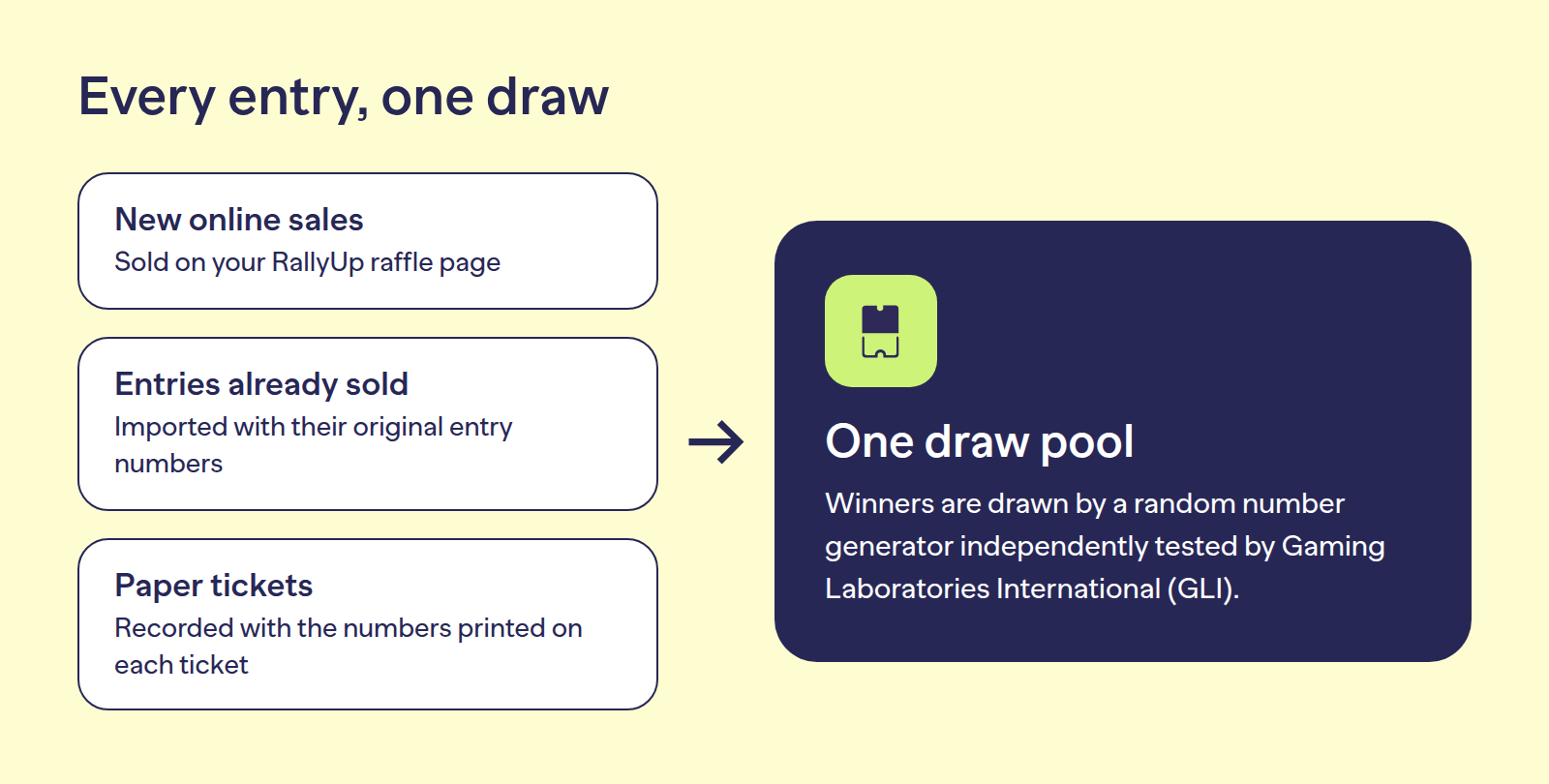
- You can import entries you’ve already sold, keep their original entry numbers, and draw online and paper entries from one pool.
- Launch from a template in as little as 15–20 minutes, or have our team build your raffle for free with Create My Campaign.
If you’re looking for a Raffle Creator alternative, this guide puts the two platforms side by side and walks you through moving your raffle to RallyUp, including entries you’ve already sold. RallyUp is genuinely, seriously easy to use, and it’s built for organizations whose raffle is just the start.
Raffle Creator does a simple job well: a raffle page, online and in-person sales, and free printable tickets. Teams tend to look around when an entrant limit gets close, when they want supporters to sell for them, or when the raffle becomes one piece of a bigger fundraising plan. The steps below work whether you’re between raffles or partway through one.
In this article
Raffle Creator vs. RallyUp at a glance
Pricing as of October 2026, taken from RallyUp’s pricing page and Raffle Creator’s pricing page.
| What you get | RallyUp | Raffle Creator |
|---|---|---|
| Getting started | Launch from a template in as little as 15–20 minutes, or Create My Campaign builds it for you free, usually within about one business day | Build your own raffle page in a few clicks |
| Platform cost | Free plan: $0 platform fee, optional donor tips. No per-raffle packages | Free (up to 25 entrants, paper tickets only); Basic $150 (up to 100 entrants); Organization $350 (unlimited entrants). Priced per raffle |
| Entrant limits | No entrant-based packages. Set your own entry cap only if you want one | When you reach your package’s limit, the entry form comes off your page until you upgrade |
| Payment processing | Your own Stripe or PayPal account, 1.9–2.9% + $0.30 | Your own Stripe account, 2.9% + $0.30 |
| Drawing winners | Automatic or manual draw inside RallyUp, using a random number generator independently tested by Gaming Laboratories International (GLI) | Automatic drawing on paid packages; the free package uses paper tickets |
| Selling help | Sharing Rewards, Peer-to-Peer selling with leaderboards, and Text-to-Give | Referrals and team selling on paid packages |
| Paper tickets | Record paper sales with your own entry numbers in the same draw pool | Free printable ticket templates |
| Where you can run it | United States and internationally (rules vary by location) | US accounts only |
| Beyond raffles | Five fundraising hubs in one account: Raffles & Sweepstakes, Galas & Events, Online Auctions, A-Thons & Peer-to-Peer, Crowdfunding & Storefront | Raffles |
What it costs to run the same raffle
Raffle Creator prices each raffle by how many entrants it can take. RallyUp doesn’t charge by entrants at all. Here’s how that plays out on two typical raffles, using Raffle Creator prices as of October 2026. Card processing isn’t included for either platform.

A small raffle: 80 entrants, $1,600 in sales
- Raffle Creator: the Basic package, $150, or about 9.4% of what you raised.
- RallyUp Free: a $0 platform fee. Supporters can add an optional tip, and on raffles, tipping earns them bonus entries.
A bigger raffle: 400 entrants, $10,000 in sales
- Raffle Creator: the Organization package, $350.
- RallyUp Free: a $0 platform fee, and every entrant can still add an optional tip for bonus entries.
Either way, there’s nothing to pay up front and no contracts, setup fees or subscriptions. Payment processing on RallyUp runs 1.9–2.9% + $0.30 per transaction through your own Stripe or PayPal account, and the money goes straight to you.
What’s better about RallyUp for raffles
Four raffle formats, plus sweepstakes
RallyUp runs Single-Prize, Multi-Prize, 50/50 and Enhanced 50/50 raffles. Enhanced 50/50 lets you set your own split, such as 60/40, and pick more than one winner. A 50/50 raffle shows a live prize total that climbs as tickets sell, which gives people a reason to buy now. Entry Tiers let you offer bundles, like 5 entries for $20, so supporters buy more. When a raffle isn’t the right fit, sweepstakes run in the same account.
Supporters who sell for you
Sharing Rewards give buyers free bonus entries when they share your raffle, and each buyer gets their own link and a dashboard to track it. With Peer-to-Peer selling, every student, player or volunteer gets their own page, and leaderboards keep the friendly competition going. Text-to-Give lets people reach your raffle by texting a keyword.
A draw you can trust
Winners are drawn by a random number generator independently tested by Gaming Laboratories International (GLI). You can let RallyUp draw automatically or run the draw yourself live, and RallyUp can notify winners for you. Our guide to raffle drawings covers both options.
Paper and online tickets in one draw
Plenty of raffles still sell at the gym door or the bake sale table. RallyUp lets you record those paper sales, with the numbers already printed on your tickets, so online and offline entries all go into one draw pool.

Room to grow past the raffle
The same account runs galas and events, online auctions, A-Thons and Peer-to-Peer campaigns, crowdfunding and Storefront sales. Organizations raise 38% more when they combine campaign types, and RallyUp lets you combine them on one page. More than 55,000 organizations have raised over $1 billion on RallyUp, which is rated 4.8 out of 5 on G2. See everything on the RallyUp platform.
Help whenever you want it
Ask for a human and you get one — on any plan, at any point. Prefer not to build it yourself? Create My Campaign builds your raffle for free, usually within about one business day. For hands-off help with promotion and setup, there’s Done-for-You.
Before you switch: what to gather
Pull these together from Raffle Creator and your own records before you build anything:
- Your entrant list: names, emails, how many entries each person bought, and their entry numbers.
- Paper sales: ticket stubs or your sales log, with the numbers each buyer received.
- Prize details: descriptions, photos, values and any donor credits.
- Your rules: the official rules text, ticket price, bundles and drawing date.
- Payment records: money from Raffle Creator sales goes to your organization’s own Stripe account, so your Stripe dashboard has the full record of charges and payouts.
Pro Tip
Save your entrant list as a .csv file. You’ll copy it into RallyUp’s import template later, and RallyUp imports .csv files, not .xlsx.
Check your raffle rules before you move
If your raffle is already selling, your license or permit may set the ticket price, the sales period or the drawing date, and some cover how and where tickets are sold. Check that moving online sales to a new platform fits those terms, and keep the same price and drawing date your buyers were promised. Some states don’t permit the online sale of raffle tickets, so if you’re selling online for the first time, read our guide to raffle laws by state.
Whether a raffle is permitted — and what’s required to run one — depends on several factors, not just your state. It’s the organizer’s responsibility to research the applicable rules and confirm legality for their own situation, including with the relevant authorities and their own legal counsel as needed. RallyUp doesn’t provide legal advice or confirm that any campaign is legal.
Last reviewed: October 2026.
How to switch from Raffle Creator to RallyUp
Here’s the whole move at a glance. Each step is explained below.

Step 1: Create your RallyUp account and connect payments
Sign up free, then connect your organization’s Stripe or PayPal account. RallyUp never holds your money; every sale is paid into your own account.
Step 2: Build your raffle
Start from a template and you can be ready in as little as 15–20 minutes. Set up the same prizes, ticket price and drawing date you already announced, and use Entry Tiers to match any bundles you sold. If you’d rather hand it off, Create My Campaign will build it for you free, even if you’re still running the raffle somewhere else.
Step 3: Test it with Power Preview
Power Preview lets you run test purchases before anyone sees your page, so you can check checkout, receipts and entry numbers yourself.
Step 4: Publish, then import entries you already sold
Offline entries can be added once your raffle is published (not while it’s in Draft Mode). Here’s how to bring them in:
- In your campaign, go to Manage Outside Raffle/Sweepstakes Entries.
- Click ADD TICKETS, then choose Import multiple entry purchases.
- Download the template and fill in one row per purchase.
- Upload the file and click Import.
A few things keep the import clean:
- Keep your numbers. You can assign each purchase its own start and end entry numbers, so buyers keep the numbers they already have. They don’t need to be sequential.
- Leave out the dollar sign in the amount column, and use digits only for phone numbers.
- Don’t add, remove or rename columns in the template, and save it as .csv.
- Include buyers’ emails so RallyUp can send each one a receipt showing their payment summary and entry numbers.
Imported entries go into the same draw pool as online sales. Running a sweepstakes? Offline entries there come with extra requirements, so read the full guide to adding offline entries first. If a file won’t upload, check the import troubleshooting guide.
Step 5: Tell your supporters
Send one short note to everyone who’s already bought, and point new buyers to the new page. For example:
“Our raffle has a new home. Your entries are safe, and you’ll get an email with your entry numbers. The drawing is still on [date]. Want more chances to win? Buy more entries here: [link].”
Then update the raffle link on your website, social profiles, emails, QR codes and any printed flyers.
Step 6: Keep selling paper tickets
Selling at an event? Keep using your printed tickets, then add those sales in RallyUp one at a time or in bulk, with the numbers printed on each ticket.
Step 7: Draw your winners
When the sales period ends, draw from one pool that holds every online and imported entry. RallyUp can draw automatically, or you can export entries and run a manual raffle draw. Sweepstakes winners must be drawn in RallyUp.
Make the move
Your buyers keep their numbers, your drawing date stays put, and your next fundraiser — raffle or otherwise — is already in the same account. See every raffle feature on our raffles page.
Pricing and features current as of October 2026.
Fundraise freeFAQs about switching from Raffle Creator to RallyUp
Yes. RallyUp’s Free plan has a $0 platform fee and no entrant-based packages, it offers four raffle formats plus sweepstakes, and the same account runs auctions, events, A-Thons and crowdfunding when you’re ready for more.
Yes. Build and publish your raffle on RallyUp, import the entries you’ve already sold with their original numbers, then send buyers to the new page. Check that the move fits your license or permit terms first.
Yes. When you import entries, you can assign each purchase its own start and end entry numbers. The numbers don’t need to be sequential, and buyers with an email on file get a receipt showing them.
Yes. Keep using your printed tickets, then record each sale in RallyUp with its ticket numbers. Paper and online entries are drawn from the same pool.
On the Free plan, the platform fee is $0 and supporters can choose to leave a tip. If you’d rather not ask supporters for tips, the Flex plan has a small platform fee instead. Payment processing is 1.9–2.9% + $0.30 per transaction.
Yes. RallyUp raffles can run in the United States and internationally, though regulations vary by country and location, so check the rules where you’ll sell.
Yes. Create My Campaign builds your raffle for free, usually within about one business day, even if you’re still on another platform.
Now that you’ve seen it in action, are you ready to start fundraising?
Get Started