Google Analytics for Nonprofits: A Complete Walkthrough (2026)
Google Analytics for Nonprofit Fundraising
Google Analytics for nonprofits helps you track donations, understand supporter behavior, and measure campaign performance. RallyUp, an end-to-end fundraising platform, integrates seamlessly with Google Analytics for complete campaign tracking.
- Set donation confirmations as conversions
- Pass gift values into reports when possible
- Use UTMs for every campaign
- Review acquisition, engagement, monetization, and retention reports
- Monitor mobile performance regularly
If you’re investing time and money into your website, you should know what it’s actually doing for your mission. Google Analytics for nonprofits gives you that visibility.
It shows how people arrive at your site, what content they engage with, and whether they complete actions like donating or signing up. Instead of relying on scattered reports, you get structured insight you can review and improve over time.
When used well, it becomes a core part of your nonprofit data analytics strategy. This guide will walk you through how to set it up and use it with clarity.
In this article
- What is Google Analytics for nonprofits?
- Why nonprofits should use Google Analytics 4
- Setting up Google Analytics 4 for your nonprofit
- Key metrics nonprofits should track in Google Analytics 4
- How donation tracking changes decision-making
- Advanced Google Analytics 4 features
- Using Google Analytics to improve your nonprofit website
- Common mistakes nonprofits make with Google Analytics 4
- Integrating Google Analytics 4 with your CRM and fundraising tools
- Governance and data discipline for nonprofit analytics
- How to use Google Analytics 4 during a live fundraising campaign
- Conclusion: Make Google Analytics work for your mission
- FAQs about Google Analytics for nonprofits
What is Google Analytics for nonprofits?
Google Analytics 4 (GA4) is Google’s website tracking platform. It shows you:
- Where visitors come from
- What pages they view
- How long they stay
- What actions they complete

For a nonprofit organization, those actions usually include:
- Donations
- Volunteer form submissions
- Event registrations
- Email signups
The platform itself works the same for every industry. What changes is your focus. A business tracks purchases, a nonprofit tracks mission-driven conversions.
In short, it answers one question clearly: Is your website helping you raise more support?
Quick tip
When connected through Google for Nonprofits, analytics can align with Ad Grants and campaign tracking.
That’s where nonprofit donor analytics becomes useful. You can see which traffic sources bring engaged supporters and which campaigns lead to real results.
Quick checklist for Ad Grants:
- Link GA4 ↔ Google Ads (Ad Grants)
- Confirm auto-tagging / attribution is working
- Use UTMs consistently for non-Google channels (email, partners, social)
Why nonprofits should use Google Analytics 4
When you have a smaller team with less time, reporting is either in spreadsheets and inboxes or completely neglected. That’s exactly why Google Analytics for nonprofits matters.
Here’s what GA4 helps nonprofits with:
- You stop guessing which campaigns work: See which email, social, or Ad Grant campaigns drive donations.
- You understand donor behavior: Track how supporters move from the landing page to the donation confirmation. This is the core of nonprofit donor analytics.
- You improve underperforming pages: Identify exit behavior (via Explorations or path analysis) and low-converting donation forms.
- You justify marketing spend: Show leadership which channels generate measurable results.
- You build smarter growth plans: Use real nonprofit data analytics instead of assumptions.
Setting up Google Analytics 4 for your nonprofit
If your nonprofit is still using Universal Analytics, that data has stopped processing. GA4 is now the standard.
Here’s the clean setup flow:
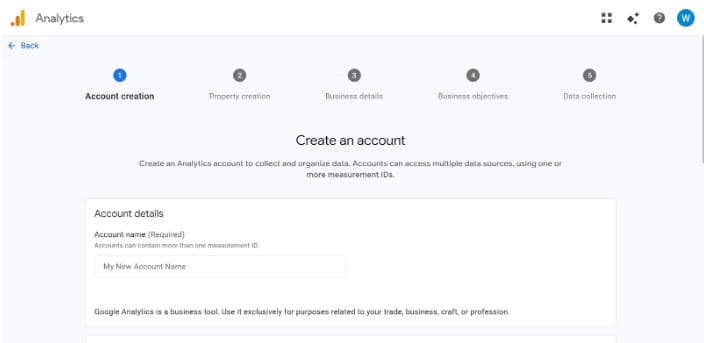
Step 1: Create an account
- Go to analytics.google.com
- Select Start Measuring
- Create an account
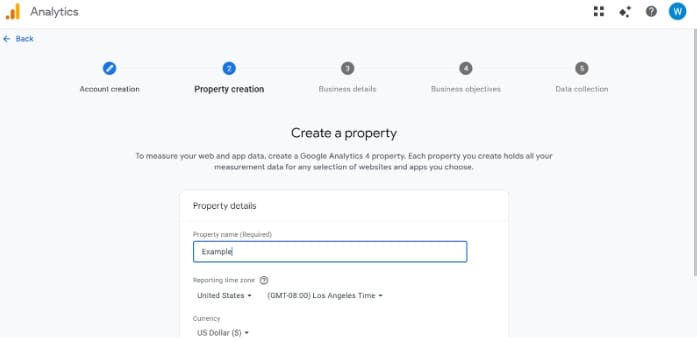
Step 2: Create a property
Type in your organization’s name to create a property and continue.
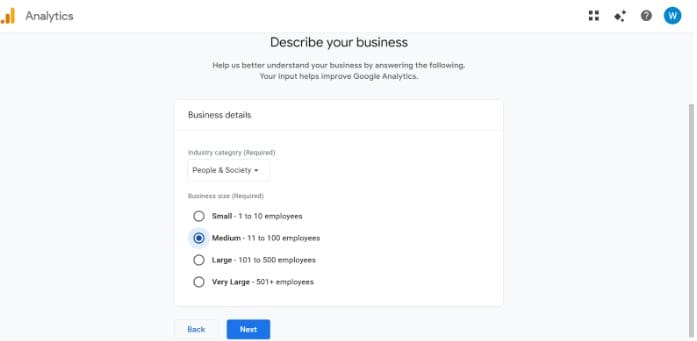
Step 3: Describe your business
Pick your nonprofit area and size.
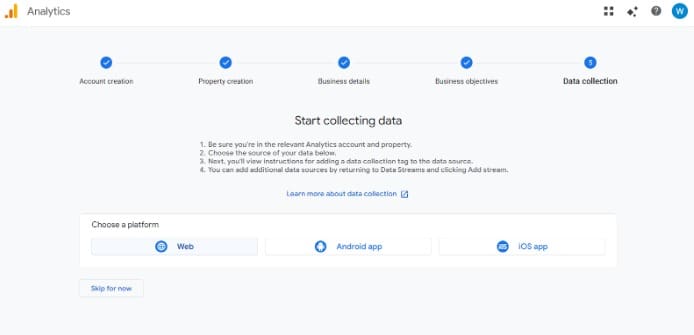
Step 4: Choose a platform
Pick the platform you want to track your data on.
Step 5: Enter the website
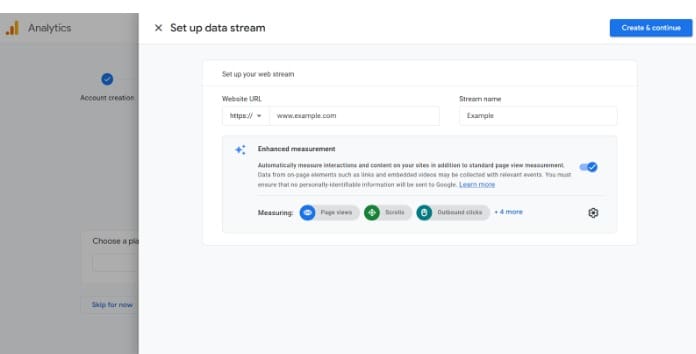
Enter your nonprofit website and turn on Enhanced measurement. Then select Create & continue.
Step 6: Create a Web data stream (Website)
Choose Web, enter your site URL, name the stream (e.g., “Main site”), and click Create stream.
Step 7: Configure Enhanced measurement
In your Web stream settings, make sure Enhanced measurement is turned on.
Toggle on/off the items you want GA4 to auto-track, such as scrolls, outbound clicks, file downloads, site search, and video engagement.
Step 8: Set up a Google Tag
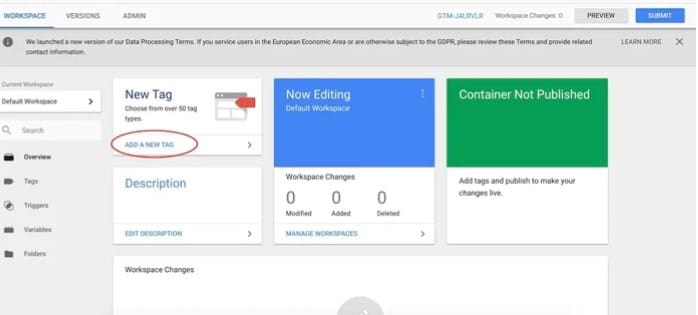
Follow the instructions to set up your Google Tag.
- Option A: Install the Google tag (gtag.js) on every page (or via your CMS/plugin).
- Option B: Use Google Tag Manager and deploy a GA4 Configuration tag.
Make sure your website details are valid, or no data collection will occur.
Step 9: Verify it’s working
- Visit the site
- Check Realtime to see page views/events
- Use DebugView when implementing via GTM or debug mode
For subdomains
If your donation form is hosted elsewhere (subdomain or third-party platform)
Many nonprofits don’t collect gifts on the same domain as their main website. Your donate flow might live on a subdomain (like donate.example.org) or a vendor-hosted checkout on a different domain.
If cross-domain tracking isn’t configured, GA4 attribution can break, donations may appear as referrals from your payment processor/vendor, and campaigns (email, ads, UTMs) can lose credit.
What to do (quick fix checklist):
- Set up cross-domain measurement so GA4 can follow a supporter from your main site to the donation domain without starting a “new” session. In your GA4 Web stream, go to Configure your domains and include your donation domain/subdomain.
- Handle referral attribution by adding payment processors and/or the donation vendor to List unwanted referrals (so they don’t overwrite your campaign source).
- Test end-to-end: Click through a tagged campaign link → land on your campaign page → start a donation → complete it → confirm in GA4 that the conversion keeps the original source/medium (and doesn’t flip to a referral).
Key metrics nonprofits should track in Google Analytics 4
Google Analytics 4 gives you hundreds of data points. Below are the ones nonprofits can track and should pay attention to.
| Category | Metric | What it tells you | Why it matters for nonprofits |
|---|---|---|---|
| Acquisition | Users by source/medium | Where visitors come from | Identifies which campaigns drive awareness |
| Acquisition | New vs Returning Users | First-time vs repeat visitors | Helps measure supporter retention |
| Acquisition | Campaign performance (UTMs) | Traffic from email, social, ads | Shows which outreach efforts work |
| Engagement | Engagement rate | Percentage of engaged sessions | Indicates content quality and relevance |
| Engagement | Average engagement time | Time spent actively interacting | Reveals whether visitors read key pages |
| Engagement | Views per user | Pages viewed per visitor | Signals depth of interest |
| Engagement | Scroll (threshold reached) *For true 25/50/75/100% depth tracking, implement custom events (often via Google Tag Manager) |
How far users scroll | Measures content consumption on long pages |
| Engagement | Outbound clicks | Clicks to external links | Tracks partner or donation platform clicks |
| Conversion | Donation confirmation event | Completed donations | Core fundraising metric |
| Conversion | Donation value | Total revenue generated | Enables nonprofit donor analytics |
| Conversion | Average donation amount | Mean gift size | Helps forecast fundraising goals |
| Conversion | Recurring donation event | Subscription gifts started | Measures long-term donor commitment |
| Conversion | Volunteer form submissions | Completed volunteer interest forms | Tracks non-monetary engagement |
| Conversion | Newsletter signups | Email list growth | Measures supporter pipeline growth |
| Behavior | Top landing pages | First pages visitors see | Evaluates campaign alignment |
| Behavior | Exit rate by page | Where users leave | Identifies friction points |
| Audience | Geographic location | Visitor regions | Supports regional campaign targeting |
| Audience | Device category | Mobile vs desktop usage | Guides donation page optimization |
| Audience | Repeat donation behavior (within GA identity) *For true donor retention and lifetime giving, use your CRM |
Repeat conversion behavior | Strengthens nonprofit donor analytics |
View your data through the donor lifecycle
For a nonprofit, the lifecycle stages mirror the donor journey. Acquisition shows how supporters discover you. Engagement reveals whether they explore your programs. Monetization reflects completed donations. Retention highlights repeat engagement and recurring gifts.
When reviewed through this lens, Google Analytics for nonprofits becomes easier to interpret. You are not reading technical reports; you are reviewing stages of supporter commitment.
How donation tracking changes decision-making
For many nonprofits, Google Analytics sits installed and untouched because you might not know how to track beyond the basics. Pageviews go up and down. Reports get opened once in a while.
To make a difference in decision-making, you need to track donations properly. Set donation completions as key events (formerly conversion) in Google Analytics 4 and start measuring outcomes.
Now you can answer questions that matter to leadership:
- Which campaigns actually generate funding?
- Does our email list convert better than search traffic?
- Are mobile users completing donations at the same rate as desktop users?
- Are returning visitors more likely to give?
Google positions GA4’s ecommerce reporting as directly applicable to digital fundraising. Replace “cart” with “donation form.” Replace “purchase” with “completed gift.”
The structure is similar. Users enter the form, some complete it, and some exit.
Advanced Google Analytics 4 features
Once the basics are in place, Google Analytics for nonprofits becomes much more powerful.
Google Analytics 4 does not require you to master every feature. It requires you to configure the right ones. When key events (formerly conversion), custom events, and lifecycle reporting are aligned with your mission, the platform becomes a financial visibility tool instead of a technical dashboard.
1. Create conversion events that reflect your mission
In Google Analytics 4, key events (formerly conversion) replace what Universal Analytics used to call goals. For a nonprofit, key events should include:
- Completed donations
- Event registrations
- Volunteer signups
- Email subscriptions
You can also create a conversion specifically for an annual appeal form. That gives you clean reporting for that campaign alone.
2. Use custom events for quantifiable actions
GA4 tracks page views, scrolls, and outbound clicks automatically. That does not cover everything.
You may want to track:
- Views of a specific donation form
- Clicks on a “Give Now” button
- Downloads of an annual report
- Video plays on a campaign page
Custom events help you measure intent, not just outcomes. That layer of nonprofit donor analytics shows who showed interest and who completed the action.
3. Build reports that match your structure
Standard reports are useful. Custom reports are better. GA4’s report builder allows you to organize:
- Campaign performance
- Donation revenue by source
- Landing page performance
- Device conversion rates
This removes noise and keeps leadership focused on the numbers that matter.
4. Use explorations to understand donor journeys
Explorations go deeper than standard reports. They allow segmentation and path analysis.
For example, you can:
- See how many people viewed a donation form but did not complete it
- Compare users who donated to those who left
- Track behavior across multiple visits
This connects directly to fundraising improvement. If many visitors view a form but exit before donating, that page needs attention.
5. Review lifecycle reports with a donor mindset
GA4’s lifecycle reports follow acquisition, engagement, monetization, and retention.
For a Google nonprofit organization, this aligns closely with the donor lifecycle:
- How supporters first discover you
- How they engage with content
- When they give
- Whether they return
That structure makes nonprofit data analytics easier to interpret.
6. Use lifetime and cohort reports for long-term insight
Lifetime reports help identify which campaigns bring in supporters who donate again.
Cohort explorations allow you to group users, such as:
- Donors acquired during a year-end campaign
- Recurring donors
- Supporters from a specific region
This is where analytics shifts from short-term campaign reporting to long-term fundraising strategy.
7. Define audiences based on supporter behavior
GA4 allows you to build audiences based on actions, such as users who completed a donation or users who viewed a specific campaign page.
This allows you to analyze behavior patterns among high-value supporters and compare them to those of general visitors. Over time, this strengthens nonprofit donor analytics by highlighting which acquisition sources attract long-term contributors.
Using Google Analytics to improve your nonprofit website
Using Google Analytics for nonprofits is all about improving results with evidence. Here is how to apply what you see inside Google Analytics 4 directly to your website.
RallyUp can integrate with Google Analytics for complete campaign trackingImprove low-engagement pages
Review engagement rates, average engagement times, and exit data for key pages, including campaign landing pages, program descriptions, and donation forms.
Insight: If visitors arrive but leave quickly, the issue is often clarity or structure.
Solution: Tighten headlines, simplify messaging, and make the call to action more visible. These changes are operational, not cosmetic. Small improvements in clarity can produce measurable lifts in conversions.
Strengthen SEO using real visitor behavior
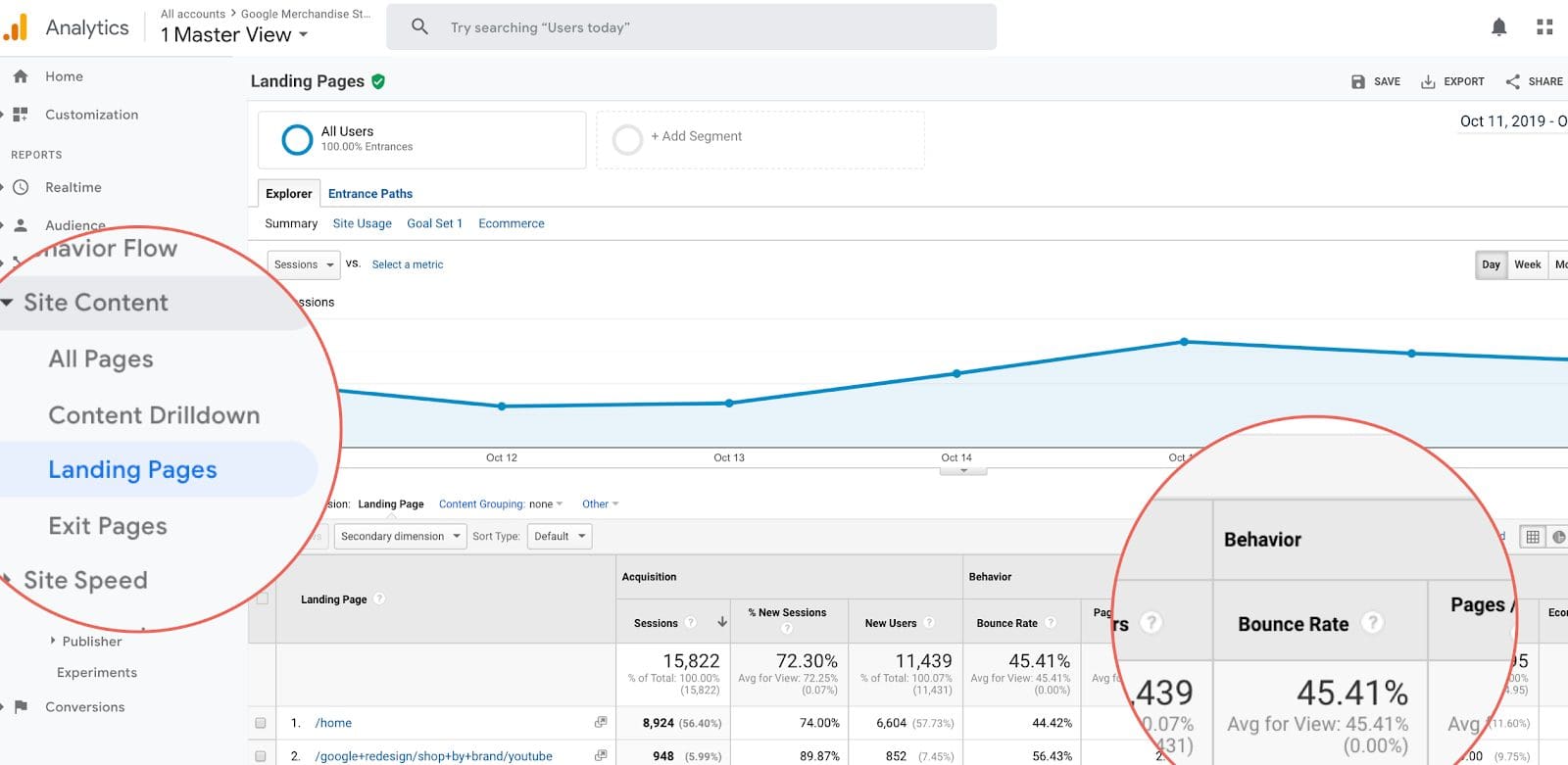
High bounce or low engagement on a campaign landing page often signals misalignment between the promise made in an email marketing campaign or ad and the content delivered on the page. GA4 helps you identify and correct that gap.
Insight: Strong traffic with low engagement signals a content mismatch. Strong engagement with low conversions signals unclear next steps.
Solution: Expand high-performing topics to capture additional search demand. Add clearer calls to action on pages that attract traffic but do not convert. Align page intent with fundraising or signup opportunities.
Optimize donation flow using conversion data
Review donation confirmation events, conversion rates by device, and drop-off behavior between donation form views and completions.
Insight: Lower mobile conversion rates or high form abandonment indicate friction within the donation experience.
Solution: Reduce required fields, simplify layout, improve page speed, and ensure payment options are clearly displayed. Small reductions in friction often increase completed donations without increasing traffic.
Replicate what already works
Review landing pages and campaigns with the highest conversion rates or strongest donation value.
Insight: High-performing pages often share structural similarities such as focused messaging, a single primary call to action, and visible trust signals.
Solution: Document the structure and apply it to underperforming campaigns. Standardize effective design patterns across fundraising pages to improve consistency and results.
Common mistakes nonprofits make with Google Analytics 4
Google Analytics for nonprofits rarely breaks. It just sits there collecting incomplete data while teams assume everything is working.
Not filtering internal traffic
If staff members regularly visit the website, internal traffic can distort engagement rates and conversion data.
Without filtering internal IPs or using internal traffic, reports may overstate activity and hide real performance patterns.
Letting “Direct” traffic hide the truth
When campaigns are not tagged with UTMs, traffic gets grouped under “Direct.” That masks whether email, social, or partnerships are actually driving donations.
Over time, this distorts decision-making. A campaign may appear ineffective when the tracking is simply incomplete. Consistent tagging protects your nonprofit data analytics from becoming misleading.
Installing GA4 and never revisiting it
Some nonprofits set up Google Analytics once and assume it will continue working indefinitely. Donation platforms change, website themes get updated, and tracking codes can stop firing without anyone noticing.
If events are not tested periodically, months of conversion data can disappear before the issue is caught.
Building dashboards no one uses
GA4 allows deep customization, so it is tempting to create complex reports immediately. Lean teams rarely maintain advanced dashboards since they need a focused view of key events, revenue, and traffic sources.
When reporting becomes overwhelming, usage drops. Simplicity increases consistency.
Ignoring mobile performance
For many nonprofits, more than half of website traffic comes from mobile devices.
If donation forms are not optimized for mobile, conversion rates suffer. This gap often goes unnoticed unless device-level data is reviewed regularly.
Integrating Google Analytics 4 with your CRM and fundraising tools
Google Analytics for nonprofits should work alongside your CRM and CMS platforms, not duplicate them.
Keep systems in their lanes
Your CRM manages donor records, gift history, recurring contributions, and communication logs. Google Analytics 4 measures how supporters interact with your website before and during a donation. Trying to make one system do both jobs creates confusion.
Make sure the donation revenue is passing correctly
If donation values are not being sent to GA4, revenue reports will not reflect reality.
Confirm that:
- Completed donations trigger conversion events
- Gift amounts are passed as event parameters
- Recurring gifts are distinguishable from one-time gifts
This ensures your campaign reporting matches your fundraising platform.
Use analytics to evaluate acquisition quality
Instead of asking how many clicks a campaign generated, use GA4 to see which traffic sources produce completed gifts and higher average donation amounts.
For simple, built-in campaign tracking without heavy setup, use RallyUp’s fundraiser reporting.
Governance and data discipline for nonprofit analytics
Analytics needs structure. Without it, data becomes background noise.
1. Assign ownership
One person should be responsible for reviewing Google Analytics monthly. It does not need to be a technical role. It just needs consistency.
2. Document your tracking setup
Maintain a simple internal record that lists:
- Events being tracked
- Events marked as conversions
- How donation values are passed
- UTM structure used for campaigns
When staff changes, this prevents confusion.
3. Check data retention early (so you don’t lose analysis history)
In GA4, exploration-level analysis depends on your data retention settings.
Early in setup, go to Admin → Data settings → Data retention and set retention as long as your account allows (commonly up to 14 months for standard properties).
If you need long-term or more advanced analysis, consider linking GA4 to BigQuery so you can store event-level data outside GA4’s UI retention limits.
4. Test donation tracking regularly
Tracking can break when websites are redesigned or platforms are updated.
Every few months:
- Make a small test donation
- Confirm the event appears in GA4
- Confirm the value matches the gift
This protects your reporting accuracy.
5. Protect donor privacy
Do not send personally identifiable information to GA4. No names. No email addresses. No payment data.
Analytics should measure behavior patterns, not store donor identities.

Consent & compliance note: If you have visitors in the EEA/UK and/or you use ads or remarketing, implement a consent banner and consider Google Consent Mode so measurement and ad features can remain compliant when users decline cookies.
6. Keep reporting focused
Track the metrics that influence fundraising and engagement. If a report does not help you make a decision, it does not need to be in your dashboard.
How to use Google Analytics 4 during a live fundraising campaign
During a year-end appeal, Giving Tuesday, or an emergency campaign, use Google Analytics 4 for real-time visibility.
Live Campaign Checklist
This process happens quickly and prevents hours of post-campaign troubleshooting. Use real-time reporting to catch issues while the campaign is still running, not after it ends.
RallyUp includes built-in tracking for your entire fundraising campaignConclusion: Make Google Analytics work for your mission
Google Analytics for nonprofits should give you clarity rather than being a chore. When donations, campaigns, and key actions are tracked correctly, you can see what drives funding and what needs improvement. That is the core of nonprofit data analytics.
You need clean conversion tracking, consistent tagging, and regular review. With that foundation, GA4 becomes a practical tool for better fundraising decisions.
If you are running raffles, events, or peer-to-peer campaigns, RallyUp’s end-to-end fundraising platform simplifies tracking from the start. Pair strong fundraising software with solid analytics, and your data starts working for your mission.
Track your fundraisers all in one place with RallyUp todayFAQs about Google Analytics for nonprofits
Google Analytics 4 (GA4) replaced Universal Analytics in 2023. It is now the standard version of Google Analytics used by nonprofits and businesses.
GA4 has a learning curve, especially for teams without analytics experience. Reports can feel complex, and donation tracking requires proper setup to be accurate.
Yes, Google Analytics 4 is free to use for nonprofits and other organizations. It is also available through Google for Nonprofits, though it is not a paid benefit.
Now that you’ve seen it in action, are you ready to start fundraising?
Get Started