Learn how to permanently delete your RallyUp account in just a few steps. Includes important information about what happens to your Campaigns, reports, and data after deletion.
RallyUp allows users to permanently delete their accounts at any time for any reason. When you delete your account, all associated Campaigns, reports, and personal information are permanently removed from the platform. This guide explains the deletion process, what data is affected, and important considerations before proceeding.
What Happens When I Delete My RallyUp Account?
Short answer: Deleting your RallyUp account permanently removes your user profile, all Campaigns you created, associated reports, and personal data. This action cannot be undone.
Detailed explanation: Account deletion is irreversible. Once you confirm deletion, RallyUp cannot retrieve your account, Campaigns, donor information, fundraising reports, or any other data associated with your profile. You will lose access to all historical Campaign data and will need to create a new account if you wish to use RallyUp again in the future.
Before You Begin
Important considerations before deleting your account:
- Ensure you have downloaded any reports or data you need for record-keeping.
- Export donor information and transaction records for tax purposes.
- Withdraw any remaining funds from your payment processor (Stripe or PayPal).
- Save Campaign images, descriptions, or content you may want to reuse.
- Consider archiving Campaigns instead of deleting your entire account if you only want to pause fundraising.
- You must know your account login credentials and password to delete your account.
Time to complete: Approximately 2-3 minutes
Delete Your RallyUp Account
Follow these steps to permanently delete your account:
- Go to rallyup.com and log in.
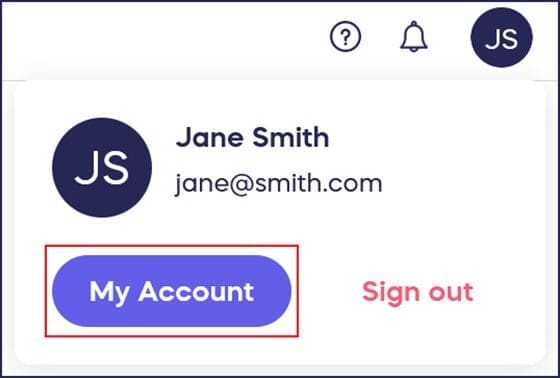
- Click on the circle with your initials in the upper right corner of your screen, then select My Account:
- Select Edit Profile:
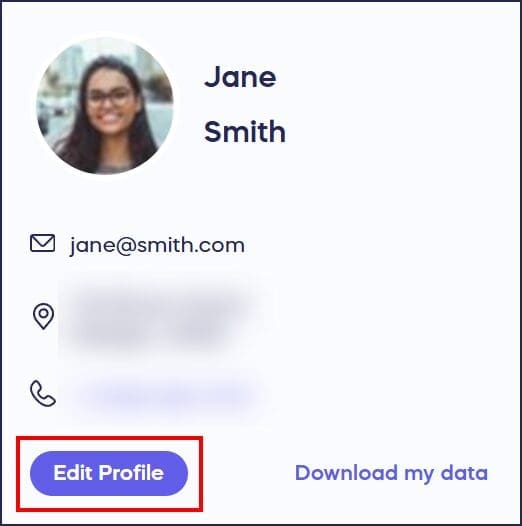
- Select Delete account at the bottom of your profile menu:

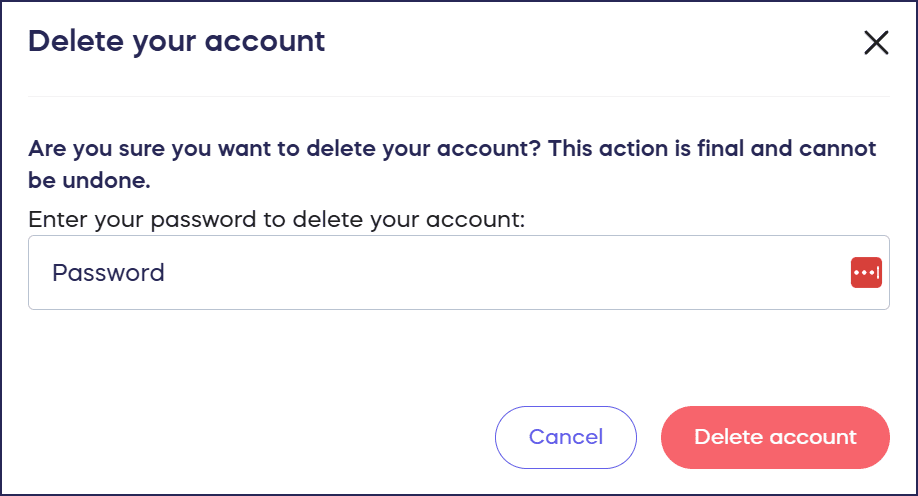
- Enter your password and select Delete account:
What Happens Next
After confirming deletion, your account is immediately and permanently removed from RallyUp. You will be automatically logged out and redirected to the login page. You cannot recover your account, Campaigns, or any associated data once deletion is complete.
Frequently Asked Questions
Why would I delete my RallyUp account?
Users typically delete accounts when they’ve completed their fundraising goals, no longer need the platform, want to remove their data from the platform, or are switching to a different fundraising solution.
What’s the difference between deleting my account and deleting a Campaign?
Deleting your account removes your entire user profile and all associated Campaigns. Deleting individual Campaigns removes only those specific fundraisers while preserving your account and other Campaigns. If you only want to remove one fundraiser, delete or archive that Campaign instead of deleting your whole account.
Can I create a new account after deletion?
Yes, you can create a new RallyUp account at any time using the same or different email address. However, none of your previous account data, Campaigns, or reports will be available in the new account.
Can I recover my account after deleting it?
No, account deletion is permanent and irreversible. RallyUp cannot retrieve your account, Campaigns, reports, or any associated information once you confirm deletion. You would need to create an entirely new account to use RallyUp again.
What happens to my active Campaigns when I delete my account?
All Campaigns associated with your account are permanently deleted. Donors will no longer be able to access your Campaign Pages, and you will lose all fundraising data and reports from those Campaigns.
Will I lose access to my donor reports and transaction history?
Yes, all reports and transaction history are permanently deleted with your account. Download and save any reports you need before deleting your account, as this data cannot be recovered after deletion.
Can someone else delete my account without my permission?
No, RallyUp only allows account deletion if you know the login credentials and password for that account. This security measure prevents unauthorized account deletion.
What if I just want to pause my Campaigns temporarily?
Instead of deleting your entire account, consider contacting our customer service team to pause your Campaign by emailing success@rallyup.com or by clicking on the chat bubble in the bottom right corner of your screen. This preserves your account data while stopping new donations. You can reactivate Campaigns later without losing historical information.
Do I need to cancel recurring donations before deleting my account?
If you have recurring donations set up through your Campaigns, you should cancel them before deleting your account. Deleting your account does not automatically cancel recurring payment schedules in payment processors.
How to Update or Cancel Your Recurring Donation
Alternative to Account Deletion
Pause Campaigns Instead
If you want to stop fundraising temporarily but may need your account or data later, consider pausing individual Campaigns rather than deleting your entire account. This preserves all your historical data while preventing new contributions. You’ll need to contact our customer service team in order to pause a Campaign by emailing success@rallyup.com or by clicking on the chat bubble in the bottom right corner of your screen.
Turn Off Donation Pages
You can disable specific Donation Pages without deleting Campaigns or your account, giving you flexibility to pause and resume fundraising as needed.
How to Turn Off a Donation Page
Related Account Management Tasks
Need to make other changes to your account? You might be looking for:
How to Change the Name or Email Associated with Your RallyUp Account
Need Help?
If you’re having trouble deleting your account or have questions about the deletion process, contact our support team:
- Live chat: Visit rallyup.com and click the purple message button at the bottom right during business hours
- Knowledge Base: Search our Help Center for additional articles and guides
Important: Our support team cannot delete your account for you. You must complete the deletion process yourself using your account credentials for security purposes.