Keep your Participants’ last names private on your public fundraising pages.
RallyUp takes the privacy of all individuals and organizations using our platform seriously. For this reason, we make it easy to keep Participants’* last names hidden from public pages. This option is handy for schools or fundraisers run among private groups, such as organizations with sensitive information or high security levels.
*Terminology may differ according to Campaign settings.
How do I hide Participant last names?
- Go to Account Navigation in the left menu and select Campaigns.
- If you have chosen a list view, click on the Campaign title. If you have chosen a grid view, click on the Campaign image.
- Select Campaign Setup.
- Go to Options in the timeline at the top, then select Peer-to-Peer Options.
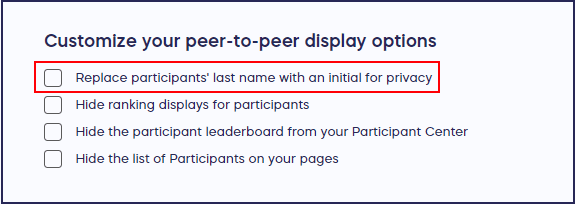
- Scroll down to Customize your peer-to-peer display options and check the box next to Replace participants’ last names with an initial for privacy:
- Select SAVE.
How do hidden last names appear on my Campaign Page?
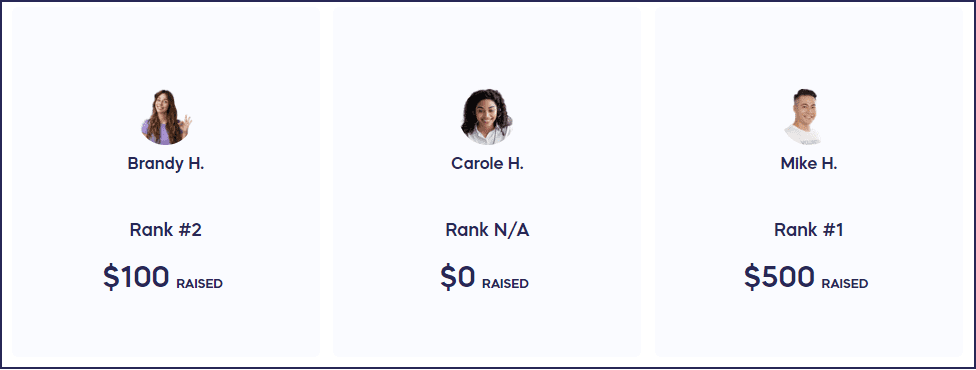
After you’ve made these changes, this is how your Participants’ names will appear:
Frequently Asked Questions
Why would I want to hide Participant last names?
Hiding last names protects Participant privacy, which is especially important for schools, fundraisers with minors, or organizations with sensitive information or high security requirements. This setting keeps full names private while still recognizing Participants publicly.
What happens when I hide Participant last names?
When you enable this setting, Participant last names are replaced with an initial on all public pages. For example, “Sarah Johnson” would appear as “Sarah J.” on your Campaign Page and Participant Center.
Can I change this setting after my Campaign goes live?
Yes, you can enable or disable the last name privacy setting at any time, even after your Campaign is live. Changes will take effect immediately on all public-facing pages.
Does hiding last names affect Participant registration?
No, Participants still need to provide their full name during registration. The privacy setting only affects how names are displayed publicly on your Campaign Page and related pages—your internal records remain complete.
When should I use this privacy feature?
Consider using this feature when working with schools, youth organizations, private groups, or any fundraiser where Participant privacy is a priority. It’s also useful for organizations with sensitive information or high security levels.