Text your donors a direct link to your fundraiser using a unique keyword.
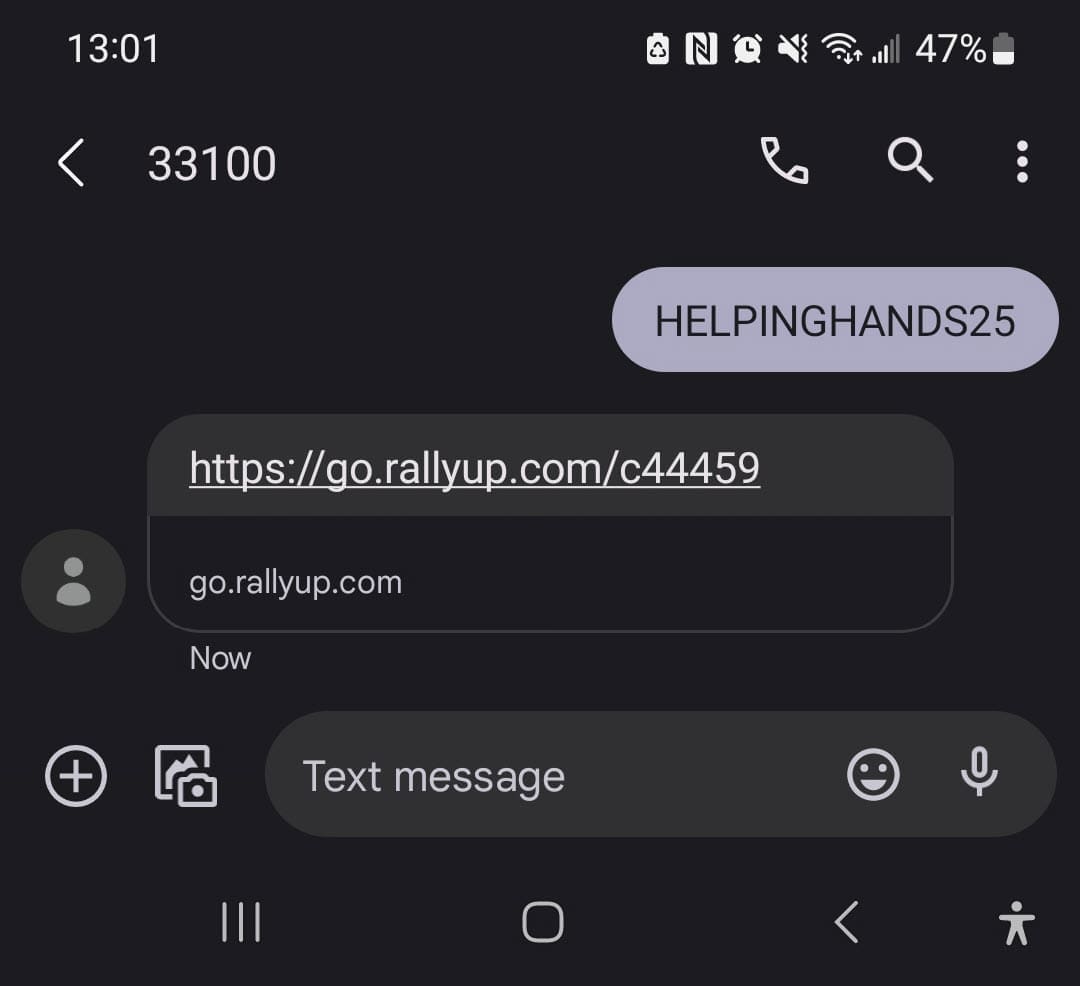
Text-to-Give makes it easy for donors to access your Campaign Page from their mobile devices. When they text a unique keyword of your choosing to 33100, they’ll receive a response with a link to your Campaign Page.
You can add this feature to any fundraiser, but it’s ideal for in-person events, Livestreaming, and ads.
What should I know before enabling Text-to-Give?
- Text-to-Give is powered by Twilio. Twilio’s Messaging Policy forbids sending messages related to cannabis and CBD or the marketing or sale of a cannabis product since they aren’t legal everywhere in the United States. If you or your donors are based in the US and your Campaign involves cannabis or CBD products, you shouldn’t use this feature.
- Text-to-Give does not enable Auction outbid notifications. See this article to learn how Auction bidders can receive SMS notifications that they’ve been outbid: What Is a Charity Auction and How Does It Work?
- Your Text-to-Give keyword will start working as soon as your Campaign goes live. The keyword will not work while your Campaign is still in draft.
How do I enable Text-to-Give on my Campaign?
- Go to Account Navigation in the left menu and select Campaigns.
- If you have chosen a list view, click on the Campaign title. If you have chosen a grid view, click on the Campaign image.
- Select Campaign Setup.
- Go to Page Design the timeline at the top.
- Scroll down to Optional settings and select Show optional settings.
- Scroll down to Promote your Campaign with text-to-give and click on the toggle so it shifts to the right.
- Enter a keyword. The keyword should be easy for your donors to remember. (Examples: GIVE2025, DONATE NOW, SAVEWHALES25)
- Select Check Availability to see if your chosen keyword is available. If it’s not, try adding numbers or using a different word.
- If you have donors outside of the US, you can check the box next to Make text-to-give available to donors outside the US. International donors can use this number if they’re able to receive US-based messages on their mobile device.
- Select SAVE.
How do I enable Text-to-Give on my Donation Page?
- Go to Organization Settings in the left menu and select Donation Pages.
- Click on the Donation Page title.
- Select Donation Page Setup.
- Go to Checkout in the timeline at the top.
- Scroll down to Promote your Donation Page with text-to-give and click on the toggle so it shifts to the right.
- Enter a keyword. The keyword should be easy for your donors to remember. (Examples: GIVE2025, DONATE NOW, SAVEWHALES25)
- Select Check Availability to see if your chosen keyword is available. If it’s not, try adding numbers or using a different word.
- If you have donors outside of the US, you can check the box next to Make text-to-give available to donors outside the US.
- Select SAVE.
What do donors see when they use Text-to-Give?
When donors text your selected keyword to 33100, they get a message back with a link to your fundraising page:
Frequently Asked Questions
What is Text-to-Give and how does it work?
Text-to-Give allows donors to quickly access your Campaign Page by texting a unique keyword to 33100. They instantly receive a text message back with a direct link to your fundraising page, making it easy to donate from their mobile devices.
Can I use Text-to-Give for Campaigns involving cannabis or CBD products?
No, if you or your donors are based in the United States and your Campaign involves cannabis or CBD products, you cannot use Text-to-Give. This restriction exists because Twilio’s Messaging Policy prohibits cannabis-related messages since these products aren’t legal everywhere in the US.
What happens if my chosen Text-to-Give keyword is already taken?
If your keyword isn’t available, try adding numbers (like GIVE2025) or using a different word combination. Keywords should be easy to remember while being unique enough to be available in the system.
Can international donors use Text-to-Give?
Yes, you can enable Text-to-Give for donors outside the US by checking the appropriate box during setup. International donors can use the US-based number (33100) if their mobile device can receive US-based text messages.
When does my Text-to-Give keyword start working?
Your Text-to-Give keyword will start working as soon as your Campaign goes live. The keyword will not function while your Campaign is still in Draft Mode, so make sure to publish your Campaign before promoting the keyword.