Simplify the fundraising process by allowing Pledge to collect and distribute funds on your behalf.
The majority of RallyUp users should set up a Stripe or PayPal account for the easiest and most direct way to receive the funds you raise. If your organization is a registered 501(c) and can’t set up a Stripe or PayPal account, Pledge can collect and distribute funds on your behalf.
What should I know about Pledge fees and requirements?
- Pledge charges fees in exchange for its services. RallyUp does not receive any portion of the fees charged by Pledge.
- If your Campaign uses Flex pricing, a Platform Fee will also apply.
- Flex pricing offers a variety of ways to share fees with donors and offset costs: How-to: Pass Campaign and Donation Page Fees on to Donors.
- Campaigns using Pledge are not eligible for Stripe or PayPal’s discounted nonprofit payment processing rate.
What will my supporters experience at checkout when I use Pledge?
From your supporters’ perspective, the checkout experience with Pledge looks and feels the same as it does with Stripe or PayPal. There are no additional steps for your supporters — they go through the standard RallyUp checkout flow.
In an Auction, supporters create a RallyUp account and pre-register a payment method before they begin bidding. When the Auction ends and payment is collected, supporters are charged automatically with no extra action required on their part.
Keep in mind that while Pledge delivers a smooth experience for your supporters, their fees are typically higher than those charged by Stripe or PayPal. If your organization is able to set up Stripe or PayPal, those options are generally more cost-effective for your fundraiser.
What is Pledge and how does it work?
You’ll be offered Pledge as a funding option if you’re fundraising for a U.S. registered 501(c) organization.
Pledge charges the following fees:
- 3% handling fee
- $5 disbursement fee per beneficiary organization
- 2.9% + $0.30 payment processing fee (additional fees may apply)
Funds distribution: Funds will automatically be delivered to the organization(s) within 15 days of the end of each calendar month. Pledge can issue funds via paper check or ACH payment. You can contact Pledge at https://www.pledge.to/contact.
How do I set up Pledge as my funding option?
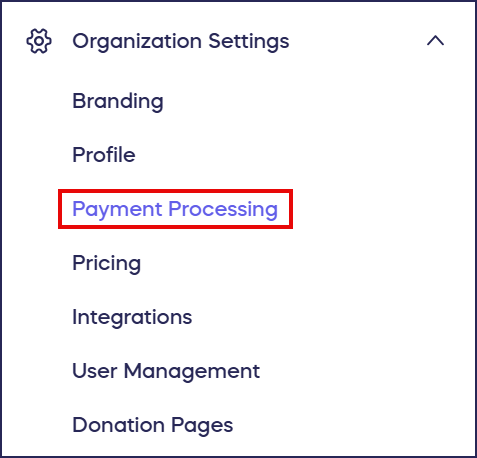
- Go to Organization Settings in the left menu and select Payment Processing:
- Scroll down to Alternative options and select Use Pledge (if your organization qualifies to use Pledge, you’ll automatically see it as a payment option):

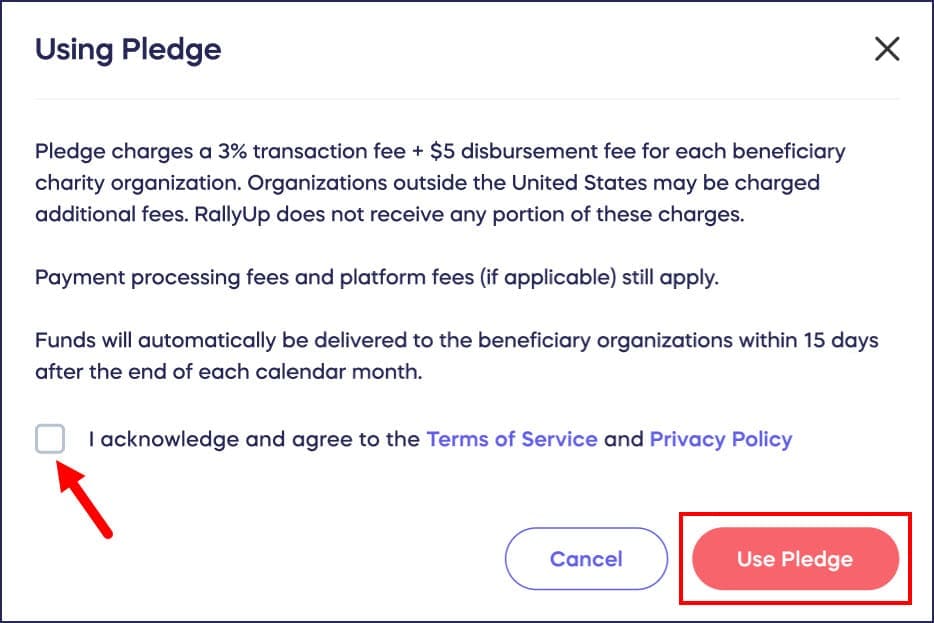
- Read the disclaimer and check the acknowledgment box, then select Use Pledge:
What do I do after I select Pledge?
After you select Pledge in RallyUp, Pledge sends a welcome email to your organization’s email address with instructions for completing your account setup. Take these three steps to finish setting up Pledge and start receiving funds:
- Claim or log in to your Pledge account. Open the welcome email from Pledge and follow the link to claim your account. If your organization already has a Pledge account, log in using your existing credentials. If you don’t see the email, check your spam folder or contact Pledge at https://www.pledge.to/contact.
- Activate ACH payments. In your Pledge account, go to the Disbursements tab in the Pledge Impact Hub and activate ACH so Pledge can send your payouts by bank transfer instead of paper check. ACH payouts typically arrive faster than a mailed check and reduce the risk of delays.
- Explore the Pledge Impact Hub. Once you’re logged in to Pledge, visit the Pledge Impact Hub to access donor data and giving reports for your organization. This is where you can track the donations Pledge collects and distributes on your behalf.
Frequently Asked Questions
What organizations are eligible to use Pledge?
Pledge is available to U.S. registered 501(c) organizations. If your organization qualifies, you’ll automatically see Pledge as a payment option in your settings.
What is the Pledge Impact Hub?
The Pledge Impact Hub is a dashboard inside your Pledge account where you can view donor data and reports for the funds Pledge collects and distributes on your behalf. Log in to your Pledge account at https://www.pledge.to to access it.
How do I activate ACH with Pledge?
After claiming your Pledge account, log in and go to the Disbursements tab in the Pledge Impact Hub to activate ACH. Once active, Pledge will send your payouts by bank transfer instead of paper check, which typically arrives faster. Contact Pledge at https://www.pledge.to/contact if you need help activating ACH.
I didn’t receive a welcome email from Pledge after selecting it in RallyUp. What should I do?
Check your spam or junk mail folder first. If you still don’t see it, contact Pledge directly at https://www.pledge.to/contact to request that they resend the account setup email.
How long does it take to receive funds through Pledge?
Pledge automatically delivers funds within 15 days of the end of each calendar month via paper check or ACH payment.
Can I use Pledge if I have a Stripe or PayPal account?
While you can choose Pledge if you qualify, most organizations should use Direct Funds through Stripe or PayPal for faster processing, lower fees, and eligibility for nonprofit payment processing discounts. Choose Pledge only if you cannot set up Stripe or PayPal.
Will my supporters have to do anything extra to check out when I use Pledge instead of Stripe or PayPal?
No. The checkout experience for supporters is the same whether you use Pledge, Stripe, or PayPal. Supporters go through the standard RallyUp checkout flow with no additional steps required.
Does using Pledge affect how bidders participate in an Auction?
No. Auction bidders create a RallyUp account and pre-register a payment method before bidding, just as they would with any other funding option. When the Auction closes, payment is collected automatically. Pledge does not add any extra steps to the bidder experience.
Can my school organization use Pledge if we don’t have 501(c) status?
Pledge is only available to registered US 501(c) organizations.