Engage viewers and boost donations with built-in Livestream features.
RallyUp’s Livestream feature helps you connect with your audience through a variety of interactive activities that you can mix and match to create a unique virtual fundraising event. All these activities are built directly into your Livestream Studio, where you can start, end, and manage your Livestream without juggling multiple platforms or tools. You and your donors access everything from one webpage, creating a seamless experience that keeps viewers engaged and inspired to donate.
What interactive activities can I add to my Livestream?
RallyUp provides six core interactive features that work together to create engaging virtual fundraising events:
- Trivia and survey questions entertain viewers while teaching them about your mission, and you can even require donations to participate.
- The customizable donation button lets you set fixed amounts for specific needs.
- Item spotlighting promotes specific Storefront products, auction items, or Sweepstakes entries during your broadcast to fuel interest and competition.
- Screen sharing capabilities allow you to display presentations, slideshows, or data visualizations that highlight key information.
- Pre-recorded video streaming lets you play emotional mission videos or testimonials without interrupting your live flow.
- The chat feature enables real-time conversation between presenters and viewers, fostering community and allowing instant donor feedback and questions.
How do trivia and surveys engage my Livestream audience?
Trivia and survey questions create fun, interactive moments that break up longer presentation segments and keep viewers actively participating rather than passively watching:
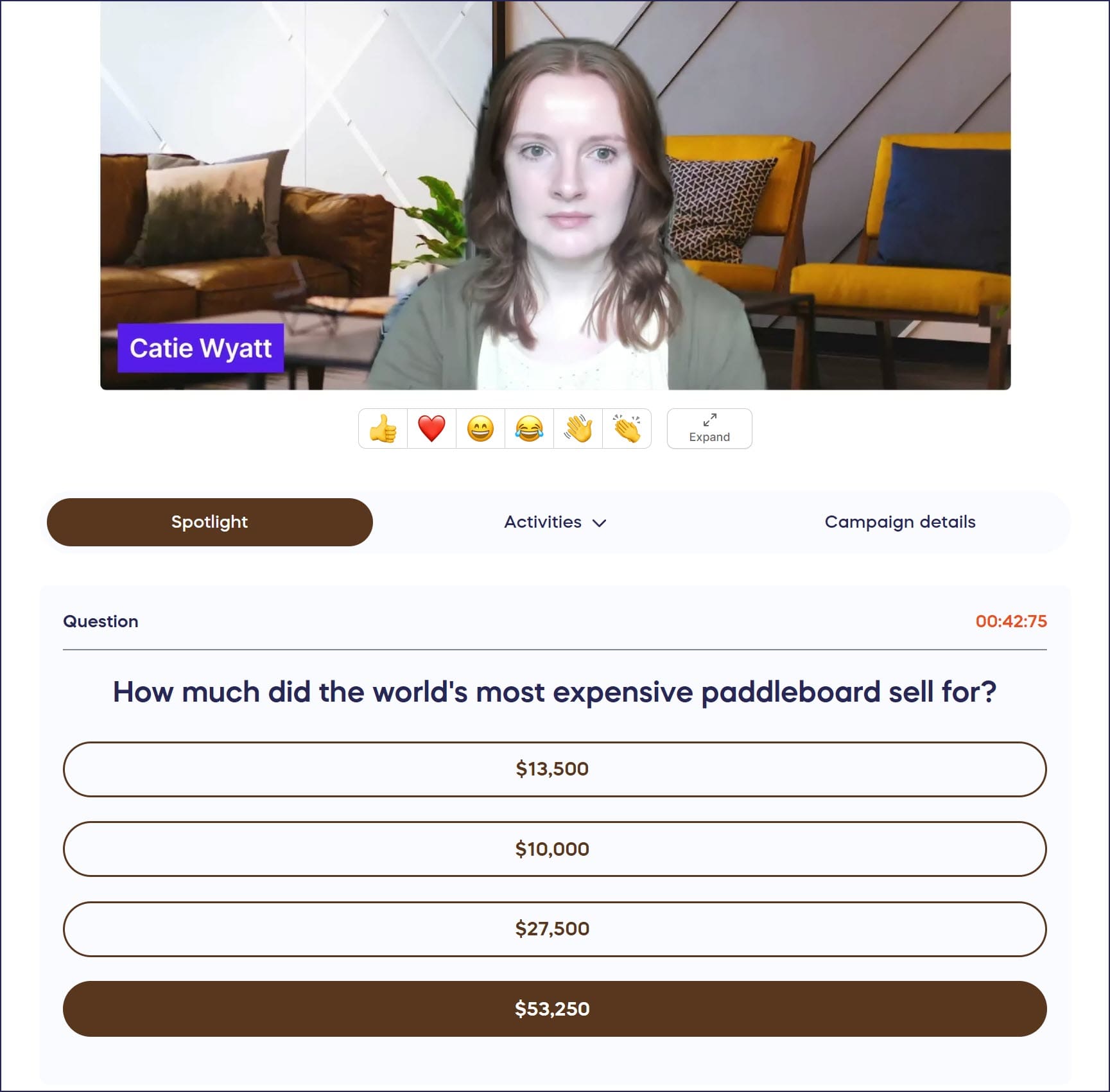
- Design questions that educate donors about your organization’s history, mission, and impact.
- Create lighthearted icebreakers that help viewers connect with each other.
- Require donations to answer questions to add a fundraising element—viewers who want to participate must contribute, directly tying engagement to revenue.
This gamification approach works especially well for younger audiences and creates friendly competition as viewers see real-time responses.
Learn more about implementing these features in Use Trivia or Surveys During Your Livestream to Engage Donors.
How does the customizable donation button work?
The customizable donation button transforms your Livestream into a powerful fundraising tool by setting specific donation amounts tied to tangible outcomes. Instead of asking for generic contributions, you can program the button to request exact amounts that fund specific needs—for example, $50 for school supplies, $100 for a day of meals, or $500 for medical equipment:

This approach helps donors understand the direct impact of their contributions and inspires them to give more because they see exactly what their money accomplishes.
Follow the instructions in Run a Fund-a-Need or Paddle Raise During Your Livestream to set up this feature.
How do I spotlight items during my Livestream?
Item spotlighting highlights specific Storefront products, Auction items, or Sweepstakes entries on viewers’ screens during your broadcast:
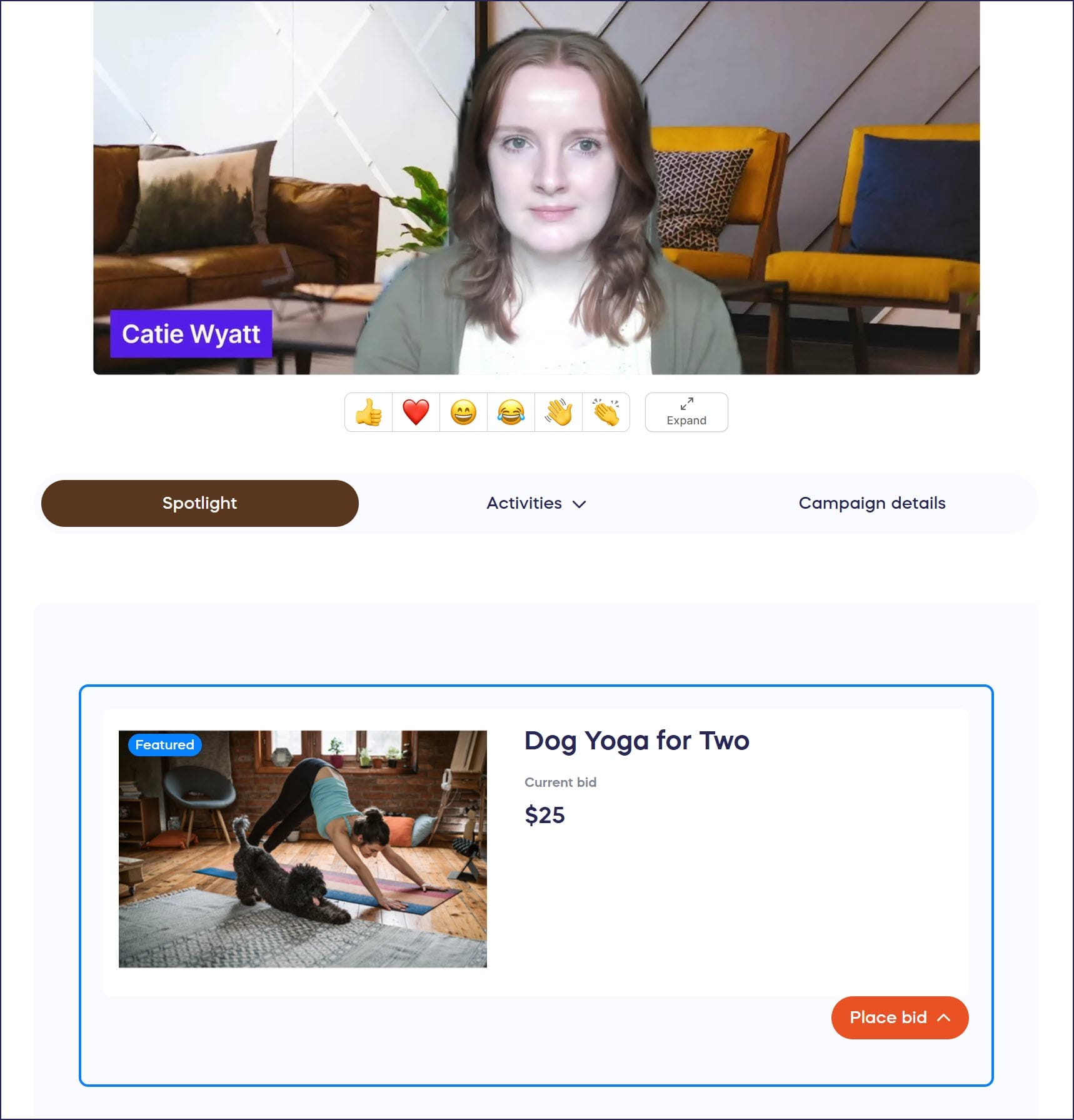
This feature directs attention to particular items you’re discussing, making it easy for viewers to bid, purchase, or enter without searching through your entire Campaign.
The spotlight appears as an overlay on the Campaign Page visible to all viewers. Learn the complete process in Spotlight an Item During Your Livestream.
What can I do with screen sharing and pre-recorded content?
Screen sharing and pre-recorded content capabilities give you professional presentation options that enhance your Livestream’s visual appeal and emotional impact:
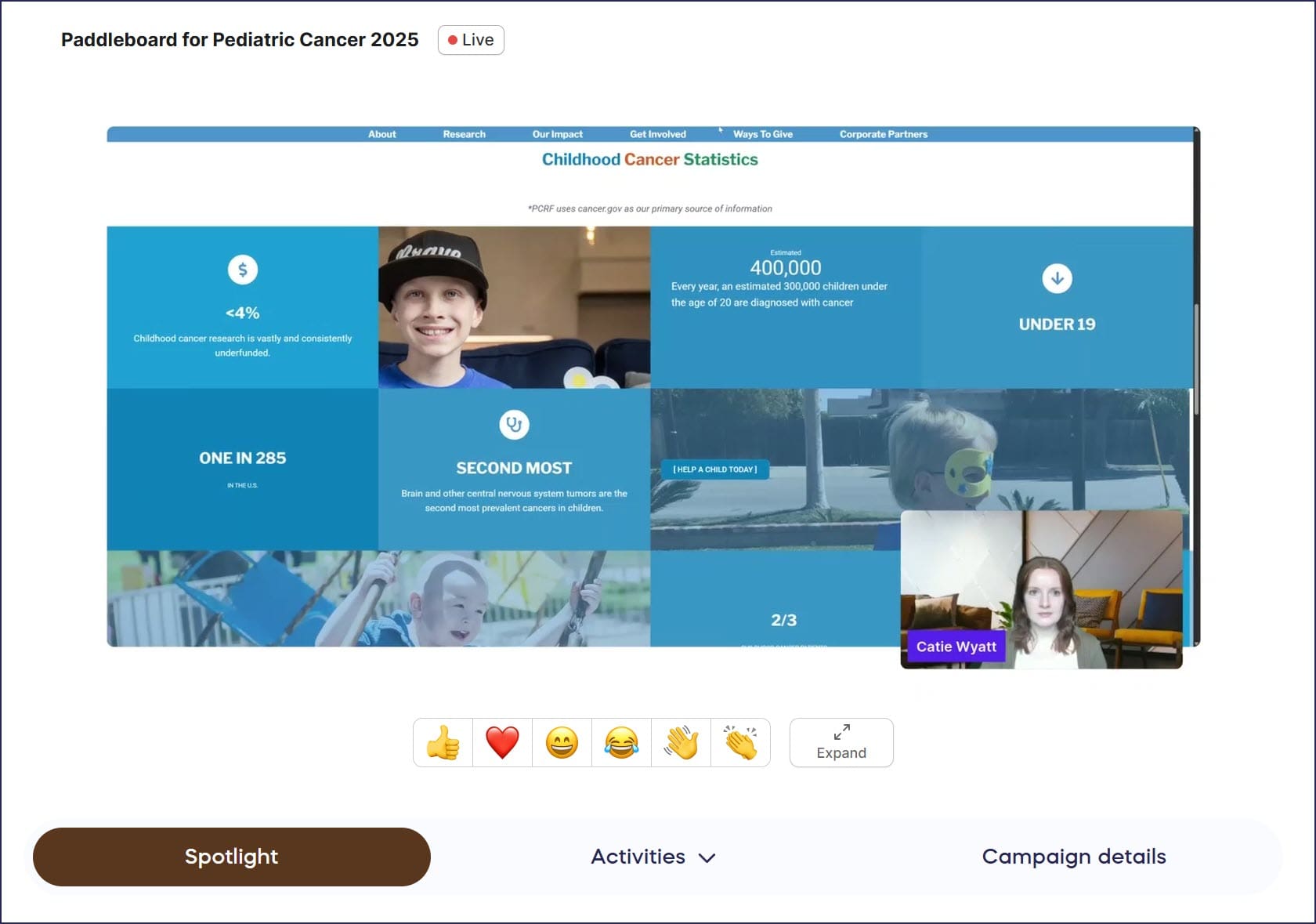
Screen sharing allows you to display PowerPoint presentations, impact data charts, sponsor recognition slides, or photo galleries directly through your Livestream broadcast. This works perfectly for showing detailed information that’s difficult to communicate verbally.
Pre-recorded video streaming lets you play professionally produced mission videos, beneficiary testimonials, or donor recognition messages without technical interruptions or transitions. These videos can run seamlessly while presenters remain available backstage, then return to live presentation immediately after.
Both features are controlled directly from the Livestream Studio interface. Learn the technical details in Screenshare During a Livestream and Share Pre-Recorded Content on Your Livestream.
How can I use the chat feature to engage donors?
Adding a chat feature to your Livestream makes it easier for donors to interact with you and each other, fostering a sense of community and emotional investment in your cause:
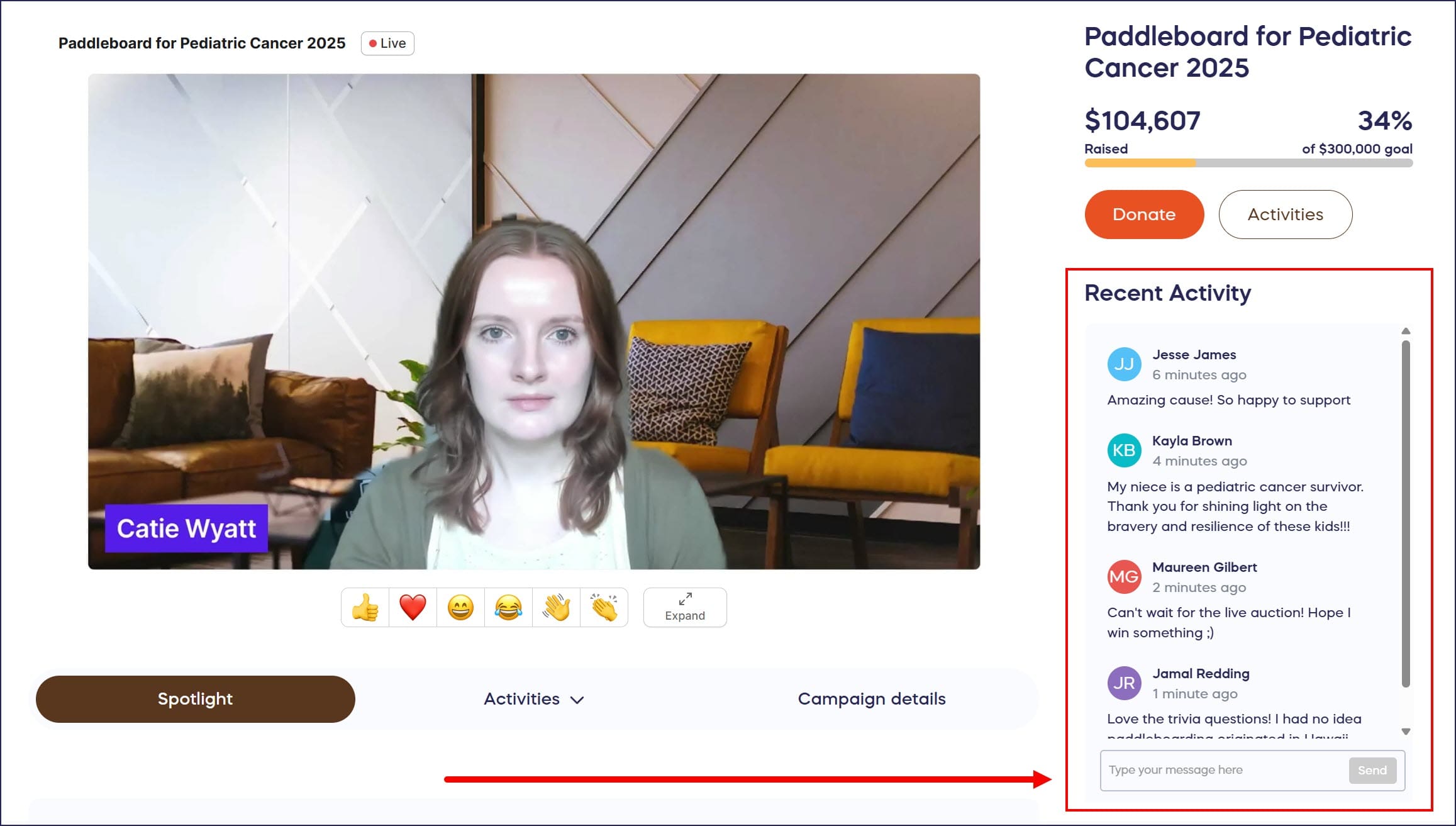
By default, the chat feature is enabled on every Livestream. However, if you’re unable to monitor the chat for questions, issues, or inappropriate comments, you can disable it. You can also remove comments and ban users.
Learn how to enable, disable, and moderate your chat in How-to: Enable or Disable the Livestream Chat Feature and How-to: Delete Comments or Ban Users from Your Livestream Chat.
Frequently Asked Questions
Can I use multiple activities during the same Livestream?
Yes, you can mix and match any combination of Livestream activities throughout your event. Many successful fundraisers alternate between different activities to maintain viewer engagement—for example, starting with trivia, moving to item spotlighting, playing a pre-recorded video, then conducting a Fund-a-Need appeal. Plan your activity sequence in advance to create a varied, dynamic program that holds attention throughout your broadcast.
Do viewers need special software to participate in activities?
No, viewers access all Livestream activities through their web browser on the Campaign Page. They don’t need to download apps, install plugins, or create accounts unless they want to donate or participate in paid activities. The chat feature, trivia, surveys, and viewing capabilities all work directly through standard web browsers on computers, tablets, and smartphones.
Can I moderate the chat feature to prevent inappropriate messages?
Yes, you can monitor and moderate the Livestream chat in real-time. Designate a team member as chat moderator to remove inappropriate comments immediately and respond to viewer questions. You also have the option to disable the chat feature entirely if you prefer one-way communication. Learn how to control these settings in Enable or Disable Livestream Chat.
How do required donations for trivia or surveys work?
When you enable required donations for trivia or survey questions, viewers must make a minimum contribution before they can submit their answers. You set the donation amount when creating each question. This creates a “pay-to-play” dynamic that turns entertainment into direct fundraising. Viewers see the donation requirement clearly before participating, and all contributions process through your Campaign’s standard payment system.
Which activities generate the most donations?
The customizable donation button typically generates the highest donation amounts because it directly asks for contributions at specific levels tied to tangible outcomes. Item spotlighting drives purchases and bids by focusing attention on valuable items. Trivia and surveys with required donations create consistent smaller contributions throughout your event. The most successful Livestreams combine multiple activities strategically—using engagement tools like chat and trivia to build audience connection, then transitioning to direct fundraising appeals when engagement peaks.