Keep track of which check payments have and haven’t been received.
When a donor chooses to pay by check, their pending payment will automatically be recorded under Manage Check Donations in the Campaign Management Menu so you can easily keep track of which checks have been received and which ones are still outstanding. Checks must be marked as Received in order to be counted in your amount raised.
How do I mark check donations as received?
- Go to Account Navigation in the left menu and select Campaigns.
- If you have chosen a list view, click on the Campaign title. If you have chosen a grid view, click on the Campaign image.
- Select Manage Check Donations.
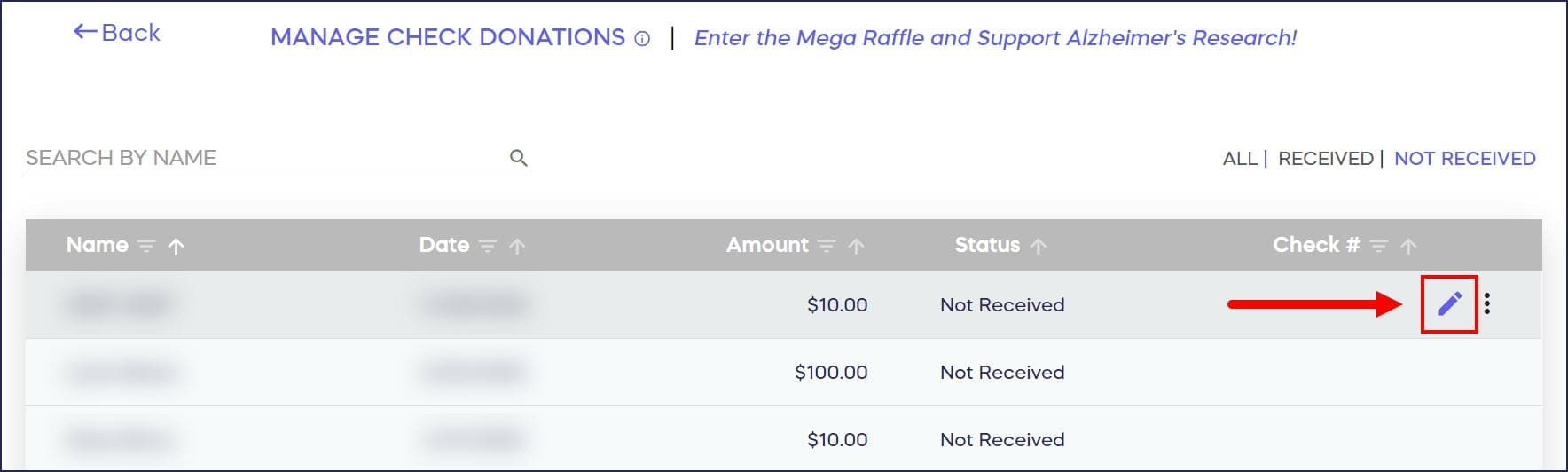
- Hover your mouse over the check you want to mark as Received and select the pencil icon:
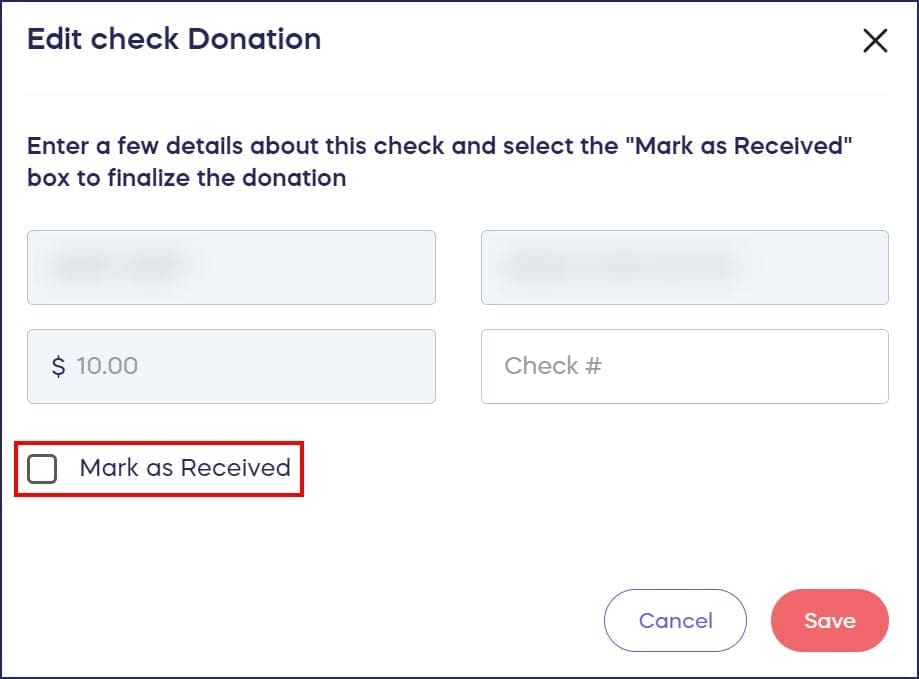
- Check the box next to Mark as Received:
- Select SAVE.
What are the requirements and limitations for check donations?
- Before finalizing an A-Thon, ensure all of your check payments are marked as Received for them to be included in the total amount raised:
- For Raffles and Sweepstakes, donors who pay by check won’t be officially entered into the drawing until their check is marked as Received.
- Check payments cannot be used to submit Auction bids or A-Thon per-unit pledges.
- Check payments cannot be enabled for Corporate Social Responsibility fundraisers.
Frequently Asked Questions
Do check donations count toward my fundraising total before they’re marked as Received?
No, check donations must be marked as Received in Campaign Management before they count toward your total amount raised. This ensures your fundraising totals accurately reflect confirmed payments you’ve actually received.
Where can I find pending check donations in my Campaign?
All pending check donations appear under “Manage Check Donations” in your Campaign Management Menu. This section shows which checks you’re waiting to receive and allows you to track outstanding payments easily.
Can donors use checks to bid on Auction items?
No, check payments cannot be used for Auction bids or A-Thon per-unit pledges. These Campaign types require immediate payment confirmation, so donors must use credit cards, debit cards, or other instant payment methods.
When are Raffle and Sweepstakes check donors entered into the drawing?
Donors who pay by check are not officially entered into Raffle or Sweepstakes drawings until you mark their check as Received. This prevents entries from donors whose checks never arrive or bounce.