Hide the amount your fundraiser has raised so far from public view.
If you’ve just started your fundraiser, you may want to hide the amount raised until donations start rolling in. Hiding the amount raised removes it from all public-facing pages, including the main Campaign Page and Peer-to-Peer or A-Thon Fundraising Pages.
How do I hide the amount raised on my Campaign?
- Go to Account Navigation in the left menu and select Campaigns.
- If you have chosen a list view, click on the Campaign title. If you have chosen a grid view, click on the Campaign image.
- Select Campaign Setup.
- Go to Options in the timeline at the top and select Page Design Options.
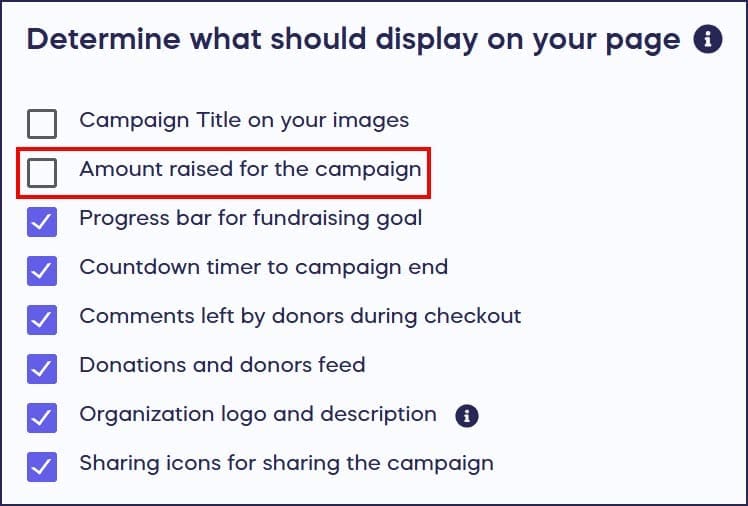
- Scroll down to Determine what should display on your page and uncheck the box next to Amount raised for the Campaign:
- Select SAVE.
How do I show the amount raised again after hiding it?
If you change your mind for any reason and want to unhide the amount raised, you can do so anytime while your Campaign is live:
- Go to Account Navigation in the left menu and select Campaigns.
- If you have chosen a list view, click on the Campaign title. If you have chosen a grid view, click on the Campaign image.
- Select Campaign Setup.
- Go to Options in the timeline at the top and select Page Design Options.
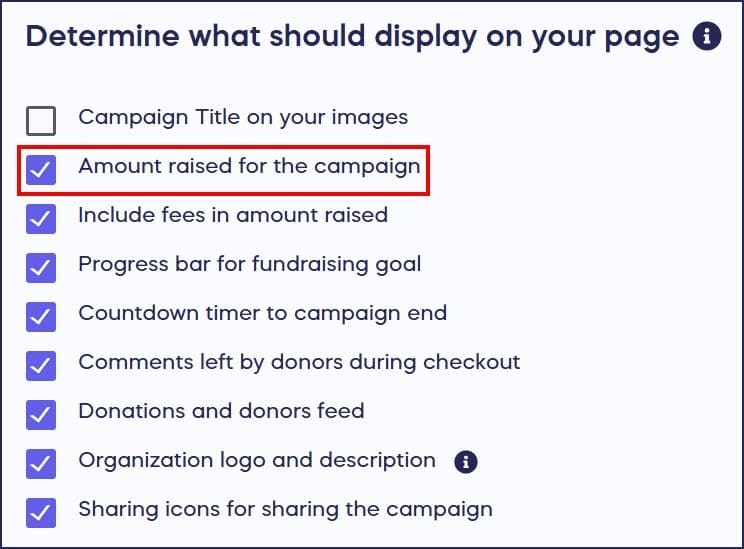
- Scroll down to Determine what should display on your page and re-check the box next to Amount raised for the Campaign:
- Select SAVE.
Frequently Asked Questions
Why would I want to hide the amount raised on my Campaign?
Many organizations hide the amount raised when first launching their Campaign to avoid showing a low starting amount. You can display the amount later once donations build momentum and create social proof for potential donors.
Can I still see the amount raised if I hide it from donors?
Yes, even when the amount raised is hidden from public view, you can always view it in your Campaign Management Menu:

Only public-facing pages will hide this information from donors.
Does hiding the amount raised affect Peer-to-Peer Fundraising Pages?
Yes, hiding the amount raised removes it from all public-facing pages, including individual Peer-to-Peer and A-Thon Fundraising Pages, not just your main Campaign Page.
Can I unhide the amount raised while my Campaign is live?
Yes, you can unhide the amount raised at any time while your Campaign is live. Go to Campaign Setup, then Options, select Page Design Options, and re-check the box next to “Amount raised for the Campaign.”
Where do I find the setting to hide or show the amount raised?
Go to Account Navigation in the left menu and select Campaigns. Select your Campaign, then Campaign Setup. Go to Options in the timeline at the top, select Page Design Options, and scroll to “Determine what should display on your page.” Check or uncheck the box next to “Amount raised for the Campaign.”