Hide prizes from your Participant Center so only registered Participants and Teams can view them.
If you add Peer-to-Peer or an A-Thon to your Campaign and enable a Participant Center, you can display prizes to motivate Participants* and Teams* to fundraise for your cause.
By default, Peer-to-Peer or A-Thon prizes are visible to anyone who visits your Participant Center, but there may be times when you don’t want the general public to see them. RallyUp allows you to hide prizes from anyone except registered Participants who are logged into their RallyUp account.
*Terminology may differ according to Campaign settings.
How do I hide prizes from public view?
- Go to Account Navigation in the left menu and select Campaigns.
- If you have chosen a list view, click on the Campaign title. If you have chosen a grid view, click on the Campaign image.
- Select Campaign Setup.
- Go to Options in the timeline at the top and select Peer-to-Peer Options.
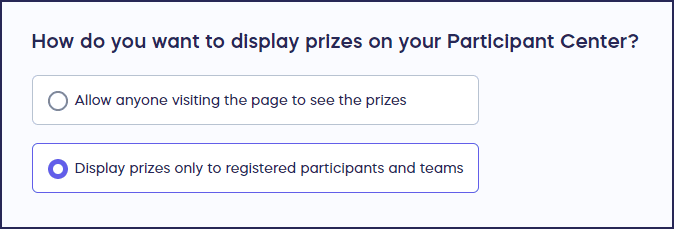
- Scroll down to How do you want to display prizes on your Participant Center? and select Display prizes only to registered Participants and Teams:
- Select Save.
What other Participant Center elements can I hide?
You can also hide leaderboards and rankings from the Participant Center. Learn how here:
How-to: Hide Peer-to-Peer or A-Thon Leaderboards
How-to: Hide Peer-to-Peer or A-Thon Rankings
Frequently Asked Questions
Why would I want to hide prizes from the public?
Hiding prizes can create exclusivity and motivate people to register as Participants. It also prevents public visitors from being overwhelmed by incentive details before they commit.
Can registered Participants still see prizes after I hide them?
Yes, when you hide prizes, they remain visible to all registered Participants and Teams who are logged into their RallyUp account. Only non-registered public visitors will be unable to view the prize information.
Do I need to hide prizes before my Campaign launches?
No, you can hide or unhide prizes at any time during your Campaign. The setting change takes effect immediately, allowing you to adjust your strategy based on how your Campaign is performing.
Will hiding prizes affect Participant motivation?
Not for registered Participants, since they can still see all prizes once logged in. In fact, hiding prizes can increase motivation by making registration feel more valuable and creating an insider experience for committed Participants.
Can I hide some prizes but not others?
No, the hide prizes setting applies to all prizes in your Peer-to-Peer or A-Thon Campaign. All prizes are either visible to everyone or restricted to registered Participants only.