Change the image in your fundraising page tabs to match your organization’s brand.
RallyUp allows you to customize the favicon that appears on your fundraising pages to reflect your organization’s brand. Your favicon will apply to all your donor-facing pages, including your fundraising Campaigns and Donation Pages.
What is a favicon?
A favicon is an image that appears on browser tabs next to the page title:

This small icon helps users quickly identify your page among multiple open tabs and reinforces your organization’s brand identity throughout the browsing experience.
How do I customize my favicon?
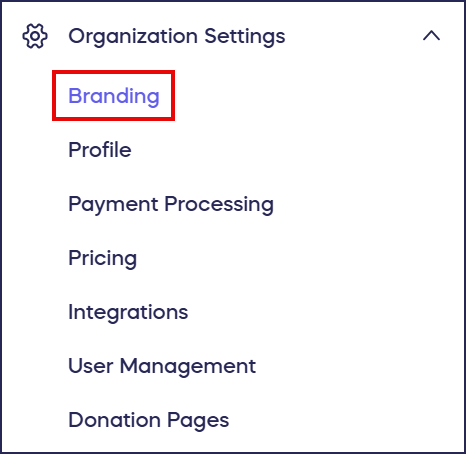
- Go to Organization Settings in the left menu and select Branding:
- Scroll down to Favicon:
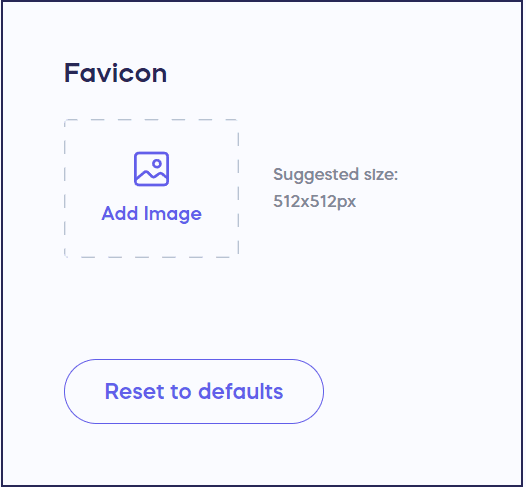
- Upload your desired favicon image. We recommend a simple image with no text, as the image will be very small.
- Select Save at the bottom of the page. This favicon will now appear in the tab on all donor-facing pages.
Where does my custom favicon appear?
Your custom favicon will apply to all your donor-facing pages throughout RallyUp. This includes your fundraising Campaigns and Donation Pages, ensuring consistent branding across every page where donors interact with your organization.
Frequently Asked Questions
Why should I customize my favicon?
Customizing your favicon allows you to change the browser tab image to something that reflects your organization’s brand. This small but important detail helps users quickly identify your page among multiple open tabs, creates a more professional appearance, and reinforces your organization’s visual identity throughout the donor experience. A branded favicon contributes to building trust and recognition with your supporters.
What type of image should I use for my favicon?
We recommend using a simple image with no text for your favicon, as the image will appear very small in browser tabs. Choose an icon or logo element that’s recognizable even at a tiny size, such as your organization’s logomark, a simple symbol, or an icon that represents your cause. Avoid complex designs or detailed text that won’t be legible when scaled down.
Will my favicon appear on all my fundraising pages?
Yes, your custom favicon will appear on all donor-facing pages. This includes your fundraising Campaigns and Donation Pages, ensuring consistent branding throughout every page where donors interact with your organization. Once you set your favicon in the Branding settings, it automatically applies across all these pages.
Can I change my favicon after I’ve already set one?
Yes, you can change your favicon at any time. Simply go back to Settings in the left menu, select Branding, scroll down to the Favicon section, upload your new favicon image, and select Save. Your new favicon will immediately replace the previous one on all donor-facing pages.
What size should my favicon image be?
The suggested size for your favicon image is 512×512 px. This size ensures your favicon displays clearly across different browsers and devices while maintaining quality when scaled down to the small icon size that appears in browser tabs.