Edit the headline that encourages donors to buy Raffle or Sweepstakes entries.
If you’re running a Raffle or Sweepstakes, you can customize the text that appears in the entry section of your Campaign Page:
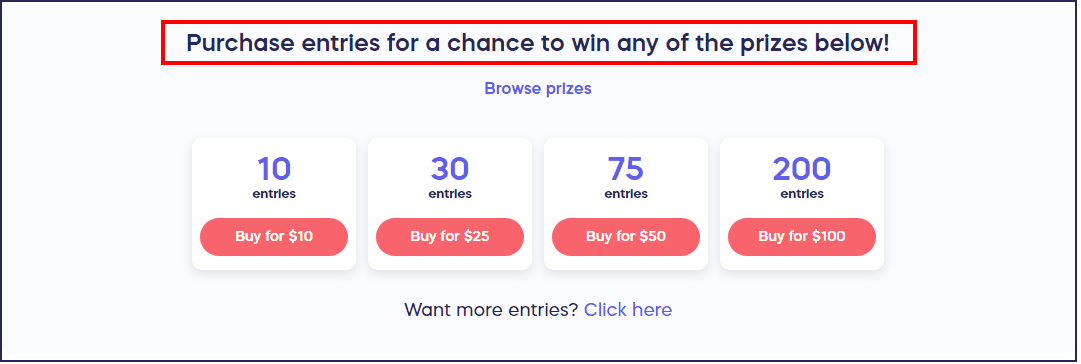
How do I customize the entry section headline?
- Go to Account Navigation in the left menu and select Campaigns.
- If you have chosen a list view, click on the Campaign title. If you have chosen a grid view, click on the Campaign image.
- Select Campaign Setup.
- Go to Options in the timeline at the top and select Campaign Options.
- Scroll down to Customize the Raffle Entry Section on your Campaign Page and enter the wording you want to use:

- Select SAVE.
Frequently Asked Questions
What is the entry section headline?
The entry section headline is the text that appears above the entry purchasing options on your Raffle or Sweepstakes Campaign Page. This headline encourages donors to buy entries and can be customized to match your Campaign’s messaging.
Why should I customize the entry section headline?
Customizing the entry section headline allows you to create more compelling, Campaign-specific messaging that resonates with your audience. A well-crafted headline can increase engagement and encourage more entry purchases by clearly communicating value or urgency.
Can I use different headlines for Raffles vs Sweepstakes?
Yes, you can customize the entry section headline for each individual Raffle or Sweepstakes Campaign. This allows you to tailor your messaging based on the specific prizes, audience, or Campaign goals for each fundraiser.
What makes an effective entry section headline?
An effective headline should be clear, compelling, and action-oriented. Consider highlighting the prizes, creating urgency with time-sensitive language, or emphasizing the impact of participation. Keep it concise and focused on motivating donors to enter.
Can I change the headline after my Campaign has started?
Yes, you can edit the entry section headline at any time, even after your Raffle or Sweepstakes has launched. Simply go to Campaign Options and update the text to reflect new messaging or promotions.