Edit a bidder’s saved payment information anytime to streamline the bidding process.
RallyUp collects and saves each Auction bidder’s payment information when they submit their first bid, making it easy to re-bid or submit new bids. At the end of the Campaign, winners are automatically charged for their winning bids using the payment information on file. If a bidder’s card expires or is deactivated, both bidders and organizers can easily update payment information before an Auction ends.
How can bidders update their own payment information?
Bidders can update their own saved payment method whenever they need. Learn how in our guide on how to save a card to your RallyUp account.
How do I update a bidder’s payment information as an organizer?
- Go to Account Navigation in the left menu and select Campaigns.
- If you have chosen a list view, click on the Campaign title. If you have chosen a grid view, click on the Campaign image.
- Select View Auction Bids.
- Select the Bidders tab in the top right corner.
- Find the bidder you’re looking for and hover over their name.
- Click on the three-dot menu on the right and select Edit Payment Information:

- When the following pop-up appears, select Edit:
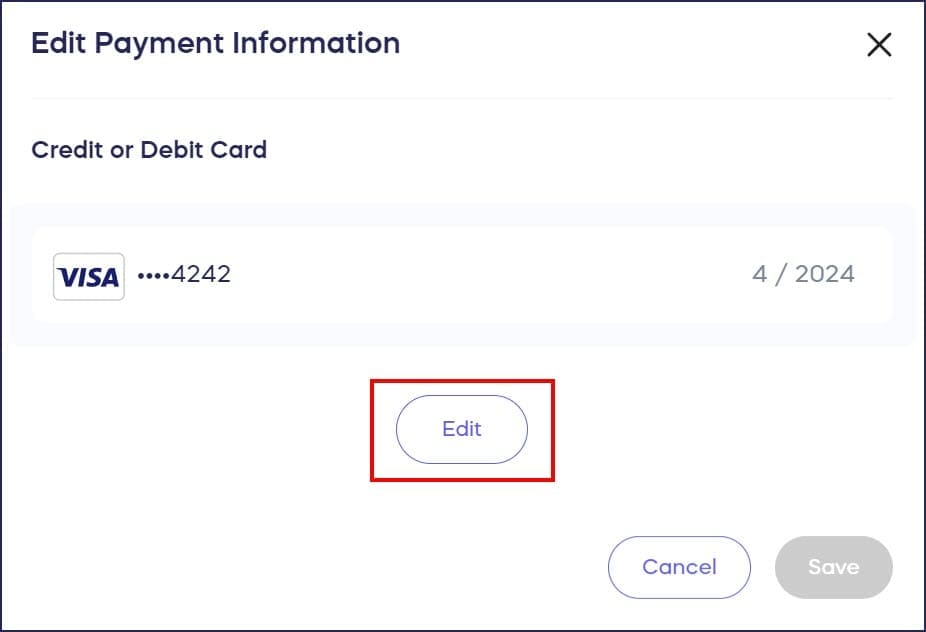
- Add the new payment information, then select SAVE.
Frequently Asked Questions
Why would I need to update a bidder’s payment information?
A bidder’s payment method may expire, be deactivated, or have insufficient funds. Updating payment information before the Auction ends ensures winning bidders can be charged successfully when the Auction closes.
Can bidders update their own payment information?
Yes, bidders can update their own saved payment method at any time through their RallyUp account. This is the easiest option if bidders have access to their account and new payment details.
What happens when payment information is updated?
When a bidder’s payment information is updated, the system automatically applies the new payment method to all items they’ve bid on. The bidder won’t have to repeat this process for multiple items.
When should payment information be updated?
Payment information should be updated before the Auction ends and before winners are charged. Once the Auction closes, winning bidders are automatically charged using their saved payment information.
Where do I find the option to edit bidder payment information?
Go to Campaigns, select your Campaign, then View Auction Bids. Select the Bidders tab, find the bidder, hover over their name, click the three-dot menu, and select Edit Payment Information.