Connect with your donors by adding a chat feature to your Livestream.
Adding a chat feature to your Livestream makes it easier for donors to interact with you and each other, fostering a sense of community and emotional investment in your cause.
By default, the chat feature is enabled on every Livestream. However, if you’re unable to monitor the chat for questions, issues, or inappropriate comments, you can disable it.
How do I disable the chat feature on my Livestream?
- Go to Account Navigation in the left menu and select Campaigns.
- If you have chosen a list view, click on the Campaign title. If you have chosen a grid view, click on the Campaign image.
- Go to the Livestream Studio.
- Find the chat box in the lower right corner of your screen.
- Click on the three horizontal dots in the banner, and select Disable chat:

How do I turn the chat feature back on?
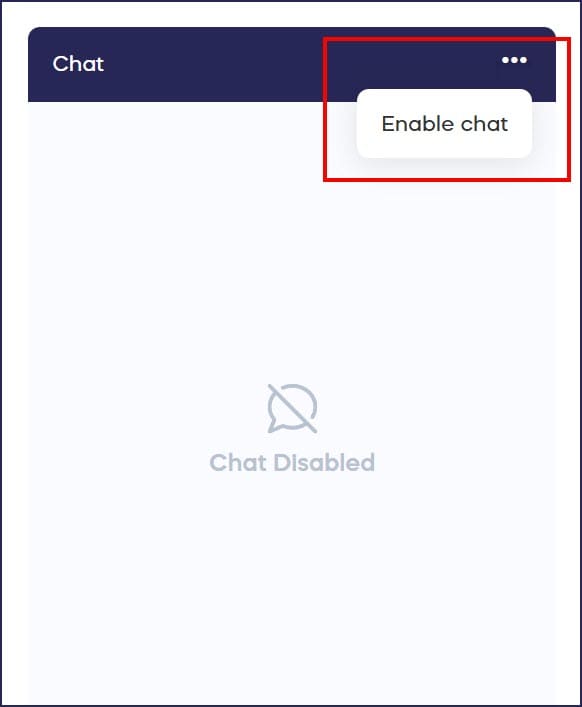
- Follow the steps above, but select Enable chat:
What else should I know about Livestream chat settings?
- The chat feature can be disabled or re-enabled at any time.
- Only Campaign Admins can disable or enable the chat feature.
Frequently Asked Questions
Is the Livestream chat feature enabled by default?
Yes, the chat feature is automatically enabled on every Livestream. This allows donors and viewers to interact with you and each other immediately, creating an engaging community experience during your event.
Can I disable chat during a Livestream?
Yes, you can disable or enable the chat feature at any time, even while your Livestream is actively running. This gives you flexibility to control audience interaction based on your real-time needs.
Why would I want to disable the Livestream chat?
You might disable chat if you’re unable to monitor it for questions or inappropriate comments, if you want viewers to focus solely on your presentation, or if you’re experiencing technical issues with the chat feature.
Can donors still participate in my Livestream without chat enabled?
Yes, donors can still watch your Livestream, make donations, place bids, and participate in all Livestream activities even when chat is disabled. Chat only affects the text-based conversation feature.
Who has permission to enable or disable chat?
Only Campaign Admins have permission to enable or disable the chat feature. Regular presenters or viewers cannot change this setting, ensuring consistent control over your Livestream interaction options.