Preview what your reports will look like when you export them.
RallyUp makes it easy for Campaign Organizers to export spreadsheet reports that contain valuable information concerning each donation, donor, and more. Reports are exported as .csv files, which allow you to manage the data using your preferred spreadsheet viewer, such as Excel or Google Sheets.
What information is included in exported reports vs. Campaign Management?
Note that most exports contain more information than what’s shown in Campaign Management. For example, the View Donations page only displays the donation date, donor name, donation amount, payment status, and donation type:
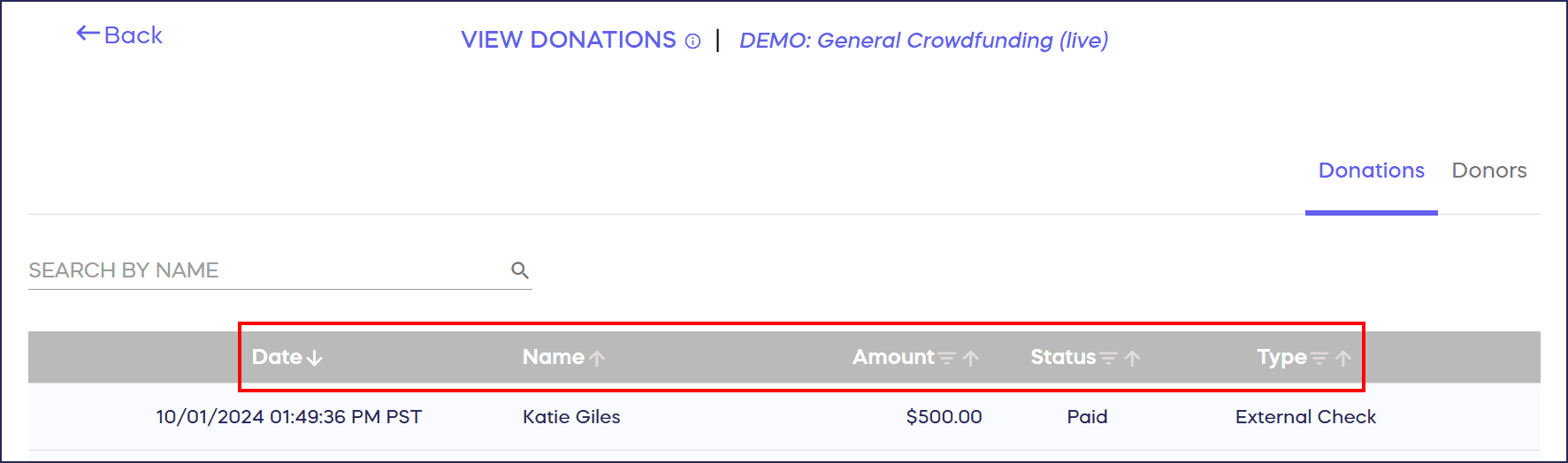
However, the exported spreadsheet shows additional columns containing donors’ emails, fee information, custom field responses, and more:

Column titles are displayed in the first row.
Frequently Asked Questions
What format are RallyUp exported reports saved in?
RallyUp exports all reports as CSV files, which can be opened in any spreadsheet program like Microsoft Excel, Google Sheets, or Apple Numbers. This universal format makes it easy to analyze and manage your fundraising data.
Do exported reports contain more data than what I see in Campaign Management?
Yes, exported reports include significantly more information than the Campaign Management display. While the dashboard shows basic details like donor names and amounts, exports include email addresses, fee breakdowns, custom field responses, and additional donor information.
Can I open RallyUp CSV files in Google Sheets?
Yes, CSV files work seamlessly with Google Sheets. Simply upload the file to Google Drive and open it with Google Sheets, or use the “Import” function within Google Sheets to load your exported report data.
How are column headers organized in exported reports?
All column titles appear in the first row of the exported spreadsheet, making it easy to identify each data field. This standard format allows you to sort, filter, and analyze your fundraising data efficiently.
What should I do if my exported report looks unformatted?
CSV files may appear plain when first opened. Use Excel or Google Sheets formatting features to adjust column widths, add filters, and format numbers or dates. Check out our formatting tips article for detailed guidance on organizing your reports.
Insights: Common Excel and Google Sheets Formatting Tips for RallyUp Reports
What related report articles should I read?
How-to: Export Donation and Donor Reports
Insights: Common Excel and Google Sheets Formatting Tips for RallyUp Reports