Troubleshoot security, privacy, or SSL certificate errors.
If you’re receiving a security, privacy, or SSL error on your fundraiser, it may look something like the image below:
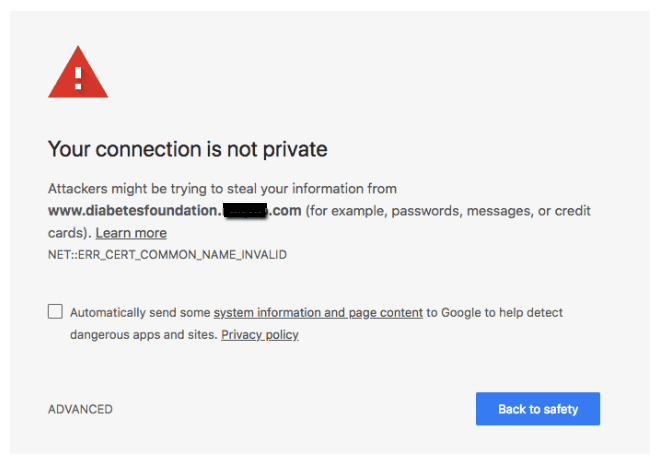
How do I fix security, privacy, or SSL certificate errors?
- Make sure to leave out the leading “www” when typing the Campaign link into your browser’s address bar. The “www” isn’t needed due to the customizable link structure of RallyUp, and adding it can sometimes create a security error.
- If you’re using a custom domain, make sure you’ve completed all setup steps, including SSL certificate installation: How-to: Customize Your Subdomain or Domain.
Frequently Asked Questions
What does a security error on my Campaign look like?
A security, privacy, or SSL certificate error typically displays a warning message in your browser indicating the connection is not secure or private. These errors can prevent visitors from accessing your Campaign Page.
Why does adding “www” to my Campaign URL cause a security error?
RallyUp’s customizable link structure doesn’t require “www” in the URL. Adding it can create conflicts with SSL certificate validation and cause security errors. Always use your Campaign link without the “www” prefix.
What should I do if I’m using a custom domain?
If you’re using a custom domain and encountering security errors, verify that you’ve completed all setup steps including SSL certificate installation. Follow the instructions in this article: How-to: Customize Your Subdomain or Domain.
Will security errors prevent donors from contributing to my Campaign?
Yes, security errors can prevent visitors from accessing your Campaign Page entirely, as most browsers will warn users about potential security risks. It’s important to resolve these errors quickly to avoid lost donations.
How can I prevent security errors from happening?
Always share your Campaign link without “www,” ensure your custom domain is properly configured with SSL certificates, and test your Campaign link in multiple browsers before sharing it with supporters.