Engage your Livestream audience by letting them answer questions.
Using trivia and survey questions during your Livestream is a fun, easy way to engage your donors. Trivia questions have right and wrong answers, while survey questions allow donors to share their opinions.
What should I know before creating trivia and survey questions?
- You’ll need to add Livestreaming to your fundraising Campaign before you can add trivia and survey questions: How-to: Add Livestreaming to Your Fundraiser.
- You can create trivia and survey questions during your Livestream, but we recommend creating your questions beforehand to ensure your Livestream runs as smoothly as possible.
- Read more about how to use trivia and surveys to engage your donors here: Insights: Use Trivia or Surveys During Your Livestream to Engage Donors.
- Learn how to start your Livestream here: How-to: Start and End a Livestream.
How do I add trivia and survey questions to my Livestream?
- Go to Account Navigation in the left menu and select Campaigns.
- If you have chosen a list view, click on the Campaign title. If you have chosen a grid view, click on the Campaign image.
- Select Campaign Setup.
- Go to Livestream in the timeline at the top and select Show optional settings.
- Scroll down to Enable trivia and survey questions and click on the toggle:

- Select CREATE A QUESTION:

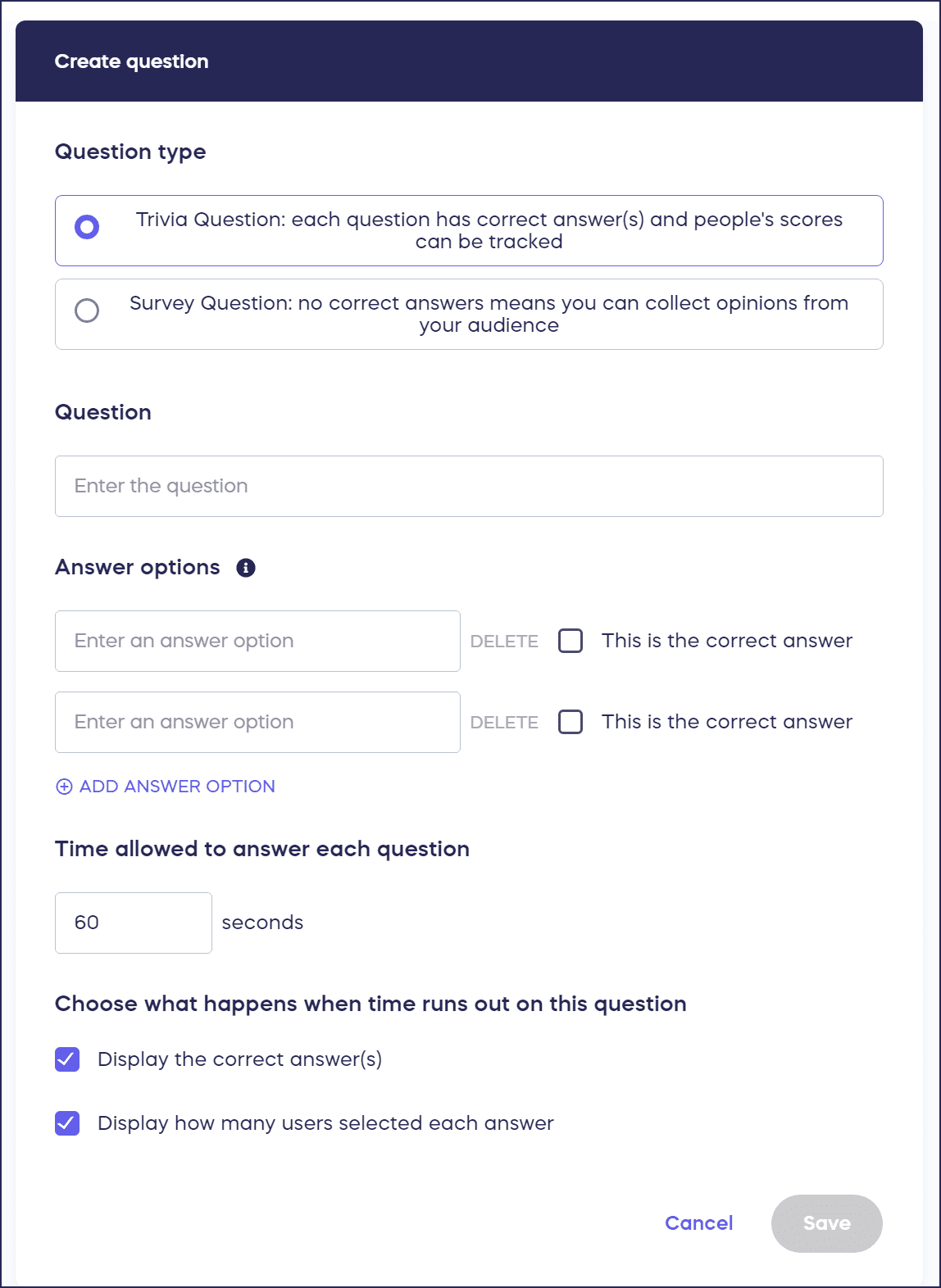
- Fill out the question details and select Save:
Can I require donations or email addresses to answer questions?
Requiring viewers to donate before answering questions can boost the amount of money you raise. Requiring viewers to share their email address can help you grow your email list.
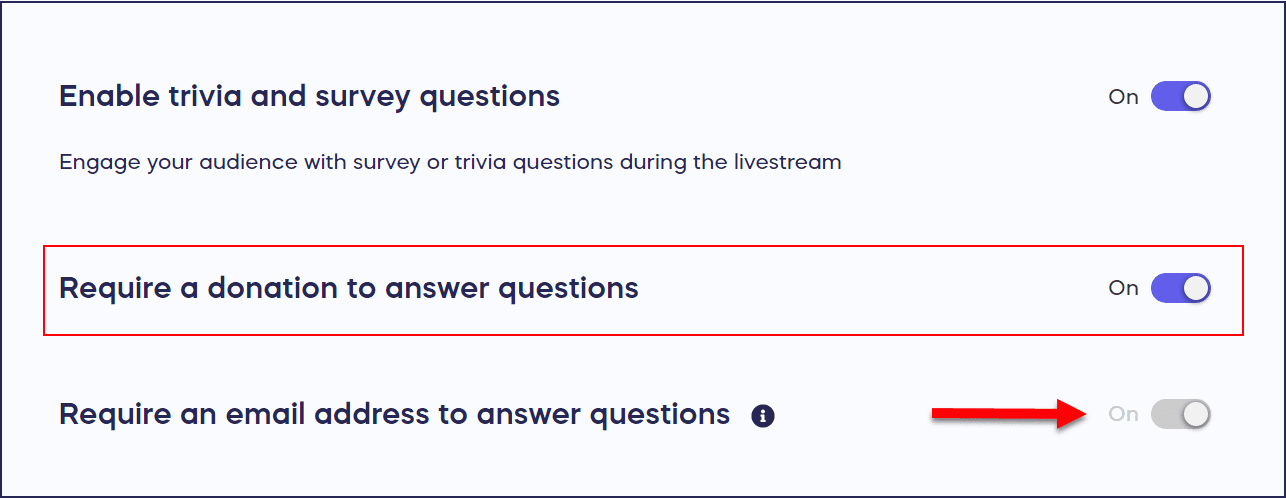
- Scroll down to Require a donation to answer questions and Require an email address to answer questions:

- Click on the toggle(s) to enable the settings you want to use. When you choose to require a donation to answer questions, the option to require an email address will automatically be enabled as an email address is required for every donation to send donors their receipt:
How do viewers see and answer trivia and survey questions?
Your audience members will see three tabs directly under the Livestream window: Spotlight, Activities, and Campaign Details. Trivia and survey questions will appear in the Spotlight tab:

Your audience members will be automatically taken to the Spotlight tab when you display a question.
If you require a donation or email address, donors will be prompted to fulfill these requirements before they can answer the question:

Email addresses are used to verify that a donation has been made and to send a receipt.
Frequently Asked Questions
What’s the difference between trivia and survey questions?
Trivia questions have right and wrong answers and can be used for fun games or testing knowledge. Survey questions allow donors to share their opinions without correct or incorrect responses, making them ideal for gathering feedback or preferences.
Should I create questions before or during my Livestream?
While you can create questions during your Livestream, we strongly recommend creating them beforehand. Pre-planning ensures your Livestream runs smoothly without interruptions and helps maintain audience engagement.
Will requiring a donation reduce participation in questions?
Requiring donations can reduce the number of responses but often increases fundraising revenue. Consider your primary goal—if engagement is most important, keep questions free. If fundraising is the priority, requiring donations can be very effective.
What happens to email addresses collected from question responses?
Email addresses are used to verify donations (if required) and send receipts. They also help you grow your email list for future outreach. Viewers are prompted to provide their email before answering if you’ve enabled this requirement.
Can I create different types of questions?
Yes, you can create both trivia questions (with correct answers) and survey questions (opinion-based) for your Livestream. Mix different question types to keep your audience engaged throughout the event. Learn more about engagement strategies: Insights: Use Trivia or Surveys During Your Livestream to Engage Donors.