Learn how Personal Fundraising Pages help Peer-to-Peer Participants and Teams raise more money. Discover how to customize, share, and track donations.
Personal Fundraising Pages are customizable mini-Campaign Pages that Peer-to-Peer Participants* and Teams* use to promote fundraisers within their own networks. These pages function like individual Campaign sites with information about your organization, fundraising goals, and donation options that Participants can personalize and share with friends, family, and social media followers:
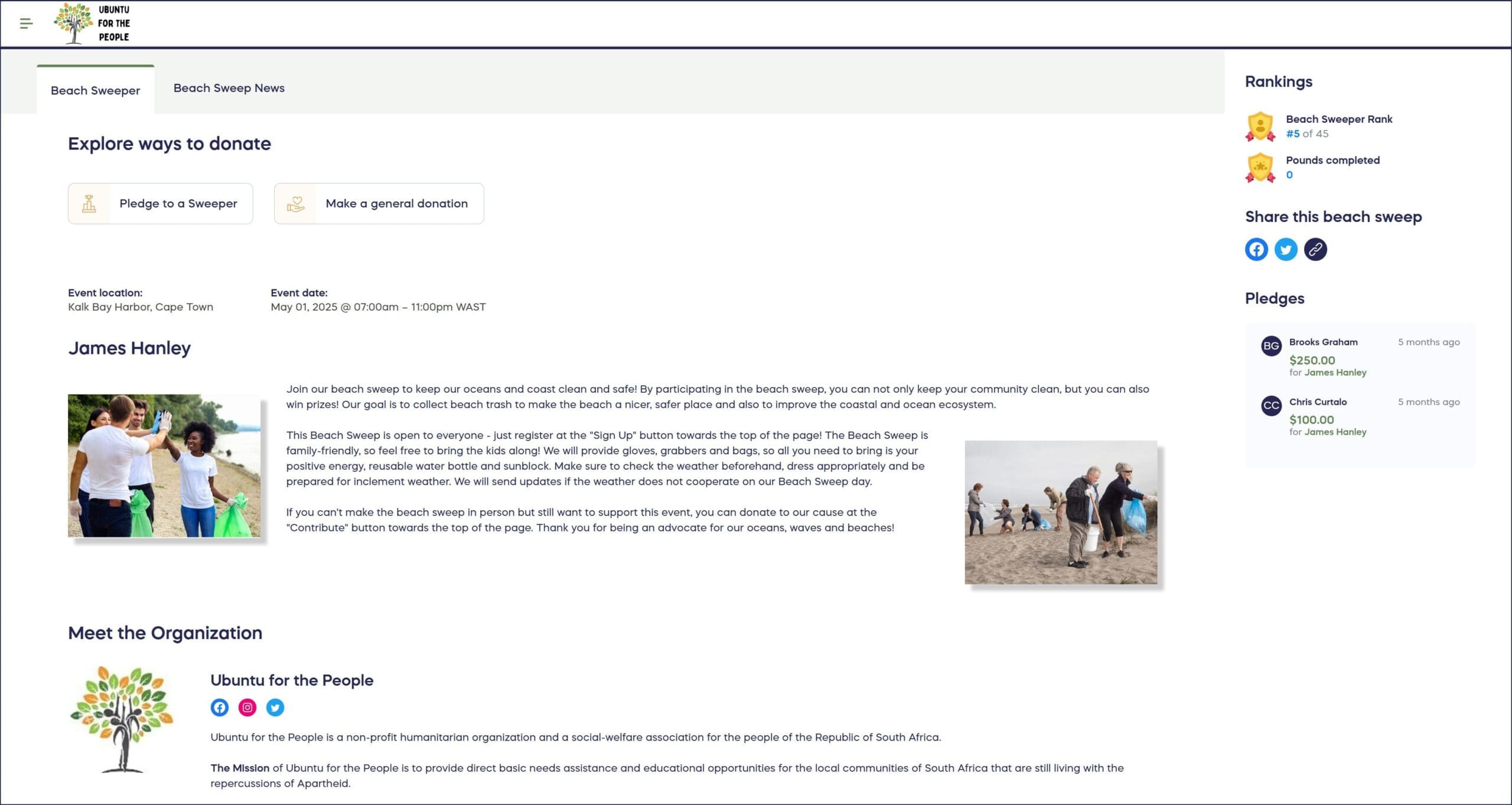
When donors contribute through a Participant’s personal page, that Participant automatically receives credit for the donation, enabling tracking, leaderboards, and prize eligibility.
*Terminology may differ according to Campaign settings.
What Are Personal Fundraising Pages?
Short answer: Personal Fundraising Pages are customizable web pages assigned to individual Participants or Teams in Peer-to-Peer Campaigns, allowing them to fundraise independently while supporting your organization’s overall goals.
Detailed explanation: When you enable Personal Fundraising Pages in your Peer-to-Peer or A-Thon campaign, each registered Participant and/or Team receives their own unique URL leading to a Personal Fundraising Page. These pages automatically populate with content from your main Campaign Page but allow Participants to add their own photos, stories, and personal reasons for supporting your cause. This personalization helps Participants connect authentically with their networks and raise funds more effectively than simply sharing a generic Campaign link.
How Personal Fundraising Pages Work
For Campaign Organizers
When you enable Personal Fundraising Pages, RallyUp automatically generates a unique page for each Participant or Team that registers for your Campaign. These pages:
- Pull default content (images, text, donation options) from your main Campaign Page
- Display the Participant or Team’s name and fundraising progress
- Track donations made through that specific page
- Update automatically to reflect current fundraising totals
For Participants
Participants access their Personal Fundraising Page through:
- Their Participant Dashboard in their RallyUp account
- The main Campaign Page’s Participant Center
- Direct links provided in registration confirmation emails
From their fundraising page, Participants can:
- Customize images and personal stories
- Share their unique page URL on social media, email, and text
- Track who donated through their page
- Monitor their fundraising progress
- View their ranking on leaderboards (if enabled)
For Donors
When someone visits a Participant’s Personal Fundraising Page, they see:
- The Participant’s personalized message about why they’re fundraising
- Information about your organization and Campaign
- Clear donation options linked to the Campaign’s fundraising Components
- The Participant’s fundraising goal and progress
Donations made through personal pages automatically credit the Participant while supporting your organization’s overall Campaign goals.
For A-Thon Campaigns
Personal Fundraising Pages work especially well for A-Thon Campaigns (walk-a-thons, read-a-thons, etc.):
- Donors can submit pledges directly from the Participant’s page
- Pages display the Participant’s activity goals and progress
- Participants can log completed activities (miles walked, books read, etc.)
- Progress updates appear automatically on their fundraising page
How-to: Log A-Thon Activity and Calculate Progress
Personal Fundraising Pages vs. Participant Dashboards
Personal Fundraising Pages
- Purpose: Public-facing pages to attract donations
- Audience: Friends, family, donors, social media followers
- Content: Campaign information, personal stories, donation options
- Access: Anyone with the URL can view
- Goal: Raise funds and spread awareness
Participant Dashboards
- Purpose: Private tracking and management tools
- Audience: Only the Participant and Campaign organizers
- Content: Fundraising statistics, donor lists, sharing tools, progress tracking
- Access: Requires login to RallyUp account
- Goal: Monitor performance and manage participation
Understand: Peer-to-Peer and A-Thon Participant and Team Dashboards
Before You Begin
Personal Fundraising Pages are an optional feature for Peer-to-Peer and A-Thon Campaigns. Before enabling them:
- Ensure you’ve added Peer-to-Peer or A-Thon functionality to your Campaign
- Decide whether Participants, Teams, or both will have fundraising pages
- Collect Participant email addresses during registration (required for page access)
- Consider whether you’ll allow Participants to edit their own pages
Time to complete setup: 2-3 minutes to enable the feature during Campaign creation
Enabling Personal Fundraising Pages
- Go to Account Navigation in the left menu and select Campaigns.
- If you have chosen a list view, click on the Campaign title. If you have chosen a grid view, click on the Campaign image.
- Select Campaign Setup.
- Go to Peer-to-Peer in the timeline at the top.
- Scroll down to Optional settings and select Show optional settings.
- Scroll down to Enable Participant Fundraising Pages and click on the toggle to move it to the right:

- Select Save.
What happens next: Once enabled, RallyUp automatically creates a Personal Fundraising Page for each Participant or Team that registers for your Campaign.
Editing Personal Fundraising Pages
Instructions for Organizers
Campaign organizers can edit any Participant or Team fundraising page:
- Go to Account Navigation in the left menu and select Campaigns.
- If you have chosen a list view, click on the Campaign title. If you have chosen a grid view, click on the Campaign image.
- Select View Participants or View Teams.
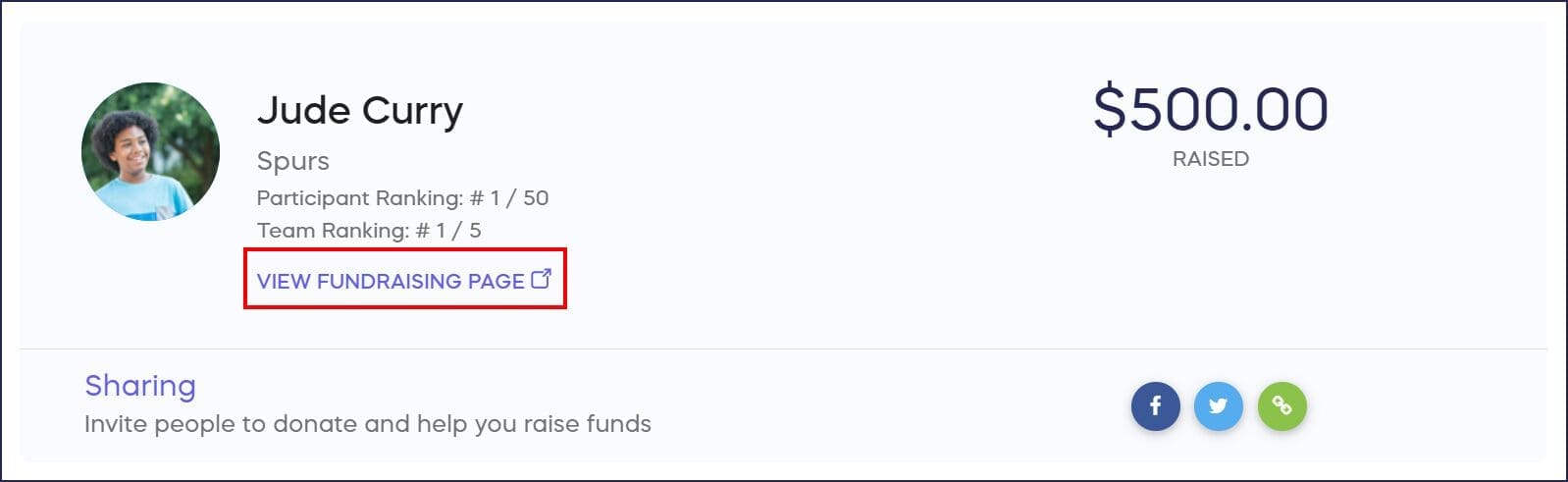
- Click on the Participant or Team name, then select View Fundraising Page:
- Once you’re on the Fundraising Page, click on the text or image you want to update (e.g., click on the title to change the title text; click on the banner image to change the image, etc.):
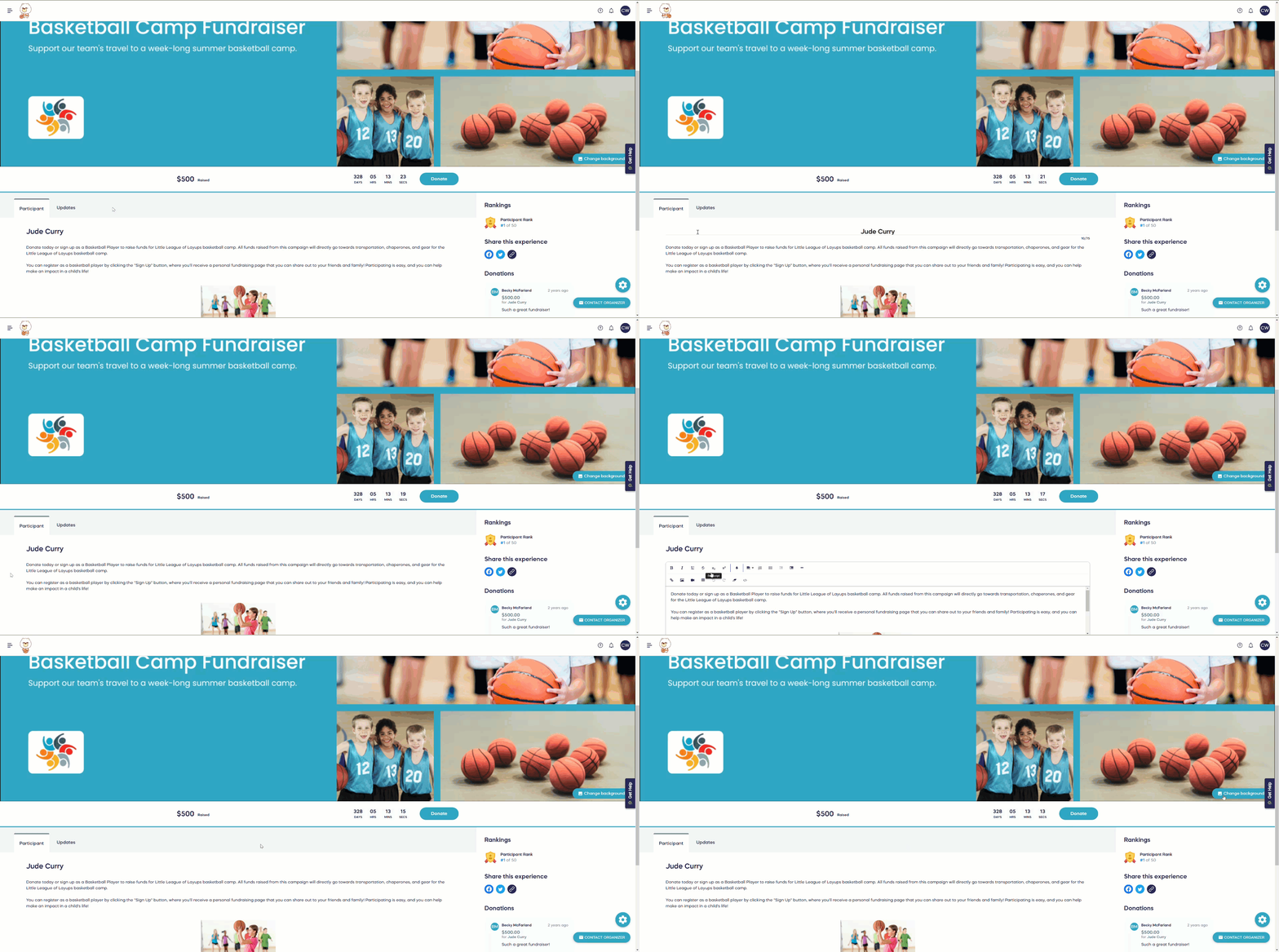
- After making your changes, click out of the area you just updated to save automatically.
Note: Changes can take up to 15 minutes to appear on the live fundraising page.
Instructions for Participants
Participants can only edit their own Personal Fundraising Page. Campaign organizers can copy and paste these instructions into an email or other message to make sure all Participants are informed.
- Go to rallyup.com and create or log into your account.
- Click on the circle with your initials in the upper right corner of the screen, then select My Account.
- Select the My Participants tab if you’re looking for your Personal Fundraising Page, or the My Teams tab if you’re looking for your Team Fundraising Page.
- Click on your name or your Team name, then select View Fundraising Page:

- Once you’re on the Fundraising Page, click on the text or image you want to update (e.g., click on the title to change the title text; click on the banner image to change the image, etc.):
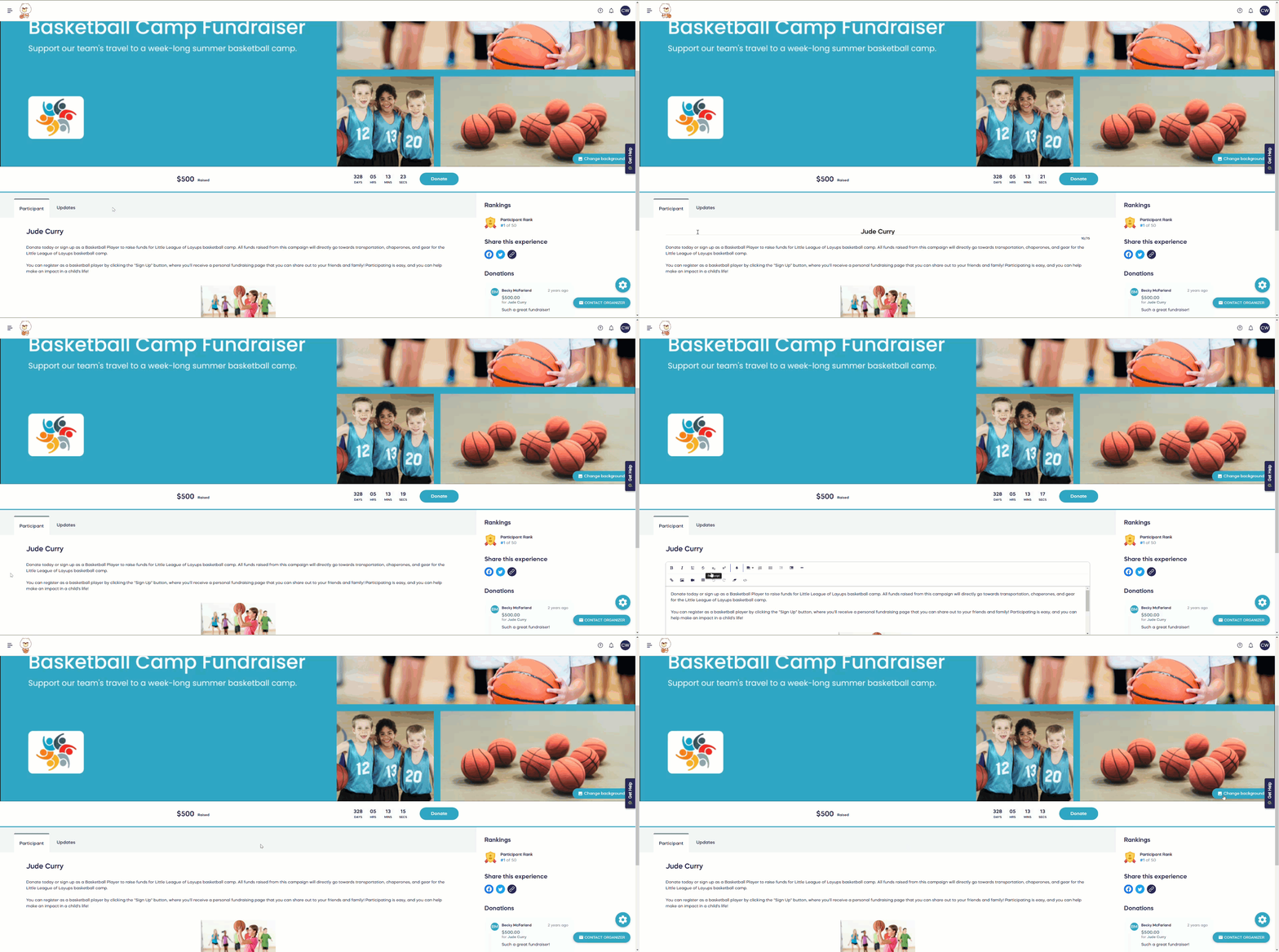
- After making your changes, click out of the area you just updated to save automatically.
Important: Participants can only access their Personal Fundraising Page if you collected their email address during registration.
Customization Options
Default Content
By default, Personal Fundraising Pages display:
- Main Campaign banner image
- Organization logo and description
- Campaign story and mission
- Donation options and fundraising Components
- Participant or Team name
- Fundraising goal and progress tracker
Customizable Elements
Participants and organizers can customize:
- Title: Personalize the page headline
- Banner Image: Upload a personal photo or relevant image
- Personal Story: Add why this cause matters to the Participant
- Fundraising Goal: Set individual targets
- Thank You Message: Customize donor appreciation text
What Cannot Be Customized
Certain elements remain consistent across all fundraising pages:
- Organization branding (if set by organizers)
- Available fundraising Components
- Donation processing methods
- Core Campaign information
Frequently Asked Questions
Do all Peer-to-Peer Campaigns have Personal Fundraising Pages?
No, Personal Fundraising Pages are an optional feature that Campaign organizers must enable. Not all Peer-to-Peer or A-Thon Campaigns include this functionality. Check with your Campaign organizer to confirm if fundraising pages are available.
Can Participants access their pages without registering with an email address?
No, Participants must provide an email address during registration to access their Personal Fundraising Page. The registration email contains login credentials and links to access the page.
How do donations through Personal Fundraising Pages get credited?
When someone donates through a Participant’s Personal Fundraising Page, the system automatically credits that Participant for the donation. This credit counts toward their fundraising total, leaderboard ranking, and prize eligibility.
Can Team pages and individual Participant pages coexist in the same Campaign?
Yes, Campaign organizers can enable Personal Fundraising Pages for both individual Participants and Teams simultaneously. Team members can have their own pages while also contributing to their Team’s collective page.
How long does it take for edits to appear on fundraising pages?
Changes made to Personal Fundraising Pages can take up to 15 minutes to appear on the live page. Allow time for updates to process before sharing recently edited pages.
What happens if a Participant doesn’t customize their page?
Participants aren’t required to customize their Personal Fundraising Pages. Pages automatically populate with content from the main Campaign Page and function perfectly well without personalization, though customized pages typically perform better.
Why would I enable Personal Fundraising Pages instead of just sharing the main Campaign link?
Personal Fundraising Pages allow Participants to tell their own stories about why the cause matters to them personally. This authentic, individualized approach typically raises more money than generic Campaign sharing because donors respond better to personal connections and peer recommendations.
How do Personal Fundraising Pages fit into the overall Peer-to-Peer strategy?
Personal Fundraising Pages extend your Campaign’s reach by enabling each Participant to tap into their own network. Instead of your organization doing all the promotion, you empower supporters to become ambassadors who share personalized pages with hundreds or thousands of potential new donors.
Getting Started with Personal Fundraising Pages
Need help setting up your Peer-to-Peer or A-Thon Campaign with Personal Fundraising Pages?
- Live chat: Visit rallyup.com and click the purple message button at the bottom right during business hours
- Email support: Contact success@rallyup.com
- Knowledge Base: Search our Help Center for additional guides