Learn how the bidding process works when you have multiples of an Auction item.
If you’re running an Auction on RallyUp, you can give away multiples of the same Auction item. Auction items with multiple quantities will have more than one winner, and each winner will pay whatever they bid.
For example, if one of your Auction items is a t-shirt and you have 10 t-shirts to auction off, the top 10 highest bidders will win a shirt. When bidders go to your Auction, only the lowest of the top bids will be displayed. Bidders will need to place in the top 10 to win a shirt, so they simply need to beat the lowest of the top bids.
Note that if a bidder wins an item with multiples, they will only be charged for the amount they bid. This means you may receive different winning bid amounts even though all winners won the same item.
How do bidders place bids on items with multiple quantities?
From the bidder’s perspective, the bidding process should be the same as if there were only one of that Auction item available:
- Go to the Auction page.
- Find the item(s) they want to bid on.
- Place a bid that is higher than the displayed Current bid:
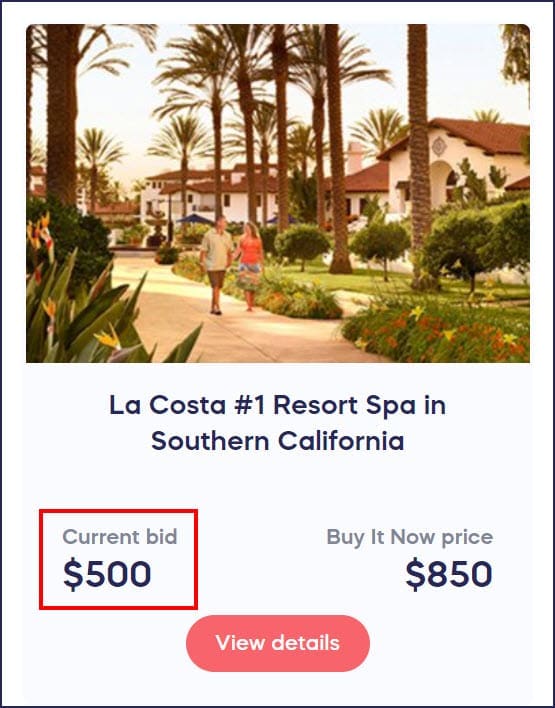
The Current bid displayed is the lowest of the current top bids.
- Check out to confirm the bid.
What if multiple bidders are tied for bid amount?
Since an item with multiple quantities will have multiple winners, it’s possible for more than one of the top bidders to place the same bid. In this case, priority will be given to whoever placed their bid first.
For example, imagine you’re auctioning off three t-shirts. The current top bids are $35, $30, and $29. Bidder A bids $32, then Bidder B also bids $32 two minutes later. The new top bids will be $35, $32 (Bidder A), and $32 (Bidder B). If someone then bids $34, the new top bids will be $35, $34, and $32 (Bidder A). Bidder A will stay in the running because they placed their bid first.
What if I want to add more items after the bidding has already started?
There may be times when you learn that you’re able to auction off higher quantities of an item than you originally planned. In that case, you can increase the quantity of an item, even if the bidding has already started. Please note, however, that this will reset the displayed “Current bid” amount to the starting bid amount.
What does this mean for current bidders?
- Existing bids are not removed. All bids that have already been placed remain valid and are still in the running.
- Bidders are not notified automatically when the quantity increases or the displayed bid resets. If you’d like current bidders to know about the change, you’ll need to communicate with them directly (e.g., through your Campaign Page updates or external messaging).
- Bid standings may shift. Because the displayed “Current bid” resets to the starting bid amount, new bidders can now enter at lower amounts. This means some existing bidders who were previously outside the winning positions may now move into winning range — and new lower bids may also qualify.
Example: Imagine you’re auctioning off 5 t-shirts with a starting bid of $15. The current lowest winning bid is $50, meaning bidders need to bid more than $50 to stay in the running. When you increase the quantity to 10, the displayed current bid resets to $15. All existing bids still count, but now there are 10 winning slots instead of 5, so new bidders can enter at lower amounts and still be in the running to win.
What if I want to decrease item quantity after bidding has already started?
There may be times when you need to reduce the quantity of an Auction item after bidding has begun — for example, if you discover you have fewer items available than originally listed. You can decrease the quantity at any time, but doing so will affect bidders who were previously in winning positions.
What does this mean for current bidders?
- Bidders who fall outside the new winning slots will be notified they’ve been outbid. RallyUp automatically sends an outbid notification to any bidder who was previously winning but is no longer in a winning position after the quantity decrease. Those bidders will need to place a new bid to re-enter the running.
- Bids from bidders still in winning positions remain valid. Only bids that fall outside the reduced number of winning slots are affected. Those bids are not removed, but those bidders are no longer in a winning position.
- The displayed Current bid will update to reflect the lowest of the new, smaller set of winning bids.
Example: Imagine you’re auctioning three t-shirts. Three bidders have placed bids of $35, $30, and $29, so all three are currently winning. If you reduce the quantity to 2, only the top two bids ($35 and $30) remain in winning positions. The bidder at $29 will receive an outbid notification and must place a new bid to win a shirt.
What else should I know about bidding on items with multiple quantities?
- Another way to auction off multiples of the same item is to list each one as its own item. In this case, you would have only one winner for each item.
- You may want to add an FAQ about Auction items with multiple quantities so that your donors know how the bidding process will work. You can copy and paste the following text or use it as a guide while writing your own FAQ:
Question: Is there a different bidding process for Auction items with multiple quantities?
Answer: Auction items with multiple quantities will have multiple winners. The bidding process will be the same whether there are multiples of an Auction item or not. You’ll need to bid an amount over the current bid displayed on the site to stay in the running. Note that if you win one of these items, you will only be charged for the amount you bid. This means that you may pay a different amount than other winners.
How do I create separate listings for multiples of the same item?
If you want each item to have its own listing with a single winner, you can duplicate an existing item and set each copy’s quantity to 1. This is useful when you prefer separate bid histories and individual winners rather than a shared multi-winner listing.
To create separate listings from an existing Auction item:
- Go to Account Navigation in the left menu and select Campaigns.
- If you have chosen a list view, click on the Campaign title. If you have chosen a grid view, click on the Campaign image.
- Select Campaign Setup.
- Find the item you want to duplicate in your list of Auction items.
- Click the copy icon next to the item. RallyUp creates a duplicate with all the same details.
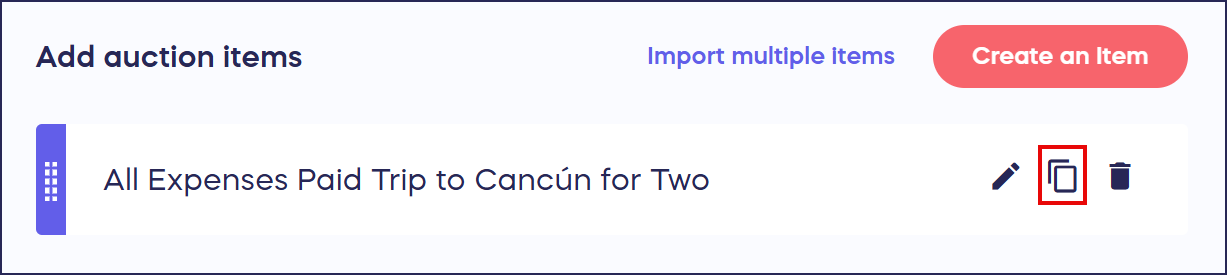
- Open the copied item and set the Number Available field to 1.
- Update the item name or any other details as needed to distinguish this listing.
- Repeat steps 5–7 for each additional copy you need.
Frequently Asked Questions
How does bidding work on Auction items with multiple quantities?
Bidders see only the lowest of the current top bids and must bid higher than that amount to compete. If you’re auctioning 10 t-shirts, the top 10 highest bidders win, and each winner pays exactly what they bid—not necessarily the same amount.
What bid amount is displayed for items with multiple quantities?
Only the lowest of the current winning bids is displayed as the “Current bid.” This gives bidders the minimum amount they need to bid to potentially win one of the available items.
Can I increase the quantity of an Auction item after bidding has started?
Yes, you can increase item quantity even after bidding begins. However, this will reset the displayed Current bid back to the starting bid amount, allowing new bidders to potentially win at lower prices than before. Existing bids are not removed and remain in the running. Bidders are not automatically notified of the change, so consider communicating the update directly if needed. See the section above — “What if I want to add more items after the bidding has already started?” — for a full breakdown.
How are tied bids handled for items with multiple winners?
When multiple bidders place identical bids, priority goes to whoever submitted their bid first. Earlier bidders maintain their position in the top bids if later bidders match their amount.
Do all winners of multi-quantity items pay the same amount?
No, each winner pays exactly what they bid, not a uniform price. This means winners of the same item may pay different amounts depending on how much they individually bid to secure their spot.
How do I create separate listings for multiples of the same item?
To list each item separately, click the copy icon next to the item in your Auction item list to duplicate it, then open each copy and set the Number Available field to 1. Repeat this process until you have one listing for each individual item. Each separate listing will have its own bid history and a single winner.
Why aren’t the hyperlinks in my item description clickable when I’m setting up the item?
Links in the item description editor may not be clickable while you’re in the setup view — this is expected. Your links will work correctly on your live Campaign Page. To confirm a link is working before you go live, use Test Campaign while your campaign is in Draft Mode to preview the Auction as a bidder would. When adding links to item descriptions, we also recommend enabling the option to open links in a new tab so bidders aren’t navigated away from your Auction when they follow a link.