Enable recurring donations on your Campaign, cancel existing recurring donations, and access reports.
RallyUp lets you enable Crowdfunding on any fundraising Campaign. If you do, you can allow donors to make recurring donations and control whether donors can give weekly, monthly, quarterly, or yearly.
You can also update a donor’s payment information or cancel their recurring donation on their behalf. However, only donors themselves can change the frequency or amount of recurring donations.
Learn more about the differences between Crowdfunding Campaigns and Donation Pages in our guide on Crowdfunding Campaigns vs. Donation Pages.
Donors can also manage their own recurring donations by following our guide on how to update or cancel recurring donations.
How do I enable recurring donations on my Campaign?
- Go to Account Navigation in the left menu and select Campaigns.
- If you have chosen a list view, click on the Campaign title. If you have chosen a grid view, click on the Campaign image.
- Select Campaign Setup.
- Go to Checkout in the timeline at the top.
- Scroll down to Optional settings and select Show optional settings.
- Scroll down to Allow donors to make recurring donations and click on the toggle so it shifts to the right:

- Select Save.
How do I disable recurring donations on my Campaign?
- Go to Account Navigation in the left menu and select Campaigns.
- If you have chosen a list view, click on the Campaign title. If you have chosen a grid view, click on the Campaign image.
- Select Campaign Setup.
- Go to Checkout in the timeline at the top.
- Scroll down to Optional settings and select Show optional settings.
- Scroll down to Allow donors to make recurring donations and click on the toggle so it shifts to the left:

- Select Save.
How do I view and export recurring donation reports?
- Go to Account Navigation in the left menu and select Campaigns.
- If you have chosen a list view, click on the Campaign title. If you have chosen a grid view, click on the Campaign image.
- Select View Donations.
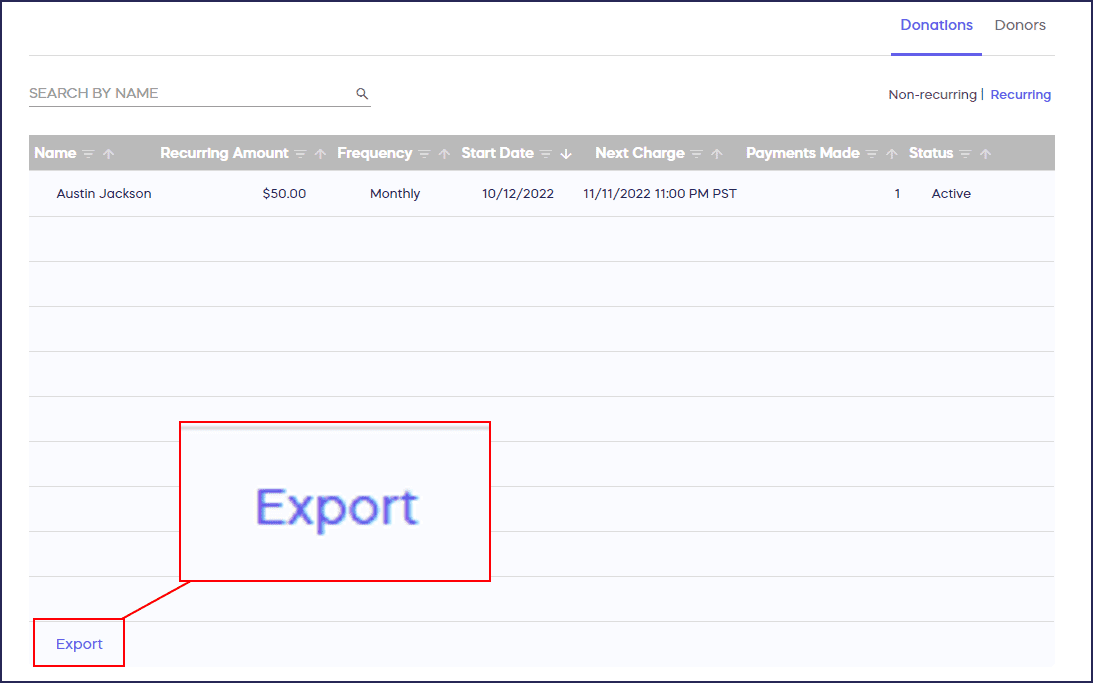
- Under the Donations tab, select Recurring:

This table will list all the recurring donations with the amount, frequency, next charge date, number of payments that have been made, and the status of the recurring donation. A report can be exported by selecting Export in the lower-left corner of the screen:
How do I edit or cancel a donor’s recurring donation?
Should you be contacted by a donor with a request to cancel or update credit card information for an existing donation, here are the steps you can take:
- Follow steps 1-4 above.
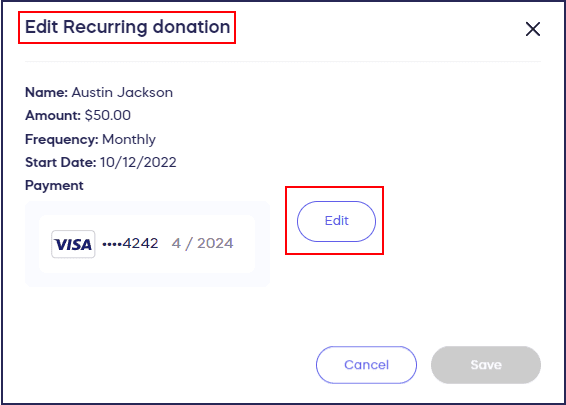
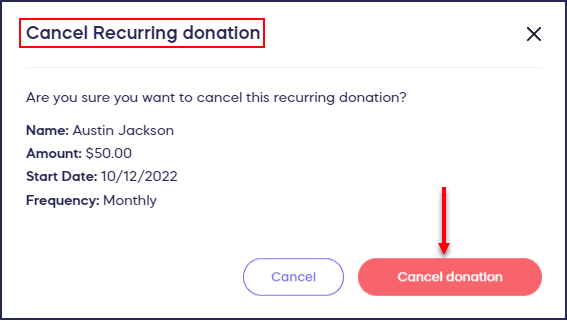
- Find the recurring donation you’re looking for, hover over it, and click the three-dot menu on the right.
- Select Edit Donation to change the payment method for that recurring donation. Select Cancel Donation to cancel any future donations:
Frequently Asked Questions
Can I change the amount or frequency of a donor’s recurring donation?
No, due to security and privacy concerns, only the donor can change the amount or frequency of their recurring donation by logging into their RallyUp account. Campaign organizers can only update payment information or cancel the recurring donation.
What happens when I cancel a recurring donation?
Canceling a recurring donation only stops future recurring donations from being made. It will not cancel or refund any previous payments that have already been made.
What recurring donation frequencies can I offer donors?
You can allow donors to give weekly, monthly, quarterly, or yearly. You can also allow donors to select how often they want to donate, giving them full control over the frequency.
Where do I find recurring donation reports?
Go to Campaigns, select your Campaign, then View Donations. Under the Donations tab, select Recurring to see all recurring donations with amount, frequency, next charge date, number of payments made, and status.
Can donors update their own recurring donations?
Yes, donors can manage their own recurring donations by logging into their RallyUp account. They can update payment information, change frequency or amount, or cancel future donations themselves.