Confirm all A-Thon fundraising data is correct so final pledge amounts can be calculated and donors can be charged.
Finalizing your A-Thon allows us to calculate the final amount to charge your donors for their pledges based on each Participant’s* and/or Team’s* activity.
*Terminology may differ according to Campaign settings.
What should I check before finalizing my A-Thon?
Before finalizing your A-Thon, take a few moments to go through the following steps:
- Ensure your A-Thon end date has been reached. You won’t be able to finalize A-Thon results until the A-Thon ends.
- Check that all write-in donations have been properly credited to the desired Participants and/or Teams. You may need to edit some donations to ensure the appropriate individuals are credited.
How-to: Credit a Write-In Donation
- If any donations were paid for by check, they will need to be marked as received to be included in the final amount raised. Note: Check donations are only allowed for one-time donations, not per-unit-of-activity pledges.
How-to: Mark Check Donations as Received
- Ensure all activity results are logged correctly for each Participant and/or Team. Note that activity results cannot be entered after you finalize your A-Thon.
How-to: Log A-Thon Activity and Calculate Progress
How do I finalize my A-Thon?
- Go to Account Navigation in the left menu and select Campaigns.
- If you have chosen a list view, click on the Campaign title. If you have chosen a grid view, click on the Campaign image.
- Scroll down to A-THON MANAGEMENT and select Enter Activity Results.
- Select FINALIZE A-THON:

- A confirmation pop-up will appear. Select Finalize:
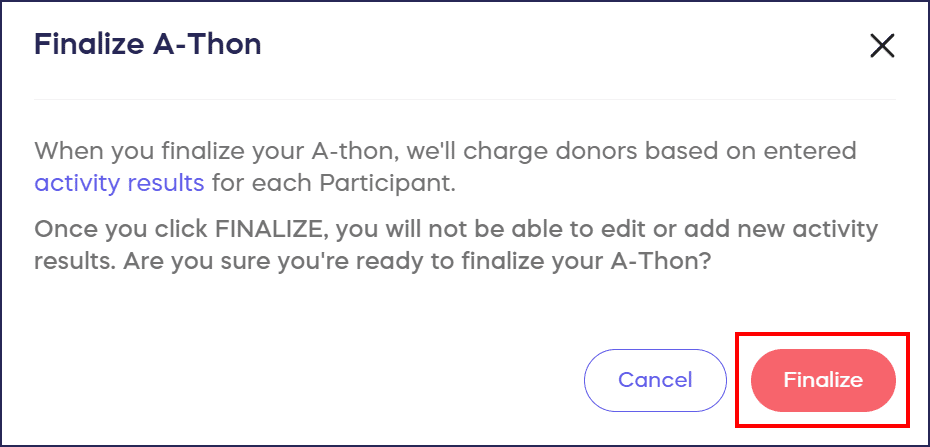
RallyUp will then calculate how much each donor owes and charge them automatically.
If you don’t see the FINALIZE A-THON button on the Enter Activity Results page, then your A-Thon has not yet reached its end date. You’ll need to wait until the end date to finalize.
Frequently Asked Questions
When can I finalize my A-Thon?
You can finalize your A-Thon only after the end date has been reached. The FINALIZE A-THON button will not appear on the Enter Activity Results page until your A-Thon’s end date arrives.
What happens when I finalize my A-Thon?
When you finalize your A-Thon, RallyUp calculates how much each donor owes based on Participant and Team activity results, then automatically charges donors for their per-unit pledges. This completes the pledge fulfillment process.
Can I add or edit activity results after finalizing my A-Thon?
No, activity results cannot be entered or edited after you finalize your A-Thon. Make sure all Participant and Team activity data is accurate and complete before selecting the finalize option.
Do I need to do anything with check donations before finalizing?
Yes, any donations paid by check must be marked as received to be included in the final amount raised. Note that check donations are only allowed for one-time donations, not per-unit-of-activity pledges.
What if write-in donations were credited to the wrong Participant?
Before finalizing, review all write-in donations to ensure they’re properly credited to the correct Participants or Teams. You can edit donation credits before finalizing to make sure the appropriate individuals receive proper credit.