Learn how to change your fundraising goal to suit your evolving needs.
When you sign up to participate in a RallyUp Campaign, your personal fundraising goals may change for any reason. You can easily update your Participant or Team fundraising goal at any time to fit your unique needs.
How do I update my fundraising goal?
- Go to rallyup.com and log into your account with the email address you used to register to participate.
- Click on the circle with your initials in the upper right corner of the screen and select My Account.
- Click on the My Participants or My Teams tab (depending on whether you want to edit a Participant or Team goal):

- Hover your mouse over your name or team name, click on the three-dot icon on the right, and select Edit:

- Enter your new goal:
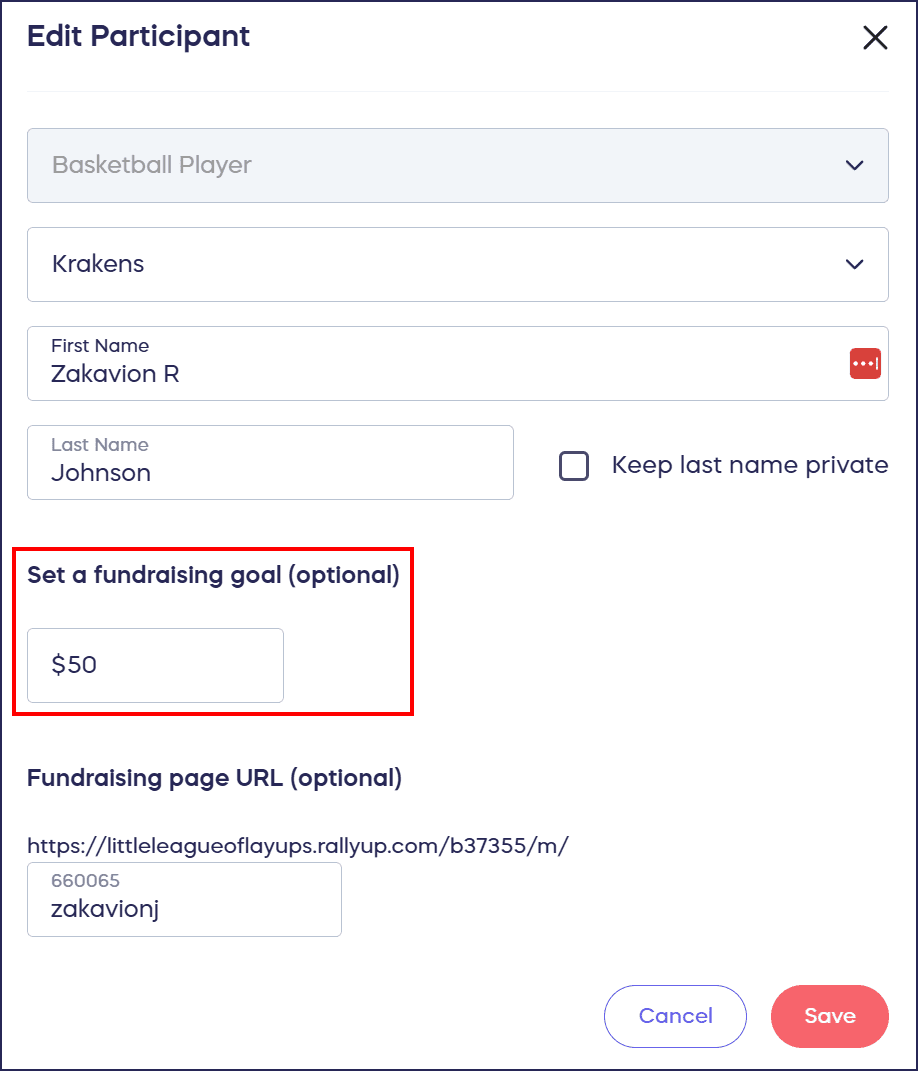
- Select Save.
Frequently Asked Questions
Can I change my fundraising goal after I’ve started fundraising?
Yes, you can update your Participant or Team fundraising goal at any time during your Campaign. Your new goal will be displayed on your fundraising page, and you can adjust it as many times as needed.
Where do I find my Participant or Team settings?
Log into your RallyUp account at rallyup.com, click on the circle with your initials in the upper right corner, and select My Account. Then click on the My Participants or My Teams tab to manage your settings.
Can I edit both Participant and Team goals?
Yes, if you’re registered as both a Participant and a Team captain, you can edit goals for both. Just navigate to the appropriate tab (My Participants or My Teams) to update each goal separately.
What email address should I use to log in?
Use the same email address you used to register as a Participant or Team for the Campaign. This is the email address associated with your RallyUp account.
Will my donors see my new fundraising goal?
Yes, once you update your fundraising goal, it will be displayed on your personal fundraising page. Your progress bar will update to reflect your new goal, and donors will see how close you are to reaching it.