Add items to your online Storefront and customize each item.
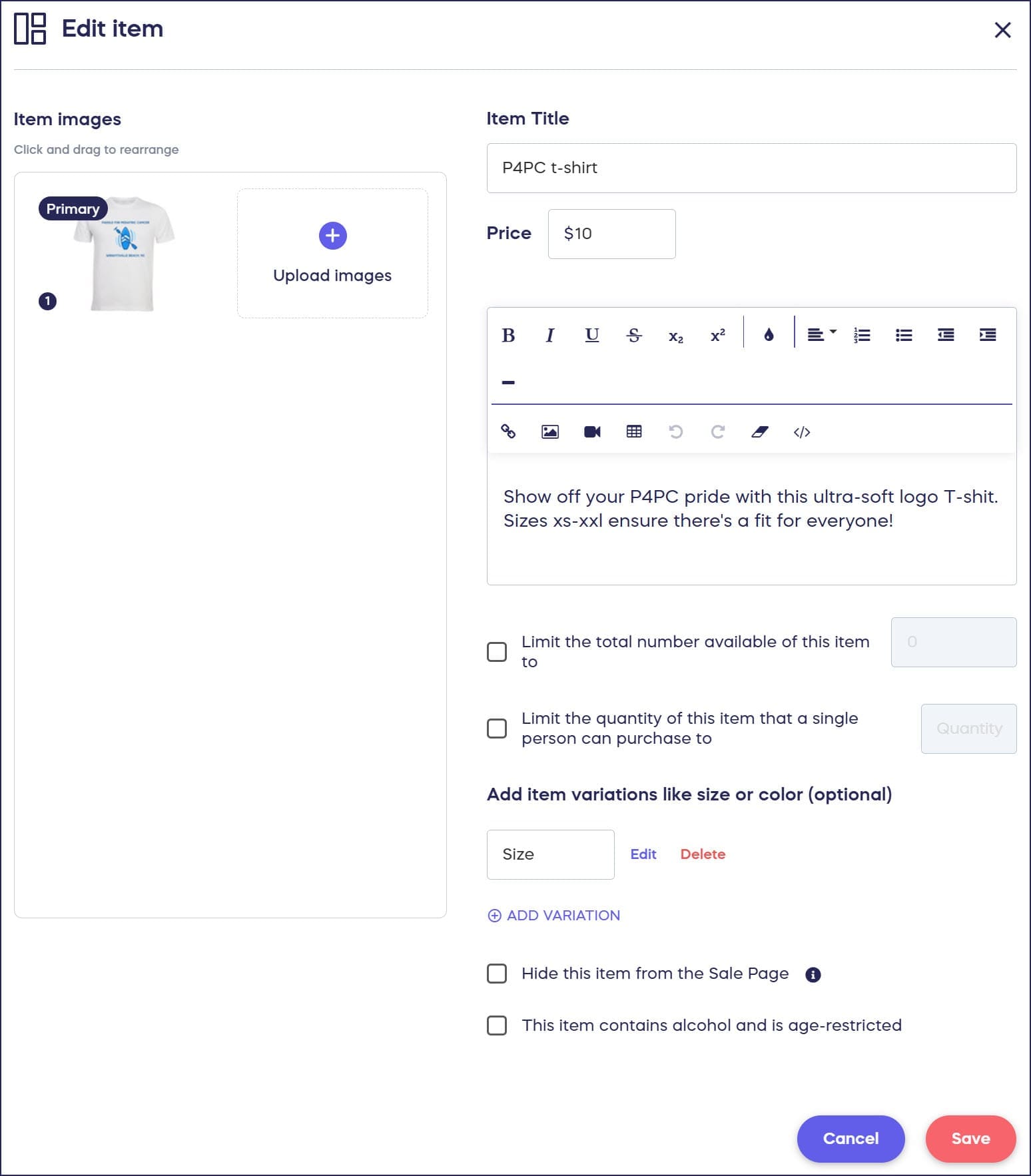
Storefront fundraisers allow organizations to sell products to raise funds (e.g., t-shirts, water bottles, cookie dough, etc.). In addition to images, description, and price, you have several more options to customize each item you offer:
- Quantity Limits: Offer a limited number of a particular item (e.g., 100 special edition t-shirts). Once the item is sold out, no more can be bought.
- Purchase Limits: Limit how many of a particular item a single person can purchase.
- Variations: Let donors choose between different variations of a particular item, such as size, color, and/or style.
How-to: Offer Variations of a Storefront Item
- Categories: Help your donors easily find the items they’re most interested in.
How-to: Sort Campaign Items into Categories
- Shipping Costs: Add a flat shipping cost when donors purchase Storefront items.
How-to: Add Shipping Costs to Storefront Items
- Sales Tax: Add sales tax to each purchase.
How-to: Add Sales Tax to Campaign Purchases
How do I add items to my Storefront?
- Go to Account Navigation in the left menu and select Campaigns.
- If you have chosen a list view, click on the Campaign title. If you have chosen a grid view, click on the Campaign image.
- Select Campaign Setup.
- Go to Storefront in the timeline at the top.
- Scroll down to Add items and select Create an item.
- Fill out all desired details and select Save:
Frequently Asked Questions
What types of items can I sell in a Storefront Campaign?
You can sell any physical products like t-shirts, water bottles, cookie dough, merchandise, branded apparel, and other tangible goods. Each item can include images, descriptions, pricing, and customization options.
Can I limit how many items each person can buy?
Yes, you can set purchase limits to restrict how many of a specific item a single person can purchase. This is separate from quantity limits, which control the total number available across all buyers.
How do I offer different sizes or colors for a single item?
Use the Variations feature to let donors choose between different options like size, color, and style for each item. This keeps your Storefront organized while giving donors the choices they need.
Can I charge shipping costs for Storefront items?
Yes, you can add flat shipping costs to items in your Storefront. You can also add sales tax to purchases to comply with local tax requirements.
What happens when a Storefront item sells out?
When an item with quantity limits reaches its maximum number of sales, it automatically becomes unavailable for purchase. Donors will see that the item is sold out on your Campaign Page.