Allow donors to purchase an Auction item instead of bidding for it.
Auctions allow donors to bid on items, with each item going to the highest bidder. However, you can also allow donors to purchase an item for a set price rather than compete for the item through the bidding process. On the RallyUp platform, this option is called Buy It Now.
What are the benefits of Buy It Now for Auction items?
Campaign organizers appreciate that Buy It Now:
- Allows them to capitalize on the desirability of their items.
Bidders appreciate that Buy It Now:
- Allows them to avoid the risk of being outbid on an item they really want.
How do I add Buy It Now to my Auction items?
- Go to Account Navigation in the left menu and select Campaigns.
- If you have chosen a list view, click on the Campaign title. If you have selected a grid view, click on the Campaign image.
- Select Campaign Setup.
- Go to Auction in the timeline at the top and scroll down to Add auction items.
- Select CREATE AN ITEM or select the pencil icon on an existing item.
- Click on the checkbox under Buy It Now and set the Buy It Now price:
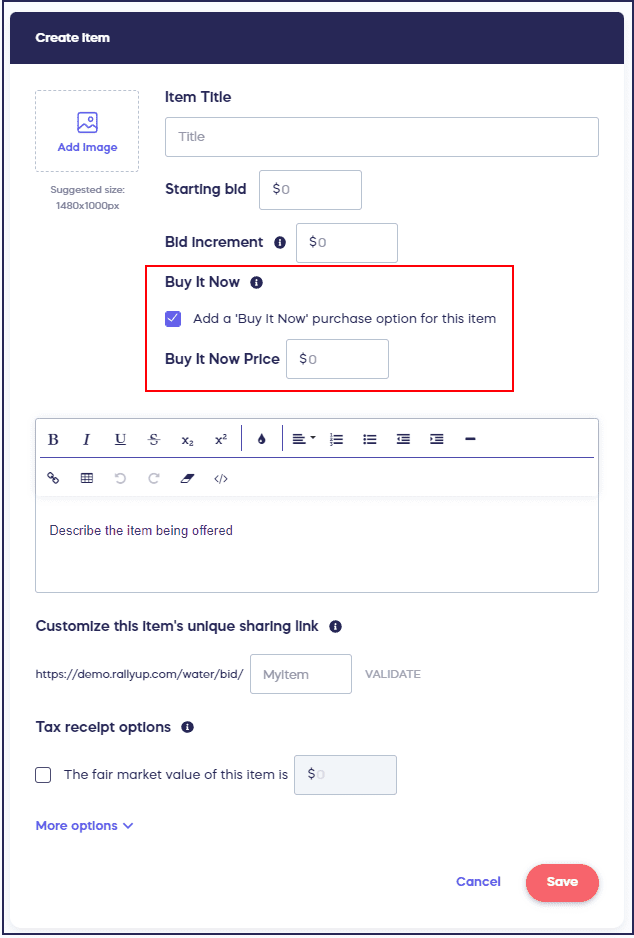
The Buy It Now price must be greater than the starting bid amount. We recommend going with the item’s true market value or slightly higher.
- Select SAVE.
How does Buy It Now appear to donors on my Campaign Page?
If added to an item, the Buy It Now price will be clearly displayed directly on your Campaign Page next to the current bid amount:

How do refunds work with Buy It Now purchases?
The process for offering a refund differs based on whether the Auction is live or ended. If the Auction is still live, the item is put back into the inventory for bidding or purchasing. An email is sent to all bidders to let them know that the item is available again, and the bidding starts over. If the Auction has closed, the item will not have a buyer or bidding winner associated with it.
How does Buy It Now work on items with bids?
- The Buy It Now option is automatically disabled if bidding exceeds the Buy It Now price.
- If someone bids on an item and then later decides to Buy It Now, their bid is automatically canceled after purchasing the item.
- If someone purchases an item through Buy It Now, anyone who has placed a bid on the item will receive an email notifying them that their bid was canceled. If more than one of the item is available, there will be a link in the email to the item so they can place a new bid.
Frequently Asked Questions
What is Buy It Now and how does it work?
Buy It Now allows donors to purchase an Auction item immediately for a set price instead of competing through the bidding process. This option gives bidders certainty they’ll win the item while helping organizations capitalize on highly desirable items.
How should I price my Buy It Now option?
Set the Buy It Now price higher than the starting bid amount. We recommend using the item’s true market value or slightly higher to encourage both bidding competition and instant purchase opportunities.
What happens if bidding exceeds my Buy It Now price?
The Buy It Now option is automatically disabled once bidding exceeds the Buy It Now price. At that point, donors can only continue bidding on the item rather than purchasing it outright.
Can someone buy an item they’ve already bid on?
Yes, if someone has placed a bid on an item and later decides to Buy It Now, they can purchase it immediately. Their previous bid is automatically canceled after completing the purchase.
What happens to other bidders when someone uses Buy It Now?
When someone purchases an item through Buy It Now, all other bidders receive an email notification that their bids were canceled. If multiple quantities are available, the email includes a link to place new bids on remaining items.