Share important information or cover legal requirements by adding a notice to the registration process.
There may be times when you need Peer-to-Peer or A-Thon Participants to sign a waiver, registration form, or other paperwork during signup. You can add a notice during signup and even require Participants to acknowledge they have read and agree to the notice.
Why would I add a waiver or form to Participant registration?
Waivers and forms serve important legal, safety, and administrative purposes for Participant-based Campaigns:
- Many organizations require liability waivers for events involving physical activity like walk-a-thons, run-a-thons, or bike-a-thons to protect against injury claims.
- Some Campaigns need Participants to acknowledge event rules, code of conduct expectations, or safety guidelines before participating.
- Medical information forms help organizers prepare for emergencies during in-person events.
- Photo release waivers allow you to use Participant images in promotional materials.
- Registration forms can collect important details like t-shirt sizes, emergency contacts, or dietary restrictions for event planning.
Adding these notices directly to the registration process ensures every Participant sees and acknowledges important information before joining your Campaign.
How do I add a waiver or form to registration?
- Go to Account Navigation in the left menu and select Campaigns.
- If you have chosen a list view, click on the Campaign title. If you have chosen a grid view, click on the Campaign image.
- Select Campaign Setup.
- Go to Options in the timeline at the top and select Peer-to-Peer Options.
- Scroll down to Do you want to show participants/teams a notice when they sign up? and type your notice into the text box:
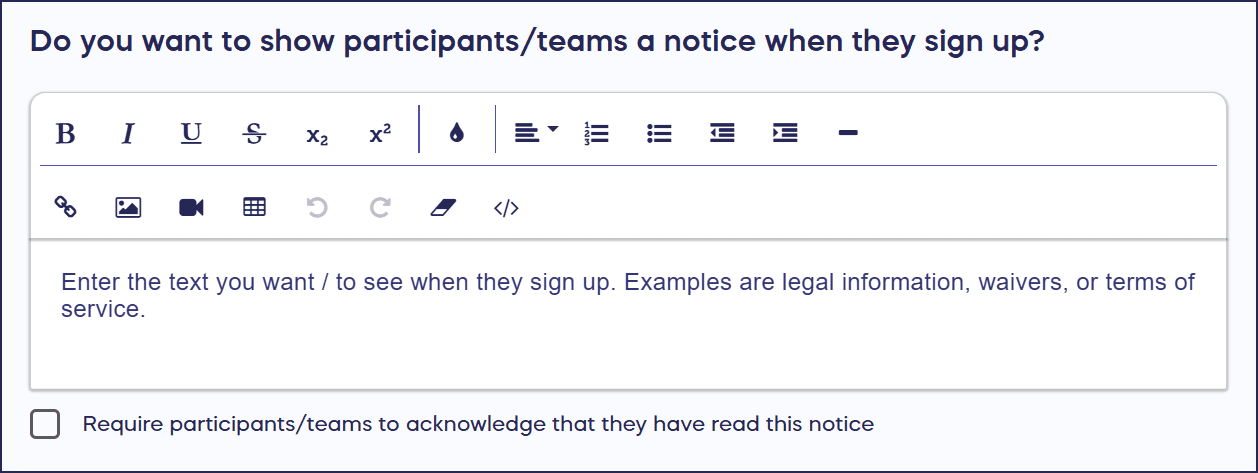
If you want to include a form for Participants to fill out, you can embed a link. If you want Participants to acknowledge and agree to the notice, check the box next to Require participants/teams to acknowledge that they have read this notice.
- Select Save.
Your notice will display during the registration process, and Participants must read and acknowledge it before completing registration if you’ve enabled the requirement.
What will Participants see when they register?
Participants see your notice displayed prominently during the registration checkout process before they can complete signup. The notice appears in a clearly marked section that draws attention to the important information you’ve shared:
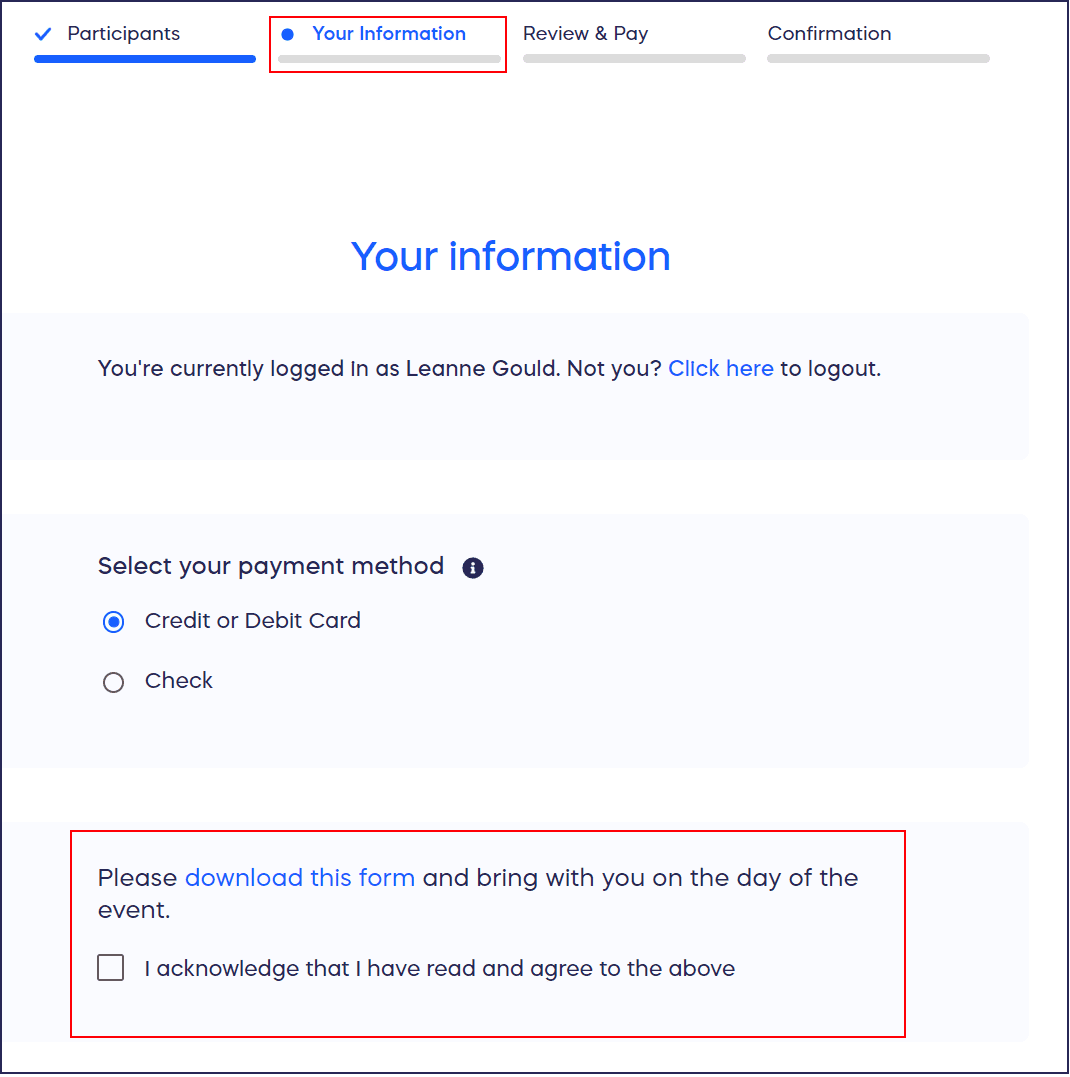
If you’ve required acknowledgment, Participants must check a box confirming they’ve read and agree to the notice before they can proceed. If you’ve included a link to an external form, Participants can click the link to access and complete the form. This ensures no Participant can register without seeing your important legal or informational notices.
Can I link to external forms or documents in my notice?
Yes, you can embed links within your notice text to direct participants to external forms, documents, or websites, such as:
- Detailed liability waivers
- Lengthy terms and conditions
- Fillable forms hosted on platforms like Google Forms or JotForm
When creating your notice, simply include the full URL or create hyperlinked text that participants can click. Many organizations use this approach to keep the inline notice brief while providing access to comprehensive documentation. For example, your notice might read “Please review and complete our liability waiver” with “liability waiver” linking to your external document. This keeps your registration process streamlined while ensuring Participants can access all necessary information.
Can I edit or remove the waiver after my Campaign starts?
Yes, you can edit or remove your registration notice anytime during your Campaign, including after Participants have already registered.
Changes to the notice only affect new registrations going forward and do not apply retroactively to Participants who already registered under previous notice versions. If you make significant changes to legal requirements or waivers mid-Campaign, consider communicating the updates directly to existing Participants through email.
To remove the notice entirely, simply delete the text from the notice field and save your changes. This flexibility allows you to adjust your legal documentation or informational notices as your Campaign evolves.
Frequently Asked Questions
Does requiring acknowledgment create a legally binding agreement?
The checkbox acknowledgment indicates Participant consent but may not constitute a legally binding contract in all jurisdictions. For events with significant liability concerns, consult with legal counsel to ensure your waiver language and delivery method meet local legal requirements. Some organizations use RallyUp’s notice feature for basic acknowledgments while requiring Participants to sign formal legal documents at in-person packet pickup or event check-in. The notice serves as an important first step in the consent process and creates a documented record of Participant acknowledgment.
Can I use different waivers for different registration options?
No, the notice applies to all registration options within your Peer-to-Peer or A-Thon Campaign. You cannot create different notices for different registration tiers or Participant types. If you need tier-specific waivers or forms, consider including conditional language in your notice (e.g., “Adult participants must complete Form A; minor participants must complete Form B”) with links to the appropriate documents. Alternatively, use custom questions during registration to collect tier-specific information alongside your universal notice.
Will Participants receive a copy of the waiver they acknowledged?
Participants do not automatically receive a copy of the notice text they acknowledged through RallyUp. If you want Participants to have a copy for their records, include a downloadable PDF link within your notice or send a follow-up email with waiver documentation. You can also direct Participants to save a screenshot of the notice for their reference.
Can I see which Participants have acknowledged the waiver?
When you require acknowledgment, Participants cannot complete registration without checking the acknowledgment box, so all registered Participants have technically agreed to your notice. However, RallyUp does not provide a separate report showing individual acknowledgment timestamps or tracking. If detailed acknowledgment records are critical for your event (such as for legal documentation), consider using a dedicated waiver management platform and linking to it from your RallyUp registration notice.
What’s the character limit for the registration notice?
The notice text box accommodates substantial content, though extremely long notices may affect the user experience during registration. For best results, keep inline notices concise and use external links for detailed documentation. If your waiver or form exceeds what’s practical to display inline, write a brief summary notice like “Participation requires completion of our liability waiver and event rules acknowledgment” with links to the full documents. This approach maintains a smooth registration flow while ensuring legal compliance.