Learn how RallyUp automatically assigns digital entry numbers to Raffle and Sweepstakes entries, including prefixes for online, offline, bonus, and Sharing Reward entries.
RallyUp’s entry numbering system automatically generates unique digital entry numbers for every Raffle or Sweepstakes entry purchase, making winner selection transparent and auditable. Each entry receives a sequential number with a prefix that identifies how it was purchased (online, offline, or bonus entry). Donors receive their assigned entry numbers on their receipt, ensuring complete transparency throughout the drawing process.
This guide explains how the numbering system works, what each prefix means, and how to manage entry numbers for both online and offline purchases.
How does the entry numbering system work?
Short answer: RallyUp automatically assigns sequential entry numbers to each Raffle or Sweepstakes entry when purchased, with unique prefixes indicating whether entries were bought online (W), offline (P), via tip bonus (T), or Sharing Rewards (B).
Detailed explanation: Whenever someone purchases Raffle or Sweepstakes entries, RallyUp’s system immediately generates digital entry numbers in sequential order. These numbers appear on donor receipts so participants know exactly which entries belong to them. The system maintains separate number sequences for different purchase types using letter prefixes, ensuring clear tracking for drawing purposes.
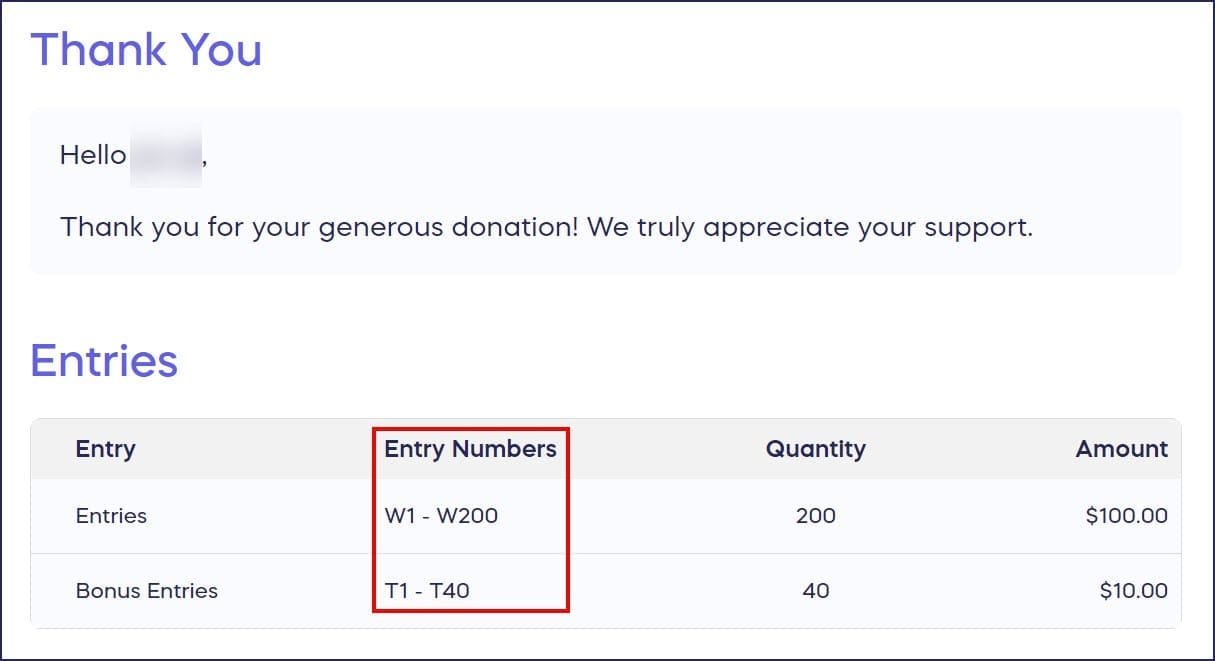
Entry Number Format
Entry numbers follow a simple format: [Prefix][Number] (e.g., W100, P123, T456).
Sequential Numbering
Entry numbers are assigned in numerical order starting from your Campaign’s first entry:
- Single entry: W100
- Next entry: W101
- Following entry: W102
Entry Ranges for Multiple Purchases
When someone buys multiple entries in one transaction, they receive a range of consecutive numbers:
- 50 entries purchased = W100–W150
- 10 entries purchased = W200–W210
This range format makes it easy for donors to verify all their entries on their receipt.
What do the entry number prefixes mean?
Each entry number begins with a one-letter prefix that identifies how the entry was obtained:
| Prefix | Entry Type | Example | Description |
|---|---|---|---|
| W | Online (Web) | W123 | Entries purchased through your online Campaign Page |
| P | Offline (Paper) | P123 | Entries purchased in-person and manually added to the system |
| T | Tip Bonus | T123 | Bonus entries awarded when donors add a tip to their purchase |
| B | Sharing Rewards | B123 | Bonus entries earned through RallyUp’s Sharing Rewards program |
Important Note About Prefixes
Entries with different prefixes are processed as completely separate entries, even if they share the same number. For example:
- Entry W123 and entry P123 are two different entries
- The prefix creates a unique identifier, so W123 ≠ P123
This separation ensures accurate tracking across all entry acquisition methods.
Can I customize the numbering system for online entries?
Yes, you can change the starting number for online entries before your Campaign goes live:
- Go to Account Navigation in the left menu and select Campaigns.
- If you have chosen a list view, click on the Campaign title. If you have selected a grid view, click on the Campaign image.
- Select Campaign Setup.
- Go to Options in the timeline at the top and select Raffle Options.
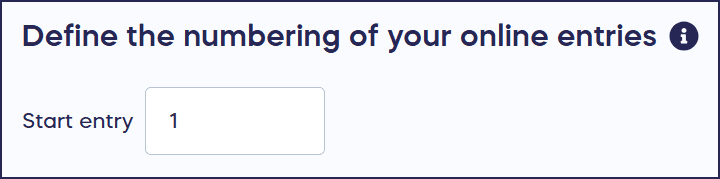
- Scroll down to Define the numbering of your online entries and enter your preferred starting entry number:
- Select Save.
Entry numbers will be assigned consecutively starting with the number you enter here.
Can I manage offline entry numbers?
Short answer: Yes, you can either manually assign entry numbers to offline entries or allow RallyUp to automatically generate sequential numbers for you.
Detailed explanation: RallyUp supports offline entry sales for both Raffles and Sweepstakes. When you add offline entries to your Campaign, you have two options: enter specific entry numbers you’ve already assigned (useful if you’ve sold physical tickets), or let the system automatically generate the next available numbers in the sequence.
How to Add Raffle or Sweepstakes Entries You’ve Sold Offline
When should I use different entry prefixes?
If you’re selling entries both online and at in-person events, then the W and P prefixes automatically separate your digital and physical sales for easier reconciliation.
If you’re offering tip incentives or sharing rewards, then the T and B prefixes let you track how many bonus entries you’re awarding versus paid entries.
If you’re running an audit or compliance check, then the prefix system provides a clear paper trail showing exactly how each entry was obtained.
How do entry numbers appear on donor receipts?
Donors receive email receipts immediately after purchasing entries online. These receipts display:
- Individual entry numbers (for small purchases)
- Entry number ranges (for bulk purchases)
- The prefix identifying the entry type
- Total number of entries purchased
This transparency builds trust with participants, as they can verify their entries before the drawing takes place.
What’s the difference between online and offline entry numbers?
| Feature | Online Entries (W) | Offline Entries (P) |
|---|---|---|
| Best for | Digital Campaigns, virtual events | In-person sales, fundraising events |
| Assignment | Automatic upon purchase | Manual or automatic when added |
| Receipt | Immediate email receipt | Must enable email receipt during manual entry into system |
| Tracking | Automatic in RallyUp dashboard | Requires manual entry into system |
Frequently Asked Questions
Can two people have the same entry number?
No, entry numbers are always unique within your Campaign. While the numeric portion might repeat (e.g., W123 and P123), the prefix makes each entry distinct and separately trackable.
What happens if I delete an entry?
When an entry is removed, that entry number is retired and won’t be reassigned. This maintains the integrity of your numbering system and prevents confusion during winner selection.
How do I see all entry numbers for my Campaign?
You can view all assigned entry numbers in your RallyUp dashboard under your Campaign’s entries report. This report shows all entries sorted by number, including their prefix and associated donor information.
Do bonus entries affect the main entry sequence?
No, bonus entries use separate prefixes (T for tip bonuses, B for sharing rewards) and maintain their own number sequences. This keeps paid entries and bonus entries clearly differentiated.
Can I customize the starting number for my Campaign?
Yes, you can change the starting number for online entries before your Campaign goes live by going to Options in Campaign Setup, selecting Raffle Options, and scrolling down to “Define the numbering of your online entries”.
How does entry numbering work with multiple prize drawings?
All entry numbers remain valid across multiple prize drawings within the same Campaign. You can draw winners sequentially and exclude already-won entries from subsequent drawings.
Why use letter prefixes instead of just numbers?
Letter prefixes provide instant visual identification of entry sources, which is essential for:
- Compliance reporting in regulated jurisdictions
- Reconciling online vs. offline sales
- Tracking the effectiveness of bonus entry incentives
- Maintaining transparent audit trails
Related Features
You can enhance your Raffle or Sweepstakes with additional engagement features:
How to Promote Your Raffle or Sweepstakes with Sharing Rewards
Before setting up entry numbers, you may want to understand the full Campaign setup process:
How to Create a Fundraising Campaign
Note: Terminology may differ according to your Campaign settings and local regulations. Always verify compliance with your jurisdiction’s Raffle and Sweepstakes laws.