Use RallyUp reports to track your Participants’ fundraising progress.
If you’ve added Peer-to-Peer or an A-Thon to your RallyUp Campaign, our system will keep track of the donations collected by each Participant* and their activity results (if applicable). RallyUp provides multiple comprehensive reports that you can export anytime.
Data concerning how much each Participant has raised and units of activity they’ve completed can be found on the View Participants* page. This information can be used to award prizes, make announcements, and even send emails to encourage engagement.
*Terminology may differ according to Campaign settings.
What reports are available for tracking Participant fundraising?
RallyUp offers comprehensive reporting tools specifically designed for Peer-to-Peer and A-Thon Campaigns. These reports provide detailed insights into individual Participant performance, donation amounts, and activity completion.
Understand: Peer-to-Peer Reports
How do I access the Participant fundraising report?
- Go to Account Navigation in the left menu and select Campaigns.
- If you have chosen a list view, click on the Campaign title. If you have chosen a grid view, click on the Campaign image.
- Select View Participants.
- Select Export Participants in the lower-left corner:
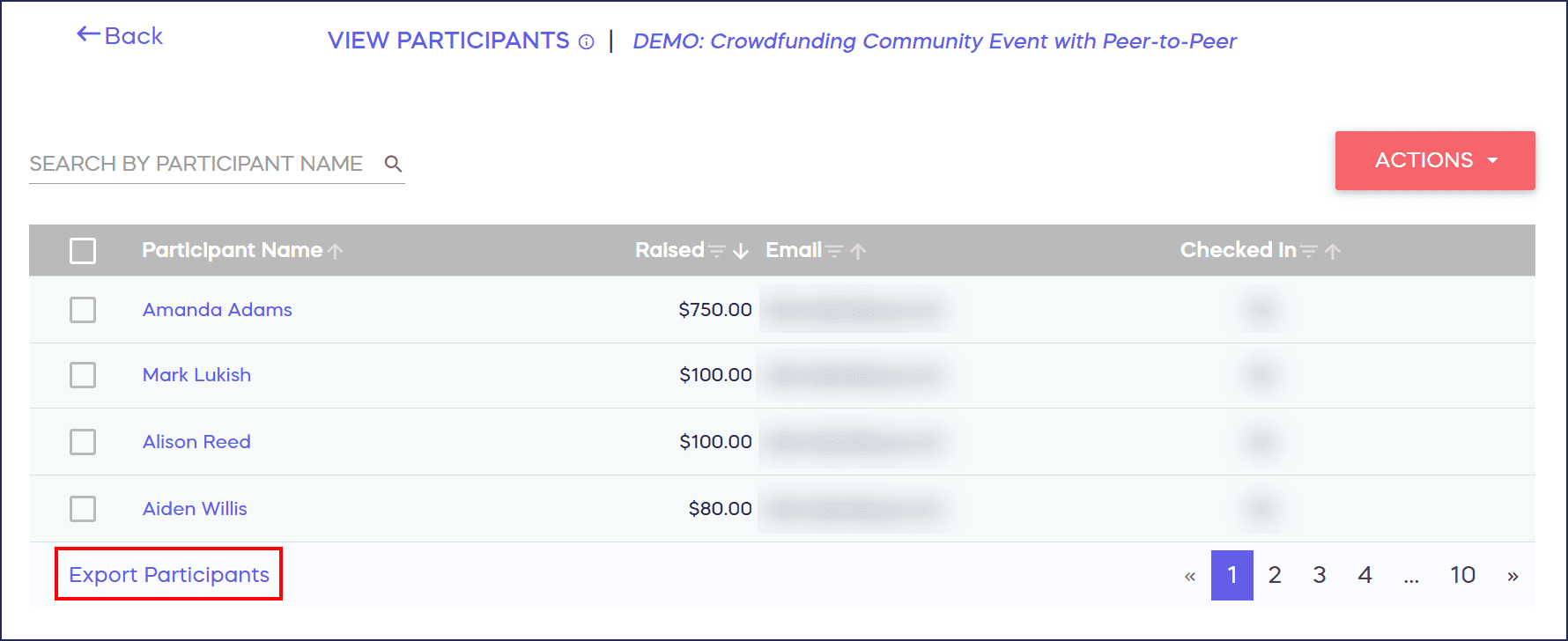
The report will download as a .csv file, which you can customize as you see fit:
Insights: Common Excel and Google Sheets Formatting Tips for RallyUp Reports
Frequently Asked Questions
How do I track individual Participant progress in real time?
Access the View Participants page from your Campaign Management menu to see real-time fundraising amounts and activity completion for each Participant. This live data updates automatically as donations come in and activities are logged, allowing you to monitor progress throughout your Campaign.
Can I export Participant fundraising data?
Yes, you can export all Participant data by selecting Export Participants from the View Participants page. The report downloads as a CSV file containing fundraising amounts, activity results, and other relevant Participant information that you can customize in Excel or Google Sheets.
What information is included in the Participant report?
The Participant report includes each Participant’s name, total amount raised, units of activity completed (for A-Thons), registration details, and other relevant fundraising metrics. This comprehensive data helps you award prizes, send targeted communications, and track overall Campaign performance.
How can I use Participant fundraising data to improve engagement?
Use Participant fundraising data to identify top performers for recognition, send encouragement to those who need support, award prizes based on specific milestones, and create targeted email campaigns. This data-driven approach helps boost engagement and motivates Participants to increase their efforts.
Do Peer-to-Peer and A-Thon reports differ?
While both report types track Participant fundraising amounts, A-Thon reports include additional activity-related data such as miles run, laps completed, or other measurable activities. Peer-to-Peer reports focus primarily on donation amounts and Participant recruitment, while A-Thon reports combine both fundraising and activity metrics.